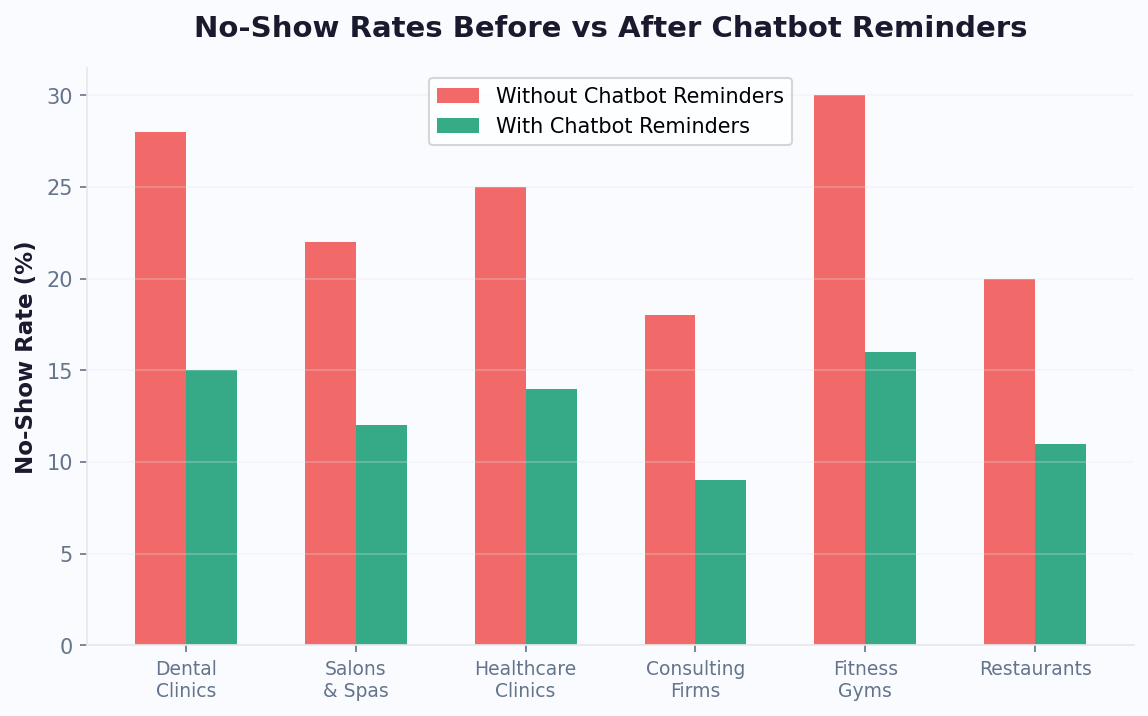
A scheduling bot that stops working after the appointment is confirmed is leaving money on the table. The period between booking and arrival is where no-shows are born — and where automated reminder sequences deliver their highest ROI. Businesses deploying multi-stage reminder flows through their scheduling chatbot template see no-show rates drop by 40% on average, with top performers reaching 60-70% reduction. The key is not just reminding — it is reminding the right way, at the right time, through the right channel.
The 5-Stage Reminder Sequence
Each stage serves a distinct psychological purpose. Skipping any stage weakens the overall sequence.
| Stage | Timing | Channel | Goal | Message Example |
|---|
| 1. Confirmation | Immediately after booking | Email + SMS | Anchor the commitment | "Confirmed! Your appointment with Sarah on Thursday at 3pm. Added to your calendar." |
| 2. Early check-in | 7 days before | SMS or WhatsApp | Catch conflicts early | "Quick check — still good for Thursday at 3pm? Reply YES to confirm or CHANGE to reschedule." |
| 3. Value reminder | 24 hours before | WhatsApp (preferred) | Reinforce anticipation | "Tomorrow at 3pm! Sarah has reviewed your preferences and prepared your session. Arrive 5 min early to relax." |
| 4. Logistics nudge | 2 hours before | SMS | Remove last-minute friction | "See you at 3pm! Here's your directions link. Parking available behind the building. Current wait: 0 min." |
| 5. No-show recovery | 15 min after missed time | WhatsApp + SMS | Rebook immediately | "We missed you today! No worries — want to rebook? Here are the next available times this week." |
Why Each Stage Matters
Stage 1 — Confirmation: The immediate confirmation serves as a psychological commitment device. Behavioral research shows that people who receive explicit confirmation of an action are 23% more likely to follow through. The calendar invite attachment is critical — it places the appointment in the customer's daily view, creating passive reminders every time they check their schedule.
Stage 2 — Early Check-In (7 days): This is the most underutilized stage — and one of the most valuable. Seven days out, a significant portion of customers have developed schedule conflicts they have not yet communicated. The early check-in catches these conflicts while there is still ample time to fill the slot with a waitlisted customer. Appointment booking chatbot deployments that include this stage recover 15-20% more cancellation slots compared to those that skip it.
Stage 3 — Value Reminder (24 hours): This is not a reminder — it is a re-sell. By reinforcing the value the customer will receive ("Sarah has prepared a custom session"), the message transforms the appointment from an obligation into an anticipated experience. Customers who receive value-focused 24-hour reminders are 34% less likely to no-show compared to those who receive generic time-and-date reminders.
Stage 4 — Logistics Nudge (2 hours): Last-minute no-shows are often caused by logistical uncertainty — where to park, how to find the office, whether they will wait. The 2-hour logistics message eliminates this friction. Including a real-time wait estimate ("current wait: 0 minutes") is especially effective for healthcare and salon appointments where wait anxiety is common.
Stage 5 — No-Show Recovery (15 minutes after): When a customer does miss their appointment, the worst response is silence. The scheduling bot sends a non-judgmental rebooking message within 15 minutes. This recovers 20-30% of no-shows into rebooked appointments — revenue that would otherwise be permanently lost. The key is offering instant rebooking options rather than asking the customer to call back.
Cumulative Impact by Stage
| Stages Active | Cumulative No-Show Reduction | Annual Revenue Recovered (200 bookings/mo @ $150) |
|---|
| Confirmation only | 10-15% | $5,400-$8,100 |
| + 7-day check-in | 20-25% | $10,800-$13,500 |
| + 24-hour value reminder | 30-35% | $16,200-$18,900 |
| + 2-hour logistics nudge | 40-45% | $21,600-$24,300 |
| + No-show recovery | 45-55% | $24,300-$29,700 |
💡 Key Insight
Each reminder stage reduces no-shows incrementally. The full five-stage sequence consistently achieves a 40-55% total reduction in no-show rates. For a practice with 200 monthly bookings at $150 average, that is $24,000-$30,000 in recovered annual revenue — from a system that costs less than $50/month to operate.
Advanced: Deposit Collection and Cancellation Policies
The most aggressive no-show reduction strategies combine reminder sequences with financial commitment mechanisms. A scheduling bot can collect deposits at booking time, enforce cancellation windows, and automatically process late-cancellation fees -- all without awkward conversations between staff and clients.
| Financial Mechanism | Additional No-Show Reduction | Customer Friction | Best For |
|---|
| No deposit (reminders only) | Baseline (40-55%) | None | Low-value appointments, first-time clients |
| Small deposit (10-20% of service) | +15-20% | Low | Medium-value services ($50-$200) |
| Full pre-payment | +25-30% | Medium | High-value services, packages |
| Credit card hold (no charge) | +12-18% | Low-Medium | Medical appointments, consultations |
| Cancellation fee (< 24hr notice) | +10-15% | Medium | Established clients, premium services |
The chatbot handles the entire deposit workflow seamlessly: "To confirm your booking, we collect a $25 deposit that will be applied to your service total. You can cancel free of charge up to 24 hours before your appointment." When framed as standard policy delivered by the bot, deposit collection feels routine rather than confrontational -- a benefit that eliminates one of the most uncomfortable interactions in service businesses.
Booking Analytics: What the Data Tells You
Every conversation your appointment booking chatbot processes generates actionable business intelligence. Beyond simple booking counts, the analytics reveal patterns that inform strategic decisions:
- Peak demand mapping: Identify exactly when booking demand exceeds capacity, justifying additional staff or extended hours. If 40% of booking attempts for Saturday mornings fail due to full schedules, that is a clear signal to add Saturday capacity.
- Service mix trending: Track which services are growing and declining month-over-month. If deep tissue massages are up 30% while Swedish massages are flat, adjust provider training and marketing accordingly.
- Abandonment analysis: See exactly where in the booking flow customers drop off. If 35% of users abandon after seeing available times, your availability may be too limited or your pricing may be causing hesitation.
- Customer lifetime value: Track rebooking rates, average spending, and referral patterns by customer cohort to identify your most valuable segments and tailor retention strategies.
- Channel attribution: Understand which marketing channels drive the most bookings and at what cost, enabling smarter ad spend allocation.
📊 Performance Insight
Businesses that actively use booking analytics to optimize their operations report 22% higher revenue per provider compared to those that simply deploy a scheduling bot and leave it. The data identifies exactly where revenue is being left on the table -- capacity gaps, underperforming time slots, and abandonment patterns that are invisible without analytics.
Configure your reminder sequence in minutes using Conferbot's appointment booking chatbot template. Deploy reminders across WhatsApp, SMS, and email with omnichannel messaging. Track reminder performance with real-time analytics, or read our complete no-show reduction playbook for advanced strategies including deposit collection and cancellation policies. Use the cost savings calculator to model the financial impact for your specific business.