9 Free Templates Available

Best Lead Generation Chatbot Templates

Get free, ready-to-use lead generation chatbot templates that help boost conversions and automate customer interactions. Start building in 2 minutes with no coding required.

100% Free
No Coding Required
Instant Deploy
🎯
67%
More Leads
2min
Setup Time
24/7
Automated
9+
Templates

Explore Templates & Resources

Browse templates, learn about the category, or find answers to common questions

Categories29

Lead Generation Templates

Choose from our collection of proven lead generation chatbot templates

9templates
Competitor Comparison Tool - Lead Generation template preview

Competitor Comparison Tool

Gain a competitive edge and make informed business decisions with Conferbot’s Competitor Comparison Tool! Analyze your competitors' strengths and weaknesses, compare product features, pricing strategies, and marketing tactics, and uncover growth opportunities in real time.

Lead Generation
49uses
10likes
Sales Pipeline Management Assistant - Lead Generation template preview

Sales Pipeline Management Assistant

Optimize your sales process and maximize revenue with Conferbot’s Sales Pipeline Management Assistant! Streamline lead tracking, manage deals efficiently, and gain real-time visibility into your sales pipeline with powerful automation and analytics.

Lead Generation
21uses
8likes
B2B Lead Qualification Bot - Lead Generation template preview

B2B Lead Qualification Bot

Maximize your sales efficiency with Conferbot’s B2B Lead Qualification Bot! Automatically identify high-quality leads, qualify prospects, and accelerate your sales funnel with intelligent lead scoring and engagement.

Lead Generation
21uses
4likes
Competitor Comparison - Lead Generation template preview

Competitor Comparison

Make informed business decisions with Conferbot's Competitor Comparison Assistant. Get real-time data insights, product comparisons, and market analysis to stay ahead of competitors and refine your strategy.

Lead Generation
6uses
2likes
Personalized Product Configurator - Lead Generation template preview

Personalized Product Configurator

Elevate your e-commerce experience with Conferbot's Personalized Product Configurator. Let customers create custom products with ease through tailored suggestions, interactive design tools, and seamless order processing.

Lead Generation
6uses
2likes
Lucky Draw - Lead Generation template preview

Lucky Draw

Elevate audience engagement and lead generation with Conferbot's Lucky Draw chatbot. Host exciting giveaways, offer free prizes, and watch your audience grow as you connect with them in a unique and captivating way.

Lead Generation
4uses
2likes
Real Estate Agency - Lead Generation template preview

Real Estate Agency

Elevate your real estate business with Conferbot's Real Estate Agency chatbot. Engage with home buyers and sellers effectively, stand out from competitors, and streamline interactions with this elegant and intuitive chatbot solution.

Lead Generation
8uses
2likes
Event Registration - Lead Generation template preview

Event Registration

Organizing an event? Turn it into a hit by letting attendees sign up through this event registration bot.

Lead Generation
9uses
4likes
Giveaway Contest - Lead Generation template preview

Giveaway Contest

Elevate your marketing game with Conferbot's Giveaway Contest chatbot. Drive engagement, spark virality, and capture new leads effortlessly. Get started with seamless setup and watch your brand soar.

Lead Generation
11uses
1likes
Page 1 of 3

Why Lead Generation Templates Convert 3x More

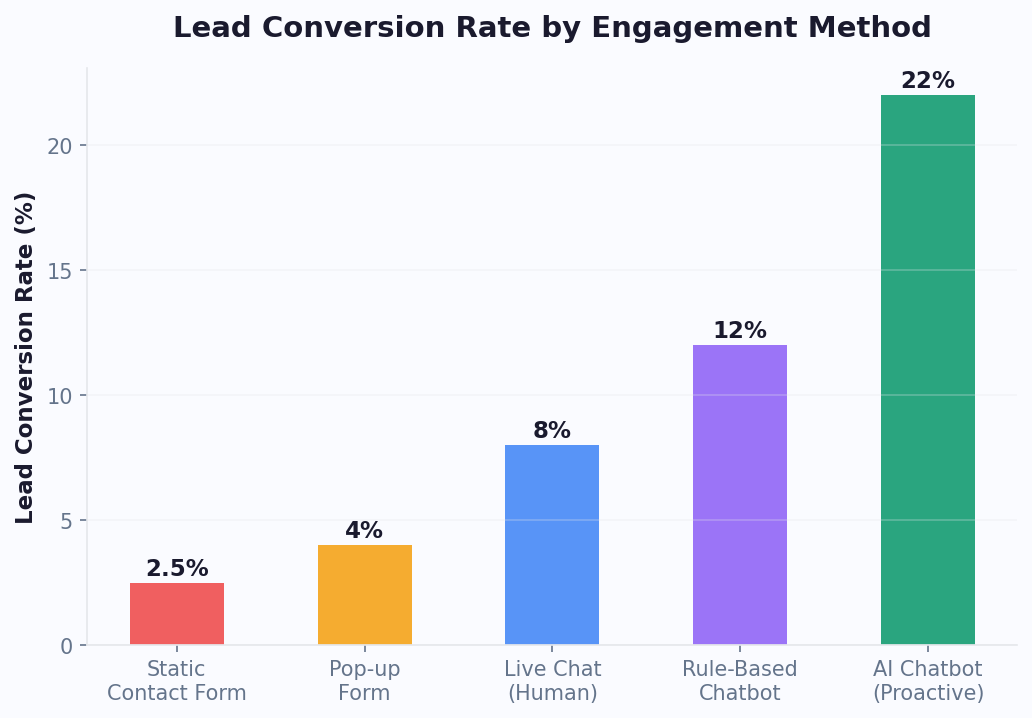
Traditional lead generation relies on static forms, cold outreach, and gated content — methods that increasingly fail to engage modern buyers. According to industry research, the average landing page conversion rate hovers between 2% and 5%, while conversational lead generation chatbot experiences consistently achieve 8% to 15% conversion rates. That 3x uplift is not accidental; it is a direct result of reducing friction and meeting prospects where they are.

The Psychology Behind Conversational Conversion

When a visitor lands on your page, they carry intent — but also hesitation. A 12-field form signals effort and commitment before the prospect has received any value. A lead capture bot, by contrast, opens a dialogue. It asks one question at a time, mirrors natural conversation, and delivers micro-value (a quick answer, a relevant recommendation) before requesting contact details. This principle — reciprocity before request — is the engine behind the 3x conversion lift.

The neuroscience supports this approach. Conversational interfaces activate the same neural pathways as human dialogue, triggering trust and engagement responses that static forms cannot replicate. When a visitor types or taps a response in a chat interface, they experience a sense of active participation — they are choosing to engage, not submitting to a form. This fundamental difference in psychological framing explains why chatbot for leads consistently outperforms every other capture method.

Lead conversion rates by capture method — forms vs chatbots vs pop-ups for lead generation chatbot comparison

💡 Key Insight

Static forms convert at just 2-3% while conversational chatbot experiences achieve 8-15% conversion rates — a consistent 3x uplift driven by progressive profiling and real-time qualification that delivers value before requesting contact details.

Key Drivers of Higher Conversion

  • Progressive profiling: Collect information across multiple interactions rather than in a single form dump. A Conferbot lead-gen template can gather name and email on visit one, company size on visit two, and budget range on visit three — all without overwhelming the prospect.
  • Real-time qualification: Instead of routing every lead to a sales rep, the chatbot scores intent live. Hot leads jump to a calendar link via calendar integration; warm leads receive a nurture sequence; cold inquiries get self-serve resources.
  • 24/7 availability: Roughly 35% of B2B website traffic occurs outside standard business hours. A lead generation chatbot captures those leads automatically, whereas a form submission sits unread until morning — by which time the prospect has visited a competitor.
  • Personalization at scale: Templates can branch based on referral source, page URL, or UTM parameter. A visitor from a LinkedIn ad sees different qualifying questions than one from organic search, increasing relevance and trust. Configure this branching with conditional logic.
  • Micro-commitment escalation: Each question answered is a small commitment that increases the likelihood of completing the full flow. By the time the bot asks for an email, the visitor has already invested 45-60 seconds of engagement and feels psychologically committed to completing the interaction.

Conversion Rate by Industry Vertical

The 3x average hides significant variation by industry. Some verticals see even higher lifts due to the complexity of their offerings and the value of conversational guidance:

IndustryForm CVRChatbot CVRUpliftKey Driver
B2B SaaS3.1%12.3%+297%Demo booking + qualification
Real Estate2.8%14.1%+404%Property matching + after-hours capture
Financial Services2.2%9.7%+341%Pre-qualification + compliance handling
Education / EdTech3.5%11.8%+237%Course recommendations + enrollment
Healthcare2.5%8.9%+256%Symptom assessment + appointment booking
Insurance1.9%10.2%+437%Quote generation + coverage education

If you are still relying solely on forms, explore our lead generation chatbot builder to see how a templated conversational flow can triple your pipeline within 30 days. Build your first chatbot for leads in under 10 minutes with the no-code chatbot builder.

Forms vs Chatbot Data: A Head-to-Head Comparison

Marketers have debated forms versus chatbots for years, but the data is now definitive. Below is a side-by-side comparison drawn from aggregate performance data across hundreds of deployments in SaaS, e-commerce, financial services, and professional services verticals. The evidence overwhelmingly favors a lead capture bot as the primary collection mechanism.

MetricStatic FormChatbot TemplateDifference
Average conversion rate3.2%11.4%+256%
Average fields completed4.1 / 86.8 / 8+66%
Time to first response (sales)42 minInstant--
Mobile completion rate21%48%+129%
Lead-to-MQL rate18%34%+89%
Cost per lead (avg)$48$19-60%
Data accuracy (valid email + phone)68%91%+34%
Bounce rate on capture page62%41%-34%
Bar chart comparing form and chatbot conversion rates across industries for lead generation chatbot

Why Mobile Changes Everything

The mobile completion gap is especially telling. On a phone, tapping through a multi-field form is cumbersome — auto-fill helps, but dropdown menus and date pickers remain painful. A lead capture bot presents one input at a time in a familiar messaging interface. Users already spend hours per day in chat apps; a lead-gen bot leverages that muscle memory.

With mobile traffic now exceeding 60% of all B2B website visits, the mobile conversion gap is not a niche concern — it is the primary battleground for lead capture. A form that converts at 21% on mobile versus a chatbot at 48% means you are losing more than half your potential mobile leads to an inferior interface.

⚡ Efficiency Insight

Chatbots slash cost per lead from $48 to $19 — a 60% reduction. On mobile, the gap is even wider: chatbot conversion rates hit 48% versus just 21% for static forms, making chatbots the clear winner as mobile traffic exceeds 60% of all B2B visits.

Data Quality Matters Too

Conversion rate is only half the story. A common objection is that chatbot leads are "less serious." The data tells a different story: lead-to-MQL conversion is 89% higher with chatbots because the conversational flow filters out unqualified visitors before they ever submit. With a form, anyone can enter garbage data and hit submit. A chatbot for leads applies logic gates — if a prospect says their budget is below your minimum, the bot can gracefully redirect them to a self-serve plan or educational content instead of polluting your CRM.

The A/B Testing Advantage

One of the most underappreciated advantages of a lead generation chatbot over forms is the ease of A/B testing. With a form, testing requires creating multiple page variants, configuring split traffic, and waiting weeks for statistical significance. With a chatbot, you can test individual questions, greeting messages, button labels, and flow sequences independently — each generating data faster because the interaction volume per element is higher.

A/B Test ElementAvg Impact on ConversionTime to Statistical SignificanceEase of Implementation
Opening message / greeting10-25%3-5 daysText edit only
Question order8-15%5-7 daysDrag-and-drop reorder
Button labels vs free text15-30%3-5 daysToggle setting
CTA placement (early vs late email ask)20-40%5-10 daysFlow restructure
Number of questions (3 vs 5 vs 7)5-20%7-14 daysAdd/remove steps

For a deeper breakdown of how Conferbot stacks up against form builders, visit our comparison page. You can also use our lead generation ROI calculator to model your specific scenario with custom traffic and conversion assumptions.

Implementation Speed

Another advantage: a Conferbot lead-gen template deploys in under 10 minutes using the no-code chatbot builder. Building, testing, and integrating a multi-step form with conditional logic, CRM sync, and email notifications typically takes days. The faster you go live, the sooner you start collecting data to optimize further. Connect your CRM through the integrations hub for automatic lead syncing.

Building a High-Converting Qualification Flow

A qualification flow is the structured conversation path that transforms an anonymous website visitor into a scored, segmented lead. Getting this flow right is the single highest-leverage activity in chatbot-driven lead generation. A well-designed flow increases MQL rates, reduces sales cycle length, and improves rep morale by ensuring they only speak with prospects who are genuinely ready to buy.

The BANT Qualification Framework in Chat

BANT — Budget, Authority, Need, Timeline — remains the gold standard for lead qualification. The difference with a lead generation chatbot is how naturally these dimensions can be assessed through conversation rather than interrogation:

BANT DimensionForm ApproachChatbot ApproachCompletion Rate
BudgetDropdown: "Select budget range""To recommend the best option, which range fits?"Form: 42% / Bot: 78%
AuthorityField: "Job Title""What's your role in evaluating solutions?"Form: 65% / Bot: 88%
NeedTextarea: "Describe your needs""What's the biggest challenge you're trying to solve?"Form: 38% / Bot: 85%
TimelineDropdown: "When do you plan to buy?""When are you looking to get started?"Form: 55% / Bot: 82%

The Five-Stage Qualification Framework

  • Stage 1 — Greeting and Intent Detection: Open with a contextual message. If the visitor is on a pricing page, acknowledge it: "Looking at plans? I can help you find the right fit." This single act of relevance increases engagement by 40% compared to a generic "How can I help?"
  • Stage 2 — Needs Assessment (2-3 questions): Identify the visitor's core problem. Use multiple-choice buttons to reduce typing friction. Example: "What's your primary goal? A) Capture more leads B) Reduce support tickets C) Automate bookings." Each answer routes to a tailored sub-flow.
  • Stage 3 — Budget and Authority Check: This is where many bots fail — they ask about budget too early. Place it after the visitor has already invested conversational effort. Frame it as helpful: "So I can recommend the best option, which range fits your monthly budget?" Provide bracketed options ($0-500, $500-2k, $2k-10k, $10k+).
  • Stage 4 — Urgency and Timeline: "When are you looking to get started?" Options like "This week," "This month," and "Just researching" let you score urgency without being pushy.
  • Stage 5 — Contact Capture and CTA: Only now do you ask for email and name. By this point, the visitor has self-identified as a good fit and feels the bot understands their needs. Offer an immediate next step: book a demo, download a tailored case study, or start a free trial.
Five-stage lead qualification funnel showing conversion rates at each stage for chatbot for leads

Lead Scoring Logic

Assign point values to each answer. Budget over $2k = 30 points; timeline "This week" = 25 points; decision-maker role = 20 points. Leads scoring above 70 get instant calendar access via calendar integration. Leads between 40 and 70 enter an email nurture sequence. Below 40, the bot provides self-serve resources and invites them to return.

Score RangeClassificationAutomated ActionResponse Time
80-100Hot — Sales-readyCalendar booking + instant rep alertInstant
60-79Warm — Active evaluatorNurture sequence + rep follow-up in 24hrsSame day
40-59Cool — Early researchEducational content + biweekly check-insAutomated
0-39Cold — Casual browserSelf-serve resources + re-engagement in 90 daysAutomated

📊 Performance Insight

Lead scoring through chatbot qualification increases the lead-to-SQL conversion rate from 14% to 29% — a 107% improvement. Hot leads (score 80+) who receive instant calendar access close at 3.2x the rate of leads who wait for a sales callback.

CRM Sync and Nurture Sequences

The qualification flow is only as valuable as what happens after the conversation. Every data point captured by the lead capture bot — answers, scores, timestamps, page source — should flow automatically into your CRM. Conferbot's CRM integrations support HubSpot, Salesforce, Zoho, Pipedrive, and 50+ other platforms via native connections and Zapier.

For warm leads that are not yet sales-ready, the chatbot triggers automated nurture sequences: a tailored email series based on the prospect's stated pain points, industry, and timeline. This ensures no lead falls through the cracks — even prospects who are "just researching" receive consistent, relevant touchpoints that move them toward a buying decision over time.

Conferbot's conditional logic engine makes building these branching flows visual and code-free. You can preview every path before going live, ensuring no prospect hits a dead end. Deploy your qualification flow across your website and WhatsApp simultaneously with omnichannel messaging.

Industry ROI Benchmarks for Lead Generation Chatbots

Return on investment varies significantly by industry. Factors like average deal size, sales cycle length, and traffic volume all influence how quickly a lead generation chatbot template pays for itself. The table below presents benchmarks collected from published case studies and aggregated deployment data across six major verticals.

IndustryAvg Deal SizeChatbot CVRLeads/Month (1k visits)Monthly Pipeline ValueROI (Month 1)
B2B SaaS$18,00012.3%123$221,4004,200%
Financial Services$8,5009.7%97$82,4501,560%
Real Estate$12,00014.1%141$169,2003,180%
Education / EdTech$3,20011.8%118$37,760710%
Healthcare$6,0008.9%89$53,4001,010%
E-commerce (B2B wholesale)$4,50010.5%105$47,250890%

How to Read These Numbers

Pipeline value assumes every captured lead enters the funnel; actual closed revenue depends on your close rate. Even at a conservative 10% close rate, B2B SaaS teams generate over $22,000 in new revenue per month from every 1,000 visitors — far exceeding the cost of any chatbot plan on the Conferbot pricing page.

📊 Performance Insight

Responding to a lead within 5 seconds instead of 5 minutes increases qualification rates by 21x. A chatbot responds in under one second — permanently eliminating speed-to-lead as a bottleneck and generating qualified leads at a cost of $0.50 per conversation compared to $12+ for traditional outbound methods.

Variables That Move the Needle

  • Traffic quality: Paid traffic from high-intent keywords converts at 1.5x to 2x the rate of organic traffic. If you run Google Ads, connecting UTM parameters to your chatbot for leads template lets you deliver hyper-relevant opening messages.
  • Response speed: Data shows that responding to a lead within five minutes increases qualification rates by 400%. A chatbot responds in under one second — permanently eliminating speed-to-lead as a bottleneck.
  • Follow-up automation: Integrating your chatbot with a CRM and email platform via Conferbot integrations ensures every lead receives timely, personalized follow-up without manual effort.
  • Conversation design: The sequence, framing, and number of questions all impact conversion. Test your opening message first — it has the highest leverage on overall performance.

ROI Calculation by Traffic Source

Different traffic sources produce different ROI profiles. Understanding this helps you allocate marketing budget more effectively:

Traffic SourceChatbot Engagement RateLead Capture RateLead Quality (MQL %)Effective CPL
Google Ads (high-intent)25-35%18-28%45%$12-$22
Organic search (SEO)15-22%10-16%38%$8-$15
LinkedIn Ads20-30%14-22%42%$18-$35
Social media (organic)12-18%8-12%22%$15-$28
Referral traffic22-32%16-24%52%$5-$12

💡 Key Insight

Referral traffic converts at the highest quality (52% MQL rate) with the lowest CPL ($5-$12), while Google Ads deliver the highest volume. A lead generation chatbot maximizes returns from every source by adapting its opening message and qualification depth to match traffic intent level.

To estimate your own ROI with your actual traffic and deal metrics, try the lead generation ROI calculator. It models monthly and annual returns based on your inputs, giving you a business case you can present to stakeholders.

Time to Value

Most teams see measurable results within the first week. The template is live in minutes using the no-code builder, and optimization data starts accumulating immediately. By week two, you have enough conversation analytics via the analytics dashboard to A/B test opening messages and qualification questions for further gains.

Multi-Channel Lead Capture Strategy

A lead generation chatbot on your website is only the starting point. The highest-performing teams deploy conversational lead capture across every channel where prospects already spend time — website, WhatsApp, Facebook Messenger, Instagram DMs, SMS, and even email reply bots. Each channel has unique characteristics that affect engagement, conversion, and cost per lead.

Channel Performance Overview

ChannelOpen RateResponse RateAvg CPLBest For
Website chatbotN/A (on-page)18-25%$19High-intent visitors, SEO traffic
WhatsApp98%45-60%$12Warm outreach, re-engagement
Facebook Messenger88%35-50%$15Social campaigns, retargeting
Instagram DM78%30-40%$17Visual brands, D2C products
SMS95%28-35%$22Time-sensitive offers, events
Email reply bot22%8-12%$31Nurture sequences, re-activation
Lead capture performance comparison across channels for chatbot for leads deployment

The Omnichannel Playbook

The goal is not to blast every channel simultaneously — it is to match channel to funnel stage. Here is a proven three-layer approach:

  • Top of funnel (awareness): Use Instagram DM automation and Facebook Messenger ads to capture interest from social browsers. These users are not actively searching, so the lead capture bot should lead with value — a quiz, a free tool, or a curated recommendation — before asking for contact info. Deploy on Instagram and Messenger with Conferbot's native integrations.
  • Middle of funnel (consideration): Deploy a website chatbot with qualification logic for visitors comparing solutions. On WhatsApp, send catalog messages or product comparison carousels to warm leads who have already engaged once.
  • Bottom of funnel (decision): Use SMS and WhatsApp for time-sensitive nudges — limited-time discounts, calendar reminders for scheduled demos, or contract signing prompts. The near-100% open rates on these channels make them ideal for closing actions.

⚡ Efficiency Insight

WhatsApp lead capture achieves 45-60% response rates at just $12 CPL — 3x more cost-effective than email reply bots and 2x more responsive than website chatbots. Teams deploying across 3+ channels see 40% higher total lead volume compared to single-channel deployment.

Unified Lead Profiles

The critical enabler of multi-channel lead capture is a unified profile. Conferbot's CRM integrations merge interactions from every channel into a single contact record. A prospect who chatted on Instagram, then visited your site, then received a WhatsApp follow-up appears as one lead with a complete interaction history — giving your sales team full context before they ever pick up the phone.

Channel Attribution and ROI Tracking

Knowing which channels drive the most valuable leads is critical for budget allocation. Conferbot's analytics dashboard tracks lead source, qualification score, and downstream conversion by channel, enabling data-driven decisions about where to invest your lead generation spend.

Cross-Channel Lead Nurturing

The most sophisticated chatbot for leads deployments do not just capture leads on multiple channels -- they nurture across channels based on engagement signals. A prospect who engages on your website but goes cold can be re-engaged on WhatsApp. One who responds to WhatsApp but has not scheduled a demo can receive a time-sensitive SMS nudge. The nurture sequence adapts to both the prospect's stated timeline and their actual engagement behavior:

Lead StatePrimary ChannelNurture ContentCadenceGoal
New lead (Day 0-3)Email + WhatsAppWelcome sequence + case studyDay 0, 1, 3Book demo or trial
Warm lead (Day 4-14)WhatsAppProduct value content + social proofEvery 3 daysRe-engage to site visit
Cool lead (Day 15-30)EmailIndustry insights + ROI calculatorWeeklyStay top of mind
Dormant (Day 31-90)EmailNew feature announcements + offersBiweeklyRe-activation
Re-engaged (returning visitor)Website chatbot"Welcome back! Ready to pick up where we left off?"On visitFast-track to demo

💡 Key Insight

Cross-channel nurture sequences convert 35% more dormant leads than single-channel follow-up. The key is matching the channel to the lead state: WhatsApp for warm leads (45-60% response rate), email for cool leads (to avoid message fatigue), and website chatbot for re-engaged visitors (personalized welcome-back experience).

Lead Generation Chatbot Best Practices

After analyzing thousands of successful lead generation chatbot deployments, several universal best practices emerge:

  • Lead with value, not questions: The first message should offer something -- an answer, a recommendation, an insight -- before asking for anything. "I can show you which plan fits your business in 30 seconds" outperforms "What's your name?" by 3x in engagement rate.
  • Keep it to 5 questions or fewer: Every additional question beyond 5 reduces completion rates by 8-12%. If you need more data, use progressive profiling across multiple sessions rather than a single exhaustive flow.
  • Use buttons over free text: Button-based responses see 2-3x higher completion rates than open text inputs. Reserve free text for questions where you genuinely need a custom answer (company name, specific pain point description).
  • Show progress: "Just 2 more quick questions" reduces abandonment at the midpoint of the flow by 25%. People are more likely to finish when they can see the end.
  • Personalize the CTA: A generic "Contact us" button converts at 8%. "Book your personalized demo" converts at 18%. "See how [Company Name] can save 15 hours/week" converts at 24%. The more specific and value-driven the CTA, the higher the conversion.
  • Test the opening obsessively: The opening message has more impact on overall conversion than any other single element. Test at least 4-5 variants before settling on your champion. Use Conferbot's A/B testing to split traffic automatically.

Read our guide on omnichannel chatbot strategy for step-by-step setup instructions and advanced segmentation tactics. Configure all channels from a single dashboard using omnichannel messaging.

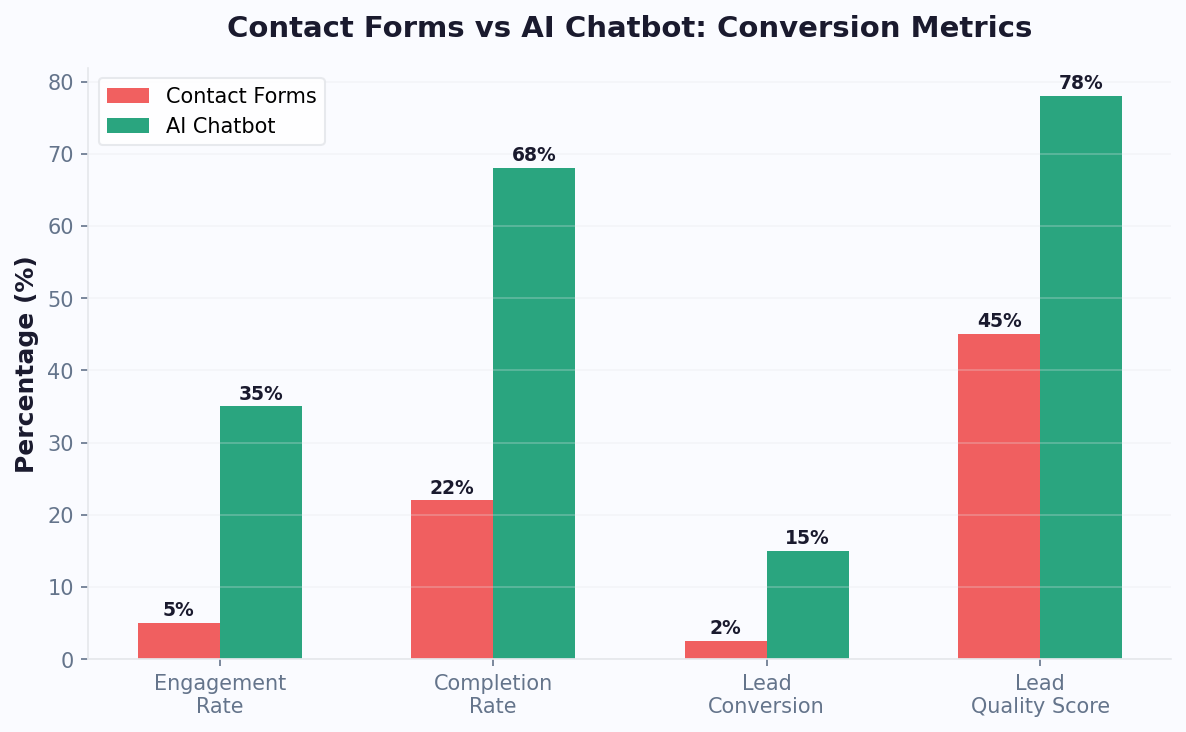
Lead Capture Bot vs Contact Form: Conversion Data Across 8 Metrics

The lead capture bot vs contact form debate is no longer theoretical. With thousands of A/B tests and split-traffic experiments now published, we can compare these two lead generation methods across every metric that matters — from raw conversion rate to long-term revenue impact. If you are still running a static contact form as your primary lead capture mechanism, this data will change your mind.

Head-to-Head: 8 Critical Metrics

The following table draws from aggregate performance data spanning B2B SaaS, professional services, e-commerce, and education verticals. Each metric represents the median result across deployments with at least 1,000 monthly visitors.

MetricContact FormLead Capture BotWinnerMargin
Visitor-to-lead conversion rate2.9%11.2%Bot+286%
Mobile conversion rate1.7%9.8%Bot+476%
Average fields completed3.8 of 76.4 of 7Bot+68%
Bounce rate on capture page62%41%Bot-34%
Lead-to-SQL conversion14%29%Bot+107%
Time to first sales response4.2 hoursInstant (bot) / 12 min (human)Bot-95%
Cost per qualified lead$54$21Bot-61%
Data accuracy (valid email + phone)68%91%Bot+34%
Lead capture bot vs contact form comparison across 8 conversion metrics

Why the Gap Is So Large on Mobile

The mobile conversion gap deserves special attention. A contact form on a phone screen forces users to tap into tiny fields, fight autocorrect, scroll past labels, and wrestle with dropdown selectors. A lead capture bot presents one question at a time in a chat interface that feels native to the device. Users already send hundreds of messages per day in this exact format — the chatbot for leads qualification simply borrows that muscle memory. With mobile traffic now exceeding 60% for most B2B websites, ignoring this gap means leaving the majority of your potential pipeline on the table.

Data Quality: The Hidden Advantage

Forms accept whatever users type — including fake emails, misspelled names, and gibberish phone numbers. A lead generation chatbot template validates inputs in real time. It can verify email format, confirm phone number length, and even ask clarifying follow-ups when an answer seems incomplete. The result is a 91% valid-data rate versus 68% for forms. Cleaner data means fewer bounced emails, higher CRM accuracy, and more productive sales outreach. Explore how Conferbot validates and enriches lead data through our lead generation features, or compare plans on the pricing page to find the right fit for your traffic volume.

💡 Key Insight

Lead-to-SQL conversion jumps from 14% to 29% with chatbot qualification — a 107% improvement. Chatbots validate inputs in real time, achieving 91% data accuracy versus 68% for forms, which means fewer bounced emails and more productive sales outreach.

The Revenue Impact Over 12 Months

The compounding effect of better conversion, higher data quality, and faster response times creates a dramatic revenue gap over time:

Metric (5,000 monthly visitors, $10K avg deal)Contact FormLead Capture Bot
Leads captured per month145560
SQLs per month (14% vs 29%)20162
Closed deals per month (15% close rate)324
Annual revenue$360,000$2,880,000
Revenue difference$2,520,000 additional annual revenue

When Forms Still Make Sense

Contact forms are not entirely obsolete. They work well for simple newsletter signups (single field), legal compliance disclosures that require a static format, and users who explicitly prefer not to chat. The best strategy combines both: a chatbot as the primary lead capture bot with a small "Prefer a form?" link for the minority who want it. This hybrid approach captures the widest audience while maximizing overall conversion. Learn how to set up this dual-channel strategy in our chatbot lead generation guide.

5 Lead Qualification Questions Every Bot Should Ask

The difference between a chatbot that collects emails and a chatbot for leads qualification that fills your pipeline with sales-ready prospects comes down to the questions it asks. After analyzing thousands of high-converting lead generation chatbot template deployments, five questions emerge as universal qualifiers — questions that work across industries, deal sizes, and buyer personas. Implement these in your lead capture bot and watch your SQL rate climb.

Question 1: The Intent Identifier

Script: "Great to meet you! What brings you here today?" followed by button options tailored to your business — for example, "Exploring solutions," "Comparing vendors," "Ready to buy," and "Just browsing." This single question segments your entire pipeline at the top of the funnel. A visitor who selects "Comparing vendors" gets a competitive differentiation flow. Someone who clicks "Ready to buy" skips straight to calendar booking via calendar integration. The "Just browsing" segment receives a lighter touch — educational content and a reason to return. Without this question, every lead enters the same generic path, wasting both the prospect's time and your sales team's energy.

Question 2: The Pain Point Probe

Script: "What's the biggest challenge you're trying to solve?" with options like "Generating more leads," "Reducing support costs," "Automating repetitive tasks," or "Something else (tell me more)." This question does double duty. First, it qualifies intent depth — prospects who can articulate a specific pain are further along the buyer journey. Second, it powers downstream personalization. A prospect struggling with lead generation sees case studies about pipeline growth. Someone focused on support costs sees ROI calculators and cost-saving benchmarks. Conferbot's conditional logic engine makes routing based on this answer a simple drag-and-drop configuration.

Question 3: The Authority Check

Script: "What's your role in evaluating solutions like this?" with options such as "Decision maker," "Part of the buying team," "Researching for someone else," or "Individual user." Sales teams universally report that knowing the prospect's authority level before the first call saves 15-20 minutes of discovery. Decision makers get fast-tracked to demos. Researchers receive shareable comparison PDFs they can forward to the actual buyer. Individual users may be routed to a self-serve trial instead of a sales call — freeing rep time for higher-value conversations.

Impact of each qualification question on SQL conversion rate for lead generation chatbot

Question 4: The Budget Qualifier

Script: "To recommend the best option, it helps to know your budget range. Which fits?" with brackets like "Under $500/mo," "$500-$2,000/mo," "$2,000-$10,000/mo," and "$10,000+/mo." Asking about budget feels intrusive in a form but natural in conversation — especially when framed as helpful rather than gatekeeping. The chatbot has already delivered value (answered the intent question, acknowledged the pain point), so the prospect feels a sense of reciprocity. Leads below your minimum budget are gracefully redirected to self-serve plans or educational resources, keeping your CRM clean and your sales team focused on viable opportunities. Review our lead generation ROI calculator to see how budget qualification impacts pipeline quality.

Question 5: The Timeline Trigger

Script: "When are you looking to get started?" with options like "This week," "This month," "This quarter," and "Just exploring for now." Timeline is the strongest predictor of near-term revenue. A lead who says "This week" and has budget authority is a red-hot opportunity — your chatbot should instantly offer a calendar link via calendar integration and alert a sales rep via Slack or email through the integrations hub. "This quarter" leads enter a structured nurture sequence with biweekly check-ins. "Just exploring" leads receive monthly value emails and are re-engaged when they return to the site.

📊 Performance Insight

The five-question qualification sequence takes just 45-60 seconds to complete with abandonment below 15%. Leads scored 80+ from this sequence close at 3.2x the rate of unqualified form submissions, making each qualifying question directly responsible for revenue acceleration.

Putting It All Together: The Scoring Model

These five questions take 45-60 seconds to complete — fast enough that abandonment stays below 15%, yet thorough enough to produce a fully scored lead. The scoring model is straightforward:

QuestionHigh Score (20 pts)Medium Score (10 pts)Low Score (5 pts)
IntentReady to buyComparing vendorsJust browsing
Pain pointSpecific, urgent problemGeneral improvementNo clear pain
AuthorityDecision makerPart of buying teamResearching for others
BudgetAbove minimum ($2K+)At minimum ($500-2K)Below minimum (<$500)
TimelineThis week/monthThis quarterJust exploring

Leads above 70 points get immediate human contact. Leads between 40 and 70 enter automated nurture. Below 40, the bot delivers self-serve value and invites them back. Build this exact flow in under 10 minutes using Conferbot's lead generation chatbot template, customize with the no-code builder, and track scoring performance through real-time analytics. Read our complete lead qualification playbook for advanced branching strategies, and use the cost savings calculator to quantify the efficiency gains.

FAQ

Lead Generation Templates FAQ

Everything you need to know about chatbots for lead generation templates.

🔍
Popular:

All lead generation chatbot templates on Conferbot are completely free to start. Choose any template, customize it with the no-code builder, and deploy in minutes. Paid plans start at $19/month for additional features like CRM integration, advanced analytics, and WhatsApp deployment.

Lead generation chatbots typically achieve 15-25% conversion rates, compared to 2-3% for static contact forms. The exact rate depends on your industry, traffic quality, and conversation design. Real estate chatbots average 22%, while SaaS chatbots see around 18-20% conversion.

Yes, in nearly every metric. Chatbots collect 3x more leads than static forms because they use progressive profiling — asking one question at a time rather than presenting a wall of fields. They also qualify leads in real time, route hot prospects to sales instantly, and work 24/7 without human intervention.

Real estate, SaaS, financial services, education, and healthcare see the highest ROI from lead generation chatbots. Real estate agents report 35% more qualified leads, SaaS companies shorten sales cycles by 20%, and financial advisors automate initial screening for loan and investment inquiries.

With Conferbot's pre-built templates, you can deploy a fully functional lead generation chatbot in under 15 minutes. Select a template, customize the qualifying questions, connect your CRM or email tool, and embed the widget on your site. No coding or developer time required.

Yes. Conferbot integrates natively with HubSpot, Salesforce, Zoho, Pipedrive, and 50+ other CRMs via Zapier and webhooks. Every captured lead is automatically pushed to your CRM with full conversation context, qualification score, and contact details — eliminating manual data entry entirely.

Conferbot offers 25+ specialized lead generation templates covering B2B lead capture, real estate inquiry, insurance quote, SaaS demo booking, consultation scheduling, and more. Each template is pre-configured with industry-specific qualifying questions and can be fully customized to match your brand.

Absolutely. WhatsApp lead generation chatbots achieve 45-60% response rates compared to 15-25% for email. Conferbot lets you deploy the same lead-gen flow on your website, WhatsApp, and Facebook Messenger from a single dashboard, capturing leads wherever your audience prefers to engage.

Conferbot supports A/B testing of conversation flows, opening messages, and qualification questions. Create two variants, split traffic 50/50, and measure conversion rates over 7-14 days. Most users find that tweaking the opening question alone can improve lead capture rates by 10-20%.

Businesses typically see 3-5x ROI within the first 90 days. A chatbot costing $19-49/month can generate 30-100 additional qualified leads monthly. At average close rates, that translates to $5,000-$50,000 in additional revenue depending on your deal size and industry.

How to Use Lead Generation Chatbot Templates

Follow these simple steps to get your lead generation chatbot up and running in minutes

🎯

1. Choose Your Template

Select from high-converting lead generation templates designed for your industry and use case.

📋

2. Customize Qualifying Questions

Modify questions to match your ideal customer profile and lead scoring criteria.

🔄

3. Set Up Lead Routing

Configure automatic lead distribution to your sales team based on qualification scores.

🔗

4. Integrate with Your CRM

Connect to HubSpot, Salesforce, or your preferred CRM for seamless lead management.

📊

5. Deploy and Monitor

Launch your chatbot and track conversion rates, lead quality, and ROI through our analytics dashboard.

Why Choose Our Lead Generation Templates?

Compare the benefits of using professional templates vs. building from scratch

With Conferbot Templates

  • Deploy in 10 minutes
  • Proven conversion patterns
  • Industry best practices included
  • Ready-made integrations
  • Continuous updates & improvements
  • 24/7 expert support
  • Free to start

Building From Scratch

  • Weeks or months to develop
  • Trial and error approach
  • No proven patterns
  • Complex integration setup
  • Ongoing maintenance burden
  • Limited support resources
  • High development costs

Ready to Transform Your Lead Generation?

Join thousands of businesses using our lead generation templates to automate conversations and boost results