
챗봇을 통해 사용자로부터 문서를 수집하세요
소득 증명 또는 신분 증명을 수집하고 싶으시든, 저희가 도와드리겠습니다. 파일 업로드 키보드를 사용하면 챗봇을 통해 고객으로부터 문서를 수집할 수 있습니다.
전체 스택을 연결하세요
챗봇을 CRM, 결제 시스템, 분석 등에 연결하는 강력한 API와 통합.
채팅을 통해 KYC 문서 수집
문서 키보드를 사용하면 KYC를 관료적인 일에서 개인화된 고객 서비스 대화로 변환할 수 있습니다.
OCR로 접수 프로세스 가속화
문서 키보드를 이미지 인식 API와 결합하면 고객 접수를 매우 빠르게 만들 수 있습니다. 고객이 해야 할 일은 주요 문서의 사진을 찍는 것뿐이며 정보가 고객 데이터베이스에 자동으로 채워집니다.
통합을 통해 문서 자동 제출
다목적 데이터 통합 기능을 사용하여 캡처된 문서를 자동으로 적절한 위치로 보낼 수 있습니다.
API 통합이 중요한 이유
챗봇은 고립되어 작동해서는 안 됩니다. 비즈니스가 의존하는 모든 도구에 연결하세요.
RESTful API
포괄적인 문서, JavaScript, Python, PHP용 SDK, Postman 컬렉션을 갖춘 완전한 REST API.
Webhooks & 이벤트
대화 이벤트, 리드 캡처, 맞춤 트리거를 위한 실시간 Webhooks. 모든 엔드포인트로 데이터 전송.
CRM 통합
Salesforce, HubSpot, Pipedrive, Zoho 및 기타 CRM 플랫폼과 리드 및 대화 동기화.
보안 인증
OAuth 2.0, API 키, JWT 토큰 인증. 엔터프라이즈 보안을 위한 속도 제한 및 IP 화이트리스팅.
Zapier & Make
Zapier 및 Make 통합을 통해 5,000개 이상의 앱에 연결. 대부분의 자동화에 코드 불필요.
맞춤 워크플로우
챗봇 상호 작용을 기반으로 외부 시스템에서 작업을 트리거하는 맞춤 자동화 워크플로우 구축.
작동 원리 💁🏻♀️
도구를 연결하고 몇 분 만에 워크플로우를 자동화하세요.
챗봇 대화 워크플로우 만들기
1000개 이상의 선택지에서 사전 구축된 챗봇 템플릿을 선택하고 드래그 앤 드롭 빌더를 사용하여 변경하세요.
챗봇에 고객 유치하기
웹사이트의 위젯, 독립형 페이지 또는 WhatsApp에 챗봇을 게시하세요
데이터가 들어오는 것을 지켜보세요
Conferbot 대시보드 내에서 대화 데이터를 보고 분석하세요. 1000개 이상의 통합을 사용하여 데이터를 CRM/데이터베이스로 이동하세요.
인기 통합
팀이 이미 사용하는 도구에 챗봇을 연결하세요.
CRM 동기화
리드, 연락처, 대화 데이터를 실시간으로 CRM에 자동 전송
결제 처리
Stripe, PayPal 또는 맞춤 결제 게이트웨이를 챗봇 플로우에 직접 통합
이메일 자동화
채팅 이벤트에서 Mailchimp, SendGrid 또는 ActiveCampaign의 이메일 시퀀스 트리거
분석 파이프라인
챗봇 데이터를 Google Analytics, Mixpanel, Segment 또는 데이터 웨어하우스로 전송
티켓 시스템
사용자가 인간 지원이 필요할 때 Zendesk, Freshdesk 또는 Jira에서 티켓 생성
캘린더 예약
Calendly, Google Calendar 또는 Outlook과 통합하여 자동 예약 일정 관리
도구를 연결할 준비가 되셨나요?
챗봇 API 통합으로 워크플로우를 자동화하는 수천 개의 비즈니스에 합류하세요. 무료로 시작, 신용카드 불필요.
API 통합 FAQ
api 통합을 위한 AI 챗봇 구현에 대해 알아야 할 모든 것. 기능, 가격, 구현, 보안 및 산업별 솔루션에 대한 답변을 얻으세요.
What Is the Conferbot API: Connecting Your Chatbot to Any System
The Conferbot API is a RESTful interface that lets your chatbot communicate with external systems, databases, and services in real time during conversations. Instead of limiting your chatbot to static, scripted responses, API integration transforms it into a dynamic assistant that can check order status from Shopify, pull customer records from Salesforce, schedule appointments in Google Calendar, process payments through Stripe, and trigger workflows in any system with an HTTP endpoint. According to MuleSoft's 2024 Connectivity Benchmark, the average enterprise uses 1,061 applications yet only 29% are integrated -- a chatbot with API access becomes a single conversational interface to this otherwise fragmented tech stack.
What API Integration Enables
Without API integration, a chatbot can only respond with pre-written text. With API integration, it becomes a transactional interface:
- Data retrieval: "What's my order status?" -- chatbot queries your order management API and returns real-time tracking info
- Data creation: "Book me an appointment for Tuesday at 2pm" -- chatbot creates a calendar event via API and confirms with the user
- Data updates: "Change my shipping address" -- chatbot updates the customer record in your CRM
- Workflow triggers: "I need to return this item" -- chatbot initiates a return workflow, generates a shipping label, and sends it to the customer
- Calculations: "How much will shipping cost to France?" -- chatbot queries shipping rate API with package details and returns exact pricing
Two Integration Approaches
Conferbot supports two approaches to API integration. The visual approach uses the no-code builder where you configure API calls through a point-and-click interface -- define the endpoint, map chatbot variables to parameters, and specify how to display the response. No coding required. The developer approach uses Conferbot's outbound API configuration with full control over headers, authentication, request bodies, and response parsing logic. Both approaches support the same capabilities; the choice depends on your team's technical comfort level.
For teams that need even simpler connectivity, Conferbot integrates with Zapier and Make (Integromat) for access to 5,000+ pre-built integrations with zero code. Our API integration guide walks through real examples. Use the ROI calculator to model how API-powered dynamic conversations improve conversion and support deflection rates.

REST Endpoints: Supported Methods, Request Formats, and Response Handling
Conferbot's API integration supports the full spectrum of REST API interactions. You can call any publicly accessible HTTP endpoint from within your chatbot conversation flows, with complete control over the request method, headers, body, and response parsing. This section covers the technical details of how API calls are configured and executed.
Supported HTTP Methods
- GET: Retrieve data from external systems (order status, account details, product info, weather, stock prices)
- POST: Create new records (book appointment, submit form, create ticket, initiate payment)
- PUT/PATCH: Update existing records (change address, update preferences, modify booking)
- DELETE: Remove records (cancel appointment, unsubscribe, delete saved item)
Request Configuration
Each API call in Conferbot is configured with:
- Endpoint URL: The full URL with support for dynamic path parameters (e.g., /api/orders/{orderId} where orderId comes from the conversation)
- Headers: Custom headers including Content-Type, Authorization, and any vendor-specific headers
- Query parameters: Key-value pairs appended to the URL, mapped from chatbot variables
- Request body: JSON body for POST/PUT requests with template variables from the conversation (customer name, email, selections)
- Timeout: Configurable per-call timeout (default 10 seconds) with custom fallback messages
Response Handling
API responses are parsed using JSONPath expressions that extract specific fields from the response:
- Simple extraction: `$.data.status` gets the order status field
- Array handling: `$.data.items[*].name` extracts all item names from a list
- Conditional display: Show different messages based on response values (e.g., if status is "shipped" show tracking link, if "processing" show estimated date)
- Error handling: Custom messages for 4xx/5xx responses, network timeouts, and malformed responses
The visual builder shows a live preview of how API responses will appear in the chat, including formatting, links, and media attachments. For complex response structures, you can use multiple JSONPath extractions to build rich response messages that combine data from different fields. See our builder documentation for detailed configuration examples.
Authentication: Securing Your API Connections
Security is paramount when your chatbot communicates with external systems that contain sensitive customer data, financial records, or operational controls. Conferbot supports multiple authentication methods to match whatever your target API requires, with all credentials stored encrypted at rest and never exposed in client-side code or conversation logs.
Supported Authentication Methods
1. API Key Authentication: The simplest and most common method. Your API key is included as a header (X-API-Key, Authorization: ApiKey xxx) or query parameter on every request. Conferbot stores the key encrypted and injects it at request time -- it never appears in conversation data or browser-accessible code. Supported by: most SaaS APIs, Google services, weather APIs, shipping calculators.
2. OAuth 2.0: The industry standard for delegated authorization. Conferbot handles the full OAuth flow: authorization code grant, token exchange, token storage, and automatic refresh when tokens expire. This is required for APIs that access user-specific data (Google Calendar, Microsoft 365, Salesforce, HubSpot). The OAuth configuration includes: authorization URL, token URL, client ID, client secret, scopes, and redirect URI.
3. Bearer Token (JWT): Used by APIs that issue JSON Web Tokens after initial authentication. Conferbot can either use a pre-generated long-lived token or call an authentication endpoint to obtain fresh tokens before each API call. Tokens are automatically refreshed based on expiration time.
4. Basic Authentication: Username and password encoded in the Authorization header. While less common in modern APIs, some legacy systems and internal endpoints still require Basic auth. Conferbot encodes credentials automatically.
5. Custom Headers: For APIs with proprietary authentication schemes, you can define arbitrary headers with static or dynamic values. This covers vendor-specific patterns like Shopify's X-Shopify-Access-Token or Twilio's Account SID + Auth Token combination.
Security Best Practices
- All credentials encrypted at rest using AES-256 encryption
- Credentials never logged in conversation transcripts or analytics
- IP whitelisting available for APIs that support it (configure Conferbot's static IP ranges)
- Per-integration audit logging shows when credentials were used and by which chatbot
- Team permissions control who can view/edit API configurations
For enterprise deployments with strict security requirements, Conferbot supports credential rotation reminders, integration health monitoring, and automatic disabling of integrations that return repeated authentication failures. Learn more about security in our privacy and compliance documentation, or compare authentication support across chatbot platforms.
Webhooks: Event-Driven Integration for Real-Time Automation
While REST API calls are initiated by the chatbot during conversations (outbound requests), webhooks enable the reverse pattern: external systems triggering chatbot actions based on events (inbound signals). This bidirectional communication makes your chatbot a true participant in your operational workflow rather than a passive responder. Webhooks are the foundation of event-driven chatbot architectures that react to real-world events in real time.
Inbound Webhooks: External Events Triggering Chatbot Actions
Configure Conferbot to receive webhook notifications from external systems. When an event fires, the chatbot can automatically initiate a conversation, send a message, or trigger a flow:
- New CRM lead: When a lead is created in Salesforce/HubSpot, the chatbot sends a personalized welcome message on WhatsApp or Messenger within seconds
- Order shipped: When your fulfillment system marks an order as shipped, the chatbot notifies the customer with tracking details
- Appointment reminder: Calendar system fires a webhook 24 hours before appointment, chatbot sends a confirmation request
- Payment received: Stripe webhook triggers a thank-you message with receipt and next-steps information
- Support ticket update: When a ticket status changes, notify the customer via their preferred channel
Outbound Webhooks: Chatbot Events Triggering External Actions
Configure the chatbot to send webhook notifications when specific conversation events occur:
- Lead captured: When a visitor provides their email/phone, notify your CRM, email marketing tool, and sales team simultaneously
- Appointment booked: Create calendar events, send confirmation emails, update availability
- Support ticket created: Notify helpdesk, assign to agent, start SLA timer
- Survey completed: Push CSAT/NPS scores to your analytics platform
- Escalation triggered: Alert human agents via Slack/Teams when AI cannot resolve
Webhook Configuration
Each webhook includes: endpoint URL, HTTP method, custom headers, payload template with conversation variables, retry logic (3 retries with exponential backoff), and failure handling (alternative action if webhook fails). Webhook payloads are signed with HMAC-SHA256 so receiving systems can verify authenticity. All webhook activity is logged with full request/response details for debugging.
Webhooks combined with the omnichannel deployment mean that external events can trigger chatbot responses on any channel -- a CRM event fires a WhatsApp message, a shipping update triggers an in-app notification via mobile SDK, or a calendar reminder sends a Telegram message. Browse templates with pre-configured webhook integrations for common use cases.
Data Sync: Keeping Chatbot Context Current with External Systems
A chatbot is only as good as its data. If a customer asks "what's my account balance?" and the chatbot returns yesterday's data, the experience breaks trust. Data synchronization ensures that the information your chatbot accesses and presents is always current, accurate, and consistent with the source of truth in your external systems.
Real-Time Sync (API Call Per Request)
For data that changes frequently or where freshness is critical (account balances, inventory counts, order status), the chatbot makes a live API call at the moment the user asks. This guarantees accuracy at the cost of adding 200-500ms latency per query. Conferbot caches nothing by default for these calls -- every request hits the source system. This is the right approach for: financial data, inventory availability, shipping status, appointment availability, and any data that could change between page loads.
Scheduled Sync (Periodic Bulk Updates)
For data that changes infrequently (product catalogs, pricing tables, office locations, staff directories), scheduled sync pulls updated data at configurable intervals (hourly, daily, weekly) and stores it locally for instant chatbot access. This eliminates API latency for stable data and reduces load on source systems. The chatbot responds instantly from cached data while background processes keep it fresh.
Event-Driven Sync (Webhook-Triggered Updates)
The most efficient pattern for data that changes unpredictably. External systems send a webhook when data changes, and the chatbot updates its local cache immediately. For example: when a product price changes in your e-commerce platform, a webhook notifies Conferbot, and the updated price is immediately available for chatbot responses. No polling overhead, no stale data, no latency penalty for users.
Conflict Resolution
When data flows in both directions (chatbot updates CRM, CRM updates chatbot), conflicts can arise. Conferbot uses a "last write wins" strategy by default with configurable override rules. For critical data, you can configure the chatbot to always defer to the source system (read-only mode) or always push changes to the source (write-through mode).
- Real-time sync: 200-500ms latency, always fresh, best for volatile data
- Scheduled sync: instant response, updated hourly/daily, best for stable catalogs
- Event-driven sync: instant response, updated on change, best balance of speed and freshness
- Hybrid approach: combine all three for different data types within the same chatbot
Data sync configuration is managed through the same visual builder interface where you design conversation flows. Each API integration can be configured with its sync strategy independently. Monitor sync health in the analytics dashboard which shows API response times, error rates, and cache hit ratios.
Rate Limits and Error Handling: Building Reliable API Integrations
Production chatbot API integrations must handle failure gracefully. External APIs go down, rate limits are hit, network connections drop, and responses sometimes return unexpected formats. A chatbot that shows users raw error messages or freezes mid-conversation destroys trust. Conferbot implements comprehensive error handling at every layer to ensure conversations continue smoothly even when APIs misbehave.
Rate Limiting
Most APIs enforce rate limits (e.g., 100 requests/minute for free tiers, 1,000/minute for paid plans). Conferbot tracks rate limit headers (X-RateLimit-Remaining, Retry-After) from each API and implements intelligent throttling:
- Preemptive throttling: When approaching limits (below 20% remaining), the system queues requests and processes them within the rate window
- Backoff and retry: When limits are hit (429 response), automatic exponential backoff with configurable retry count (default: 3 retries)
- Fallback responses: While waiting for rate limit reset, the chatbot provides helpful alternatives ("I'm checking that for you -- it may take a moment")
- Cross-conversation deduplication: If 10 users ask the same question within seconds, the system makes one API call and shares the result
Error Handling Strategies
For each API integration, you configure error handling behavior at three levels:
Level 1: Retry (transient errors): For 5xx errors, timeouts, and network failures, the system retries up to 3 times with exponential backoff (1s, 2s, 4s). Most transient errors resolve within the retry window without the user noticing any delay.
Level 2: Fallback response (persistent errors): When retries fail, the chatbot delivers a pre-configured fallback message. Instead of "Error: API returned 500," the user sees: "I'm having trouble looking that up right now. Would you like me to connect you with a team member, or can I help with something else?"
Level 3: Alternative path (critical failures): For integrations where the API is the core value (e.g., order lookup), you can configure alternative conversation paths: collect the customer's email and send the information later, offer to create a callback request, or escalate to a human agent via live chat.
Monitoring and Alerts
The analytics dashboard includes an API Health section showing: success rates per integration, average response times, error frequency and types, rate limit utilization, and trend analysis. Configure email or Slack alerts when error rates exceed thresholds, so your team can address issues before they impact customer experience at scale.
Robust error handling is what separates production chatbot deployments from demos. All paid plans include full error handling configuration. See how reliability features compare across platforms on our comparison page.
SDKs and Client Libraries: Integration Options for Every Stack
Beyond the visual API configuration in the dashboard, Conferbot provides programmatic access through SDKs and client libraries for teams that prefer code-first integration or need to build custom automation around their chatbot. These libraries handle authentication, request signing, error handling, and response parsing automatically, letting developers focus on business logic rather than HTTP plumbing.
Available Libraries
- JavaScript/Node.js: `npm install @conferbot/sdk` -- Full API coverage with TypeScript definitions, async/await patterns, and built-in retry logic. Works in Node.js backends, serverless functions (AWS Lambda, Vercel), and edge workers.
- Python: `pip install conferbot` -- Pythonic interface with dataclass models, async support via httpx, and integration with popular frameworks (Flask, FastAPI, Django).
- REST API (language-agnostic): Full OpenAPI 3.0 specification available for generating clients in any language. Use with Go, Java, Ruby, PHP, or any HTTP-capable environment.
- Zapier: No-code integration with 5,000+ apps. Triggers fire on conversation events; actions send messages or update chatbot data.
- Make (Integromat): Visual workflow builder with Conferbot modules for complex multi-step automations.
Common SDK Use Cases
Developers use the SDK to build functionality beyond what the visual builder provides:
- Custom analytics pipelines: Stream conversation events to your data warehouse (BigQuery, Snowflake, Redshift) for advanced analysis
- Dynamic flow updates: Programmatically update chatbot responses based on external triggers (e.g., update pricing when your catalog changes)
- Bulk operations: Create/update/delete conversations, contacts, or chatbot configurations across many bots simultaneously
- Testing automation: Write automated tests that simulate conversations and verify API integrations work correctly
- Custom dashboards: Pull chatbot analytics data into your own reporting tools or client portals
API Rate Limits for SDK Usage
| Plan | API Requests/min | Webhook Events/min | Concurrent Connections |
|---|---|---|---|
| Free | 60 | 30 | 5 |
| Starter ($19/mo) | 300 | 100 | 20 |
| Pro ($39/mo) | 1,000 | 500 | 50 |
| Business ($59/mo) | 5,000 | 2,000 | 200 |
| Enterprise | Custom | Custom | Custom |
All SDKs include comprehensive documentation with code examples, quick-start guides, and integration recipes. The JavaScript SDK includes a CLI tool for testing API calls from your terminal. See pricing details for API limits per plan, or explore the mobile SDKs for native app integration.
Use Cases: Real-World API Integration Examples Across Industries
API integration transforms chatbots from information kiosks into transactional interfaces. The following use cases demonstrate how Conferbot customers connect their bots to external systems across different industries, showing the specific APIs involved, the conversation flows enabled, and the business results achieved.
E-Commerce: Order Management
A Shopify store connects their chatbot to the Shopify Orders API and ShipStation tracking API. Customers type "where's my order?" and the chatbot asks for their email, queries the order API, and returns real-time shipping status with tracking links. Results: 73% of order status queries resolved without human involvement, average response time reduced from 4 hours (email) to 3 seconds. The same chatbot handles returns by creating return labels via the Shippo API and sending them directly in the chat.
Healthcare: Appointment Scheduling
A dental practice connects to their practice management system (Dentrix) API and Google Calendar. Patients can book, reschedule, or cancel appointments entirely through the chatbot on their WhatsApp channel. The chatbot checks real-time availability, handles provider preferences, and sends confirmation with calendar invites. Results: 45% of appointments now booked via chatbot (previously all phone calls), no-show rate decreased 28% due to automated WhatsApp reminders.
Real Estate: Property Search
A real estate brokerage connects their chatbot to MLS (Multiple Listing Service) API. Buyers describe what they want ("3 bedroom house under $500K in Austin with a pool") and the chatbot queries the MLS API with extracted criteria, returning matching listings with photos, prices, and scheduling links for viewings. Integrated with Google Calendar API for instant showing bookings and DocuSign API for digital offer submissions.
SaaS: Account Management
A B2B SaaS company connects their chatbot to Stripe (billing), their own product API (usage data), and Salesforce (account records). Customers can check their current plan usage, upgrade/downgrade subscriptions, download invoices, and get usage-based recommendations -- all without logging into the product or contacting support. Connected via AI agent for complex billing questions that go beyond simple lookups.
Financial Services: Account Inquiries
A digital bank connects to their core banking API (behind a secure gateway). Customers check balances, view recent transactions, freeze/unfreeze cards, and set up direct debits through the chatbot. OAuth 2.0 ensures proper authorization, and biometric verification via mobile SDK adds a security layer for sensitive operations.
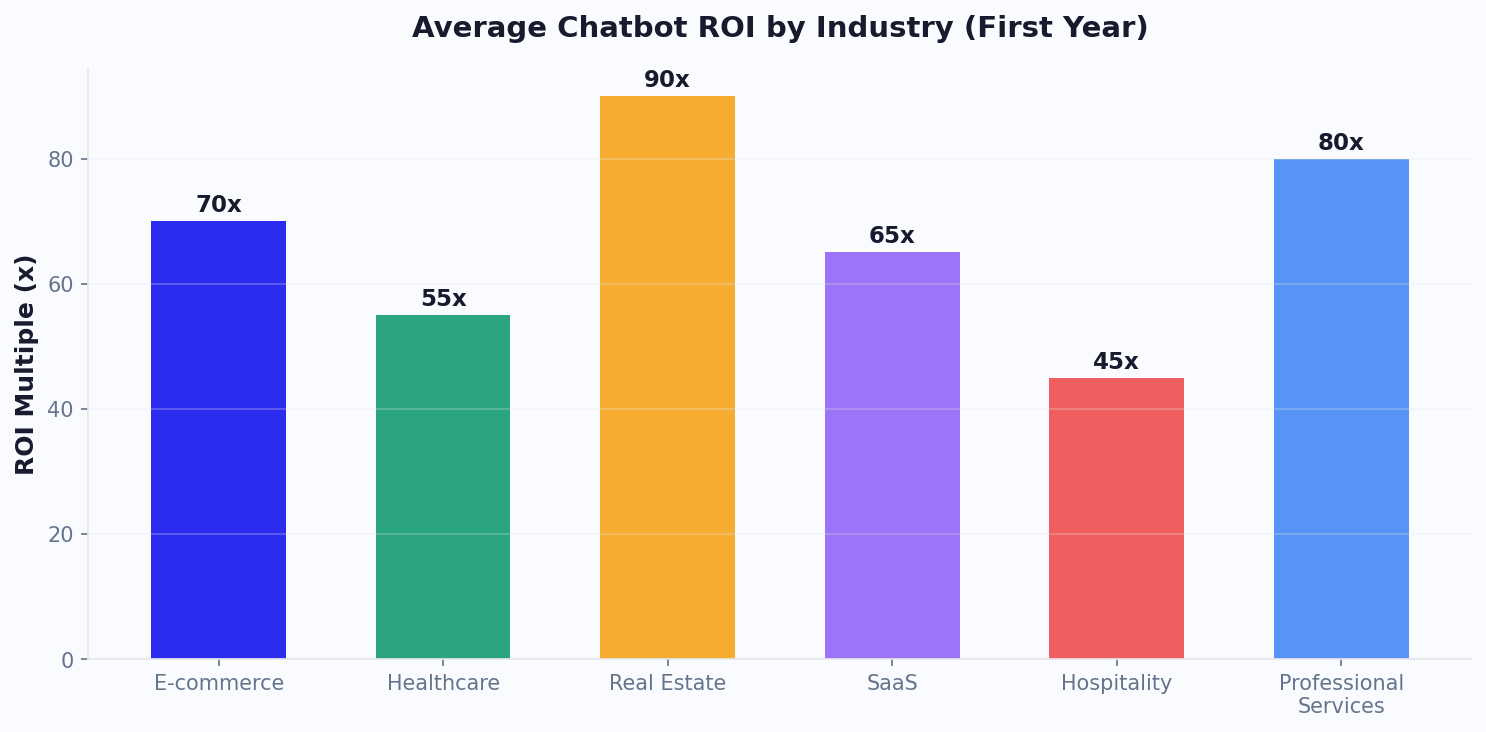
Each of these integrations was configured without custom backend code using Conferbot's visual API builder. Explore industry templates with pre-configured integrations, or use the ROI calculator to model the impact for your specific use case.
Developer Quick Start: Build Your First API Integration in 15 Minutes
This quick-start guide walks you through connecting your first external API to a Conferbot chatbot. We will build a practical example: a chatbot that checks real-time weather data for any city using the OpenWeatherMap API. The same patterns apply to any REST API -- CRM lookups, payment processing, booking systems, or custom backends.
Step 1: Create Your API Connection (3 minutes)
In your Conferbot dashboard, navigate to Integrations > API Connections > Add New. Enter the following:
- Name: Weather API
- Base URL: https://api.openweathermap.org/data/2.5
- Authentication: API Key (query parameter: appid)
- API Key: [your OpenWeatherMap API key]
Step 2: Configure the API Call (5 minutes)
Create a new API action within your chatbot flow:
- Endpoint: /weather
- Method: GET
- Parameters: q = {city_name} (mapped from chatbot variable), units = metric
- Response mapping: temperature = $.main.temp, description = $.weather[0].description, humidity = $.main.humidity
- Timeout: 5 seconds
- Fallback message: "Sorry, I couldn't check the weather right now. Try again in a moment."
Step 3: Build the Conversation Flow (5 minutes)
In the visual builder, create a flow:
- User says: "What's the weather in [city]?"
- Bot extracts city name into variable {city_name}
- Bot triggers Weather API call
- Bot responds: "The weather in {city_name} is {description} with a temperature of {temperature}C and {humidity}% humidity."
Step 4: Test and Deploy (2 minutes)
Use the built-in API tester to verify your endpoint returns data correctly. Test with different city names to confirm error handling works for invalid inputs. Once satisfied, publish your chatbot -- the API integration is live immediately across all connected channels.
Next Steps
With the basic pattern established, you can extend to more complex integrations:
- Add CRM lookups: replace weather API with Salesforce/HubSpot contact queries
- Add transactional APIs: POST requests to create appointments, orders, or tickets
- Chain multiple APIs: query one system, use the result to query another
- Add conditional logic: different API calls based on user segment or conversation path
- Connect webhooks: trigger proactive messages based on external events
For more complex integration patterns, review our API integration guide with production examples. Compare integration capabilities across platforms on our comparison page, or view plans with their API call limits and integration quotas.
Discover More
Continue Exploring
Explore features, connect third-party tools, and browse ready-made templates.