
코드 한 줄 작성하지 않고 챗봇 구축
기본 FAQ 챗봇을 만들거나 복잡한 대화형 앱을 만들고 싶든, 저희가 해결해 드립니다. 노코드 챗봇 빌더를 사용하면 기술적 전문 지식이 없어도 팀이 챗봇을 구축할 수 있습니다.
챗봇을 코드 없이
아이디어에서 라이브 챗봇까지 몇 분이면 됩니다. 비주얼 빌더로 누구나 강력한 대화 경험을 쉽게 만들 수 있습니다.
IT 의존성에서 벗어나기
Conferbot 챗봇 빌더를 사용하면 IT 부서의 개입 없이 팀이 챗봇을 아이디어에서 배포, 최적화까지 진행할 수 있습니다.
빛의 속도로 반복
챗봇 문구의 문법 오류를 수정하거나 챗봇을 완전히 개편해야 하는 경우에도 빌더를 사용하면 성가신 코드를 만지지 않고 챗봇 플로우를 변경하고 배포할 수 있습니다.
비즈니스의 나머지 부분과 통합
통합 제품군을 사용하여 챗봇을 비즈니스 운영에 사용하는 다른 소프트웨어와 연결하세요. 챗봇으로 데이터를 가져와 초개인화된 CX를 만들 수 있습니다. 챗봇이 캡처한 데이터를 전송하여 고객 데이터베이스를 최신 상태로 유지하세요. 가능성은 무한합니다.
왜 노코드인가요?
개발자 의존성 없이 팀이 챗봇을 만들고, 테스트하고, 개선할 수 있도록 지원합니다.
드래그 앤 드롭 빌더
직관적인 드래그 앤 드롭 인터페이스의 비주얼 플로우 빌더. 코드 한 줄 작성하지 않고 복잡한 대화 트리를 만드세요.
사전 구축 템플릿
리드 생성, 지원, 설문 조사 등을 위한 100개 이상의 전문적으로 디자인된 템플릿으로 시작하세요.
실시간 미리보기
구축하는 동안 즉시 변경 사항을 확인하세요. 웹사이트에 게시하기 전에 실시간으로 대화를 테스트하세요.
버전 관리
내장 버전 관리로 자신 있게 반복하세요. 클릭 한 번으로 이전 버전으로 되돌릴 수 있습니다.
반응형 디자인
만드는 모든 챗봇은 자동으로 데스크톱, 태블릿 및 모바일 장치에 최적화됩니다.
원클릭 게시
클릭 한 번으로 웹사이트, 앱 또는 모든 채널에 배포하세요. 개발자가 필요 없습니다.
작동 방식 💁🏻♀️
3가지 간단한 단계로 첫 번째 챗봇을 만드세요.
챗봇 대화 워크플로우 생성
1000개 이상의 선택지 중에서 미리 구축된 챗봇 템플릿을 선택하고 드래그 앤 드롭 빌더를 사용하여 변경하세요.
챗봇으로 고객 유도
챗봇을 웹사이트의 위젯으로, 독립 실행형 페이지로 또는 WhatsApp에 게시하세요
데이터 수집 확인
Conferbot 대시보드 내에서 대화 데이터를 보고 분석하세요. 1000개 이상의 통합을 사용하여 데이터를 CRM/데이터베이스로 이동하세요.
만들 수 있는 것들
노코드는 성능 저하를 의미하지 않습니다. 모든 사용 사례에 맞는 정교한 챗봇을 만드세요.
리드 생성
자격 양식, 리드 캡처 플로우 및 자동 후속 시퀀스 생성
고객 서비스
FAQ 봇, 티켓 라우팅 플로우 및 셀프 서비스 지식 베이스 구축
설문 및 피드백
인터랙티브 설문, NPS 수집 및 고객 피드백 루프 설계
E-Commerce
제품 추천 봇, 장바구니 복구 플로우 및 주문 추적
예약 관리
캘린더 통합, 가용성 확인 및 자동 스케줄링
온보딩
인터랙티브 튜토리얼, 제품 워크스루 및 사용자 활성화 플로우
코드 없이 만들 준비가 되셨나요?
프로그래밍 없이 강력한 챗봇을 만드는 수천 개의 비즈니스에 합류하세요. 무료로 시작, 신용카드 불필요.
What Is a No-Code Chatbot Builder?
A no-code chatbot builder is a visual development platform that enables anyone to create sophisticated conversational AI without writing a single line of code. Instead of programming languages, you use drag-and-drop interfaces, visual flow charts, pre-built components, and configuration panels to design, build, and deploy chatbots. The no-code approach democratizes chatbot development by removing the technical barrier entirely — if you can draw a flowchart, you can build a chatbot.
Core Capabilities of No-Code Builders
Modern no-code chatbot platforms go far beyond simple FAQ bots. They support conditional logic (if/then branching), variable storage, API calls to external services, payment processing, file uploads, calendar integration, and multi-channel deployment. The visual interface makes complex logic accessible — you can see your entire conversation architecture as a flowchart and trace every possible user path.
The no-code movement has transformed software development broadly, but chatbots are one of the categories where it has been most successful. Conversational flows are inherently visual — they are decision trees with messages at each node — which makes them perfectly suited to drag-and-drop interfaces. Unlike building a custom CRM or ERP system with no-code tools (which often hits limitations), no-code chatbot builders can handle 95%+ of real-world use cases without any custom code.
Market Growth and Adoption
The no-code chatbot builder market reached $1.2 billion in 2025 and is projected to grow to $4.8 billion by 2028 (28% CAGR). This growth is driven by three factors: rising customer expectations for instant responses, shortage of developers who know conversational AI, and the proven ROI of chatbot automation. Businesses using no-code builders report an average 340% ROI within the first year, primarily from reduced support costs and increased lead conversion. To see what is possible, explore our template library with 100+ pre-built flows, or use the ROI calculator to estimate your specific savings.
Who Is a No-Code Chatbot Builder For?
No-code chatbot builders serve an extraordinarily wide range of users, from solo entrepreneurs to enterprise marketing teams. The common thread is a need for conversational automation without the ability or desire to hire developers.
Primary User Segments
- Marketing Teams: Build lead capture bots, quiz funnels, product recommendation flows, and campaign-specific conversational landing pages. Marketing teams are the largest user segment, accounting for 35% of no-code chatbot projects.
- Customer Support Managers: Create FAQ bots, ticket routing flows, and escalation workflows without waiting for engineering sprints. Support use cases account for 28% of deployments.
- Sales Teams: Design lead qualification bots that ask progressive questions, score prospects, and route hot leads to calendar booking. Sales bots generate 3x more qualified meetings than static forms.
- Small Business Owners: Solo founders and small teams who need 24/7 customer engagement but cannot afford a support team. No-code builders give them enterprise-level automation at startup pricing.
- E-commerce Managers: Build product finders, order tracking bots, return processors, and upsell flows that run across web and WhatsApp.
- HR & Operations: Internal teams building employee onboarding assistants, IT helpdesk bots, policy Q&A bots, and feedback collection flows.
- Agencies: Digital agencies building chatbots for clients using white-label solutions to deliver branded experiences under their own name.
When No-Code Is NOT the Right Fit
No-code is not ideal for: building proprietary NLP models, creating chatbots that need sub-100ms response times for financial trading, or extremely custom integrations with legacy systems that lack APIs. For these edge cases (roughly 5% of chatbot projects), custom development is still necessary. For the other 95%, no-code delivers equivalent or better results. Learn more about the tradeoffs in our comparison of the best no-code chatbot builders.
Visual Builder vs Code: Which Approach Wins?
The debate between visual no-code builders and traditional coded chatbot development has clear winners depending on the evaluation criteria. Here is an objective comparison across every dimension that matters for production chatbot deployment.
Head-to-Head Comparison
| Dimension | No-Code Visual Builder | Coded Development |
|---|---|---|
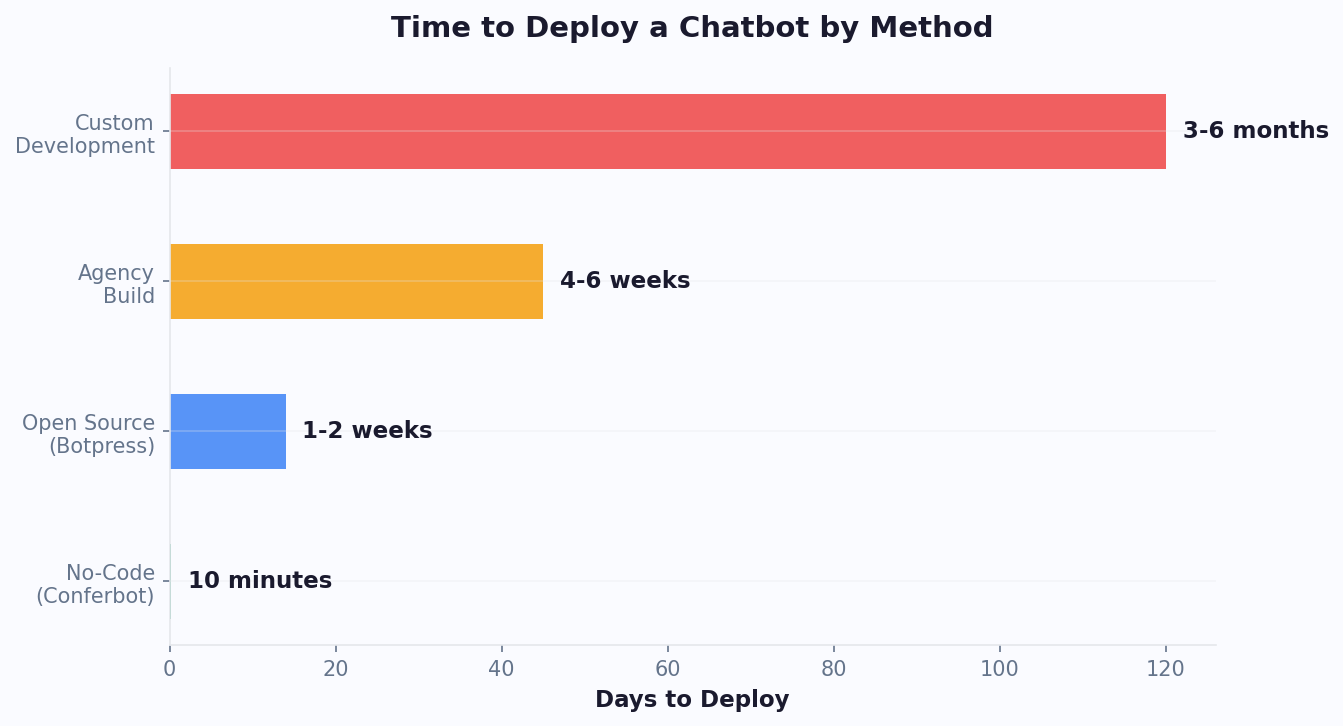
| Time to first deployment | 15 minutes – 4 hours | 4 – 16 weeks |
| Annual cost | $228 – $708 | $50K – $200K |
| Iteration speed | Minutes | Days to weeks |
| Maintenance burden | Platform handles infrastructure | Ongoing DevOps team needed |
| Scalability | Platform scales automatically | Manual scaling architecture |
| NLP capability | Built-in AI models | Custom model training possible |
| Multi-channel | One-click deployment to all | Build per-channel adapters |
| Team collaboration | Built-in sharing and roles | Git workflows needed |
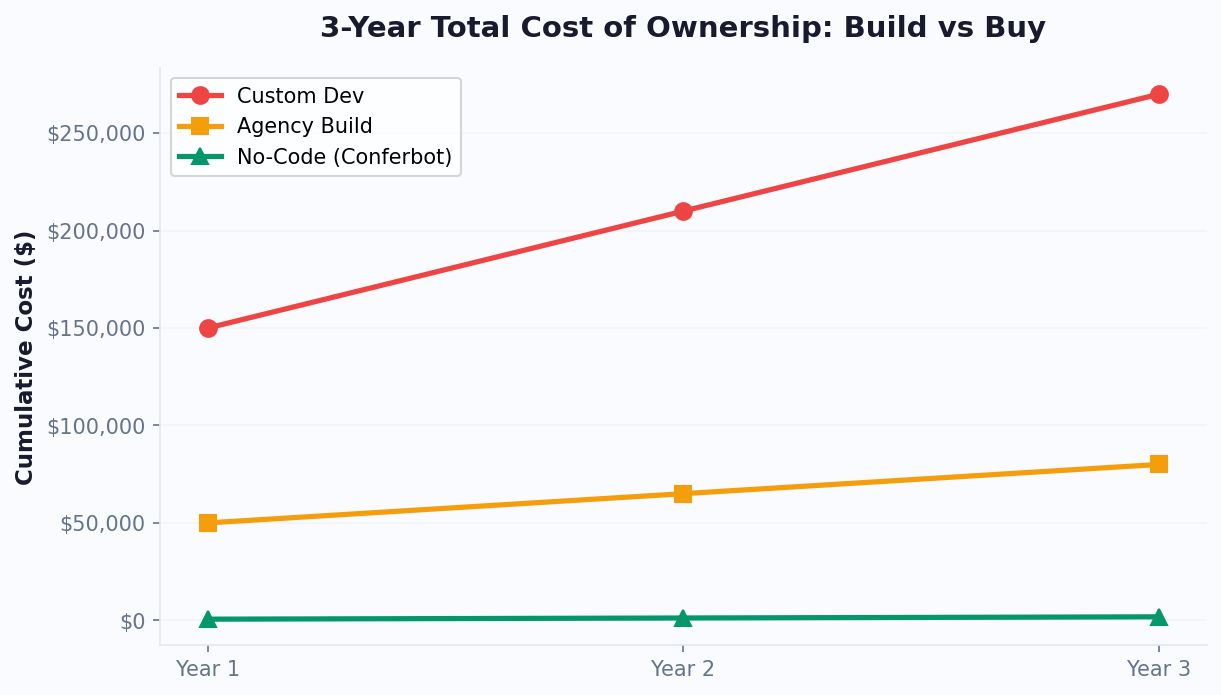
The total cost of ownership over 3 years tells the most compelling story. A no-code chatbot platform costs approximately $1,800 over three years (at $50/month average). A custom-built chatbot costs $150,000-$270,000 over the same period when you factor in initial development, ongoing maintenance (15-25% annually), hosting, security patches, and feature additions. That is a 150x cost difference for functionally equivalent chatbots.
Where coded development still wins: proprietary NLP models for highly specialized domains (medical diagnosis, legal analysis), chatbots embedded in custom hardware, or bots that need to process millions of messages per second in real-time trading environments. For standard business chatbots — lead gen, support, booking, e-commerce — no-code platforms deliver identical results at a fraction of the investment.
See the full cost breakdown on our pricing page or compare platforms on our comparison page.
Building Your First No-Code Chatbot Flow
Creating your first chatbot with a no-code visual builder is straightforward once you understand the core building blocks. This guide walks you through the process step by step using Conferbot's drag-and-drop interface.
Understanding Building Blocks
Every no-code chatbot is composed of these fundamental elements:
- Message blocks: Text, images, videos, or cards that the bot sends to the user
- Input blocks: Fields where users provide information (text, email, phone, date, file upload)
- Choice blocks: Multiple-choice options, buttons, or quick replies that guide the conversation
- Logic blocks: Conditional branches that route conversations based on user responses
- Action blocks: Triggers that perform actions like sending data to a CRM, booking a calendar slot, or notifying a team member
- Integration blocks: Connections to external tools via native integrations or webhooks
Your First Bot: A Lead Capture Flow
Step 1: Start with a greeting message. Keep it friendly and set expectations: "Hi! I'm here to help you find the right plan. I'll ask you 4 quick questions — takes less than a minute."
Step 2: Add a choice block asking about their role (Marketing, Sales, Support, Engineering, Other). This determines the conversation path.
Step 3: Add an input block for company size. Use a dropdown or buttons (1-10, 11-50, 51-200, 200+) rather than free text for cleaner data.
Step 4: Add a conditional branch. If company size is 200+, route to an "Enterprise" path that asks about specific requirements. For smaller companies, route to a "Standard" path with a simpler flow.
Step 5: Collect email with validation (the platform auto-validates email format). Add a phone number field as optional.
Step 6: End with a CTA — either book a demo for enterprise prospects or direct to the pricing page for smaller teams.
Step 7: Connect the action block to send captured data to your CRM via the integrations hub.
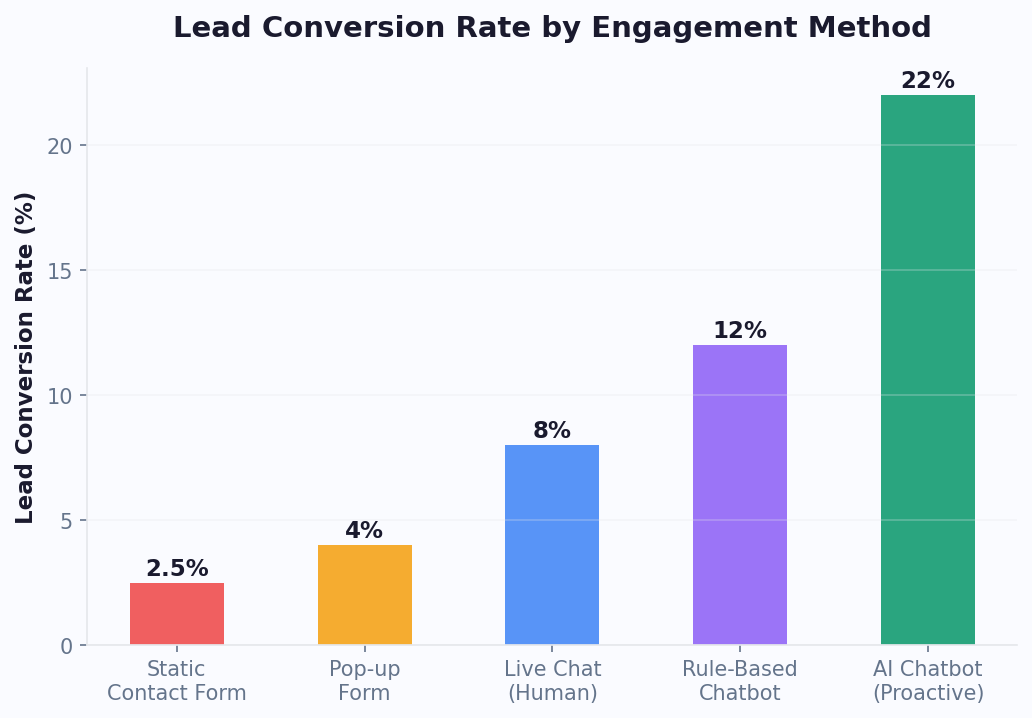
This entire flow takes 15-20 minutes to build visually and will outperform a static contact form by 2-3x in conversion rate. For inspiration, browse our template library where similar flows are available as one-click starting points.
Templates & Quick Start: Launch in Minutes
Templates are the fastest path from idea to deployed chatbot. Rather than building from scratch, you select a pre-designed conversation flow that matches your use case, customize the content and branding, and deploy. Conferbot offers 100+ professionally designed templates across every major category.
Template Categories
- Lead Generation (25+ templates): SaaS demo booking, real estate inquiry, insurance quote, consultation scheduling, webinar registration, newsletter signup, content gating
- Customer Support (20+ templates): FAQ bot, order tracking, return/refund processing, technical troubleshooting, account management, billing questions
- E-commerce (18+ templates): Product recommendation, size finder, gift guide, cart abandonment recovery, post-purchase feedback, loyalty program enrollment
- Appointment Booking (12+ templates): Healthcare scheduling, salon booking, restaurant reservation, service appointment, consultation booking
- HR & Internal (10+ templates): Employee onboarding, IT helpdesk, policy FAQ, time-off requests, feedback collection, training quiz
- Education (8+ templates): Course finder, enrollment assistant, student FAQ, tutoring scheduler, campus tour booking
How to Use Templates Effectively
The best approach is to use templates as starting points, not final products. Select the template closest to your need, then customize in three phases:
Phase 1 — Content: Replace placeholder text with your actual company information, product names, pricing, and policies. This takes 5-10 minutes.
Phase 2 — Logic: Adjust conditional branches to match your specific routing needs. Add or remove options, change scoring criteria, modify escalation triggers.
Phase 3 — Branding: Upload your logo, set brand colors, customize the chat widget appearance, and adjust the greeting to match your voice.
Businesses that start with templates and customize achieve 60% faster time-to-deploy and 25% higher initial performance compared to building from scratch, because templates encode proven conversation design patterns. Explore the full library at Conferbot Templates. Or, if you prefer AI-assisted creation, try the AI chatbot builder which generates custom flows from a text description.
Deployment Options: Where Your No-Code Bot Can Live
A chatbot is only valuable if it reaches your audience where they already are. No-code builders handle the deployment complexity — you click a button, and your bot appears on the channels you choose. Here is a complete overview of deployment options and when to use each one.
Channel Deployment Matrix
| Channel | Best For | Avg. Engagement | Setup Time |
|---|---|---|---|
| Website widget | Support, lead gen | 3-5% of visitors engage | 2 minutes (copy embed code) |
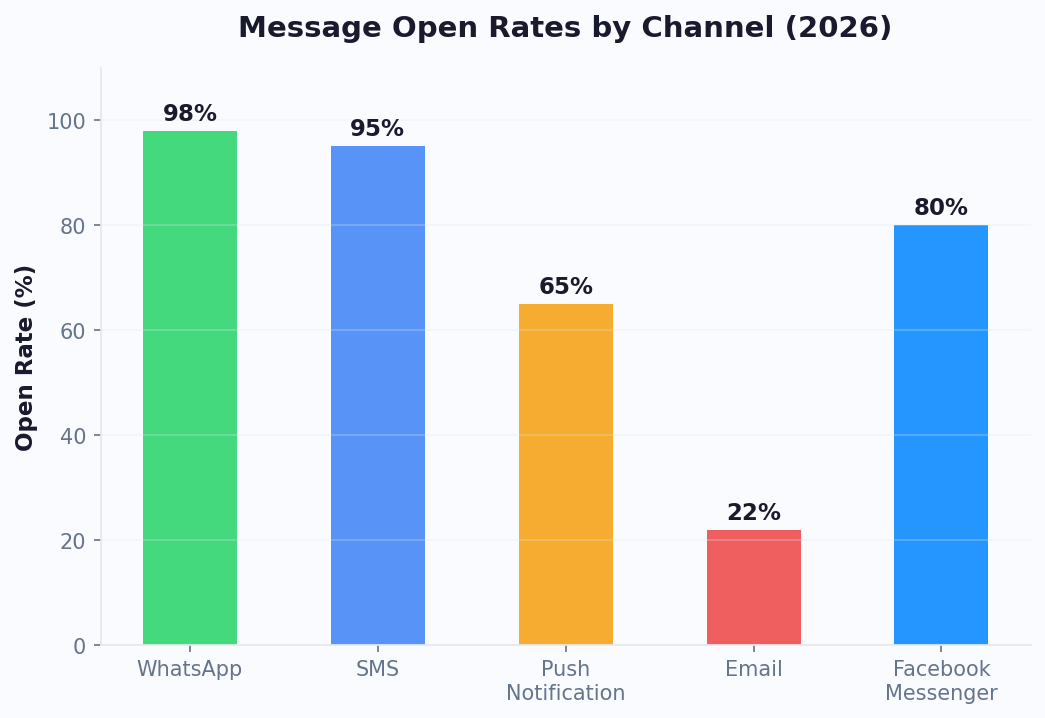
| Commerce, support, notifications | 98% open rate | 10 minutes | |
| Messenger | Social commerce, retargeting | 80% open rate | 5 minutes |
| Instagram DMs | E-commerce, brand engagement | 75% open rate | 5 minutes |
| Landing page (full page) | Conversational landing pages | 40-60% completion | 1 minute |
| Custom domain | Branded experiences | Varies | 15 minutes |
The highest-performing strategy is omnichannel deployment — the same bot accessible across multiple channels simultaneously. Users who interact on their preferred channel show 40% higher completion rates. With Conferbot's no-code builder, a single flow automatically adapts to each channel's format. Rich media cards display as carousels on web, image messages on WhatsApp, and quick replies adjust to each platform's native format.
For web deployment, you have three options: a floating widget (most common — appears in the bottom corner), an inline embed (embedded within your page content), or a full-page experience (replaces the traditional landing page). Each serves different purposes. The widget works for always-available support, inline embeds work for content marketing, and full-page bots work for high-converting lead capture.
Deploy to WhatsApp, Messenger, and Instagram with one-click channel connections. Use custom domains for branded bot URLs that build trust and improve SEO.
Measuring Success: KPIs for No-Code Chatbots
Deploying a no-code chatbot is just the first step. Measuring its performance and continuously optimizing is what separates chatbots that deliver ROI from those that sit idle. Here are the key metrics every no-code chatbot should be tracked on, with benchmarks to measure against.
Core Metrics and Benchmarks
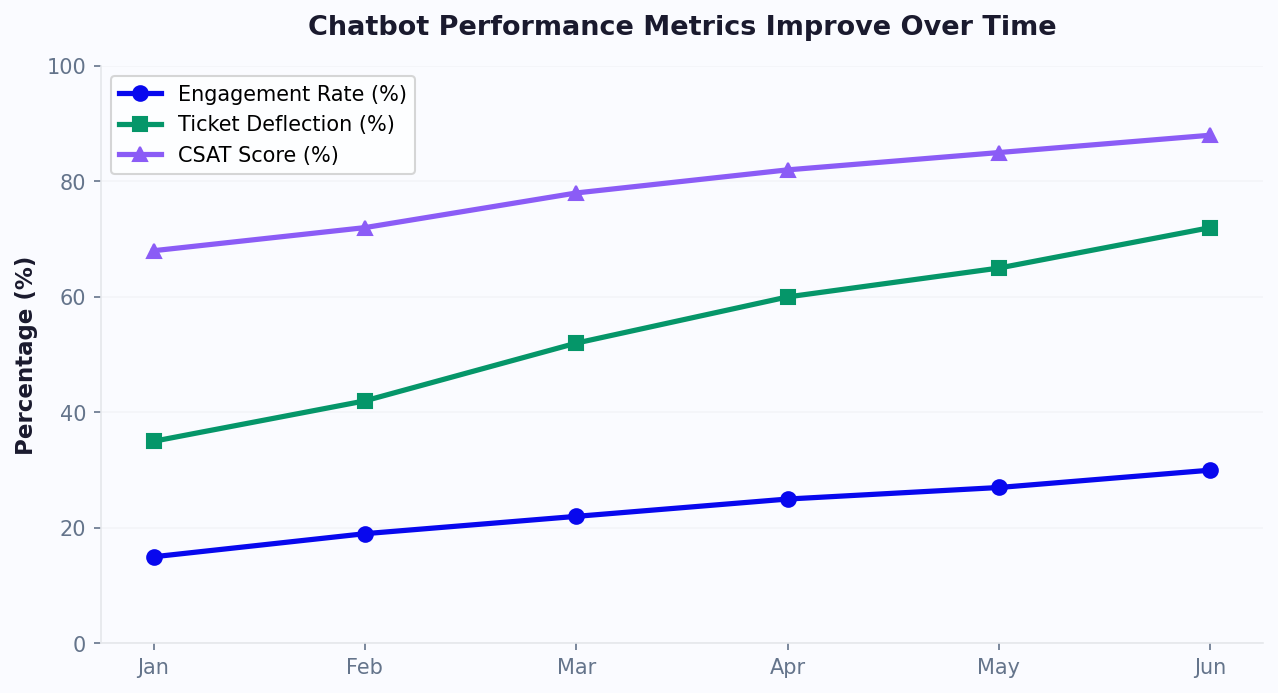
- Engagement Rate: Percentage of eligible visitors who interact with the bot. Benchmark: 3-8% for website widgets, 15-30% for proactive triggers. Below 3% suggests your trigger conditions or placement need adjustment.
- Completion Rate: Percentage of started conversations that reach the end. Benchmark: 65-80% for 4-6 question flows. Below 50% indicates friction — look at your drop-off points.
- Conversion Rate: Percentage of completed conversations that result in a desired action (form fill, booking, purchase). Benchmark: 25-45% for well-optimized lead gen bots.
- Resolution Rate: For support bots, the percentage of issues resolved without human escalation. Benchmark: 60-75% for FAQ bots with AI knowledge base.
- CSAT Score: User satisfaction rating at the end of conversation. Benchmark: 4.0-4.5 out of 5 for well-designed bots.
- Cost per Conversation: Total chatbot platform cost divided by conversations handled. Benchmark: $0.10-$0.50 vs $5-$15 for human-handled conversations.
Setting Up Tracking
Conferbot's built-in analytics dashboard tracks all these metrics automatically. Set up custom goals for your specific conversion events — a "goal" could be a calendar booking, an email capture, a product added to cart, or any action your bot drives. Use funnel visualization to see exactly where users drop off and prioritize those sections for optimization.
For advanced attribution, connect chatbot analytics to Google Analytics via the integrations hub to see how chatbot interactions influence downstream revenue. Teams that track and optimize weekly see a 40-60% improvement in core metrics within the first 30 days of deployment.
No-Code vs Low-Code vs Custom: Decision Framework
Understanding where no-code fits in the broader spectrum of chatbot development approaches helps you make the right choice for your specific situation. Here is a framework for deciding between no-code, low-code, and custom development.
Complete Comparison
| Factor | No-Code | Low-Code | Custom |
|---|---|---|---|
| Target user | Business users, marketers | Technical marketers, junior devs | Senior engineering teams |
| Learning curve | 1-2 hours | 1-2 weeks | Months |
| Flexibility | High within platform capabilities | Very high with code extensions | Unlimited |
| Cost (annual) | $228 – $708 | $5K – $25K | $50K – $200K+ |
| Use case coverage | 95% of business chatbots | 98% of business chatbots | 100% |
| Vendor lock-in risk | Medium (export available) | Medium-High | None (you own the code) |
| Time to market | Hours to days | Days to weeks | Weeks to months |
Decision Criteria
Choose No-Code if: You need a chatbot live quickly, your team lacks developers, your use case is lead gen/support/booking/e-commerce, and your budget is under $1K/year for chatbot tooling.
Choose Low-Code if: You have a technical team member, need custom API integrations beyond standard connectors, want to extend the platform with custom logic, or have compliance requirements needing custom data handling.
Choose Custom if: You are building a chatbot product (not just using one), need proprietary NLP models, have massive scale requirements (millions of daily messages), or need deep integration with legacy systems.
For 95% of businesses, no-code is the right starting point. You can always graduate to more complex approaches as needs evolve. Conferbot supports this progression — start with no-code visual building, extend with API integrations when needed, and use webhooks for custom data flows. Read our detailed comparison at best no-code chatbot builders compared.
Getting Started with Conferbot No-Code Builder
Ready to build your first no-code chatbot? Here is your fast-track guide to going from signup to deployed bot in under 30 minutes, even if you have never built a chatbot before.
Quick Start Checklist
- Sign up for a free Conferbot account (no credit card required, 600 conversations/month included)
- Choose your path: Start from a template or use the AI builder to generate from a description
- Define your goal: What is the single most important action you want users to take? (Book a call, submit info, get an answer)
- Keep it short: Start with 4-6 questions maximum for your first bot. You can always add more later based on data.
- Test thoroughly: Use the preview mode to walk through every possible path before publishing
- Deploy to one channel first: Start with your website widget, measure results, then expand to messaging channels
- Set up analytics: Define your conversion goal in the analytics dashboard before launch so you capture data from day one
First-Week Optimization Plan
Day 1-2: Deploy and observe. Let your bot collect at least 50-100 conversations before making changes. This gives you statistically meaningful data.
Day 3-4: Check drop-off points. If more than 30% of users abandon at a specific question, simplify it — make it multiple choice instead of open text, or split it into two easier questions.
Day 5-7: Optimize your CTA. Test different end-of-conversation offers. If booking a demo, try adding a specific time slot suggestion ("Would Tuesday at 2pm work?") instead of a generic "Book a time."
Resources to Accelerate Your Success
Explore these resources as you build:
- Template Library — 100+ ready-made flows to customize
- Complete Building Guide — Step-by-step tutorial with screenshots
- Support Bot Guide — Best practices for customer service chatbots
- ROI Calculator — Quantify expected savings before you start
- Pricing Plans — Find the right tier for your conversation volume
The no-code chatbot revolution is here, and the barrier to entry has never been lower. Whether you are a marketing team looking to capture more leads, a support manager seeking to scale without hiring, or a business owner wanting 24/7 customer engagement — the tools are ready. Start building today and have your first chatbot live before lunch.
노코드 빌더 FAQ
노코드 빌더에 AI 챗봇을 구현하는 데 필요한 모든 것을 알아보세요. 기능, 가격, 구현, 보안 및 산업별 솔루션에 대한 답변을 얻으세요.
Discover More
Continue Exploring
Explore features, connect third-party tools, and browse ready-made templates.