
Build Once,
Converse Everywhere
Deploy your AI chatbot on WhatsApp, Messenger, Instagram, Telegram, Discord, Slack, your website & native mobile apps - all from a single conversation flow. Reach 5B+ users worldwide.
No credit card required • Free plan available
How It Works
Build Your Chatbot
Use our visual drag-and-drop builder to create your conversation flow. No coding required.
Connect Your Channels
Connect your WhatsApp Business, Facebook Page, Instagram, Telegram bot, or other accounts in minutes.
Go Live Everywhere
Your chatbot automatically responds on all connected channels. Manage everything from one unified inbox.
Supported Channels
Connect with customers on the platforms they already use
Website Widget
Universal usersEmbed intelligent chatbots directly on your website
WhatsApp Business
2.7B+ usersConnect with customers on the world's most popular messaging app
Facebook Messenger
1B+ usersEngage customers through your Facebook Business Page
Instagram DMs
2B+ usersAutomate Instagram Direct Messages for your business
Telegram Bot
800M+ usersCreate powerful Telegram bots without coding
Discord Bot
150M+ usersBuild community bots for Discord servers
Slack Bot
32M+ daily usersInternal automation for your Slack workspace
LINE
230M+ usersReach customers in Japan, Taiwan, and Southeast Asia
Microsoft Teams
320M+ usersEnterprise chatbots for Microsoft Teams
React Native SDK
Mobile Apps usersEmbed chatbots in React Native mobile apps
Flutter SDK
Mobile Apps usersEmbed chatbots in Flutter mobile apps
Android SDK
Mobile Apps usersNative Android SDK for Kotlin and Java apps
iOS SDK
Mobile Apps usersNative iOS SDK for Swift and SwiftUI apps
Why Choose Omnichannel?
Conferbot's omnichannel deployment works seamlessly with your entire chatbot setup. Design flows visually with our no-code chatbot builder, add AI-powered conversations with OpenAI, track performance across all channels with real-time analytics, and hand off complex conversations to agents via live chat. Get started fast with pre-built support templates or lead generation templates that work across all channels out of the box.
Ready to Go Omnichannel?
Start reaching customers on every platform today
Get Started FreeOmnichannel FAQ
Everything you need to know about chatbots for omnichannel.
What Is Omnichannel Chatbot Deployment?
Omnichannel chatbot deployment means building a single conversational AI system and deploying it across every customer touchpoint -- website, mobile app, WhatsApp, Messenger, Instagram, Telegram, Slack, Teams, and more -- with unified conversation history, consistent behavior, and centralized management. Unlike deploying separate bots on each platform, omnichannel ensures that a customer who starts a conversation on your website and later messages you on WhatsApp continues the same thread without repeating themselves.
Why Omnichannel Matters in 2025
Customer behavior has fundamentally shifted. According to Salesforce's State of the Connected Customer report, 76% of customers expect consistent interactions across departments and channels, and 54% say it feels like sales, service, and marketing teams do not share information. A chatbot that lives only on your website misses the 2.8 billion WhatsApp users, the 1 billion Messenger users, and the 900 million Telegram users who prefer messaging apps over web browsing. Omnichannel deployment meets customers where they already spend their time.
The business impact is measurable. Companies with strong omnichannel engagement retain 89% of their customers compared to 33% for companies with weak omnichannel strategies (Aberdeen Group). Harvard Business Review found that omnichannel customers spend 4% more per in-store visit and 10% more online compared to single-channel customers. When your chatbot is everywhere, it captures opportunities that a web-only deployment misses entirely.
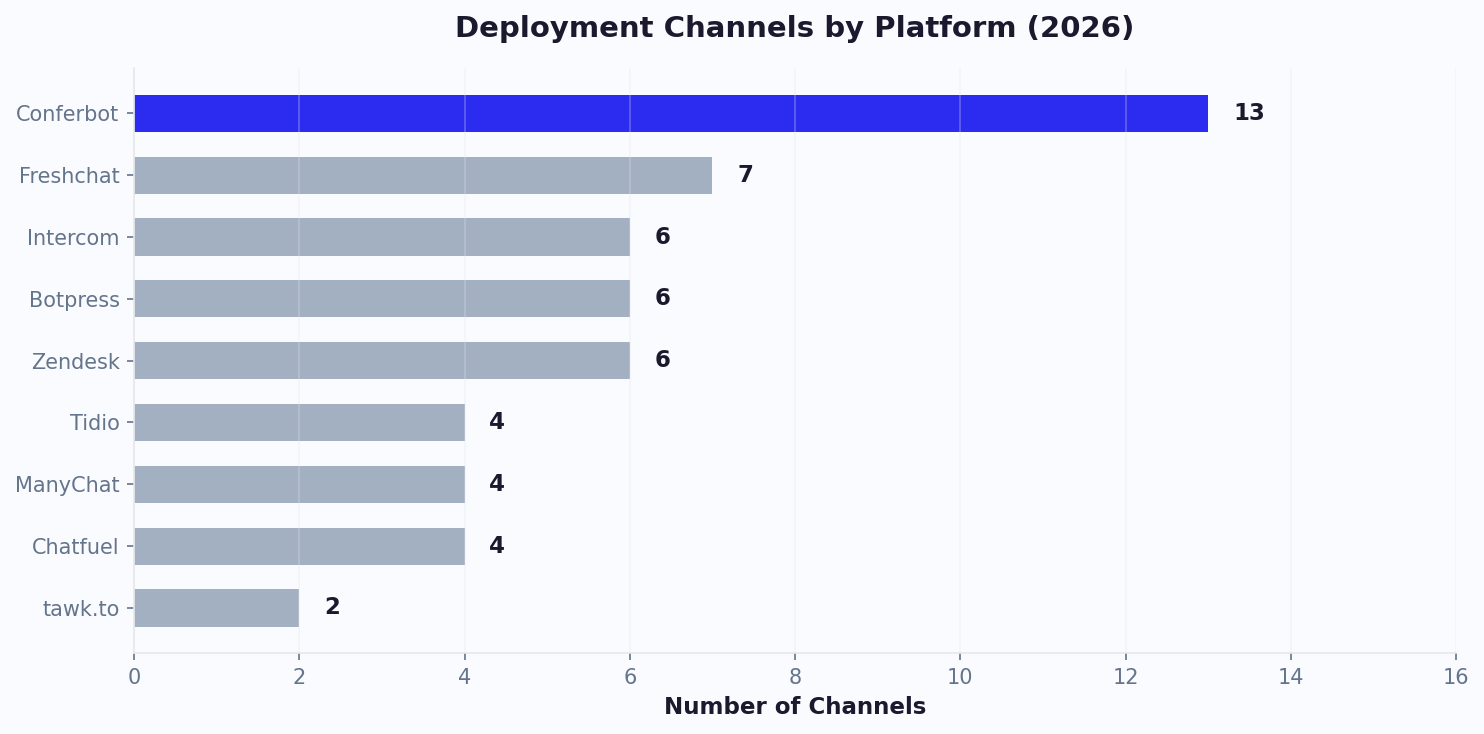
- Build once, deploy everywhere -- single conversation flow works on all 13+ channels
- Unified conversation history -- customers never repeat themselves when switching channels
- Centralized analytics -- single dashboard shows performance across all platforms
- Channel-specific customization -- adapt greeting, tone, and media per platform while sharing core logic
- No per-channel fees -- all channels included in every Conferbot plan
Conferbot currently supports 9 messaging channels (WhatsApp Business, Facebook Messenger, Instagram DMs, Telegram, Discord, Slack, LINE, Microsoft Teams, and website widget) plus 4 mobile SDKs (iOS, Android, React Native, Flutter). Combined, these channels reach over 5 billion users worldwide. The visual builder includes channel preview so you can see exactly how your flows render on each platform before going live.
Omnichannel vs Multichannel: Why Unified Conversations Win
The terms "omnichannel" and "multichannel" sound similar but represent fundamentally different architectures with dramatically different customer experiences. Understanding this distinction is critical for choosing the right chatbot strategy.
| Dimension | Multichannel | Omnichannel (Conferbot) | Customer Impact |
|---|---|---|---|
| Conversation history | Per-channel silos | Unified across all channels | No repetition when switching |
| Customer identity | Separate profiles per channel | Single unified profile | Personalized across touchpoints |
| Bot configuration | Separate bot per channel | One bot, deployed everywhere | Consistent experience |
| Analytics | Separate dashboards per platform | Single unified view | Cross-channel insights |
| Agent handoff | Channel-specific routing | Unified inbox for all channels | Faster resolution with context |
| Maintenance effort | Update each bot separately | Single update applies everywhere | Always up-to-date information |
| Knowledge base | May differ across channels | Shared knowledge base | Consistent answers everywhere |
| Setup complexity | Configure each platform separately | Build once, connect channels | Faster time-to-value |
The practical difference is stark. Consider a customer who browses products on your website, adds items to their cart, then messages your WhatsApp number with a question about sizing. In a multichannel system, the WhatsApp bot has no idea about the browsing session -- it starts from zero. In an omnichannel system, the bot knows exactly which products the customer was viewing and can provide contextual sizing guidance, dramatically increasing conversion probability.
Conferbot's architecture stores all interactions in a unified conversation graph regardless of the originating channel. Customer identity is resolved through email, phone number, or platform-specific identifiers, ensuring that cross-channel journeys are connected automatically. This is the same architecture that powers the AI agent handover system -- when escalation occurs, human agents see the complete cross-channel history in a single live chat inbox. Compare omnichannel capabilities across platforms on our comparison page.
13 Channels Explained: Capabilities, Audiences, and Best Use Cases
Each messaging channel has unique technical capabilities, audience demographics, and interaction patterns that influence how your chatbot should behave. Understanding these differences helps you prioritize which channels to deploy first and how to optimize the experience for each platform's users.
Messaging Channels
WhatsApp Business (2.8B users): The world's most-used messaging app. Supports text, images, documents, videos, location sharing, interactive buttons, and list messages. Best for: transactional notifications, customer support, appointment reminders, and order updates. Setup time: 10-15 minutes (Meta Business verification required). Read our WhatsApp chatbot guide for detailed configuration.
Facebook Messenger (1B users): Deep integration with Facebook Pages and Instagram. Supports persistent menus, webviews, receipts, airline boarding passes, and carousel cards. Best for: e-commerce product discovery, lead generation from Facebook ads, and community engagement. Setup time: 5 minutes via Facebook Page connection.
Instagram DMs (2B users): Reaches younger demographics (67% are 18-34). Supports text, images, stories replies, and quick replies. Best for: brand engagement, influencer-driven commerce, product inquiries triggered by story mentions. Setup time: 5 minutes via Instagram Business account.
Telegram (900M users): Popular with tech-savvy audiences and in markets like Russia, Iran, and Southeast Asia. Supports rich bot APIs including inline keyboards, custom commands, and group bot functionality. Best for: crypto/fintech communities, tech products, and privacy-conscious audiences. Setup time: 3 minutes via BotFather.
Discord (200M users): Gaming and community-first platform expanding into business use. Supports slash commands, embeds, buttons, and server-level bot deployments. Best for: community management, developer documentation bots, and gaming companies.
Slack (32M daily users): Dominant B2B communication platform. Supports slash commands, modal dialogs, Block Kit UI, and workflow integration. Best for: internal support bots, HR assistants, IT help desks, and sales team tools.
LINE (196M users): Dominant in Japan, Taiwan, Thailand, and Indonesia. Rich messaging with Flex Messages, LIFF apps, and LINE Pay integration. Best for: businesses targeting East Asian markets.
Microsoft Teams (320M users): Enterprise communication standard. Supports adaptive cards, task modules, and integration with Microsoft 365 ecosystem. Best for: internal enterprise bots, HR, IT support, and employee onboarding.
Web and Mobile
Website Widget: Embedded chat interface on your website. Highest intent channel -- visitors are already on your site. Supports full rich media, forms, and mobile-optimized responsive layouts.
Mobile SDKs (iOS, Android, React Native, Flutter): Native chat experience inside your mobile app with 60fps performance, push notifications, and offline support. See our Mobile SDK documentation for platform-specific details.
Unified Conversation History: How Cross-Channel Context Works
The core technical challenge of omnichannel chatbot deployment is maintaining a unified view of each customer across all touchpoints. When a customer interacts on multiple channels, the system must recognize them as the same person, merge their interaction history, and present accumulated context to the chatbot and human agents. Conferbot solves this through a multi-layer identity resolution system and a centralized conversation graph.
Identity Resolution
Customers are identified and linked across channels using multiple signals:
- Explicit identifiers: Email address or phone number provided during conversation (strongest match)
- Platform identifiers: WhatsApp phone number, Facebook user ID, Instagram handle (platform-specific)
- Cookie/session matching: Browser fingerprint and session cookies for website visitors
- Device linking: Mobile SDK device identifiers connecting app usage to other channels
- CRM matching: Cross-referencing with CRM records via API integration to match identities
The Conversation Graph
Once identity is resolved, all interactions are stored in a unified conversation graph. This graph contains: every message exchanged across all channels, extracted entities (name, email, preferences, issues), sentiment analysis per interaction, actions taken (links clicked, forms submitted, purchases made), and escalation history. The graph is queryable in real-time by the chatbot, AI agent, and human agents.
Cross-Channel Handoff Experience
From the customer's perspective, switching channels is seamless. They might initiate a support request on your website during work hours, then continue the conversation on WhatsApp from their phone while commuting. The chatbot greets them with: "Hi [name], I see you were asking about [topic] earlier. Would you like to continue where we left off?" This level of continuity requires no action from the customer -- the system handles identity resolution and context retrieval automatically.
For live chat agents, the unified history means they never ask "has anyone helped you with this before?" The complete cross-channel timeline is visible in the agent dashboard, including which channels the customer has used, what was discussed, and what solutions were attempted. Combined with the AI agent tier, this creates a support experience where context is never lost regardless of how many channels or tiers a conversation traverses.
The unified history also powers analytics that track customer journeys across channels -- identifying which cross-channel paths lead to conversion and which lead to abandonment.
Channel-Specific Optimization: Maximizing Performance Per Platform
While omnichannel means building once and deploying everywhere, optimization means understanding what makes each channel unique and adapting accordingly. The same core conversation logic should power all channels, but the presentation layer, greeting experience, and interaction patterns should be tailored to each platform's strengths and user expectations.
WhatsApp Optimization
WhatsApp users expect quick, conversational responses -- not formal or lengthy paragraphs. Optimize by: keeping messages under 320 characters when possible, using interactive list messages for menu selections instead of numbered text lists, sending rich media (images, videos) for product showcases, and leveraging template messages for proactive outreach within Meta's approved categories. WhatsApp's 24-hour conversation window means you should capture essential information quickly before the window closes.
Website Widget Optimization
Website visitors have the highest intent but the shortest patience. Optimize by: triggering the chatbot proactively based on page context (pricing page = "Questions about plans?"), using quick reply buttons instead of open text input for initial interactions, matching the widget design to your site's aesthetic, and implementing exit-intent triggers for visitors about to leave. Page-specific greetings increase engagement by 35-50% compared to generic "How can I help?" messages.
Messenger and Instagram Optimization
Meta's platforms support rich carousel cards that are ideal for product discovery. Optimize by: connecting your product catalog for in-chat browsing, using persistent menus for common actions, leveraging comment-reply automation on Instagram (someone comments on a post, the bot sends a DM with more info), and building click-to-Messenger ads that start conversations from Facebook/Instagram ads.
Slack and Teams Optimization
B2B channels require a different approach. Optimize by: supporting slash commands for power users (/help, /status, /book), using structured block messages with clear CTAs, integrating with workspace tools (Google Calendar, Jira), and respecting professional context -- avoid emoji-heavy or overly casual responses unless your brand is deliberately informal.
Conferbot's visual builder lets you set channel-specific greeting messages, button labels, and media types while sharing the underlying conversation logic. The analytics dashboard shows per-channel engagement metrics so you can identify which optimizations have the biggest impact. Browse channel-optimized templates that come pre-configured with platform-specific best practices.
Deployment Strategy: Phased Rollout for Maximum Impact
Deploying across all 13 channels simultaneously is possible with Conferbot but rarely optimal. A phased rollout lets you validate your chatbot's performance, gather data, and optimize before expanding. The following deployment strategy is based on patterns from successful Conferbot customers who maximized ROI while minimizing risk.
Phase 1: Website Widget (Week 1)
Start with your website. It is the channel with highest intent, easiest to deploy (single script tag), and provides the most control over the experience. Use this phase to validate conversation flows, identify FAQ gaps, and establish baseline metrics. Deploy on high-traffic pages first: homepage, pricing, contact, and product pages. Target: prove the chatbot can handle 60%+ of common queries without human intervention.
Phase 2: Primary Messaging Channel (Week 2-3)
Add your audience's primary messaging channel. For most businesses this is WhatsApp (highest engagement rates) or Messenger (largest social audience). This validates that your conversation flows work in a messaging context and exposes the bot to a different interaction style. Users on messaging channels tend to be more conversational and less structured than website visitors -- you may need to add more natural language handling.
Phase 3: Secondary Channels (Week 4-6)
Expand to 2-3 additional channels based on where your audience lives. For B2B: add Slack and Teams. For consumer brands: add Instagram and Telegram. For mobile-first products: add mobile SDKs. Each new channel adds incremental reach without requiring new conversation design -- the same flows deploy automatically.
Phase 4: Full Omnichannel (Week 6+)
Deploy remaining channels and focus on cross-channel optimization: ensuring smooth handoffs between channels, optimizing per-channel greetings, and leveraging unified analytics to understand cross-channel customer journeys.
- Start with highest-intent channel (website) to validate core flows
- Add highest-reach messaging channel to test conversational interactions
- Expand based on audience demographics and business type
- Optimize per-channel after baseline data is established
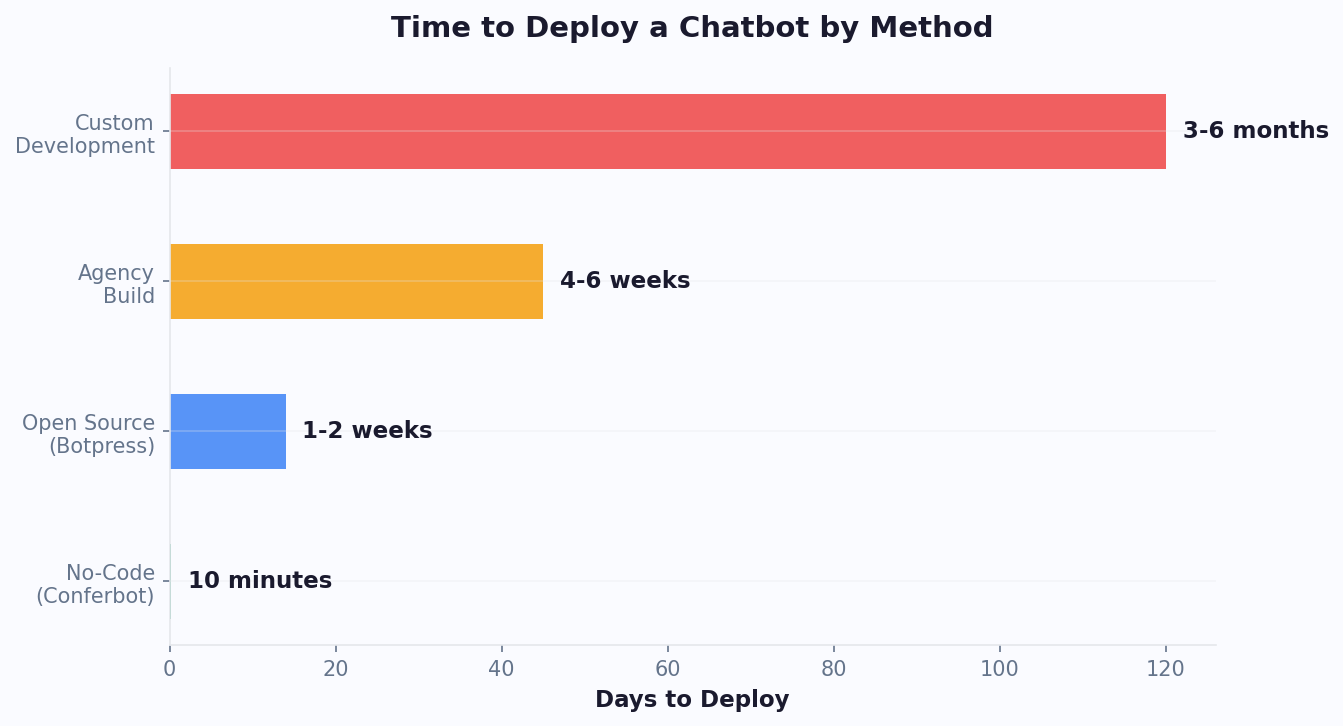
- Full omnichannel deployment achievable within 4-6 weeks
Throughout all phases, the analytics dashboard tracks performance per channel and identifies which channels drive the most value for your specific business. Use the ROI calculator to model the expected impact of adding each channel to your deployment.
Cost Analysis: ROI Per Channel and Total Omnichannel Economics
One of the strongest arguments for omnichannel deployment is the economics: the incremental cost of adding each new channel is near-zero because the conversation logic is shared, while each channel adds incremental conversations (and therefore value) that would not exist otherwise. Unlike platforms that charge per-channel, Conferbot includes all channels in every plan -- your cost is based on conversation volume, not deployment breadth.
Per-Channel ROI Analysis
Based on aggregated data from Conferbot customers across industries, here is the typical ROI contribution of each channel:
- Website widget: Captures 15-25% of website visitors who would otherwise bounce. Average value per captured lead: $20-150 depending on industry. Typically generates 60-70% of total chatbot conversations.
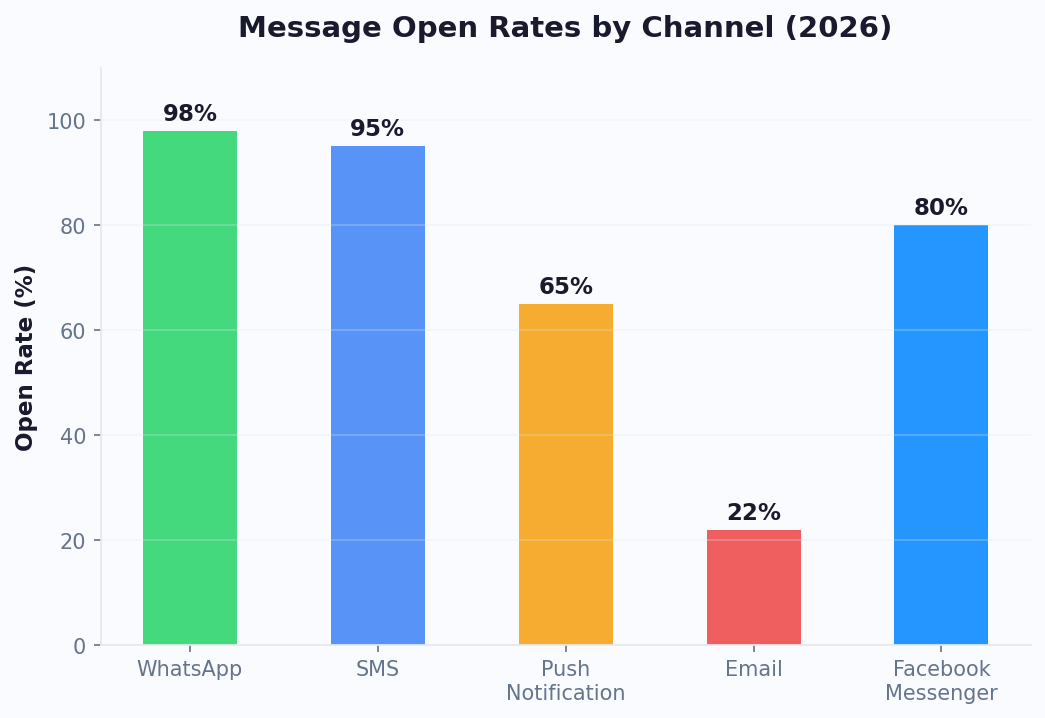
- WhatsApp: 98% message open rate means outbound campaigns (appointment reminders, order updates, abandoned cart) are highly effective. Reduces missed appointments by 35-45%. Generates 15-20% of conversations.
- Messenger/Instagram: Captures social media engagement that would otherwise be lost comments. Ad-to-Messenger campaigns achieve 3-5x lower cost-per-lead than landing page forms. Generates 10-15% of conversations.
- Slack/Teams: Internal bots deflect 40-60% of IT/HR help desk tickets. At $15-25 per ticket, even moderate volume creates significant savings. Generates 5-10% of conversations.
- Mobile SDK: Increases in-app engagement by 25-40% and reduces support email volume by 30-50%. Generates 5-15% of conversations depending on app type.
Cost Model Comparison
The total cost of an omnichannel chatbot deployment on Conferbot ranges from $19/month (Starter: 2,000 conversations across all channels) to $59/month (Business: 10,000 conversations). Compare this to the alternative: hiring additional support staff ($3,000-5,000/month per agent), maintaining separate chat tools per channel ($50-200/month each), or building custom integrations ($10,000-50,000 development cost). The ROI calculator models your specific scenario with actual conversation volumes and channel mix.
View pricing to see conversation limits per plan, or compare Conferbot's all-inclusive channel pricing with competitors who charge per-channel fees.
Performance Data: Cross-Channel Benchmarks and Engagement Metrics
Making data-driven decisions about omnichannel deployment requires understanding how each channel performs across key metrics. The following benchmarks are aggregated from Conferbot's platform data across thousands of chatbot deployments in 2024-2025, providing realistic expectations for teams planning their omnichannel strategy.
| Channel | Open Rate | Response Rate | Avg. Session Length | Lead Capture Rate | Resolution Rate |
|---|---|---|---|---|---|
| WhatsApp Business | 98% | 45-60% | 4.2 min | 32% | 78% |
| Facebook Messenger | 80% | 30-40% | 3.1 min | 28% | 72% |
| Instagram DMs | 75% | 25-35% | 2.4 min | 22% | 65% |
| Website Widget | N/A | 15-25% | 2.8 min | 18% | 70% |
| Telegram | 85% | 35-45% | 3.5 min | 25% | 74% |
| Slack | 90% | 50-65% | 1.8 min | N/A (internal) | 82% |
| Microsoft Teams | 88% | 45-55% | 2.1 min | N/A (internal) | 80% |
| Mobile SDK (native) | Push: 60% | 40-55% | 3.8 min | 35% | 76% |
Key Insights from Cross-Channel Data
Several patterns emerge from this data that should inform your omnichannel strategy:
- WhatsApp and Slack have the highest response rates -- prioritize these for active engagement campaigns
- Website widget has lower initial engagement but highest intent -- visitors who do engage are more likely to convert
- Mobile SDK achieves the highest lead capture rate thanks to native form inputs and reduced friction
- B2B channels (Slack, Teams) have the shortest session lengths because users are efficient and goal-oriented
- Cross-channel customers (those who interact on 2+ channels) convert at 2.3x the rate of single-channel users
Track your own channel performance in Conferbot's analytics dashboard, which provides all metrics in the table above for your specific deployment. All plans include all channels and unified analytics.
Getting Started: Deploy Your Omnichannel Chatbot Today
Launching an omnichannel chatbot with Conferbot is designed to be fast -- most teams go from zero to live on 3+ channels within a single day. The following quick-start guide takes you from account creation to full omnichannel deployment.
Step 1: Create Your Chatbot (10-15 minutes)
Sign up at app.conferbot.com and use the visual builder to create your conversation flow. Start with a template for your industry and customize the questions, responses, and branching logic. Add your knowledge base content (help articles, FAQs, product information) so the AI agent can answer open-ended questions.
Step 2: Deploy on Website (5 minutes)
Copy the embed script from your dashboard and paste it into your website's HTML (before the closing body tag). The chatbot appears immediately. Customize colors, position, and greeting message to match your site's design.
Step 3: Connect Messaging Channels (5-15 minutes each)
Navigate to Channels in your dashboard. Click "Connect" on each platform you want to add:
- WhatsApp: Connect your Meta Business account, verify your phone number, submit message templates for approval (10-15 minutes)
- Messenger: Connect your Facebook Page with one click (2 minutes)
- Instagram: Link your Instagram Business account via Facebook settings (3 minutes)
- Telegram: Create a bot via @BotFather, paste the token into Conferbot (3 minutes)
- Slack: Install the Conferbot Slack app to your workspace (2 minutes)
- Discord: Add bot to your server with OAuth link (3 minutes)
- Teams: Upload app package to Microsoft Teams admin center (5 minutes)
Step 4: Customize Per Channel (optional, 10 minutes)
Set channel-specific greeting messages, adjust response tone for different platforms, and configure which conversation branches are available on which channels (e.g., disable appointment booking on Discord where it is not relevant).
Step 5: Go Live and Monitor
All connected channels go live immediately after setup. Monitor performance in the unified analytics dashboard that shows conversations, resolution rates, and engagement metrics across all channels in a single view. Set up live chat agent assignments for conversations that need human attention.
Ready to deploy everywhere your customers are? All channels are included on every plan with no per-channel fees. Use the ROI calculator to estimate the value of adding each channel to your deployment, or compare Conferbot's omnichannel coverage with competing platforms.
Continue Exploring
Explore features, connect third-party tools, and browse ready-made templates.