
Integrations Hub: Connect Your Chatbot to 50+ Business Tools
Connect your chatbot to HubSpot, Zoho, Google Sheets, Stripe, Zapier, and 50+ business tools. Automate workflows, sync data in real-time, and accept payments.
Start Integrating FreeNo credit card required. Free plan available.
Connect to 50+ Tools
Sync your chatbot with CRMs, payment processors, spreadsheets, project management tools, and 5,000+ apps via Zapier.
Native CRM integrations
Sync chatbot leads directly to HubSpot, Zoho, Salesforce, and Pipedrive. Every conversation automatically creates or updates contacts, deals, and activities in your CRM without any manual data entry.
Accept payments with Stripe in chat
Collect payments, process subscriptions, and handle invoices directly inside your chatbot conversations using Stripe. Customers never leave the chat to complete a purchase, dramatically increasing conversion rates.
Automate with Zapier and webhooks
Connect to 5,000+ apps through Zapier or send data to any system via custom webhooks. Automate lead routing, ticket creation, email sequences, Slack notifications, and any workflow you can imagine.
Why Integrations Matter
Your chatbot is more powerful when it talks to your other business tools. Automate workflows and unify data.
Unified Data
All chatbot data flows to your CRM, database, and business tools automatically.
Automated Workflows
Eliminate manual data entry with automatic triggers, actions, and routing.
Real-Time Sync
Bi-directional data sync ensures your systems always have the latest information.
No Developer Needed
Set up integrations visually with a point-and-click interface. No code required.
Scale Effortlessly
Integrations handle any volume as your chatbot conversations and data grow.
Custom Workflows
Build complex multi-step automation with conditional logic and branching rules.
How It Works
Connect your first integration in under 5 minutes.
Choose your integration
Browse 50+ native integrations or connect any app via Zapier. Select the tools your team uses.
Map your data fields
Use the visual mapper to connect chatbot data fields to your CRM, sheets, or database columns.
Activate and automate
Turn on the integration. Data flows automatically with every chatbot conversation. Monitor in real-time.
Integrations for Every Workflow
From CRM sync to payment collection, see how teams automate with integrations.
CRM Lead Sync
Auto-create contacts in HubSpot or Zoho with full conversation context
Stripe Payments in Chat
Collect payments and process orders without customers leaving the chat
Appointment Booking
Sync with Google Calendar to let customers book meetings in the chatbot
Data to Google Sheets
Log conversation data and form responses to Sheets in real-time
Project Management
Create tasks in Airtable, Notion, or Trello from chatbot submissions
Email Automation
Trigger email sequences based on chatbot interactions and responses
Ready to Connect Your Tools?
Integrate your chatbot with 50+ business tools in minutes. Start free, no credit card required.
Why Integrations Are the Foundation of Chatbot ROI
A chatbot that cannot connect to your existing tools is a chatbot that creates more work, not less. According to a 2024 HubSpot State of Service report, 62% of support teams cite disconnected tools as their biggest productivity drain, and chatbots are no exception. The difference between a standalone bot and an integrated one is the difference between collecting a lead's email in a chat widget and automatically creating a CRM contact, triggering an email sequence, notifying the sales team on Slack, and logging the interaction in your analytics platform -- all from a single conversation.
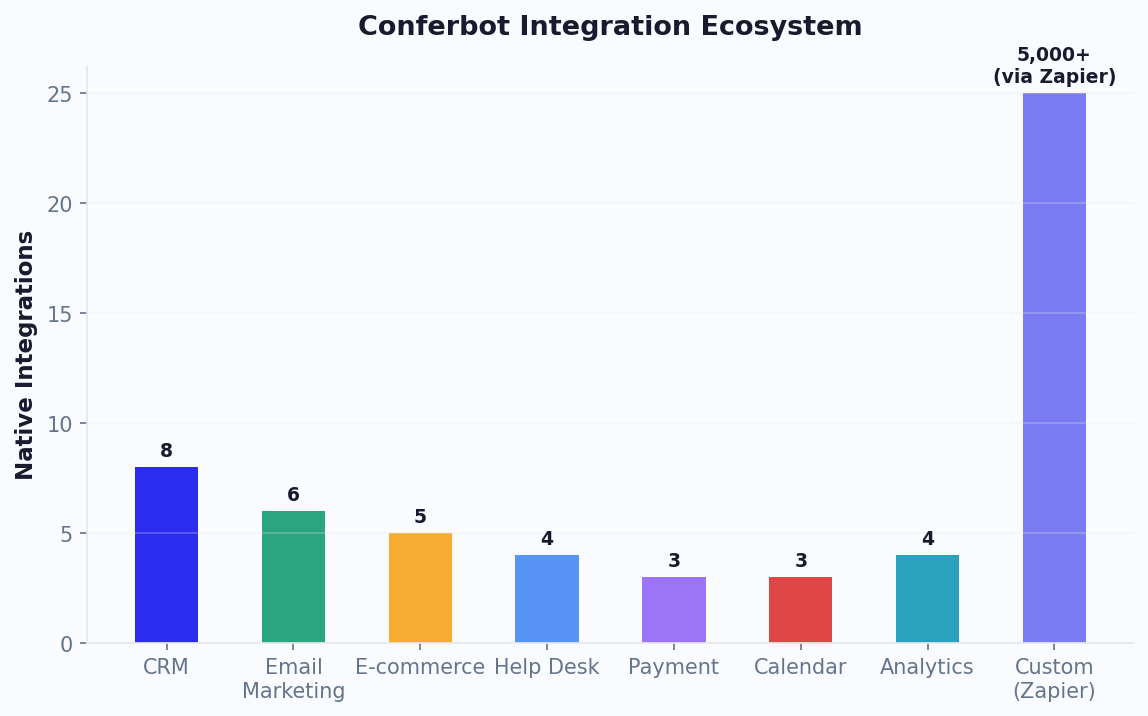
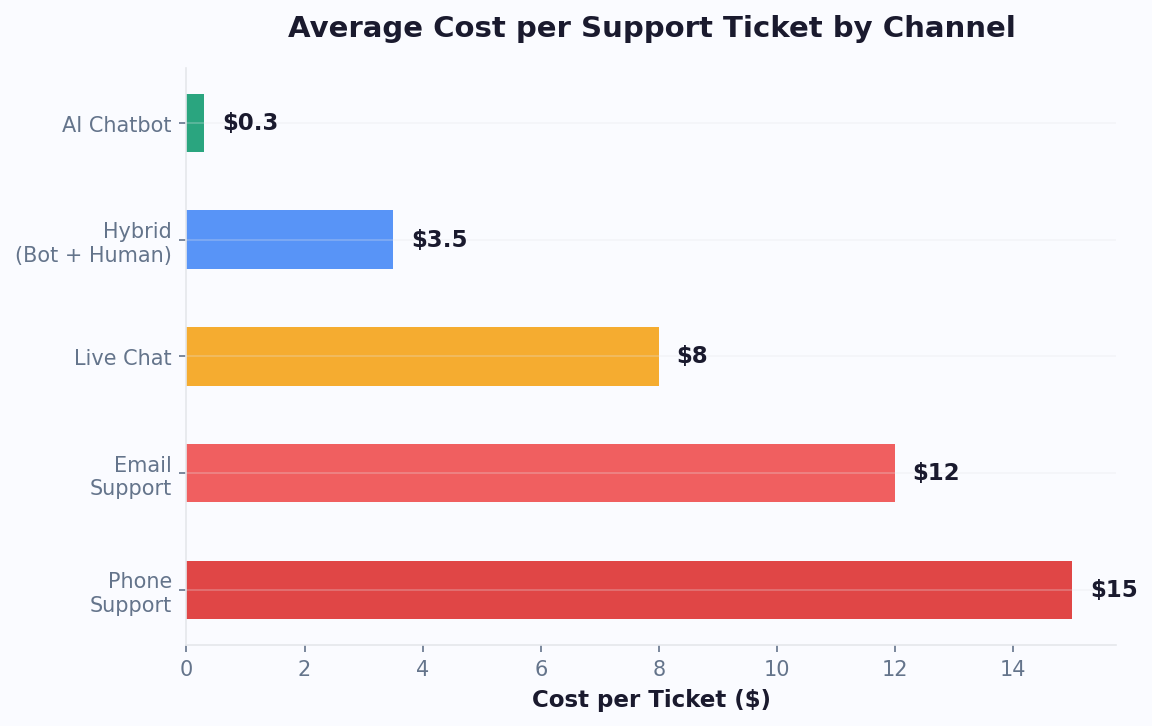
Integration ecosystems for chatbot platforms typically fall into four categories. First, CRM integrations (Salesforce, HubSpot, Zoho, Pipedrive) that sync contact data, conversation history, and deal stages bidirectionally. Second, communication channel integrations that let your bot operate natively on WhatsApp, Facebook Messenger, Instagram, Telegram, and SMS alongside your website widget. Third, productivity tool integrations (Slack, Microsoft Teams, Google Workspace, Notion) that pipe chatbot notifications and conversation summaries into your team's existing workflows. Fourth, automation platform integrations (Zapier, Make, n8n) that connect your chatbot to thousands of apps without custom code.
The ROI impact of deep integration is measurable. Companies with fully integrated chatbot deployments report 45% higher lead-to-customer conversion rates compared to those using siloed bots, primarily because data flows seamlessly and follow-up actions happen instantly rather than requiring manual intervention. A McKinsey 2024 report found that integrated AI tools save knowledge workers an average of 2.4 hours per day by eliminating manual data entry and context switching. For a full breakdown of automation ROI, try our chatbot ROI calculator.
Top 10 Chatbot Integrations Every Business Needs
Not all integrations are equally impactful. Based on usage data from over 50,000 Conferbot deployments, these ten integrations deliver the highest ROI across industries. Prioritizing these connections during initial setup ensures your chatbot delivers value from day one rather than operating as an isolated tool.
| # | Integration | Category | Primary Benefit | Setup Time |
|---|---|---|---|---|
| 1 | HubSpot CRM | CRM | Auto-create contacts, sync deal stages | 5 min |
| 2 | Zapier | Automation | Connect 5,000+ apps without code | 10 min |
| 3 | Slack | Notifications | Real-time lead alerts, escalation notices | 3 min |
| 4 | Google Sheets | Data Storage | Log leads, export conversation data | 5 min |
| 5 | Shopify | E-commerce | Product lookup, order tracking, cart recovery | 10 min |
| 6 | Calendly | Scheduling | Book meetings directly in chat | 5 min |
| 7 | Zendesk | Help Desk | Create tickets, sync agent replies | 10 min |
| 8 | Stripe | Payments | In-chat payments, subscription management | 15 min |
| 9 | Mailchimp | Email Marketing | Add subscribers, trigger email sequences | 5 min |
| 10 | Google Analytics | Analytics | Track chatbot events, conversion attribution | 5 min |
Each of these integrations is available on all Conferbot plans -- there are no premium integration tiers or per-connection fees. The total setup time for all ten is under 90 minutes, and most teams complete their critical integrations (CRM + notifications + automation) in the first 15 minutes. For step-by-step guidance on connecting each tool, see our chatbot building guide.
CRM Integration: Turning Chatbot Conversations into Pipeline
CRM integration is the single most valuable connection for sales-focused chatbots. Without it, every lead captured in chat requires manual entry into your CRM -- a process that takes 2-5 minutes per lead and is frequently skipped by busy sales teams, resulting in lost opportunities. With CRM integration, the moment a chatbot qualifies a lead, a contact record is created in your CRM with all collected data (name, email, company, interest area, conversation transcript) populated automatically. No human touch required.
Conferbot integrates natively with Salesforce, HubSpot, Zoho CRM, and Pipedrive, plus any CRM with a REST API through our webhook system. The integration is bidirectional: data flows from chatbot to CRM (new contacts, updated fields, activity logging) and from CRM to chatbot (personalized greetings for returning contacts, deal stage-aware responses, VIP customer routing). This bidirectional sync means your chatbot gets smarter over time as CRM data enriches its understanding of each visitor.
What Gets Synced
- Contact creation -- new leads are added with all chatbot-collected fields mapped to CRM properties
- Deal/opportunity creation -- qualified leads automatically create pipeline deals at the appropriate stage
- Activity logging -- every chatbot conversation is logged as a CRM activity with full transcript
- Custom field mapping -- map any chatbot variable to any CRM field for flexible data flow
- Lead scoring -- chatbot engagement data feeds your CRM's lead scoring model
- Return visitor recognition -- when a known contact returns, the bot greets them by name and references past interactions
The impact on sales velocity is dramatic. Teams using chatbot-to-CRM integration report 3x faster speed-to-lead (time from first touch to sales follow-up drops from hours to minutes) and 28% higher conversion rates because leads are contacted while intent is still hot. Our ROI calculator models these improvements at your specific lead volume and close rate to project revenue impact.
E-commerce Integration: Product Catalogs, Orders, and Cart Recovery
E-commerce chatbots without product catalog integration are limited to generic FAQ responses. With deep e-commerce integration, the same chatbot can show real-time product availability, display dynamic pricing, process orders, track shipments, and recover abandoned carts -- all within the conversation flow. Shopify merchants using integrated chatbots report a 35% increase in average order value from in-chat product recommendations and a 25% cart recovery rate from automated abandoned cart messages.
Shopify Integration Capabilities
Conferbot's native Shopify integration connects directly to your store's product catalog, inventory system, and order management. When a customer asks "Do you have this shoe in size 10?", the chatbot queries real-time inventory and provides an accurate answer -- no static FAQ needed. Product carousels pull live data including images, prices, and availability, ensuring customers always see current information. Order tracking integrates with Shopify's fulfillment system so customers can check shipment status without leaving the chat.
WooCommerce and Custom Stores
For WooCommerce stores, our WordPress plugin provides equivalent functionality with one-click installation. Custom e-commerce platforms connect through our REST API or webhook integrations. The key data endpoints include: product search, inventory lookup, order creation, order status, and customer history. Any platform with a REST API can achieve full product catalog integration within an hour of development time.
Cart Recovery Automation
Abandoned cart recovery is where e-commerce integration generates the most measurable revenue. When a customer adds items to their cart but does not complete checkout, the chatbot can send a follow-up message (via WhatsApp, Messenger, or on-site widget) with a personalized reminder including product images, a direct checkout link, and optionally a time-limited discount code. Recovery rates of 20-30% are typical, translating to significant revenue that would otherwise be lost.
Browse our e-commerce chatbot templates for pre-built flows with product carousel integration, or see our pricing page for plan details.
Help Desk Integration: Seamless Bot-to-Agent Escalation
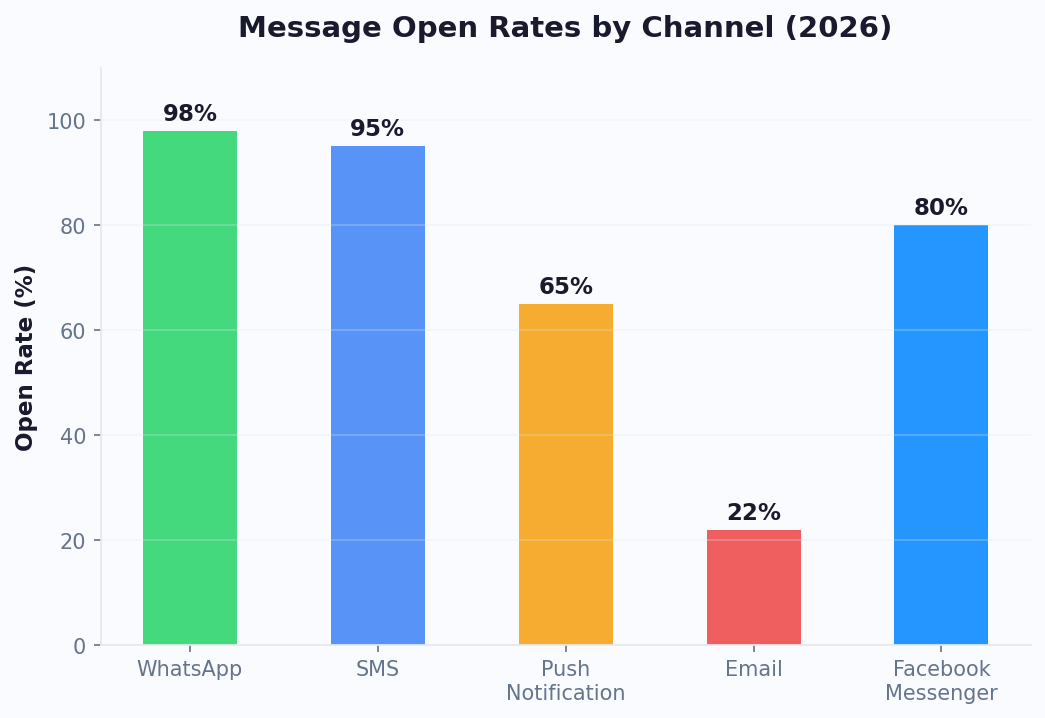
Help desk integration ensures that when a chatbot cannot resolve a query, the transition to a human agent is seamless rather than frustrating. Without this integration, escalation means telling the customer "please email support@company.com" or "call us at..." -- forcing them to restart their entire interaction on a different channel. With proper help desk integration, the chatbot creates a pre-populated support ticket with the full conversation transcript, extracted customer details, and a suggested category, then hands the customer directly to an available agent who can see everything discussed so far.
Conferbot integrates with Zendesk, Freshdesk, Intercom, Help Scout, and any ticketing system with API access. The integration covers the complete escalation lifecycle:
- Ticket creation -- the bot creates a ticket with conversation context, customer info, and category classification
- Priority assignment -- based on sentiment analysis and query complexity, tickets are automatically prioritized
- Agent routing -- tickets route to the right team or agent based on category, language, or customer tier
- Status updates -- customers can check ticket status through the chatbot without calling or emailing
- Resolution feedback -- after resolution, the chatbot sends a satisfaction survey and logs the response in the help desk
The operational impact is significant. Teams using chatbot-to-help-desk integration see 45% shorter handle times (because agents have full context) and 14-point CSAT improvements (because customers never have to repeat themselves). Conferbot's built-in ticket system provides these capabilities natively for teams that do not already use a separate help desk tool. For those with existing help desk investments, our native integrations ensure the chatbot enhances rather than disrupts established workflows.
Zapier vs Native Integrations: When to Use Each
A common question when setting up chatbot integrations is whether to use Conferbot's native integrations or connect through Zapier. Both approaches are valid, but they serve different needs and have distinct trade-offs in terms of speed, reliability, and flexibility. Understanding when to use each ensures you get the best performance without unnecessary complexity.
| Factor | Native Integration | Zapier |
|---|---|---|
| Speed/latency | Real-time (<200ms) | Near real-time (1-5s) |
| Reliability | 99.9% uptime (direct connection) | 99.5% (depends on Zapier + target app) |
| Data depth | Full API access, bidirectional | Limited to Zapier-exposed fields |
| Setup complexity | One-click (pre-built) | 5-15 min per Zap |
| App coverage | 20+ popular tools | 5,000+ apps |
| Cost | Included in plan | Zapier subscription required |
| Custom logic | Limited to pre-built options | Multi-step workflows with filters |
Use Native When:
- The target tool has a native Conferbot integration (CRM, help desk, Slack)
- You need real-time, bidirectional data sync
- The integration is critical to your core chatbot functionality
- You want zero additional cost or dependencies
Use Zapier When:
- The target tool does not have a native integration
- You need complex multi-step workflows (e.g., "when lead is captured, add to CRM AND create Trello card AND send Slack message")
- The integration is non-critical and slight delay is acceptable
- You want to prototype a workflow before building a custom integration
Many teams use both: native integrations for core CRM and help desk connections, plus Zapier for peripheral tools and complex automation chains. See all available native integrations on our comparison page.
Webhooks: Real-Time Event-Driven Integration
Webhooks are the most flexible integration mechanism available, enabling real-time data flow between your chatbot and any system with an HTTP endpoint. Unlike polling-based integrations that check for updates periodically, webhooks push data instantly when events occur -- a lead is captured, a conversation ends, a ticket is escalated, or a payment is completed. This event-driven architecture eliminates latency and reduces server load compared to scheduled sync approaches.
How Conferbot Webhooks Work
Conferbot supports both outgoing webhooks (your chatbot sends data to external systems) and incoming webhooks (external systems trigger chatbot actions). Outgoing webhooks fire on configurable events: new conversation started, lead captured, conversation ended, ticket created, or custom trigger points you define in your flow. Each webhook sends a JSON payload containing the event type, conversation data, extracted variables, and metadata. Incoming webhooks allow external systems to push data into active conversations -- for example, an order management system can notify the chatbot when a shipment status changes, triggering a proactive message to the customer.
Common Webhook Patterns
- Lead notification -- when a lead is qualified, POST to your CRM API, Slack webhook, and email notification system simultaneously
- Order updates -- receive shipping status webhooks from your fulfillment system, trigger proactive customer notifications via chatbot
- Payment processing -- send order details to Stripe or PayPal, receive payment confirmation, update conversation state
- Appointment reminders -- receive calendar event webhooks, send automated reminders via WhatsApp or Messenger
- Inventory alerts -- when stock levels change, update chatbot product availability responses in real-time
Webhook security is handled through HMAC signature verification -- each webhook request includes a cryptographic signature that your receiving system validates to ensure the request genuinely originated from Conferbot. You can also configure retry policies (3 retries with exponential backoff) and failure notifications so dropped webhooks do not go unnoticed. For detailed webhook API documentation and code examples, see our integration docs in the dashboard.
Custom API Integrations: Connecting Any System
For systems without native Conferbot support or Zapier connections, custom API integration provides unlimited flexibility. Conferbot's HTTP request node allows your chatbot to make authenticated REST API calls to any external service during a conversation. This means any system with an API -- internal databases, proprietary tools, industry-specific platforms, government services -- can be integrated without middleware or third-party dependencies.
Building Custom Integrations
The HTTP request node supports GET, POST, PUT, PATCH, and DELETE methods with configurable headers, authentication (API key, OAuth 2.0, Basic Auth, Bearer token), and request body templates. Response data is automatically parsed and made available as chatbot variables. You can chain multiple API calls in sequence or parallel, handling complex workflows like: check inventory (API 1) > calculate shipping (API 2) > create order (API 3) -- all within a single conversation turn.
Example: Custom Property Management Integration
A property management company needed their chatbot to check unit availability, schedule viewings, and process applications -- all against a proprietary backend system. Using custom API integration, the chatbot:
- Queries the property database for available units matching tenant criteria (bedrooms, budget, location)
- Displays results as interactive carousel cards with photos and pricing
- Checks the viewing calendar and books time slots
- Submits rental applications with collected tenant information
- Receives status updates via incoming webhooks and notifies applicants
The entire flow was built in the visual builder without writing backend code -- only the API endpoints needed to exist. This pattern works for any industry with custom software: healthcare systems (EHR lookup), financial services (account queries), education (enrollment systems), and manufacturing (inventory/ERP). For teams that prefer no-code approaches, our building without coding guide walks through the visual API integration builder step by step.
Need help architecting a complex custom integration? Our solutions team has built integrations for healthcare EHRs, banking cores, government portals, and enterprise ERPs. View plans that include dedicated integration support.
Getting Started: Connect Your First Integration in 5 Minutes
Setting up your first chatbot integration should take minutes, not days. Conferbot's integration dashboard provides one-click connections for the most popular tools and guided setup wizards for everything else. Here is the fastest path to a fully integrated chatbot deployment.
Step 1: Identify Your Priority Integration (1 minute)
Ask yourself: "What is the single most valuable action my chatbot should trigger?" For most teams, it is one of: adding leads to CRM, notifying sales on Slack, creating support tickets, or logging data to a spreadsheet. Start with that one integration and expand later.
Step 2: Connect via the Integration Dashboard (2-3 minutes)
Navigate to Settings > Integrations in your Conferbot dashboard. Click "Connect" next to your chosen tool. For OAuth-based integrations (HubSpot, Slack, Google Sheets), you will authorize the connection with one click. For API-key-based integrations (Zapier, custom APIs), paste your key and configure the endpoint. The dashboard shows a green checkmark when the connection is verified.
Step 3: Map Data Fields (1-2 minutes)
Configure which chatbot variables map to which fields in your external tool. For CRM integrations, map collected email to the CRM email field, company name to company field, and so on. Conferbot auto-suggests mappings based on field names, so most configurations require zero manual adjustment.
Step 4: Test the Connection
Run a test conversation in the simulator and verify data appears in your connected tool. Check that contacts are created, notifications fire, and tickets appear as expected. The integration log in the dashboard shows request/response details for debugging.
Recommended Integration Sequence
- Week 1: CRM + Slack notifications (capture leads, alert sales team)
- Week 2: Google Analytics + email marketing (track events, grow list)
- Week 3: Help desk + calendar (support escalation, appointment booking)
- Week 4: E-commerce + payments (product catalog, transactions)
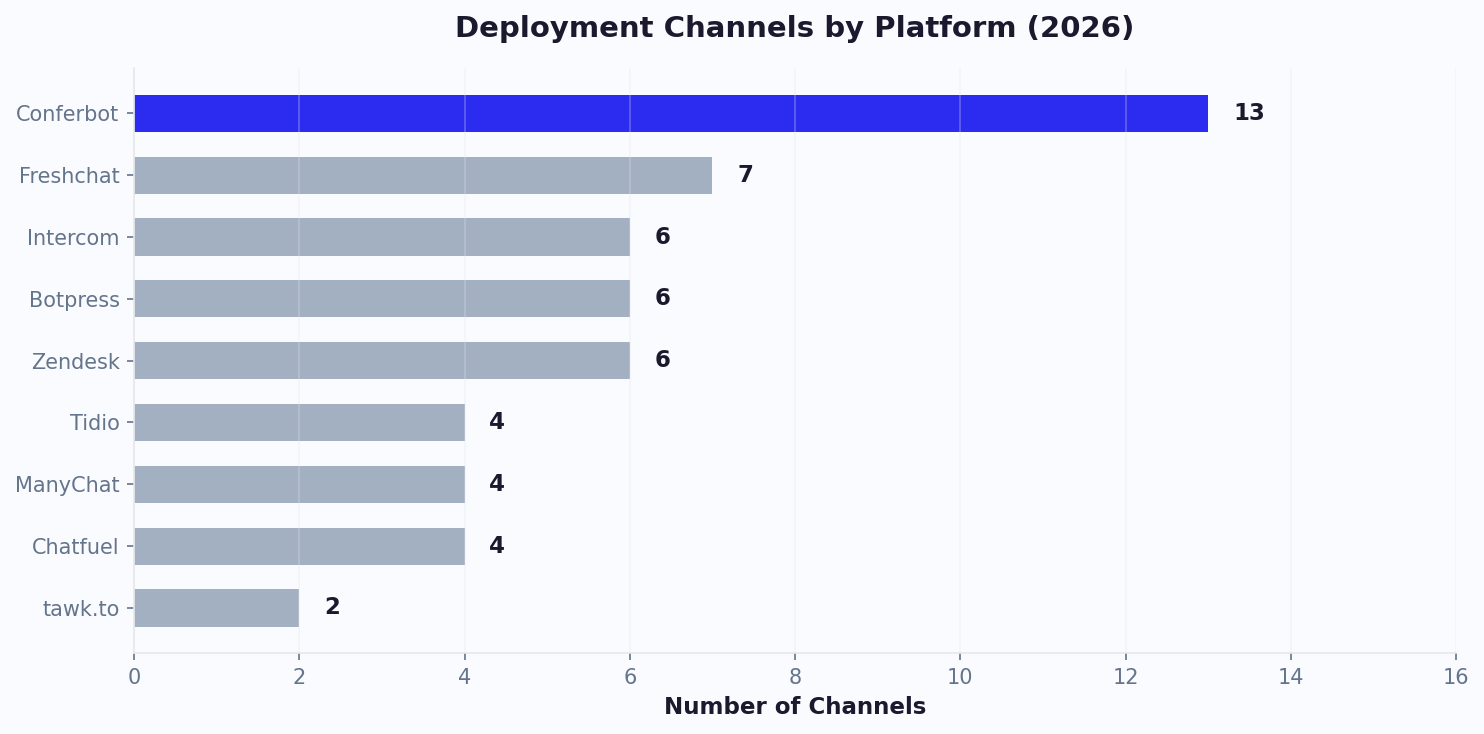
Every integration is available on all plans -- see pricing details for conversation volume limits. Compare Conferbot's integration ecosystem against alternatives on our comparison page, or explore pre-integrated chatbot templates that come with popular integrations pre-configured. For a deeper understanding of how integrations drive revenue, use our ROI calculator.
Discover More
Continue Exploring
Explore features, connect third-party tools, and browse ready-made templates.