
Instagram DMs Chatbot Builder
Turn your Instagram Business account into a 24/7 customer service channel. Respond to DMs instantly, qualify leads, and never miss an inquiry.
Instagram Chatbot Features
Everything you need to build powerful automated conversations
What Can You Build?
Get Started in 10 Simple Steps
Follow this guide to connect your Instagram chatbot
Convert to Instagram Professional Account (Business or Creator)
Connect your Instagram to a Facebook Page
Create an App in Meta Developer Portal with Instagram Messaging
Generate Page Access Token with instagram_manage_messages permission
In Conferbot, go to Channels → Instagram → Connect
Enter your Facebook Page ID and Page Access Token
Copy the Webhook URL and Verify Token from Conferbot
Configure webhook in Meta Developer Portal
Subscribe to Instagram messaging webhook fields
Your Instagram bot is live!
Introduction
Instagram has evolved from a photo-sharing app into a $2 trillion commerce ecosystem with over 2 billion monthly active users. For brands, creators, and businesses, Instagram is not just a marketing channel — it is where customers discover products, ask questions, and make purchasing decisions. And the DM inbox is where those conversations happen.
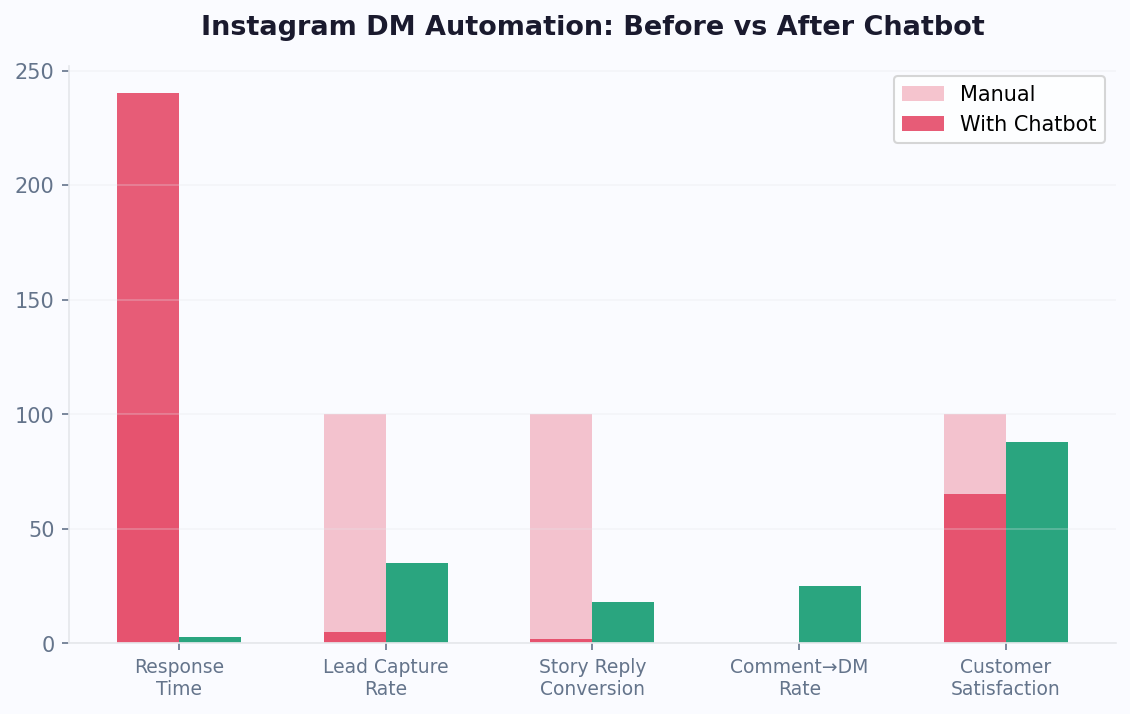
The problem? Instagram DMs are overwhelming. A mid-size brand can receive hundreds to thousands of DMs daily — product inquiries, pricing questions, collaboration requests, story replies, and support issues. Manual responses simply cannot keep up. Research shows that 60% of Instagram users have messaged a business, yet the average business response time on social media exceeds 10 hours. Every hour of delay costs potential sales.
An Instagram chatbot changes this dynamic entirely. With Conferbot, you can automate DM responses, reply to story mentions instantly, qualify leads through conversational flows, and hand off complex issues to your team — all without leaving the Instagram app your customers already love. No coding required, no disruption to the user experience.
Instagram's Messaging API, available for Business and Creator accounts, enables chatbots to interact with users through text, quick replies, media, and ice breakers. Combined with Conferbot's visual chatbot builder and AI capabilities, you can create DM experiences that feel personal, responsive, and on-brand. This guide covers everything from platform capabilities to advanced strategies for Instagram chatbot success in 2026.
New to chatbot building? Read our complete guide to building a chatbot without coding. Already running bots on other channels? See how Instagram compares to Messenger and WhatsApp, or deploy on all three with Conferbot's omnichannel platform. Browse our template library for ready-to-use Instagram DM flows.
Instagram Chatbot Capabilities
Instagram's Messaging API provides a focused but powerful set of tools for automated conversations. Here is what you can build with an Instagram chatbot on Conferbot.
Message Types
- Text Messages — Standard text responses with support for links and formatting. Keep messages concise and conversational to match the Instagram tone
- Quick Replies — Tappable response options displayed below a message. Users tap instead of type, reducing friction and guiding conversations efficiently
- Media Messages — Send images, videos, and other media directly in the conversation. Share product photos, tutorials, or branded content
- Ice Breakers — Pre-defined conversation starters shown when a user opens a DM thread with your account for the first time. Set up to 4 ice breakers to showcase your bot's capabilities
Trigger Events
- Direct Messages — Any message sent to your Instagram DM inbox triggers the chatbot. This is the primary interaction mode
- Story Mentions — When someone mentions your account in their story, the bot can automatically send a thank-you DM, offer a discount code, or start a conversation. This is a powerful engagement driver
- Story Replies — When users reply to your stories, the bot engages them in real time while your content is still top of mind
Profile Context
With user permission, your bot can access the user's Instagram name, username, and profile picture. This enables personalized greetings and helps your team identify users during live chat handoffs.
While Instagram's message types are simpler than Messenger's carousels and templates, the platform's visual-first audience and high engagement rates make it exceptionally effective for commerce and brand engagement.
Comment-to-DM Funnels
One of the most powerful Instagram automation strategies is the comment-to-DM funnel. Here is how it works: you publish a post or Reel with a call-to-action like "Comment GUIDE to get our free sizing guide" or "Drop DEAL to receive an exclusive discount code." When a user comments the trigger keyword, your chatbot automatically sends them a DM with the promised content, starting a conversation that can qualify leads and drive sales. This strategy leverages Instagram's algorithm (comments boost post visibility) while simultaneously building your DM subscriber list. Brands using comment-to-DM funnels report 10-20x more DM conversations compared to organic DM volume, and conversion rates of 15-30% from DM to purchase.
Story Reply Triggers
When you post Instagram Stories with interactive elements -- polls, questions, quizzes, or sliders -- users who respond or reply create an engagement signal that your chatbot can act on. Configure your bot to detect Story replies and immediately follow up with a personalized DM. For example, if you run a poll about product preferences, the bot can DM users who voted with a tailored product recommendation. Story reply automation turns passive Story viewers into active conversations, with brands reporting 5-8x higher engagement compared to standard Story views alone.
Instagram Shop Integration
For businesses with an Instagram Shop, chatbot automation creates a seamless discovery-to-purchase journey. When customers browse your product tags in posts, Reels, or the Shop tab and then DM you with questions, the chatbot provides instant answers about sizing, availability, shipping, and returns. The bot can share direct product links that take users straight to checkout, apply discount codes, and collect shipping details -- all within the DM thread. Businesses combining Instagram Shopping with DM automation see 40-60% higher average order values compared to self-service shopping alone because the conversational guidance reduces purchase anxiety and enables personalized upselling.
DM Automation Rules and Compliance
Instagram enforces specific rules for DM automation that differ from Messenger. The key constraints: your bot can only send messages within a 24-hour window after the user's last interaction, there are no message tags or sponsored messages (unlike Messenger), and automated messages must comply with Instagram's Community Guidelines and Meta's Platform Policy. Your bot must not send unsolicited promotional content, must provide a way for users to stop receiving messages, and cannot impersonate human agents without disclosure. Conferbot's platform is designed with these guardrails built in, automatically respecting the 24-hour window and providing opt-out mechanisms in every flow. To maintain compliance, always collect the user's email or phone number early in the conversation so you can continue engagement through other channels like WhatsApp or email after the DM window closes.
Step-by-Step Instagram Bot Setup
Connecting an Instagram chatbot requires linking your Instagram Professional account through Meta's platform. Here is the complete walkthrough.
Prerequisites
- An Instagram Professional Account (Business or Creator) — you can convert any personal account in Settings
- A Facebook Page connected to your Instagram account (required by Meta's API)
- Admin access to both the Instagram account and the Facebook Page
- A Conferbot account
Step 1: Design Your Chatbot
In the Conferbot dashboard, create your chatbot using the visual builder. For Instagram, we recommend starting with a lead generation template or FAQ template and customizing for your brand voice. Keep flows short and mobile-friendly — Instagram users expect quick, snappy interactions.
Step 2: Create a Meta App with Instagram Messaging
- Log in to developers.facebook.com
- Create a new App and select "Business" type
- On your App Dashboard, find "Instagram" in the product list and click "Set Up"
- Navigate to Instagram → Messaging settings
Step 3: Generate Access Token
- In the App Dashboard, go to Messenger → Settings → Access Tokens
- Add your Facebook Page (which is connected to your Instagram account)
- Generate a Page Access Token with the instagram_manage_messages permission
- Copy the Page Access Token and your Facebook Page ID
Step 4: Connect to Conferbot
- In Conferbot, go to Channels → Instagram → Connect
- Enter your Facebook Page ID and Page Access Token
- Conferbot generates a Webhook URL and Verify Token
Step 5: Configure the Webhook
- In Meta Developer Portal, navigate to your App's Webhook configuration
- Enter the Callback URL and Verify Token from Conferbot
- Subscribe to Instagram messaging webhook events
- Click Verify and Save
Test by sending a DM to your Instagram account. The bot should respond within seconds. Total setup time: 10-15 minutes.
Common Setup Troubleshooting
If your Instagram bot does not respond: verify your Instagram account is a Professional Account (Business or Creator), confirm the Facebook Page is properly linked to your Instagram account in Instagram Settings, ensure the Meta App has the instagram_manage_messages permission, and check that the webhook subscription is active. Also note that Instagram Messaging API is only available to accounts with at least 1,000 followers (this requirement was added by Meta for API access). If your account is under this threshold, you can still prepare your chatbot flows and connect once you reach the follower count. For advanced integrations like CRM syncing and e-commerce connections, configure these in the Conferbot dashboard after the basic setup is complete.
Key Instagram Bot Features
Conferbot enhances Instagram's native messaging with intelligent automation, making your DM inbox a revenue-generating machine.
Story Mention Automation
This is Instagram's secret weapon for engagement. When a customer, fan, or influencer mentions your brand in their story, your bot can instantly DM them with a personalized thank-you, a discount code, or an invitation to engage further. Brands using story mention automation report 3-5x higher engagement rates compared to manual responses.
AI-Powered Intent Recognition
With OpenAI integration, your Instagram bot understands the intent behind messages — whether someone is asking about pricing, product availability, shipping times, or return policies. The bot matches intent to the right response or flow, even when users phrase things differently.
Conversational Commerce
Guide users from product discovery to purchase entirely within DMs. Share product images, answer sizing questions, provide discount codes, and send direct links to checkout. Instagram users who engage with brands via DM are 40% more likely to purchase than those who browse passively.
Lead Qualification Flows
Use quick replies to qualify leads based on budget, timeline, location, or specific needs. Qualified leads are automatically tagged and can be routed to the right team member or synced to your CRM.
Seamless Agent Handoff
When a conversation needs human attention — high-value prospects, complaints, or complex questions — Conferbot's live chat seamlessly transfers the conversation to your team. Agents see the full DM history and user profile for context.
Analytics and Reporting
Track DM volume, bot response accuracy, conversation completion rates, popular topics, and conversion metrics through the analytics dashboard. Identify your most asked questions and optimize flows accordingly.
AI Knowledge Base for Instagram
Connect your product catalog, FAQ documents, and brand guidelines to Conferbot's AI knowledge base. The bot draws from this knowledge to answer product questions accurately, provide sizing information, explain shipping policies, and share return instructions -- all without requiring you to build individual flows for every possible question. This is especially valuable for brands with large product catalogs where building a manual flow for each item would be impractical.
Calendar Booking via DMs
Service businesses, consultants, fitness trainers, and healthcare providers can integrate calendar booking directly into Instagram DM conversations. When a potential client asks about availability, the bot presents open time slots, confirms the booking, and syncs with Google Calendar or Outlook. This turns Instagram DMs into a direct revenue channel for appointment-based businesses, with studies showing that conversational booking achieves 40% higher completion rates than sending users to an external booking page.
Instagram Chatbot Use Cases by Industry
Instagram chatbots are particularly effective in visual, consumer-facing industries. Here are the highest-impact use cases.
Fashion and Beauty
Instagram is the dominant platform for fashion and beauty brands. Use your chatbot to help users find the right size, recommend products based on skin type or style preferences, share lookbook images, and send personalized discount codes. Brands in this space report 25-40% higher conversion rates when using DM chatbots compared to website-only interactions.
Food and Restaurants
Share daily menus, handle reservation requests, process takeout orders, and collect feedback — all through DMs. Story mention automation is especially powerful here: when customers tag your restaurant in their food photos, your bot instantly thanks them and offers a loyalty reward.
Fitness and Wellness
Handle class bookings, share workout schedules, provide membership information, and offer free trial sign-ups. Fitness studios using Instagram chatbots see 60% faster lead response times and higher trial-to-membership conversion rates.
Real Estate
When prospects inquire about a property they saw on your Instagram feed, the bot qualifies them by asking about budget, preferred location, and timeline, then schedules viewings and connects them with the right agent.
E-Commerce
Product recommendations, order tracking, return processing, and size guides. With Instagram Shopping integration, users discover products in your feed and get instant support through DM chatbots, creating a seamless discovery-to-purchase journey. Explore e-commerce chatbot solutions for more.
Agencies and Freelancers
Automate responses to collaboration inquiries, share rate cards, collect project briefs, and schedule discovery calls. Creators and agencies save 10-15 hours per week by automating repetitive DM conversations.
Instagram DMs vs Other Social Channels
Understanding where Instagram fits in your channel strategy helps you allocate resources effectively.
| Feature | Instagram DMs | Messenger | Discord | |
|---|---|---|---|---|
| Monthly Active Users | 2B+ | 1B+ | 2.7B+ | 150M+ |
| Primary Audience | 18-34 visual consumers | Broad demographics | Global, all ages | Gaming, tech, creators |
| Commerce Strength | Excellent (Shopping + DMs) | Good (Carousels, Receipts) | Good (Catalogs) | Limited |
| Story Mention Triggers | Yes | No | No | No |
| Rich Templates | Basic (quick replies) | Advanced (carousels) | Buttons, lists | Embeds, buttons |
| Proactive Messaging | 24-hour window | 24h + templates | Templates (paid) | Unlimited |
| Visual Content | Native strength | Good | Good | Good |
| Ad Integration | Click-to-DM Ads | Click-to-Messenger | Click-to-WhatsApp | None |
| Best For | D2C brands, creators | Lead gen, e-commerce | Support, notifications | Communities |
When to prioritize Instagram: If your target audience is aged 18-34, your product is visually driven, or you run Instagram ads, then Instagram DM automation should be a top priority. For comprehensive coverage, use Conferbot's omnichannel platform to combine Instagram with Messenger and WhatsApp for maximum reach.
Instagram's unique strengths: Instagram is the only major messaging channel that offers Story mention triggers and comment-to-DM funnels -- features that create organic conversation starters at scale. The platform's visual-first nature also makes it ideal for product discovery, where users find items through photos and Reels and then DM for details. Unlike Telegram or Discord, Instagram's audience skews toward consumers making purchasing decisions, making it the strongest channel for direct-to-consumer brands, fashion, beauty, food, fitness, and lifestyle businesses. See how Conferbot compares to other chatbot platforms for Instagram automation.
Instagram Chatbot Best Practices
Instagram has its own culture and communication norms. Your chatbot must feel native to the platform to succeed.
1. Match the Instagram Tone
Instagram conversations are casual, visual, and fast-paced. Your bot should sound like a friendly brand ambassador, not a corporate FAQ system. Use conversational language, keep messages under 2-3 short sentences, and let your brand personality shine through.
2. Leverage Ice Breakers Effectively
Set up 3-4 ice breaker questions that address your most common DM topics. Examples: "What's your return policy?", "Do you ship internationally?", "I need help with my order." These pre-set questions guide users to instant answers and reduce the burden on your team.
3. Automate Story Mentions Immediately
Story mention automation is the highest-ROI feature for Instagram chatbots. When someone mentions your brand, respond within seconds with a genuine thank-you and a relevant offer. This turns passive mentions into active conversations and builds brand loyalty at scale.
4. Design for the 24-Hour Window
Instagram's messaging window allows bot responses only within 24 hours of the user's last message. Design your flows to capture key information (email, phone) early in the conversation, so you can continue engagement through other channels if the window closes.
5. Use Quick Replies for Every Decision Point
Typing on mobile is tedious. Offer quick reply buttons at every step so users can tap through your flows effortlessly. This improves completion rates by 40-60% compared to open-ended text prompts.
6. Integrate with Your Content Strategy
Align your chatbot responses with your Instagram content. If you post about a new product, your bot should be ready to answer questions about it. If you run a contest, your bot should handle entries and rules inquiries.
7. Monitor and Optimize with Analytics
Use Conferbot analytics to track which flows convert best, where users drop off, and what questions the bot cannot answer. Update your bot weekly based on real conversation data.
Getting Started with Instagram DM Automation
Your Instagram audience is already messaging you. The question is whether you respond in seconds with a chatbot or in hours with manual effort. Here is how to get started.
Quick Start Path
- Sign up for Conferbot and choose a template that matches your use case — customer support, lead generation, or e-commerce
- Customize the flows for your brand: update the welcome message, add your products or services, set up FAQ responses
- Connect your Instagram following the setup guide above — it takes 10-15 minutes
- Enable story mention automation — this alone can justify the entire setup
- Test thoroughly by sending DMs and story mentions from a second account
- Go live and monitor performance through the analytics dashboard
Pro Tips for Launch
- Announce your chatbot in an Instagram Story — tell followers they can now get instant responses by DM
- Add a "Message" CTA button to your Instagram profile
- Run a Click-to-DM ad campaign to drive traffic directly into your bot
- Set up live chat as a fallback so no message goes unanswered
Instagram DM automation is one of the fastest-growing channels for customer engagement in 2026. With 2 billion active users and a built-in commerce ecosystem, the opportunity is massive. Check our pricing plans and start building your Instagram chatbot today.
Why Conferbot for Instagram
- No code required — Build DM automation with our visual AI chatbot builder
- Story mention automation — Instantly respond to brand mentions with personalized DMs
- Comment-to-DM funnels — Turn post engagement into DM conversations at scale
- AI-powered answers — AI knowledge base handles product questions from your documentation
- Calendar booking — Let clients book appointments directly in DMs with calendar integration
- Omnichannel reach — Same bot works on Instagram, Messenger, WhatsApp, and your website
- Real-time analytics — Track every DM metric with built-in analytics
- Seamless handoff — Transfer to live agents when human touch is needed
How Conferbot Compares for Instagram
Most platforms charge per message, per seat, or limit channels by tier. Here's how Conferbot is different.
| Feature | Conferbot | Typical Competitor |
|---|---|---|
| Channels included | 13+ (all plans) | 3-6 (varies by tier) |
| Pricing model | Flat rate from $19/mo | Per-seat or per-message |
| AI chatbot builder | Yes (plain English) | No or limited |
| Native mobile SDKs | 4 (Android, iOS, Flutter, RN) | None (WebView only) |
| Knowledge base AI | Included | Add-on ($30-99/mo) |
| Live chat handoff | Included | Higher tiers only |
| Calendar booking | Built-in | Third-party required |
| Setup time | Under 10 minutes | Hours to days |
Instagram FAQ
Everything you need to know about chatbots for instagram.
Discover More
Continue Exploring
Explore features, connect third-party tools, and browse ready-made templates.