
Website Widget Chatbot Builder
The classic Conferbot experience. Embed a powerful, customizable chatbot widget on any website. Works with WordPress, Shopify, Wix, React, and any web platform.
Website Chatbot Features
Everything you need to build powerful automated conversations
What Can You Build?
Get Started in 5 Simple Steps
Follow this guide to connect your Website chatbot
Create your chatbot using the visual flow builder
Customize the widget appearance (colors, position, avatar)
Copy the embed code from the Publish section
Paste the code into your website's HTML
Your chatbot is live!
Introduction
Your website is the center of your digital presence — and every visitor who leaves without engaging is a missed opportunity. Studies show that 98% of website visitors leave without converting, and the average time on page is under 60 seconds. The gap between attracting traffic and converting it into customers, leads, or subscribers is where most businesses lose the most money.
A website chatbot widget bridges this gap by proactively engaging visitors the moment they land on your site. Unlike static contact forms that sit passively in a corner, a chatbot initiates conversations, answers questions in real time, qualifies leads through interactive flows, and guides visitors toward conversion — all without requiring a single human agent.
Conferbot's website widget is the foundation of our platform. It works on any website — WordPress, Shopify, Wix, Squarespace, React, Next.js, static HTML, or any web platform. A single line of embed code adds a fully customizable, mobile-responsive chatbot that starts engaging visitors within 5 minutes of installation.
With the visual flow builder, you design conversations visually. With AI integration, the bot handles open-ended questions intelligently. With analytics, you see exactly which conversations drive conversions. And with live chat, your team can take over any conversation when a human touch is needed. This guide covers everything you need to know about deploying a high-converting website chatbot in 2026.
New to chatbot building? Start with our complete guide to building a chatbot without coding. Want to extend your website bot to messaging channels? Add WhatsApp, Messenger, and Instagram with our omnichannel platform. Browse our template library for ready-to-deploy website chatbot flows, or see how Conferbot compares to other chatbot platforms.
Website Widget Capabilities
The Conferbot website widget is the most feature-rich channel in the platform, designed to maximize visitor engagement and conversion.
Widget Display Options
- Popup Chat — The classic chat bubble in the bottom-right corner that expands into a full chat window. Non-intrusive yet always accessible. The most popular option for most websites
- Slide-In Panel — A wider chat panel that slides in from the side, providing more space for complex conversations, product displays, or form fields
- Full Page — Dedicate an entire page to your chatbot for focused interactions like applications, detailed consultations, or guided product selection
- Embedded Inline — Place the chatbot directly within your page content, integrating it into specific sections like product pages, help centers, or landing pages
Visual Customization
- Brand Colors — Match your chatbot to your website's color scheme with custom primary colors, backgrounds, and accent tones
- Custom Avatar — Upload your own bot avatar or company logo for a branded experience
- Custom Fonts — Match your website's typography for visual consistency
- Position Control — Place the widget on the left or right side, adjust spacing from edges, and control the chat bubble size
- Welcome Messages — Customizable greeting messages that appear automatically after a configurable delay, with different messages for different pages
Interaction Features
- Rich Media — Send images, videos, GIFs, and files within the chat for product showcases, tutorials, and document sharing
- Buttons and Quick Replies — Guide visitors through choices with clickable options instead of free-text typing
- Forms and Input Fields — Collect structured data like names, emails, phone numbers, and custom fields
- Typing Indicators — Show the typing animation for a natural conversation feel
- Real-Time Visitor Tracking — See which page the visitor is on, how they arrived, and their browsing history during the conversation
How to Add a Chatbot to Your Website
Adding a Conferbot chatbot to your website takes just a few steps regardless of your web platform.
Step 1: Build Your Chatbot
Start with the visual flow builder. Choose from pre-built templates — lead generation, customer support, product recommendation, appointment booking, or more — and customize for your business. Design your welcome message, conversation flows, and fallback responses.
Step 2: Customize the Widget Appearance
- Go to Publish → Widget Settings in the Conferbot dashboard
- Set your brand colors to match your website
- Upload a custom avatar or choose from built-in options
- Configure the widget position (left/right, bottom spacing)
- Set the welcome message and display delay
- Choose your display type (popup, slide-in, full page, or inline)
Step 3: Copy and Paste the Embed Code
- Go to Publish → Get Embed Code
- Copy the single-line JavaScript snippet
- Paste it before the </body> tag on your website
Platform-Specific Instructions
| Platform | Where to Add the Code |
|---|---|
| WordPress | Appearance → Theme Editor → footer.php (or use Header/Footer plugin) |
| Shopify | Online Store → Themes → Edit Code → theme.liquid (before </body>) |
| Wix | Settings → Custom Code → Add Code → Body (End) |
| Squarespace | Settings → Advanced → Code Injection → Footer |
| Webflow | Project Settings → Custom Code → Footer Code |
| React/Next.js | Add script tag in _document.js or use useEffect in layout component |
| Static HTML | Paste directly before </body> in your HTML files |
Your chatbot appears on your website within seconds of saving. No server restarts, no deployments, no cache clearing needed. Setup time: 5 minutes.
WordPress Installation Deep-Dive
WordPress powers 43% of all websites, making it the most common platform for Conferbot deployments. You have three installation options: Option 1 (Recommended) — Install the Conferbot WordPress plugin from the plugin directory. Go to Plugins > Add New, search "Conferbot," install and activate. The plugin adds the embed code automatically to every page without editing theme files. It also provides a settings page where you can control which pages display the chatbot using URL rules, configure WooCommerce order lookup integration, and manage visibility for logged-in vs guest users. Option 2 — Use a header/footer plugin like "Insert Headers and Footers" by WPBeginner. Paste the Conferbot embed code in the footer section. This approach works well if you want manual control without installing a dedicated plugin. Option 3 — Edit your theme directly by adding the embed code to footer.php before the closing body tag. This is the fastest method but requires updating after theme changes. WordPress sites using Conferbot chatbots report 40% more leads compared to contact-form-only setups.
Shopify Installation Deep-Dive
For Shopify stores, navigate to Online Store > Themes > Edit Code, open theme.liquid, and paste the Conferbot embed code before the closing body tag. Alternatively, install the Conferbot app from the Shopify App Store for a managed integration that connects your product catalog to the chatbot, enabling conversational product search, real-time order tracking (customers enter their order number and get status updates), and abandoned cart recovery. Shopify stores using chatbot-driven cart recovery report recapturing 10-20% of abandoned carts, significantly higher than email-only campaigns at 5-8% recovery.
React and Next.js Installation
For React single-page applications, add the Conferbot script tag in your index.html or load it dynamically using useEffect in your root layout component. For Next.js specifically, add the script to your _document.js file or use the built-in Script component with the "afterInteractive" strategy for optimal loading. The widget loads asynchronously and does not affect your Core Web Vitals scores — Largest Contentful Paint, First Input Delay, and Cumulative Layout Shift remain unaffected because the script defers execution until after the main page content renders.
Website Chatbot vs Live Chat vs Contact Form
Choosing between a chatbot, live chat, and contact forms depends on your team size, traffic volume, and customer expectations. Here is how they compare:
| Criteria | AI Chatbot (Conferbot) | Live Chat Only | Contact Form |
|---|---|---|---|
| Availability | 24/7/365 — instant responses always | Business hours only (or expensive 24/7 staffing) | 24/7 submission, response in 24-48 hours |
| Response Time | Under 1 second | 30 seconds to 5 minutes (agent dependent) | Hours to days |
| Cost per Interaction | $0.01-$0.05 | $6-$12 (agent salary per conversation) | $0 (but low conversion offsets this) |
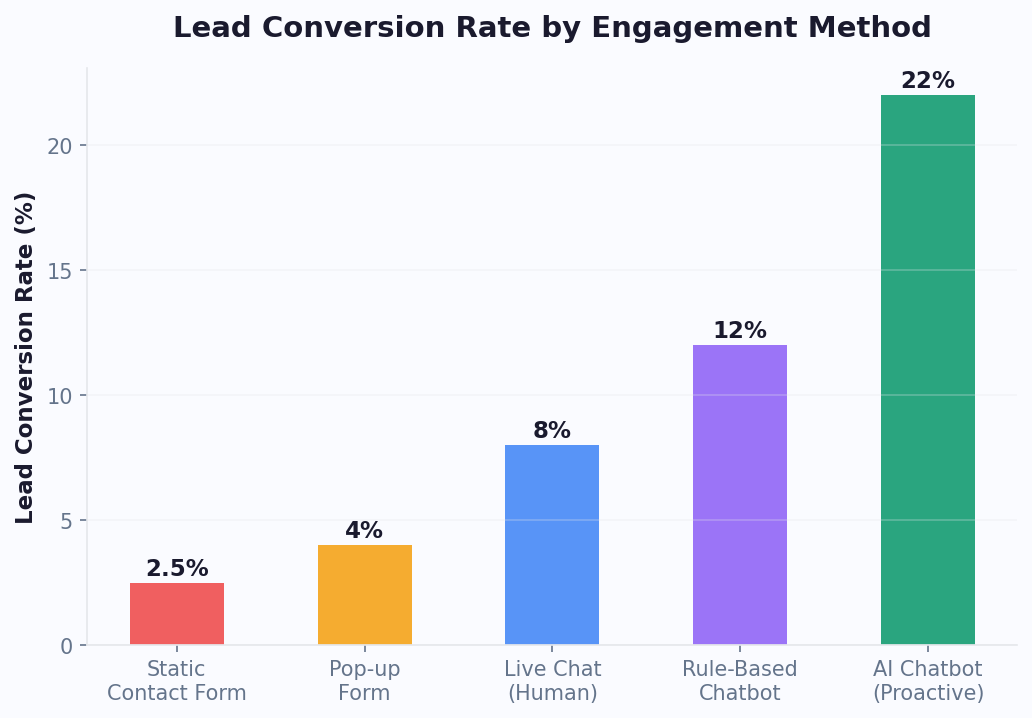
| Lead Conversion Rate | 15-25% of engaged visitors | 10-20% of engaged visitors | 2-5% of page visitors |
| Scalability | Unlimited concurrent conversations | Limited by agent count (3-5 chats per agent) | Unlimited submissions |
| Personalization | Page-aware, behavior-triggered, AI-driven | Agent-dependent, manual | None |
| Data Capture | Conversational, high completion rates | Manual during conversation | Form fields, high abandonment |
| After-Hours Coverage | Full automation | Offline form fallback | Same as business hours |
| Complex Queries | AI handles most; escalates to human | Human handles all | Delayed response |
| Setup Time | 5 minutes | 30-60 minutes + agent training | 5-10 minutes |
The optimal approach for most businesses is combining AI chatbot automation with live chat handoff. The chatbot handles 70-85% of conversations autonomously — answering FAQs, qualifying leads, booking appointments — and seamlessly transfers the remaining 15-30% to human agents who see the full conversation context. This hybrid model costs 60-80% less than pure live chat staffing while delivering faster response times and higher customer satisfaction. Learn more about this approach in our chatbot building guide.
Key Website Chatbot Features
Conferbot's website widget goes beyond simple chat to become a complete visitor engagement and conversion tool.
Widget Placement Best Practices
Where you place your chatbot widget directly impacts engagement rates. The bottom-right corner is the industry standard position, achieving the highest interaction rates because users have been conditioned by years of live chat tools to look there. Conferbot places the widget at a default z-index of 9999 to ensure it renders above most page elements without conflicting with modals or cookie consent banners. If your site uses a higher z-index for overlays, adjust the widget's z-index in the dashboard settings. On mobile devices, the chat bubble should sit 16-20px from the bottom edge to avoid overlapping with iOS home indicators and Android gesture navigation bars. Never position the widget where it covers critical action elements like "Add to Cart" buttons on e-commerce pages or form submission buttons on landing pages. For sites with sticky bottom navigation bars, increase the bottom offset to at least 70px to prevent overlap.
Proactive Trigger Strategies with Engagement Data
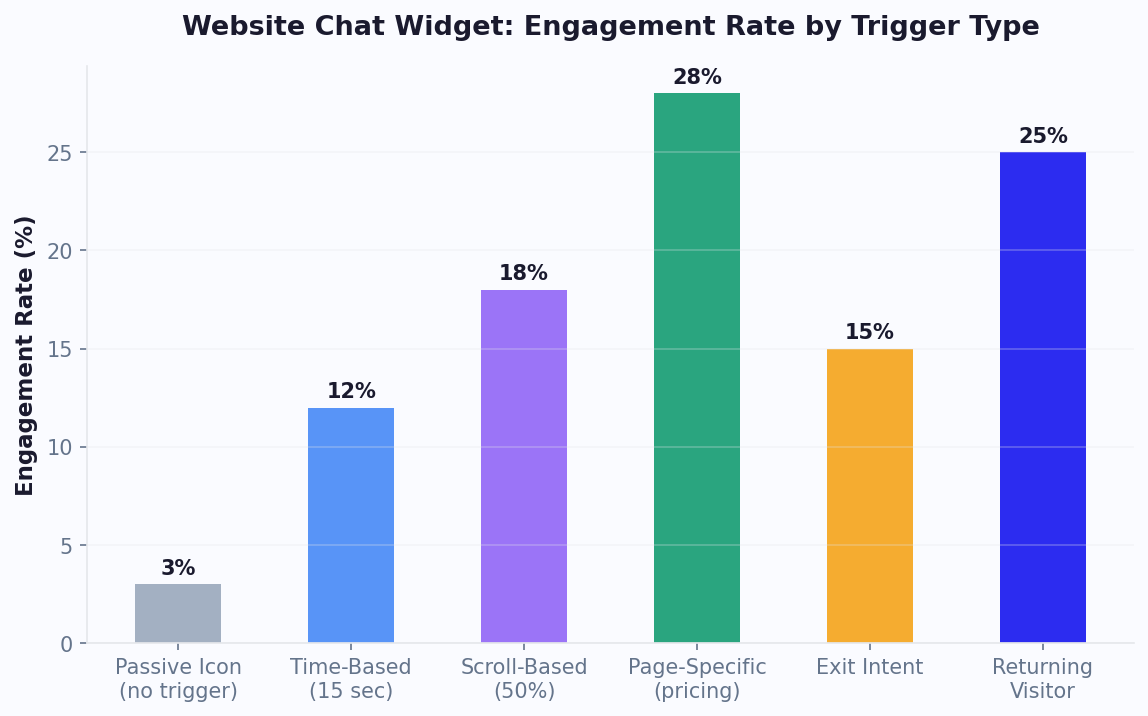
Do not wait for visitors to click the chat bubble. Configure triggers that open the chat proactively based on behavior. Our data across thousands of Conferbot deployments reveals clear engagement benchmarks by trigger type:
- Time-based triggers (chat opens after 8-15 seconds on page) — 12% average engagement rate. Best for blog content, documentation pages, and general browsing. Use shorter delays (5-8 seconds) for high-intent pages like pricing; longer delays (15-30 seconds) for content pages where visitors need reading time
- Scroll-based triggers (chat opens at 40-60% scroll depth) — 18% average engagement rate. Ideal for long-form content, product pages, and landing pages. Triggering at 50% scroll indicates the visitor is engaged but may have questions about what they have read
- Page-specific triggers (custom messages matched to the page context) — 28% average engagement rate. The highest-performing trigger type because the chatbot message directly addresses the visitor's current intent. On pricing pages, "Need help choosing a plan?" converts at nearly 3x the rate of a generic greeting
- Exit-intent triggers (chat opens when cursor moves toward the browser close) — 8-15% recovery rate of abandoning visitors. Most effective on checkout pages, trial signup pages, and high-value landing pages
- Returning visitor triggers (personalized greeting for repeat visitors) — 22% engagement rate. Messages like "Welcome back! You were looking at our Enterprise plan last time" create a powerful personalized experience
Combine multiple triggers strategically: use time-based on the homepage, scroll-based on blog posts, page-specific on pricing, and exit-intent on checkout. Track performance through Conferbot analytics and optimize continuously.
A/B Testing Your Greetings
The welcome message is the single most impactful element for chatbot engagement. A/B testing different greetings can improve interaction rates by 15-40%. Test across these dimensions: question vs statement ("Need help finding the right plan?" vs "I can help you find the right plan"), specific vs generic ("Looking for enterprise pricing?" vs "How can I help?"), value-led vs service-led ("Get a free ROI estimate in 60 seconds" vs "Chat with our team"), and short vs long (under 10 words vs 15-20 words). Run each test for at least 1,000 widget impressions per variant for statistical significance. The best-performing greetings are typically specific, value-driven, and under 15 words.
Page-Aware Conversations
The chatbot knows which page the visitor is on and adapts accordingly. On a pricing page, it can answer plan comparison questions. On a product page, it can offer size guides or alternatives. On the homepage, it can qualify the visitor's intent and route them to the right section. This contextual awareness makes every conversation more relevant.
Lead Capture and CRM Sync
Capture visitor information through natural conversation instead of intimidating forms. Studies show chatbot-based lead capture achieves 3-5x higher completion rates than traditional web forms. Captured leads can be synced to your CRM or emailed to your sales team in real time.
AI-Powered Support
Train the bot on your website content, product documentation, and FAQ using OpenAI integration. The bot answers visitor questions accurately, reducing the need for live agents. When AI confidence is low, the bot seamlessly escalates to live chat.
Mobile-Responsive Design
The widget automatically adapts to mobile screens — adjusting size, layout, and interaction patterns for touch devices. With mobile traffic exceeding 60% on most websites, responsive chatbot design is not optional. Conferbot's widget is tested across iOS Safari, Android Chrome, and all major mobile browsers.
Multi-Language Support
Detect the visitor's browser language and serve content in their preferred language automatically. Essential for businesses with international traffic. The widget UI, welcome messages, and conversation flows can all be localized.
Widget Customization Deep-Dive
Conferbot's website widget offers the deepest customization of any chatbot platform. Beyond basic colors and positioning, you can control the chat bubble icon (upload a custom SVG or choose from built-in options), the opening animation style (slide up, fade in, or bounce), the widget size on desktop vs mobile, whether the widget shows on specific pages only (using URL matching rules), custom CSS overrides for pixel-perfect brand alignment, and sound notifications for new messages. For developers, the widget exposes a JavaScript API that lets you programmatically open/close the chat, send messages, pass visitor data (name, email, plan) as context, and listen to conversation events for custom analytics integration.
Proactive Trigger Strategies
Proactive triggers are what separate passive chat widgets from conversion-driving chatbots. Here are the most effective trigger strategies by page type:
| Page Type | Trigger | Message Example | Expected Lift |
|---|---|---|---|
| Pricing Page | Time on page > 30s | "Need help choosing a plan? I can compare features for you." | +35% engagement |
| Product Page | Scroll depth > 60% | "Have questions about this product? I can help with sizing and specs." | +25% engagement |
| Cart/Checkout | Exit intent | "Wait! I can help if something is not right with your order." | +10-15% cart recovery |
| Homepage | Returning visitor | "Welcome back! Would you like to continue where you left off?" | +20% re-engagement |
| Blog Post | Time on page > 60s | "Enjoying this article? I can recommend related content." | +15% lead capture |
Configure triggers in the Conferbot dashboard under Publish > Trigger Rules. You can combine multiple conditions (AND/OR logic) and set frequency caps to prevent repeat pop-ups for the same visitor.
WordPress and Shopify Specifics
WordPress: Install the Conferbot plugin directly from the WordPress plugin directory for one-click setup. The plugin adds the embed code automatically -- no theme editing required. It also provides a dedicated settings page where you can configure which pages show the chatbot, set up WooCommerce order lookup integration, and manage widget visibility for logged-in vs guest users. WordPress sites using Conferbot chatbots report 40% more leads compared to contact-form-only setups.
Shopify: Add the Conferbot app from the Shopify App Store for seamless integration. The app connects your Shopify product catalog to the chatbot, enabling product search, order tracking (customers enter their order number and get real-time status), and abandoned cart recovery. Shopify stores using chatbot-driven cart recovery report recovering 10-20% of abandoned carts -- significantly higher than email-only recovery campaigns. The app also supports Shopify's checkout extensibility for post-purchase upsell conversations.
A/B Testing for Chatbots
Conferbot supports A/B testing of chatbot configurations to optimize conversion rates. Test different welcome messages, button copy, conversation flow structures, and trigger timing to find the combination that drives the best results. The analytics dashboard tracks performance for each variant, showing engagement rate, conversation completion, and lead capture rate side by side. Run tests for at least 1,000 conversations per variant for statistically significant results. Businesses that A/B test their chatbot flows typically see 20-40% improvement in conversion metrics within the first month of optimization.
AI Knowledge Base for Websites
Connect your website content, help center articles, and product documentation to Conferbot's AI knowledge base. The AI crawls your content and builds an intelligent Q&A system that answers visitor questions accurately -- without requiring you to manually build flows for every possible question. This is especially powerful for businesses with large catalogs, extensive documentation, or frequently updated content. The AI stays current with your content through periodic re-indexing.
Website Chatbot Use Cases
Every website can benefit from a chatbot, but the highest ROI comes from these proven use cases.
Lead Generation and Qualification
Replace or supplement your contact forms with conversational lead capture. Ask qualifying questions (budget, timeline, company size, specific needs) through a natural chat flow. Qualified leads are tagged, scored, and routed to sales. Businesses using chatbot-based lead gen report 35-55% more leads compared to forms alone. See lead generation templates.
E-Commerce Product Assistance
Help shoppers find the right product, answer size and compatibility questions, compare options, and reduce cart abandonment with timely exit-intent interventions. E-commerce stores using chatbots see 15-25% higher conversion rates and 20-30% lower cart abandonment.
Customer Support and FAQ
Deflect 40-70% of support tickets by answering common questions instantly. Shipping information, return policies, account issues, and product troubleshooting can all be automated. When the bot cannot help, it creates a ticket or connects to live chat. See support templates.
Appointment and Demo Booking
SaaS companies, healthcare providers, professional services, and any appointment-based business can let visitors book directly through the chatbot. Integrate with calendar tools for real-time availability. Conversational booking sees 40% higher completion than standalone booking pages.
Real Estate and Property
Property search assistance, virtual tour scheduling, mortgage pre-qualification, and agent matching. Real estate websites with chatbots capture 3-5x more qualified leads than those relying on contact forms.
Education and Enrollment
Course information, admission requirements, financial aid guidance, and campus tour scheduling. Educational institutions using chatbots see 50% faster response to prospective student inquiries and higher application completion rates.
Website Widget vs Other Channels
Your website chatbot serves a different purpose than messaging channel bots. Here is how they compare and complement each other.
| Feature | Website Widget | Messenger | Mobile SDK | |
|---|---|---|---|---|
| Audience | All website visitors | Phone contacts | Facebook users | App users |
| User Identification | Anonymous until captured | Phone number | Facebook profile | App login |
| Proactive Triggers | Time, scroll, exit intent | Templates only | 24h window | Push notifications |
| Page Context | Full (current URL, referrer) | None | None | In-app screen |
| Visual Customization | Fully brandable | Limited | Limited | Fully customizable |
| Rich Media | Images, video, files | Images, video, docs | Carousels, media | Native UI |
| Persistent Conversations | Session-based (or cookie) | Ongoing | Ongoing | Ongoing |
| Installation | 1 line of code | API setup | API setup | SDK integration |
| Setup Time | 5 minutes | 10-15 minutes | 5-10 minutes | 10-15 minutes |
| Best For | Visitor conversion | Ongoing support | Social engagement | In-app experience |
The website widget is your first line of engagement. It captures visitors who may never contact you through other channels. Combine it with WhatsApp for ongoing customer communication, Messenger for social media engagement, and mobile SDKs for in-app experiences. Conferbot's omnichannel platform connects all channels into one unified conversation history.
Website Chatbot Best Practices
A well-implemented website chatbot dramatically improves conversion and support metrics. A poorly implemented one annoys visitors and drives them away. Follow these practices.
1. Do Not Be Annoying
The biggest mistake businesses make is aggressive pop-ups. Give visitors time to browse before engaging — a 5-10 second delay is typical. Never block content with the chat window. Make the close button obvious. Let visitors choose to engage rather than forcing interaction.
2. Match Your Brand
Your chatbot should feel like a natural extension of your website. Use your brand colors, tone of voice, and visual style. A chatbot with default styling on a premium website signals carelessness. Invest 10 minutes in customization for a polished result.
3. Optimize for Mobile
Test your chatbot on mobile devices before launching. Ensure the chat window does not cover critical content, buttons are large enough to tap, and the close button is accessible. Over 60% of web traffic is mobile — your chatbot must work flawlessly on small screens.
4. Use Page-Specific Welcome Messages
A generic "How can I help you?" is missed potential. On your pricing page, ask "Would you like help choosing a plan?" On product pages, offer "Need help finding the right size?" On the blog, try "Looking for something specific?" Context-specific messages increase engagement by 30-50%.
5. Capture Contact Info Early (But Naturally)
Ask for the visitor's email or name after providing value — not as the first question. Help them first, then request contact details. "I'd love to send you a summary of this conversation — what's your email?" works far better than a gated entry.
6. Set Up Exit-Intent Triggers
When a visitor moves their cursor toward the browser close button, trigger a chat message with a compelling offer, a quick question, or a final CTA. Exit-intent chatbot triggers can recover 5-15% of abandoning visitors.
7. Continuously Optimize with Data
Use analytics to monitor engagement rates, conversation completion, lead capture rates, and popular questions. A/B test different welcome messages, button labels, and flows. The best website chatbots improve continuously based on real visitor data.
Getting Started with Your Website Chatbot
Adding a chatbot to your website is the fastest way to increase conversions and reduce support workload. Here is your launch plan.
5-Minute Quick Start
- Sign up for Conferbot — free plan available to start
- Choose a template — lead generation, customer support, or build from scratch
- Customize the widget — set your brand colors, avatar, and position
- Copy the embed code — one line of JavaScript
- Paste on your website — before the closing body tag
That is it. Your chatbot is live and engaging visitors.
Recommended Enhancement Path
- Week 1: Launch with FAQ and basic lead capture. Monitor conversations to see what visitors ask most
- Week 2: Add AI-powered responses to handle open-ended questions
- Week 3: Set up live chat handoff for high-value conversations
- Week 4: Implement proactive triggers (exit intent, time-based, page-specific)
- Ongoing: Optimize based on analytics data — refine flows, update FAQ, improve conversion rates
Expand to More Channels
Once your website chatbot is performing, extend the same bot to WhatsApp, Messenger, Instagram, and other channels through Conferbot's omnichannel platform. Your website is the starting point — not the finish line.
Why Conferbot for Your Website
- 5-minute setup — One line of embed code, works on any website platform
- No code required — Build with our visual AI chatbot builder
- AI knowledge base — Train on your website content for instant, accurate answers
- Proactive triggers — Time-based, scroll-based, exit-intent, and page-specific engagement
- WordPress and Shopify plugins — One-click install with native e-commerce integration
- Calendar booking — Let visitors book appointments with calendar integration
- Rich integrations — Connect CRMs, email tools, and more via integrations hub
- A/B testing — Optimize flows with data-driven experimentation
- Omnichannel — Extend to WhatsApp, Messenger, Instagram
- Real-time analytics — Track engagement, conversion, and ROI with built-in analytics
View pricing to find the right plan for your website traffic, or start building for free today.
Conversion Rate Optimization Data
The difference between a passive chat widget and a conversion-driving chatbot comes down to engagement strategy. Across thousands of Conferbot deployments, we have collected benchmark data that shows how different engagement approaches impact conversion rates.
Proactive vs Passive Engagement Rates
The single most impactful decision is whether your chatbot waits for visitors to click (passive) or initiates conversation (proactive). The data is clear:
| Engagement Approach | Widget Interaction Rate | Lead Capture Rate | Avg. Messages per Session | Conversion to Sale/Signup |
|---|---|---|---|---|
| Passive (no trigger, bubble only) | 2-4% | 0.5-1.5% | 2.1 | 0.3-0.8% |
| Generic proactive ("How can I help?") | 8-12% | 3-5% | 3.4 | 1.5-2.5% |
| Page-specific proactive | 18-28% | 8-14% | 5.2 | 3.5-6.0% |
| Behavior-triggered (scroll + time) | 15-22% | 6-10% | 4.7 | 2.8-4.5% |
| Exit-intent triggered | 8-15% | 4-8% | 3.8 | 2.0-3.5% |
| Returning visitor personalized | 20-30% | 10-18% | 6.1 | 5.0-8.0% |
The takeaway: page-specific proactive messages and returning visitor personalization deliver the highest conversion rates — 10-20x better than a passive chat bubble. This is because context-aware messages address the visitor's specific intent rather than placing the burden of conversation initiation on them.
Conversion Benchmarks by Industry
Chatbot conversion rates vary significantly by industry due to differences in purchase cycle, average order value, and visitor intent:
| Industry | Avg. Chatbot Interaction Rate | Lead Capture Rate | Chatbot-Assisted Conversion | Avg. ROI (6 months) |
|---|---|---|---|---|
| E-commerce | 12-18% | 8-12% | 3.5-5.0% | 350-500% |
| Real Estate | 15-22% | 12-20% | 4.0-7.0% | 500-800% |
| Healthcare | 10-15% | 10-16% | 5.0-8.0% | 400-600% |
| SaaS / B2B | 8-14% | 6-10% | 2.5-4.5% | 300-500% |
| Education | 12-18% | 14-22% | 6.0-10.0% | 400-700% |
| Professional Services | 10-16% | 8-14% | 3.0-5.5% | 350-550% |
These benchmarks represent websites with properly configured proactive triggers, page-specific messaging, and optimized conversation flows. The ROI calculation includes lead value, reduced support costs, and after-hours coverage. Track your own metrics in the Conferbot analytics dashboard and benchmark against these industry averages.
After-Hours Value
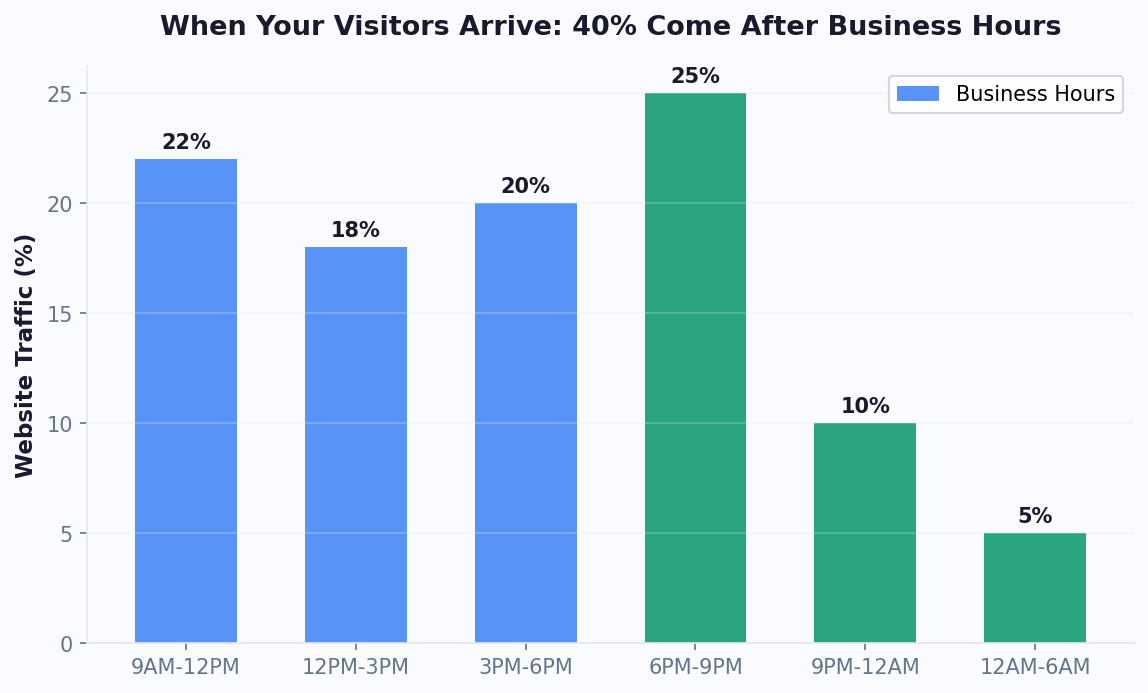
Approximately 40% of website traffic arrives outside business hours — evenings, weekends, and holidays when no human agents are available. Without a chatbot, these visitors encounter a contact form or no engagement at all, resulting in near-zero conversion. A chatbot captures this traffic by providing instant responses, qualifying leads, booking appointments, and routing urgent issues for morning follow-up. Businesses that deploy chatbots for after-hours coverage report a 25-35% increase in total monthly leads simply by engaging visitors who previously received no interaction.
Multi-Page Deployment Strategy
A one-size-fits-all chatbot wastes the potential of your highest-value pages. The most effective website chatbot deployments use different configurations for different page types.
Conditional Visibility Rules
Conferbot's visibility rules let you control exactly where the chatbot appears and how it behaves on each page. Configure rules based on URL patterns (exact match, contains, starts with, regex), visitor attributes (new vs returning, logged in vs anonymous, referral source), device type (desktop, mobile, tablet), geographic location (country, region), and time of day (business hours vs after hours). For example: show the chatbot on all pages except the blog (where a different content-recommendation bot runs), use a sales-focused flow on pricing and product pages, use a support-focused flow on help center pages, hide the widget on the login and checkout pages where it might distract from the primary action, and show a different welcome message for visitors arriving from Google Ads versus organic search.
Page-Type Strategy Guide
| Page Type | Chatbot Goal | Trigger Strategy | Recommended Flow |
|---|---|---|---|
| Homepage | Qualify visitor intent | Time-based (10s delay) | Intent qualification — route to sales, support, or content |
| Pricing Page | Convert to trial/demo | Time-based (5s) + scroll 30% | Plan comparison, ROI calculator, demo booking |
| Product Pages | Answer questions, reduce bounce | Scroll-based (50%) | Product FAQ, size guide, alternative suggestions |
| Blog Posts | Capture leads, suggest content | Scroll-based (60%) | Content recommendation, newsletter signup, lead magnet |
| Help Center | Deflect tickets | Time-based (3s) | Search assistance, ticket creation, live agent handoff |
| Checkout | Reduce abandonment | Exit-intent only | Payment help, shipping questions, discount offer |
| Landing Pages | Maximize form completion | Page-specific (immediate) | Qualification questions, objection handling, CTA support |
Configure these rules in the Conferbot dashboard under Publish > Visibility Rules. You can create unlimited rules with AND/OR logic and test them with the dashboard's preview mode before deploying to production.
Custom CSS Theming
For brands that need pixel-perfect control beyond the dashboard's theme settings, the Conferbot widget supports custom CSS overrides. The widget renders in a shadow DOM to prevent style conflicts with your website, but it exposes CSS custom properties (variables) that you can override from your stylesheet. Target the widget container with .conferbot-widget and override properties including --cb-primary-color, --cb-font-family, --cb-border-radius, --cb-bubble-max-width, and --cb-header-height. For advanced customization, inject a custom stylesheet URL through the dashboard under Widget Settings > Advanced > Custom CSS URL. This stylesheet loads inside the shadow DOM and has full access to the widget's internal elements. Use this for scenarios like matching a specific design system, adding custom animations, or implementing branded scrollbar styles.
GDPR Cookie Consent Integration
For websites serving European visitors, the chatbot must comply with GDPR cookie consent requirements. Conferbot provides three compliance modes: Strict mode — the widget does not load until the visitor accepts cookies. Integrate with your consent management platform (CMP) by calling window.Conferbot.init() only after consent is granted. The embed code supports a data-defer-init="true" attribute that prevents automatic loading. Functional-only mode — the widget loads immediately but only uses strictly necessary cookies (session ID for conversation continuity) until the visitor consents to analytics cookies. No tracking or analytics data is collected until consent is received. Full mode — all cookies are set immediately (only use this if your legal team confirms chatbot cookies are covered under "strictly necessary" for your use case). The SDK integrates with popular CMPs including OneTrust, CookieBot, Didomi, and custom implementations through event listeners. When using Google Consent Mode v2, the widget respects the analytics_storage and ad_storage consent signals automatically.
Conferbot Widget vs Competitor Widgets
The website chat widget market is crowded, with options ranging from free tools to enterprise platforms. Here is how the Conferbot widget compares to the most popular alternatives in 2026.
| Criteria | Conferbot | Intercom | Drift | tawk.to |
|---|---|---|---|---|
| Pricing | Free tier available; Pro from $19/mo | From $74/seat/month | From $2,500/month | Free (ad-supported) |
| No-Code Bot Builder | Full visual builder + AI | Limited Custom Bots | Playbook builder | No bot builder |
| AI Capabilities | OpenAI + custom knowledge base | Fin AI ($0.99/resolution) | GPT-powered (add-on) | AI Assist (beta) |
| Widget Load Time | Under 200ms | 400-800ms | 500-900ms | 300-600ms |
| Core Web Vitals Impact | Zero (async, deferred) | Minor CLS impact | Minor LCP impact | Minimal |
| Customization Depth | Colors, fonts, CSS overrides, SVG icons | Colors, limited layout | Colors, templates | Colors, basic styling |
| Proactive Triggers | Time, scroll, exit-intent, URL, visitor data | URL and visitor data | URL and segments | Time-based only |
| Display Types | Popup, slide-in, full page, inline embed | Popup only | Popup, slide-in | Popup only |
| A/B Testing | Built-in flow and greeting testing | A/B on messages | A/B on playbooks | Not available |
| GDPR Compliance | Consent mode, CMP integration, data-defer | Consent banner | Consent settings | Basic consent |
| WordPress Plugin | Yes (one-click install) | Yes | Yes | Yes |
| Shopify App | Yes (product catalog integration) | Yes | No | Yes |
| Omnichannel | WhatsApp, Messenger, Instagram, SMS, Discord, Telegram, Slack, Teams, mobile SDKs | WhatsApp, Messenger, SMS | Limited channels | Website only |
| Live Chat Handoff | Built-in with full context | Yes (core feature) | Yes | Yes (core feature) |
| Calendar Booking | Built-in | Third-party | Built-in | Not available |
| Analytics | Conversion tracking, funnel analysis, A/B results | Reports and dashboards | Revenue attribution | Basic chat stats |
| Offline Message Queue | Yes | Yes | Yes | Offline form |
When to Choose Conferbot
Conferbot is the best choice when you need a full chatbot automation platform with a competitive website widget — not just a live chat tool with basic bot features. Conferbot excels for businesses that want to automate 70-85% of visitor interactions with AI-powered bots while maintaining live agent handoff for complex issues, need omnichannel deployment (the same bot works across your website, WhatsApp, Messenger, Instagram, and mobile apps), require advanced no-code bot building with conditional logic, API integrations, and AI knowledge base, and operate on a budget that does not accommodate $74/seat (Intercom) or $2,500/month (Drift) pricing.
When Competitors Might Fit Better
Intercom is better if your primary need is a full customer communication platform with product tours, email campaigns, and help center — and you have the budget ($74+/seat/month). Drift is better if you are an enterprise B2B company focused primarily on account-based marketing and revenue attribution, with budget for their $2,500+/month plans. tawk.to is better if you only need free live chat with no automation, no AI, and no chatbot flows. For most businesses that want the combination of powerful AI chatbot automation, omnichannel reach, and accessible pricing, Conferbot delivers the most value. See our detailed platform comparison for the full breakdown, or check pricing plans to find the right fit for your traffic volume.
How Conferbot Compares for Website
Most platforms charge per message, per seat, or limit channels by tier. Here's how Conferbot is different.
| Feature | Conferbot | Typical Competitor |
|---|---|---|
| Channels included | 13+ (all plans) | 3-6 (varies by tier) |
| Pricing model | Flat rate from $19/mo | Per-seat or per-message |
| AI chatbot builder | Yes (plain English) | No or limited |
| Native mobile SDKs | 4 (Android, iOS, Flutter, RN) | None (WebView only) |
| Knowledge base AI | Included | Add-on ($30-99/mo) |
| Live chat handoff | Included | Higher tiers only |
| Calendar booking | Built-in | Third-party required |
| Setup time | Under 10 minutes | Hours to days |
Website FAQ
Everything you need to know about chatbots for website.
Discover More
Continue Exploring
Explore features, connect third-party tools, and browse ready-made templates.