
Powerful Chatbot Features
Build intelligent AI chatbots with our comprehensive feature set. From visual builders to AI integration, everything you need to create engaging conversations.
Everything You Need to Build Smart Chatbots
Discover our comprehensive suite of chatbot features designed to help you create, deploy, and optimize intelligent conversational experiences.
AI-Powered
AI Agent Handover
Seamlessly hand over conversations from chatbot to AI agents for complex queries and personalized support.
AI Chatbot Builder
Build intelligent chatbots powered by AI that understand context, intent, and deliver human-like conversations.
AI Knowledge Base
Train your chatbot on your content with AI-powered knowledge base that learns and improves over time.
Core Platform
No-Code Chatbot Builder
Build powerful chatbots without writing a single line of code using our visual drag-and-drop builder.
Live Chat & Tickets
Provide real-time support with live chat and manage customer issues with an integrated ticket system.
Chatbot Analytics
Track performance, user engagement, and conversation metrics with comprehensive analytics dashboards.
Knowledge Base
Create a self-service knowledge base to help customers find answers instantly without agent intervention.
Ticket System
Manage, prioritize, and resolve customer support tickets efficiently with built-in ticket management.
Intelligence
OpenAI & Claude
Integrate GPT-4, Claude, and other leading AI models for advanced natural language understanding.
NLP Processing
Advanced natural language processing for intent recognition, entity extraction, and sentiment analysis.
Rich Media
Engage users with images, videos, carousels, buttons, and interactive elements in conversations.
Team & Operations
Team Management
Manage team roles, permissions, and collaboration with multi-agent support and assignment rules.
Calendar Booking
Let customers book meetings and appointments directly through your chatbot with calendar integration.
Version Control
Track changes, roll back to previous versions, and manage chatbot updates with built-in version control.
Integrations & Deployment
Integrations Hub
Connect with 50+ tools including Slack, HubSpot, Salesforce, Zapier, and more from one central hub.
API Integration
Powerful REST APIs to integrate Conferbot with your existing systems, workflows, and applications.
Custom Domains
Host your chatbot on your own domain for a fully branded, white-labeled customer experience.
Mobile SDKs
Native iOS and Android SDKs for seamless chatbot integration into your mobile applications.
Enterprise
White Label
Fully rebrand the chatbot platform with your logo, colors, and domain for a seamless brand experience.
Geolocation
Deliver location-aware responses and personalized experiences based on user geography.
File Upload
Allow users to upload files, documents, and images directly within chatbot conversations.
The platform teams trust and love
Built for businesses that want powerful AI chatbots without the complexity.
No Code Required
Build powerful chatbots without writing a single line of code. Our visual drag-and-drop builder makes it easy for anyone.
AI-Powered Intelligence
Leverage GPT-4 and advanced NLP for smart, context-aware conversations that understand your customers.
Deploy Everywhere
Website, WhatsApp, Slack, Telegram, and 9+ channels. Your chatbot goes wherever your customers are.
Enterprise Security
SOC 2 compliant, GDPR ready, and fully encrypted data. Your customers' information is always safe.
How Conferbot's Features Compare
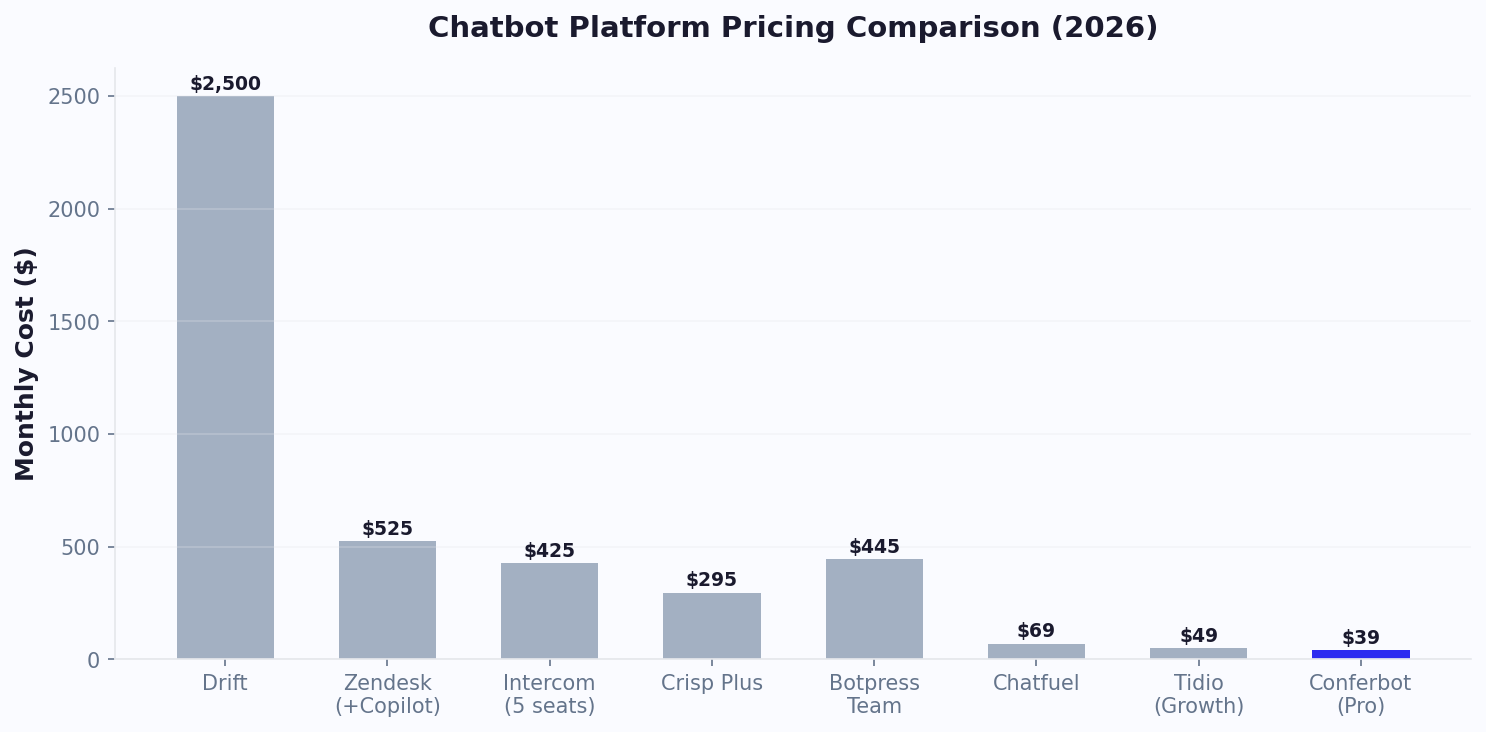
Conferbot combines capabilities that typically require 3-4 separate tools into a single platform. Instead of paying for a chatbot builder, live chat software, knowledge base tool, and analytics dashboard separately, you get everything under one roof with flat-rate pricing that does not charge per seat, per message, or per channel.
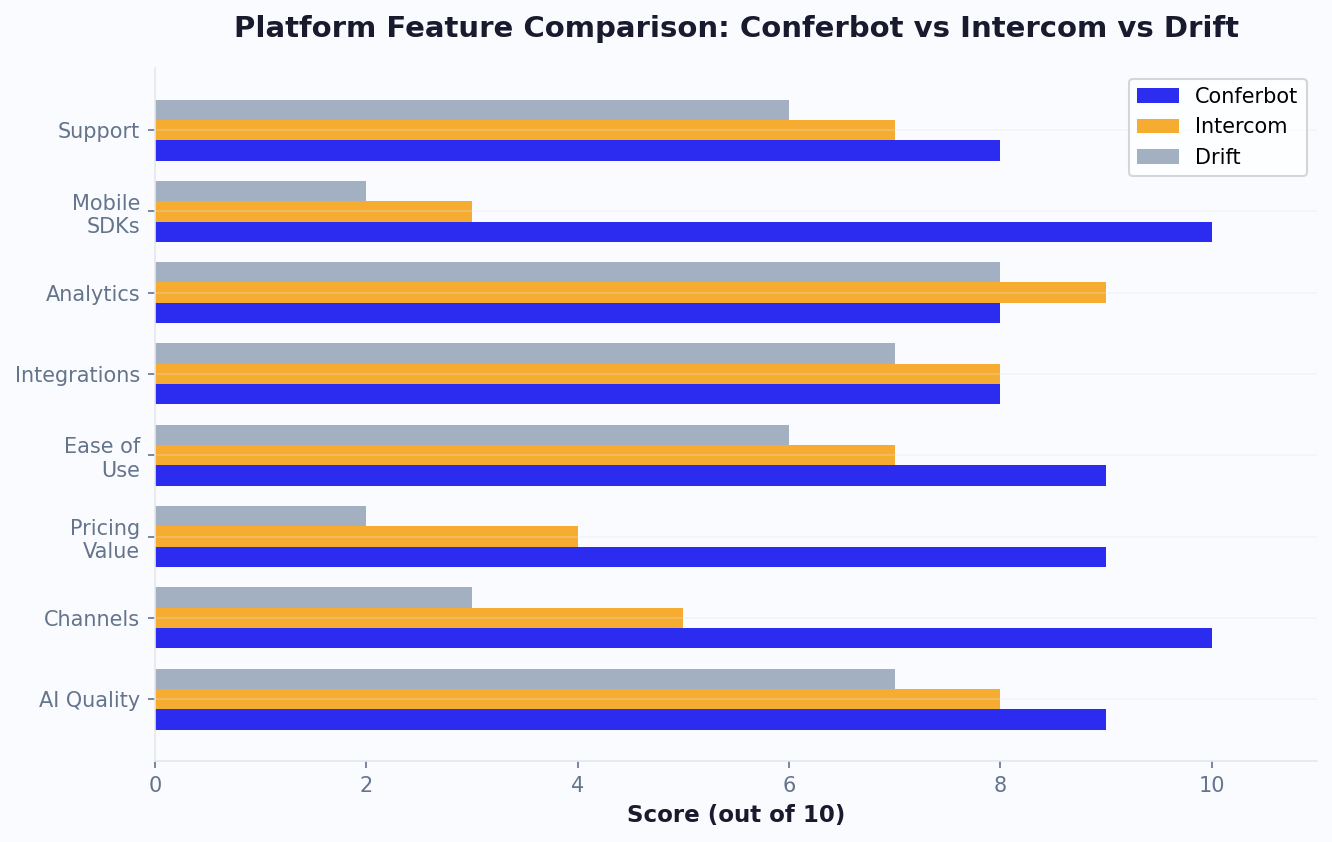
What Makes Conferbot Different From Competitors
| Capability | Conferbot | Drift | Intercom | Tidio |
|---|---|---|---|---|
| AI Chatbot Builder | Yes (plain English) | No | No | Add-on |
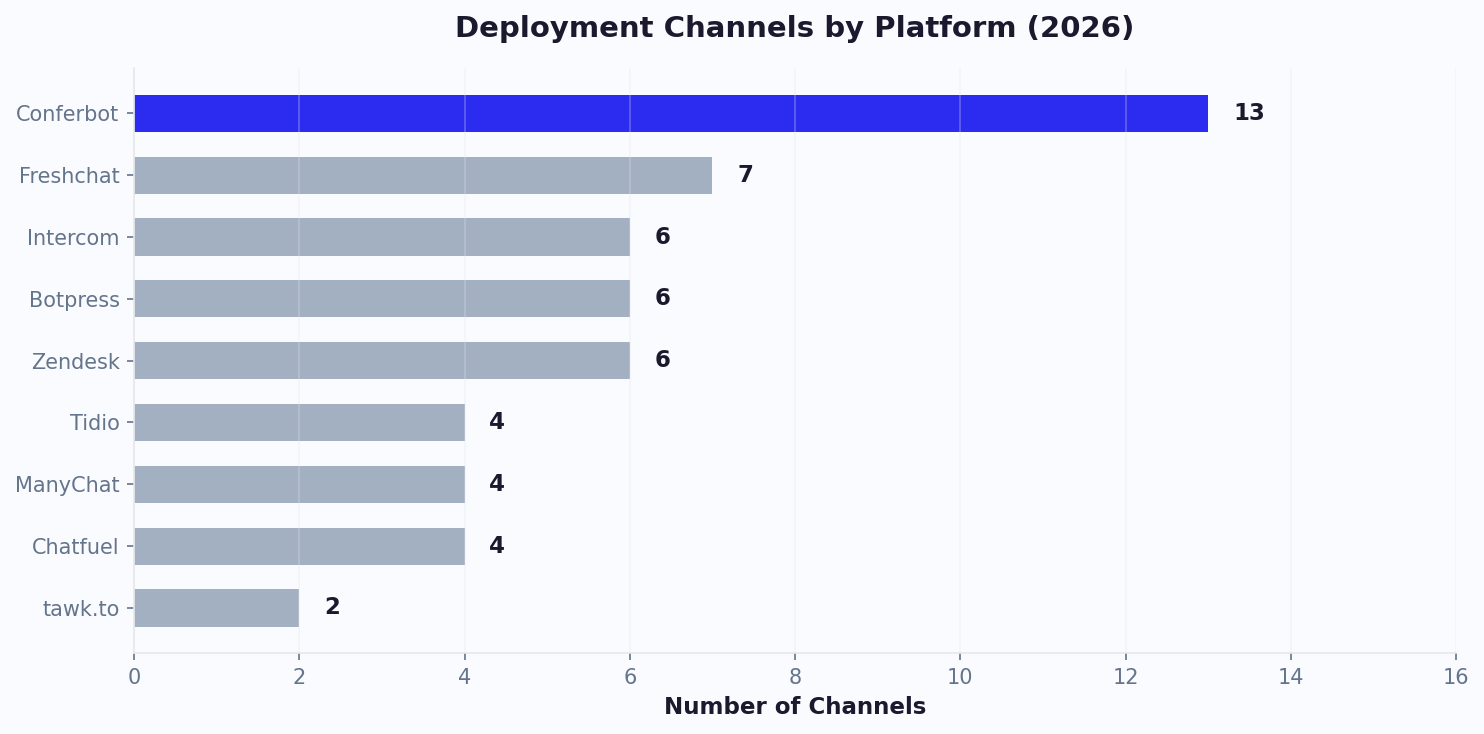
| Deployment Channels | 13+ | 3 | 6 | 4 |
| Native Mobile SDKs | 4 (Android, iOS, Flutter, RN) | No | No | No |
| Knowledge Base AI | Included | No | Add-on | Add-on ($33/mo) |
| Live Chat + Tickets | Included | Included | Included | Included |
| Calendar Booking | Built-in | No | No | No |
| Version Control | Yes | No | No | No |
| Starting Price | $19/month flat | $2,500/month | $29/seat/month | $24/month |
The Impact of These Features on Your Business
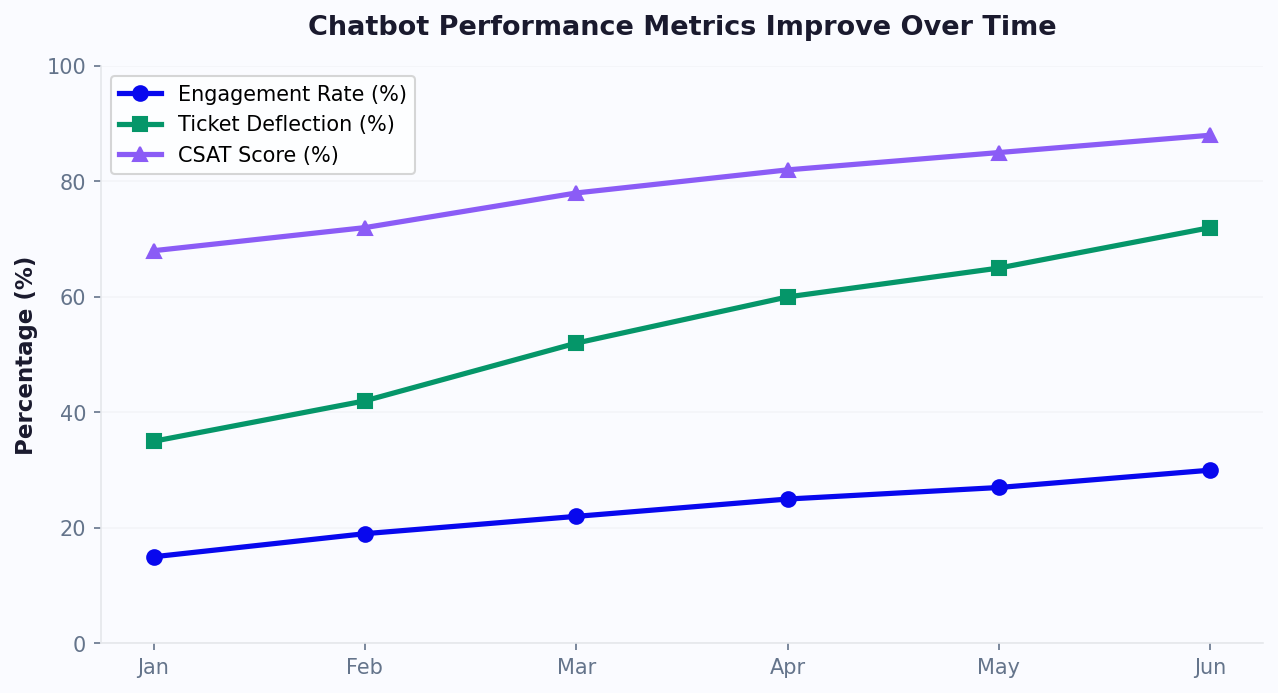
Businesses using Conferbot's full feature set see measurable results within the first 30 days. The AI chatbot builder reduces setup time from months to minutes. The knowledge base AI achieves 65-80% ticket deflection by learning from your existing documentation. Live chat handoff ensures complex issues reach human agents with full context — achieving 89% customer satisfaction in the hybrid model.
The key differentiator is omnichannel deployment. While competitors limit you to 3-6 channels, Conferbot deploys one bot across WhatsApp, Messenger, Instagram, Telegram, Slack, Teams, and native mobile apps — with the same AI, same analytics, same knowledge base across all channels. No per-channel fees.
Explore each feature in detail by clicking any card above, or compare Conferbot with competitors to see the full breakdown. Calculate your potential savings with our free ROI calculator, or browse 500+ templates to see what you can build.
Features by Use Case
Every business has different priorities. Here is how Conferbot's features map to the outcomes that matter most for your team.
Customer Support
Reducing ticket volume while maintaining high satisfaction scores is the central challenge for support teams. Conferbot addresses this with a layered approach. The live chat module lets agents handle conversations in real time with full customer context, while the ticket system organizes and prioritizes requests that need follow-up. For deflection, the AI knowledge base learns from your documentation to answer repetitive questions automatically, achieving 65-80% deflection rates within weeks. Meanwhile, chatbot analytics surfaces trends in customer queries so you can proactively update content, close knowledge gaps, and identify training opportunities for agents. Together, these features transform support from a cost center into a strategic advantage — teams respond faster, customers self-serve more often, and satisfaction scores climb past the 90% benchmark.
Lead Generation
Static contact forms convert at 2-3%. Conversational lead capture converts at 10-15%. The difference is engagement — visitors answer questions when the experience feels like a dialogue rather than a form. Start with the AI chatbot builder to design qualification flows in plain English, then use calendar booking to let qualified prospects schedule demos or consultations without leaving the conversation. The NLP engine interprets free-text responses so visitors can answer naturally instead of selecting rigid multiple-choice options, and rich media elements — carousels, product cards, and embedded video — showcase your offering right inside the chat window. The result is a pipeline that runs 24/7, captures 3-5x more leads than forms, and routes each prospect to the right sales rep with complete qualification context already attached to the CRM record.
E-commerce
Online stores lose 70% of carts before checkout. A well-placed chatbot recovers abandoned carts, recommends products, and answers pre-purchase questions that prevent drop-off. The integrations hub connects Conferbot to Shopify, WooCommerce, and major payment providers so your bot can pull real-time inventory, order status, and shipping information. Use the API integration to build custom workflows — like triggering a discount offer when a returning visitor views the same product three times. Deploy across WhatsApp, Messenger, Instagram, and your website simultaneously using the omnichannel engine, and enrich every interaction with rich media product galleries, review carousels, and one-click "Add to Cart" buttons. Merchants using Conferbot report 18-25% cart recovery rates and a 35% reduction in "Where is my order?" tickets within the first month.
Internal Operations
Chatbots are not only customer-facing. IT helpdesks, HR departments, and operations teams use Conferbot internally to automate repetitive requests — password resets, PTO balance checks, onboarding checklists, and internal FAQ lookups. Team management controls who can edit, publish, and review bots with role-based permissions, preventing accidental changes to production flows. Version control tracks every update and allows instant rollback if a change introduces errors, which is critical for compliance-heavy industries. Custom domains let you host internal bots on your own subdomain (e.g., help.yourcompany.com), and the white-label option removes all Conferbot branding so employees see only your organization's identity. Companies running internal chatbots report 40% fewer repetitive helpdesk tickets and 30% faster onboarding for new hires, because answers are instant and consistent regardless of which team member asks.
How Businesses Use Conferbot: Industry Results
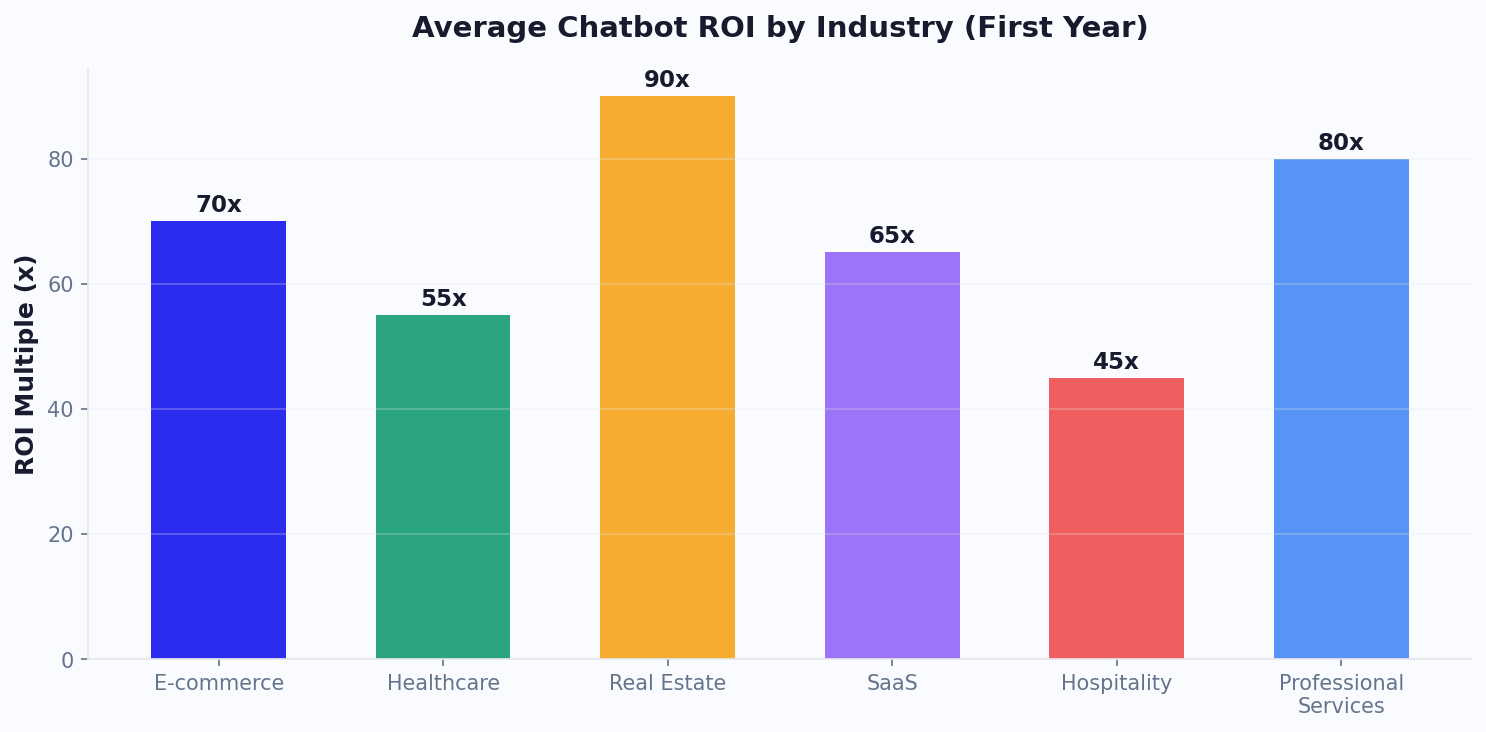
Conferbot powers chatbots across dozens of industries. Below is a snapshot of the features each vertical relies on most and the measurable outcomes they achieve in the first 90 days.
| Industry | Primary Features Used | Key Result |
|---|---|---|
| E-commerce | Integrations Hub, Rich Media, Omnichannel, API Integration | 22% cart recovery rate; 35% fewer WISMO tickets; $4.80 revenue per chatbot conversation |
| Healthcare | AI Knowledge Base, Live Chat, Ticket System, Calendar Booking | 68% appointment-scheduling automation; 45% reduction in no-shows; 12,000 patient queries deflected/month |
| Real Estate | AI Chatbot Builder, Calendar Booking, NLP Chatbot, Geolocation | 3.5x more qualified showing requests; 58% faster response to new leads; $18,000/month saved on after-hours staff |
| SaaS | AI Agent Handover, Chatbot Analytics, Knowledge Base, Team Management | 72% first-contact resolution; 40% shorter onboarding time; NPS improved from 38 to 61 in 90 days |
| Hospitality | Omnichannel, Rich Media, Geolocation, Calendar Booking | 4,200 booking inquiries handled/month without staff; 28% upsell rate on room upgrades; 91% guest satisfaction score |
| Professional Services | NLP Chatbot, Calendar Booking, White Label, Custom Domains | 47% increase in consultation bookings; 6 hours/week saved per advisor on scheduling; 89% client satisfaction rating |
These numbers are drawn from aggregated, anonymized customer data across Conferbot deployments. Individual results vary based on traffic volume, industry complexity, and how thoroughly the bot is trained — but the pattern is consistent: businesses that deploy a chatbot with AI knowledge base training and analytics-driven optimization see meaningful ROI within the first billing cycle. Use our ROI calculator to estimate your expected return based on your current support volume and conversion rate.
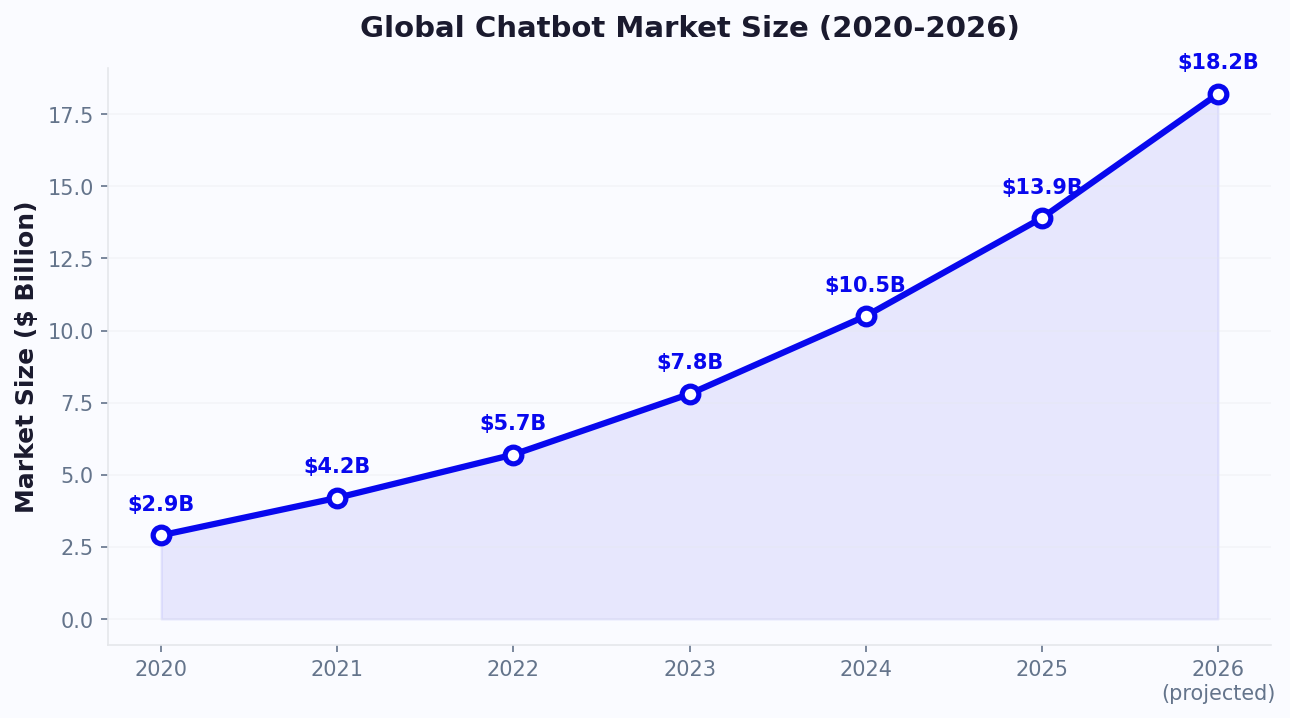
The broader market trajectory reinforces why investing in chatbot features now matters. Global chatbot adoption is accelerating across every sector, and businesses that establish automated customer interaction workflows today will compound their advantage as AI capabilities improve each quarter. Conferbot's platform roadmap is designed to keep customers ahead of this curve with quarterly feature releases, model upgrades, and new channel integrations.
Implementation: From Signup to Results in 30 Days
You do not need months of development or a dedicated engineering team. Here is the proven four-week playbook that Conferbot customers follow to go from zero to measurable impact.
Week 1: Deploy Your First Chatbot With the AI Builder
Start by describing what your chatbot should do in plain English using the AI chatbot builder. The platform generates conversation flows, fallback responses, and initial training data automatically. Most teams have a working bot on their website within 30 minutes. Choose from 500+ pre-built templates for common use cases — lead qualification, FAQ handling, appointment booking, or product recommendations — and customize from there. If you prefer a visual approach, the no-code drag-and-drop builder lets you design every interaction step by step without writing code. By Friday of the first week, your chatbot should be live, answering basic questions, and collecting its first round of conversation data.
Week 2: Connect Your Knowledge Base and Set Up Human Handoff
Now that your bot is live, feed it your existing content. Upload help articles, product documentation, PDFs, and FAQ pages to the AI knowledge base. The system indexes everything and begins answering questions using your actual documentation — no manual intent mapping required. Next, configure AI agent handover rules so conversations that exceed the bot's confidence threshold are seamlessly escalated to your live chat team with complete conversation history. Set up the ticket system for after-hours inquiries so nothing falls through the cracks. By the end of week two, your chatbot handles straightforward requests autonomously and routes complex issues to the right human agent with full context.
Week 3: Go Omnichannel — WhatsApp, Messenger, and Beyond
Your chatbot is already proven on your website. Week three is about meeting customers where they already spend time. Deploy the same bot — same AI, same knowledge base, same conversation flows — to WhatsApp and Facebook Messenger with one-click channel activation. Add Instagram, Telegram, or Slack depending on where your audience is most active. Connect your CRM, helpdesk, and marketing tools through the integrations hub to ensure every conversation — regardless of channel — syncs to a single customer record. There are no per-channel fees and no per-message charges. Your flat-rate plan covers all channels, so expanding reach does not expand cost.
Week 4: Review Analytics, Optimize, and Scale
After three weeks of live data, you have enough conversation volume to make data-driven improvements. Open the chatbot analytics dashboard to review deflection rates, average resolution time, user satisfaction scores, and drop-off points. Identify the top five unanswered questions and add them to your knowledge base. Refine conversation flows that show high abandonment using the visual builder, and A/B test greeting messages or qualification questions. Use version control to safely experiment — if a change underperforms, roll back to the previous version instantly. By day 30 you should see measurable improvements: lower ticket volume, faster response times, higher conversion rates, and a clear picture of where to optimize next. From here, the cycle repeats — review, optimize, expand — and your chatbot compounds value every month. Explore the full competitive comparison to see how this playbook stacks up against alternative platforms, or jump straight to pricing to find the plan that fits your team.
Discover More
Continue Exploring
Explore features, connect third-party tools, and browse ready-made templates.
Frequently Asked Questions
Learn more about Conferbot's features and capabilities
Conferbot includes a visual drag-and-drop builder, 100+ templates, OpenAI integration, analytics dashboard, live chat handoff, rich media support, NLP capabilities, API integrations, geolocation features, file upload functionality, and multi-platform deployment options.
Yes! Conferbot offers extensive integration capabilities including REST APIs, webhooks, database connections, CRM integrations (Salesforce, HubSpot), email marketing platforms (Mailchimp, ConvertKit), e-commerce platforms (Shopify, WooCommerce), and 1000+ other apps via Zapier.
Absolutely! Conferbot supports 95+ languages for chatbot conversations. You can create multilingual chatbots, auto-detect user language, and provide localized experiences. OpenAI integration enables natural conversations in any supported language.
Our analytics dashboard provides real-time insights including conversation metrics, user engagement rates, conversion tracking, popular conversation paths, response times, and user satisfaction scores. Export detailed reports and integrate with Google Analytics for advanced tracking.
Yes! Full customization options include custom colors, fonts, logos, chat widget design, conversation backgrounds, button styles, and CSS customization. White-label options available for agencies and enterprise clients.
Ready to Build Your First Chatbot?
Start with our free plan and access all features. No credit card required.