
Discord Bot Chatbot Builder
Perfect for gaming communities, creator groups, and tech communities. Built-in Gateway Manager maintains persistent connection. Up to 25 buttons per message with rich embed support.
Discord Chatbot Features
Everything you need to build powerful automated conversations
What Can You Build?
Get Started in 12 Simple Steps
Follow this guide to connect your Discord chatbot
Go to Discord Developer Portal (discord.com/developers)
Create a new Application
Go to 'Bot' section and click 'Add Bot'
Enable MESSAGE CONTENT INTENT under Privileged Gateway Intents
Copy the Bot Token (keep it secret!)
Go to OAuth2 → URL Generator
Select scopes: bot, applications.commands
Select permissions: Send Messages, Read Message History
Open the generated URL to invite bot to your server
In Conferbot, go to Channels → Discord → Connect
Paste your Bot Token and click Connect
Your Discord bot is live!
Introduction
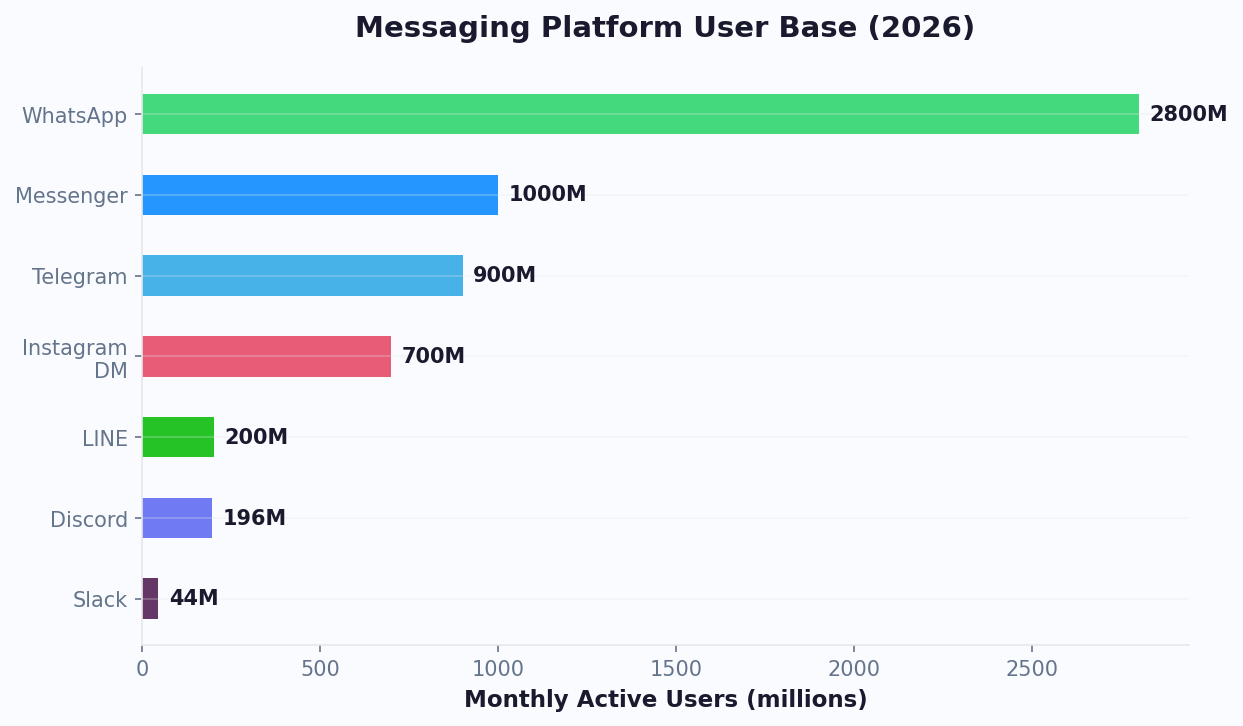
Discord has grown far beyond its gaming roots. With over 150 million monthly active users across 19 million active servers, Discord has become the go-to platform for communities of every kind — from gaming guilds and crypto projects to SaaS companies, educational institutions, and creator fan bases. It is the modern community hub, and your members expect immediate, always-on support.
Managing a thriving Discord server is demanding. As communities scale past a few hundred members, the same questions get asked dozens of times a day, new members need onboarding, support requests pile up, and moderators burn out. A single moderator team cannot cover every timezone, and manual processes that worked at 100 members collapse at 10,000.
A Discord chatbot solves these challenges by providing instant, automated responses 24/7. With Conferbot, you build your bot using a visual flow builder — no JavaScript, no discord.js, no hosting required. Conferbot's built-in Gateway Manager maintains a persistent WebSocket connection to Discord, so your bot stays online without external infrastructure. Add AI-powered responses for open-ended questions, and your Discord community runs itself.
This guide covers everything you need to know about building and deploying a Discord chatbot in 2026: platform-specific features, setup instructions, use cases for different community types, and the strategies that keep members engaged and your moderation team sane.
New to chatbot building? Start with our complete guide to building a chatbot without coding. Want to see how Discord compares to Slack, Telegram, or Microsoft Teams for bot deployment? Check our channel comparisons or deploy on all platforms simultaneously with Conferbot's omnichannel platform. Browse our template library for community-ready bot flows.
Discord Bot Capabilities
Discord's bot platform is one of the most feature-rich in the messaging ecosystem. Here is what makes it powerful — and how Conferbot leverages those capabilities without requiring you to write code.
Interactive Message Components
- Buttons — Up to 25 interactive buttons per message (5 rows of 5). Buttons can trigger new bot responses, open URLs, or execute actions. Far more flexible than any other messaging platform
- Select Menus — Dropdown menus with up to 25 options, supporting single or multi-select. Perfect for complex choices like selecting a support category, game server, or language preference
- Rich Embeds — Formatted message blocks with titles, descriptions, fields, images, thumbnails, footers, and custom colors. Use embeds for structured information like help guides, server rules, or status updates
Conversation Modes
- Channel Conversations — The bot responds in public channels, visible to all members. Ideal for FAQ, announcements, and community knowledge sharing
- DM Conversations — Private direct message conversations for sensitive topics like support tickets, moderation actions, or personal account inquiries
- Thread Support — Conversations can happen in threads to keep channels organized and focused
Platform-Specific Features
- Message Editing — Unlike most messaging platforms, Discord bots can edit previously sent messages. Update status embeds, refresh information panels, or correct responses without message clutter
- Reaction-Based Interactions — Users can react to messages with emojis to trigger bot actions, enabling intuitive role selection, polls, and feedback collection
- Gateway Connection — Conferbot maintains a persistent WebSocket connection through its built-in Gateway Manager, so your bot stays online and responsive without any external hosting
Combined with Conferbot's analytics and live chat handoff, these features let you build Discord bots that rival custom-coded solutions — without writing a single line of code.
Server Management and Moderation
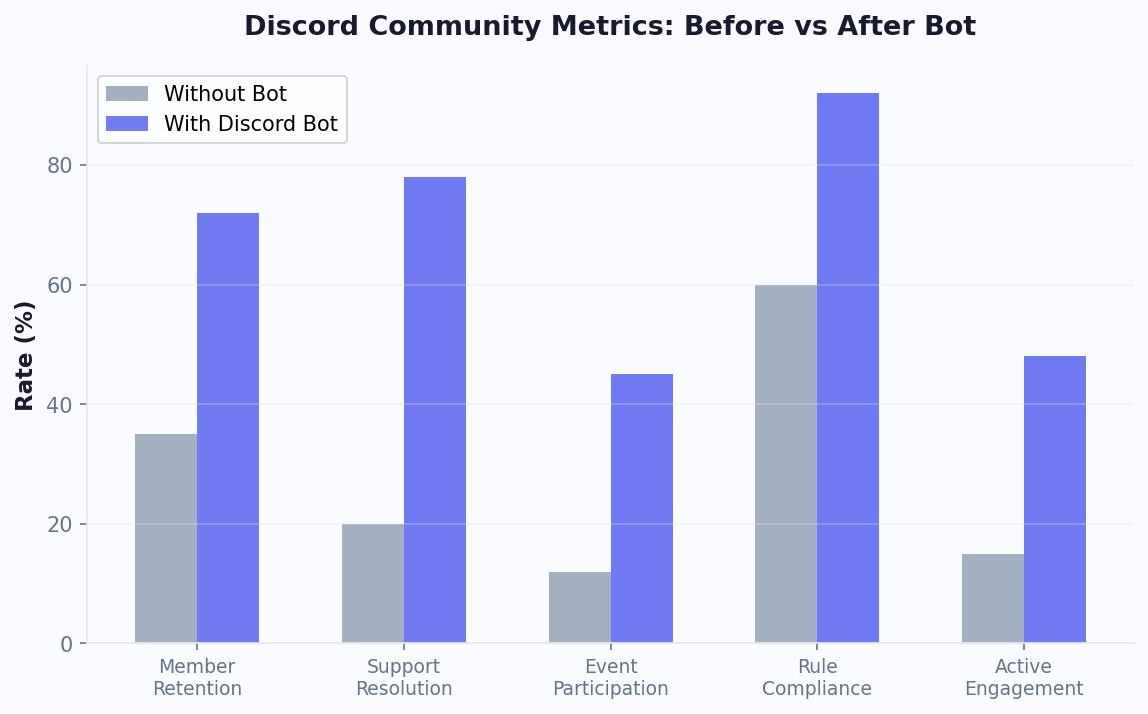
Discord communities face unique moderation challenges as they scale. Spam bots, off-topic messages, harassment, and raid attacks can destroy community culture if not managed proactively. While Conferbot focuses on conversational automation rather than traditional moderation (auto-ban, word filters), your bot can assist moderation efforts by guiding users to read and acknowledge server rules through interactive flows, creating structured report-a-problem workflows that collect evidence and route reports to moderators, providing automated warnings and information about community guidelines, and managing verification flows where new members must answer questions or complete steps before gaining full server access. Communities using structured onboarding bots report 60% fewer rule violations in the first week after a member joins.
Role Assignment Automation
Discord's role system controls what members can see and do in your server. Bots can automate role assignment through reaction-based role selection (users react to a message to receive a role), conversational role assignment (the bot asks questions and assigns appropriate roles based on answers), and activity-based roles (automatically assign roles based on engagement thresholds). For example, a gaming community might ask new members to select their favorite games, time zone, and play style, then assign channel-access roles accordingly. A SaaS company's community might verify customer status and assign "Customer," "Trial," or "Partner" roles that control access to specific support channels.
Event Management
Discord servers regularly host events -- game nights, AMAs, webinars, tournaments, and community calls. Your chatbot can automate event management by announcing upcoming events with interactive RSVP buttons, sending reminders before events start, collecting post-event feedback through conversational surveys, managing sign-ups for limited-capacity events, and creating temporary event channels that are archived automatically after the event ends. Servers using event automation bots see 35% higher event attendance compared to manual announcement-only approaches.
Community Engagement Features
Beyond support and moderation, Discord bots drive engagement through daily discussion prompts posted automatically, welcome flows that introduce new members and suggest channels to explore, milestone celebrations (member anniversaries, contribution counts), FAQ channels that stay current with the most-asked questions, and feedback collection that informs product development. These engagement features transform passive server members into active community participants. Communities with well-configured engagement bots report 2-3x higher daily active user rates compared to servers without automation. Connect your bot to Conferbot's AI knowledge base to answer community questions from your documentation automatically.
Step-by-Step Discord Bot Setup
Setting up a Discord bot with Conferbot is straightforward. The built-in Gateway Manager handles the complex WebSocket connection, so you just need to create a bot application and paste your token.
Prerequisites
- A Discord account
- A Discord server where you have admin/owner permissions
- A Conferbot account
Step 1: Build Your Chatbot
Create your chatbot in the Conferbot visual builder. For Discord communities, we recommend starting with a FAQ template and customizing it with your community's most common questions, server rules, and resource links.
Step 2: Create a Discord Application
- Go to the Discord Developer Portal at discord.com/developers/applications
- Click "New Application" and give it a name (this will be your bot's display name)
- Navigate to the "Bot" section in the left sidebar
- Click "Add Bot" and confirm
- Under "Privileged Gateway Intents," enable MESSAGE CONTENT INTENT (required for reading messages)
- Click "Reset Token" to generate a new bot token — copy and save this securely
Step 3: Invite the Bot to Your Server
- Go to "OAuth2" → "URL Generator" in the Developer Portal
- Under Scopes, select: bot and applications.commands
- Under Bot Permissions, select: Send Messages, Read Message History, Embed Links, Add Reactions
- Copy the generated URL and open it in your browser
- Select your server and click "Authorize"
Step 4: Connect to Conferbot
- In Conferbot, navigate to Channels → Discord → Connect
- Paste your Bot Token
- Select the chatbot you built in Step 1
- Click "Connect" — Conferbot's Gateway Manager establishes the connection
Your bot should appear online in your Discord server within seconds. Send it a DM or mention it in a channel to test. Total setup: 5-10 minutes.
Configuring Channel-Specific Behavior
After setup, configure which channels your bot monitors and responds in. Best practice is to create a dedicated #bot-help or #support channel where the bot actively responds to all messages, while keeping it silent in social and off-topic channels. In the Conferbot dashboard, you can set channel-specific triggers, different conversation flows for different channels, and quiet hours when the bot only responds to direct commands. For large servers with multiple use cases, you can deploy separate chatbot instances to different channels -- for example, an FAQ bot in #help, an event bot in #events, and an onboarding bot that DMs new members.
Key Discord Bot Features with Conferbot
Conferbot brings enterprise-grade automation to Discord without the complexity of custom bot development.
Built-in Gateway Manager
Most Discord bots require you to host a server that maintains a persistent WebSocket connection. Conferbot handles this entirely for you. The Gateway Manager keeps your bot online 24/7 with automatic reconnection, heartbeat management, and shard handling for large servers. Zero DevOps required.
25-Button Interactive Messages
Discord supports more interactive buttons per message than any other platform — up to 25 (5 rows of 5). Build rich FAQ panels, multi-step forms, product browsers, and interactive guides using only buttons. Users tap instead of type, making interactions fast and error-free.
AI-Powered Community Support
Integrate OpenAI to handle the long tail of questions that structured flows cannot anticipate. Your bot can answer nuanced questions about your product, game, service, or community — drawing from your knowledge base to provide accurate, context-aware responses.
DM-Based Support Tickets
Handle sensitive support issues privately. When a member requests help in a public channel, the bot can move the conversation to DMs, collect details, and create a support ticket. Your team manages tickets through Conferbot's dashboard with full conversation history.
Multi-Channel Awareness
Configure different bot behaviors for different channels. The bot can provide technical support in #help, handle role requests in #roles, answer product questions in #general, and stay silent in social channels.
Seamless Human Handoff
When the bot encounters an issue it cannot resolve, live chat connects the member with a human agent. The agent joins the conversation with full context, ensuring a smooth handoff that does not frustrate the community member.
Discord Chatbot Use Cases
Discord's versatility means chatbot applications vary dramatically by community type. Here are the most effective deployments.
Gaming Communities
Automate server information (rules, maps, schedules), provide game tips and strategies, manage team signups for events and tournaments, handle ban appeals through DM flows, and send automated announcements for game updates. Gaming communities with chatbots report 50% fewer repeated questions in general channels.
SaaS and Developer Communities
Answer technical FAQs, troubleshoot common issues, link to relevant documentation, collect bug reports in structured formats, and triage support requests by severity. Developer communities find that chatbots resolve 40-60% of support questions without human intervention, freeing engineers to focus on building.
Web3 and Crypto Projects
Provide tokenomics information, explain staking or minting processes, verify wallet connections, prevent common scam patterns, and manage allowlist applications. Security-focused automation is critical in Web3 where community members are high-value targets for phishing.
Education and Courses
Handle enrollment questions, share course schedules and deadlines, provide assignment help, collect feedback, and manage study group formation. Educational communities using chatbots see 30% higher student engagement in Discord-based courses.
Creator and Brand Communities
Welcome new fans, share content schedules, handle merchandise inquiries, manage exclusive access roles, and collect community feedback. Creators using Discord bots save 10-20 hours per week on community management.
Internal Company Servers
HR FAQ automation, IT support triage, onboarding guides for new employees, meeting scheduling, and internal knowledge base access. More companies are adopting Discord for internal communication, especially remote-first teams.
Discord vs Other Community Platforms
Discord excels as a community platform but competes with alternatives for different use cases. Here is how it compares for chatbot deployment.
| Feature | Discord | Slack | Telegram | Microsoft Teams |
|---|---|---|---|---|
| Primary Audience | Communities, gaming, creators | Business teams | Global messaging, groups | Enterprise workplace |
| Monthly Active Users | 150M+ | 32M+ daily | 800M+ | 320M+ |
| Buttons Per Message | 25 | 5+ | Unlimited inline | Limited |
| Rich Embeds | Excellent | Blocks | Basic formatting | Adaptive Cards |
| Group/Channel Support | Excellent (servers + channels) | Good (workspaces + channels) | Groups + supergroups | Teams + channels |
| DM Support | Full bot DM | Full bot DM | Full bot DM | Limited |
| Message Editing | Yes | Yes | Yes | No |
| Voice Channels | Built-in | Huddles | No | Calls/Meetings |
| Bot Hosting | Gateway (Conferbot managed) | Event-based | Webhook | Webhook |
| Cost | Free | Free tier limited | Free | Microsoft 365 license |
| Best For | External communities | Internal teams | Global outreach | Enterprise internal |
When to choose Discord: Discord is the clear winner for external community building, fan engagement, and customer communities — especially if your audience skews younger (18-35) or is tech-savvy. For internal business automation, consider Slack or Microsoft Teams. For global customer messaging, WhatsApp or Telegram may be more appropriate. Conferbot's omnichannel platform lets you cover all bases from a single dashboard.
Discord Chatbot Best Practices
Discord communities have strong cultural norms. Your bot must feel like a helpful member of the community, not an intrusive corporate tool.
1. Respect Channel Culture
Configure your bot to only respond in designated channels. A bot that responds to every message in #general will annoy your community. Create dedicated channels like #bot-help or #support where the bot is expected, and let social channels remain bot-free.
2. Use Embeds for Structured Information
Plain text messages get lost in busy channels. Use Discord's rich embeds with colors, fields, images, and footers to make bot responses stand out and be scannable. A well-formatted embed for server rules or FAQ answers is far more useful than a wall of text.
3. Design for Both Channel and DM Contexts
Some conversations belong in public (FAQs, announcements, community knowledge) while others need privacy (support tickets, account issues, moderation). Build flows that start in channels but can transition to DMs when appropriate.
4. Keep Button Labels Short and Clear
With 25 buttons available, the temptation is to use them all. Resist. Use 3-5 buttons per message for the most common choices, with a "More Options" button if needed. Labels should be 2-4 words maximum for mobile readability.
5. Implement a Help Command
Every Discord bot should respond to a help command or button that explains what the bot can do. New members should be able to discover your bot's capabilities instantly without asking in chat.
6. Update Content Regularly
Communities evolve. Update your bot's FAQ answers, resource links, and flows monthly. Stale information erodes trust faster than no information at all. Use analytics to identify which responses need refreshing.
7. Set Clear Bot Boundaries
Let your community know what the bot can and cannot do. A brief bot introduction message when a new member joins (or when someone types /help) sets expectations and reduces frustration.
Getting Started with Your Discord Bot
Building a Discord bot with Conferbot takes minutes. Here is the fastest path to a live bot in your server.
Quick Start Checklist
- Create your Conferbot account and choose a community FAQ template
- Customize the flows with your community's most-asked questions, server rules, and resource links
- Add AI responses using OpenAI integration for questions your structured flows do not cover
- Create the Discord application and bot on the Discord Developer Portal
- Invite the bot to your server using the OAuth2 URL
- Paste the bot token in Conferbot's Discord channel settings
- Test in a private channel before opening to the full community
- Announce to your community and monitor with analytics
What Makes Conferbot Different for Discord
- No hosting required — The built-in Gateway Manager keeps your bot online 24/7
- No coding required — Visual flow builder with drag-and-drop design
- AI-powered — OpenAI integration handles complex, open-ended questions
- Human backup — Live chat handoff when the bot needs help
- Cross-platform — The same bot logic works across Discord, your website, WhatsApp, and other channels
Whether you run a gaming community of 50 or a product community of 50,000, a Discord chatbot automates the repetitive work so your team can focus on building genuine connections. View pricing and start building today.
Server Template Automation
Discord server templates let you clone your server's channel structure, roles, and permissions for rapid deployment. Your Conferbot bot can automate the template experience by configuring itself in new servers instantly — when the bot is invited to a server created from your template, it automatically sets up channel-specific responses, assigns default roles through welcome flows, and posts a setup-complete embed in the designated admin channel. For communities that manage multiple servers (e.g., regional chapters, franchise locations, or course cohorts), template automation reduces per-server setup from hours to seconds. The bot detects the template source and applies the correct configuration preset without manual intervention.
Welcome Flow and Onboarding Scripts
First impressions determine whether a new member becomes an active participant or silently leaves. An effective welcome flow does more than say hello — it builds investment. Configure your bot to send a DM welcome sequence within 30 seconds of a new member joining: introduce the server's purpose, ask 2-3 questions (interests, timezone, how they found the server), assign roles based on answers, and direct them to the most relevant channels. The best onboarding scripts include a brief interactive quiz about server rules (members who complete a rules quiz are 70% less likely to violate community guidelines in their first month). Follow up 24 hours later with a "Getting Started" guide DM that highlights active discussions and upcoming events. Servers with structured onboarding retain 45% more members at the 30-day mark compared to servers with no welcome flow.
XP and Leveling Systems
Gamification drives engagement. While Conferbot is not a dedicated leveling bot, your chatbot can complement XP systems by announcing level-up milestones in a dedicated channel, triggering reward flows when members reach specific levels (exclusive channel access, custom roles, special bot interactions), and providing leaderboard information through conversational queries ("Who are the top contributors this week?"). Pair the Conferbot engagement bot with a leveling bot like MEE6 or Arcane for a complete gamification stack — Conferbot handles the conversational and informational layer while the leveling bot tracks XP. Communities with gamification see 2-4x higher message volume from mid-tier members who are motivated by progression systems.
Ticket Channel Management
Support ticket systems on Discord typically create private channels for each ticket. Your Conferbot bot can manage the entire ticket lifecycle: a member clicks a "Create Ticket" button in a support channel, the bot creates a private channel visible only to the member and support staff, runs through an automated triage flow (collecting category, priority, description, and screenshots), and assigns the ticket to the appropriate support role based on the category. When the issue is resolved, the bot prompts for a satisfaction rating, archives the channel (or deletes it after a configurable retention period), and logs the complete interaction to the Conferbot dashboard. This creates a searchable ticket history that Discord's native channel structure does not provide. Teams using structured ticket flows resolve issues 35% faster because the triage step ensures complete information upfront.
Audit Logging
Discord's built-in audit log tracks server changes, but it does not capture bot interactions, conversation content, or member engagement patterns. The Conferbot dashboard provides a complete audit trail of every bot interaction: who initiated the conversation, which flow was triggered, what data was collected, whether a handoff occurred, and how the interaction was resolved. For communities in regulated industries or those that need accountability (e.g., educational institutions, financial communities), this audit capability is essential. Export logs to CSV for compliance reporting or integrate with your existing audit tools through the integrations hub.
Multi-Server Management
Organizations managing multiple Discord servers — franchise networks, educational institutions with per-class servers, or brands with regional communities — can deploy and manage bots across all servers from a single Conferbot dashboard. Key multi-server capabilities include centralized flow management (update a bot flow once and it deploys to all connected servers), per-server configuration overrides (customize welcome messages, FAQ content, and role assignments for each server), aggregate analytics across all servers (total interactions, common questions, resolution rates), and bulk operations (connect a new bot version to 50 servers simultaneously). This eliminates the operational nightmare of managing separate bot instances for each server. Whether you have 3 servers or 300, the management overhead stays constant.
Why Conferbot for Discord
- No hosting required — Built-in Gateway Manager keeps your bot online 24/7 without external servers
- No coding required — Build with our visual AI chatbot builder
- AI-powered answers — AI knowledge base resolves community questions from your documentation
- 25-button interactive messages — The most interactive bot experience of any messaging platform
- Channel and DM support — Public knowledge sharing and private support in one bot
- Rich integrations — Connect CRMs, ticketing systems, and more via the integrations hub
- Omnichannel deployment — Same bot works on Discord, website, WhatsApp, Telegram, and other channels
- Real-time analytics — Track community engagement with built-in analytics
- Seamless handoff — Route complex issues to live agents with full context
How Conferbot Compares for Discord
Most platforms charge per message, per seat, or limit channels by tier. Here's how Conferbot is different.
| Feature | Conferbot | Typical Competitor |
|---|---|---|
| Channels included | 13+ (all plans) | 3-6 (varies by tier) |
| Pricing model | Flat rate from $19/mo | Per-seat or per-message |
| AI chatbot builder | Yes (plain English) | No or limited |
| Native mobile SDKs | 4 (Android, iOS, Flutter, RN) | None (WebView only) |
| Knowledge base AI | Included | Add-on ($30-99/mo) |
| Live chat handoff | Included | Higher tiers only |
| Calendar booking | Built-in | Third-party required |
| Setup time | Under 10 minutes | Hours to days |
Discord FAQ
Everything you need to know about chatbots for discord.
Discover More
Continue Exploring
Explore features, connect third-party tools, and browse ready-made templates.