
LINE Chatbot Builder
Connect with users in LINE's key markets - Japan, Taiwan, Thailand, and Indonesia. Features carousel templates, quick replies, and super-fast 30-second reply tokens.
LINE Chatbot Features
Everything you need to build powerful automated conversations
What Can You Build?
Get Started in 13 Simple Steps
Follow this guide to connect your LINE chatbot
Go to LINE Developers Console (developers.line.biz)
Create a Provider (or select existing)
Create a new Messaging API Channel
Copy the Channel ID from Basic settings
Copy the Channel Secret from Basic settings
Issue a long-lived Channel Access Token
In Conferbot, go to Channels → LINE → Connect
Enter Channel ID, Channel Secret, and Access Token
Copy the Webhook URL from Conferbot
In LINE Console, paste the Webhook URL
Enable 'Use webhook' option
Disable auto-reply and greeting messages (optional)
Your LINE bot is live!
Introduction
LINE is not just another messaging app — it is the digital infrastructure of daily life in Japan, Taiwan, Thailand, and Indonesia. With over 230 million monthly active users concentrated in these four markets, LINE functions as the primary communication tool, mobile payment platform, news source, and e-commerce gateway for hundreds of millions of people.
In Japan alone, LINE reaches 95 million users — roughly 75% of the entire population. It is used for everything from personal chats and business communication to government alerts and restaurant reservations. In Taiwan, Thailand, and Indonesia, LINE holds similar market dominance. For any business targeting these regions, LINE is not optional — it is essential.
LINE Official Accounts let businesses interact with customers through the Messaging API, offering features like carousel templates, quick replies, rich media, and 30-second reply tokens for lightning-fast responses. But manually managing these interactions is impractical at scale. A chatbot automates the work while delivering the instant, personalized experiences that LINE users expect.
With Conferbot's no-code chatbot builder, you can deploy a LINE chatbot in minutes. Design conversational flows with our visual builder, integrate AI-powered responses, and connect to your LINE Official Account without writing any code. This guide covers LINE's unique platform features, setup process, market-specific strategies, and best practices for success in 2026.
New to chatbot building? Read our complete guide to building a chatbot without coding. Want to combine LINE with global channels like WhatsApp and Messenger? Deploy on all three with Conferbot's omnichannel platform. Browse our template library for ready-to-customize LINE bot flows.
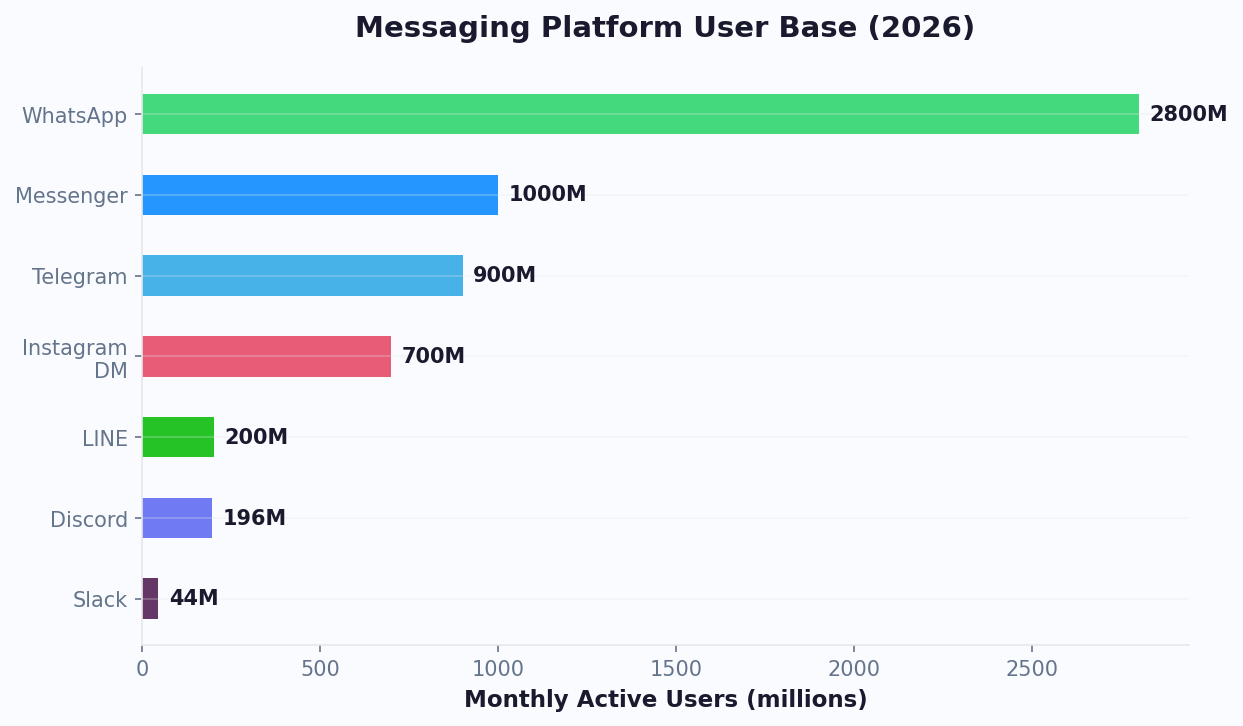
LINE Messaging API Capabilities
LINE's Messaging API offers a rich set of templates and interaction types designed for the mobile-first Asian market. Understanding these capabilities is key to building effective LINE chatbots.
Message Templates
- Carousel Templates — Up to 10 horizontal scrolling columns, each with an image, title, text, and up to 3 action buttons. Perfect for product catalogs, menu displays, and property listings. The most visually rich template in LINE's toolkit
- Confirm Templates — Simple Yes/No or binary choice messages with two action buttons. Ideal for confirmations, opt-ins, and decision points
- Buttons Templates — A message with an image, title, text, and up to 4 action buttons. Use for CTAs like booking, purchasing, or navigating to specific bot flows
- Image Map Messages — Full-image messages with clickable regions, enabling rich visual menus and interactive images
- Flex Messages — Highly customizable JSON-based messages with flexible layouts, fonts, and colors. The most design-flexible option for brands that need pixel-perfect control
Quick Replies
Up to 13 quick reply items displayed as horizontally scrollable buttons below a message. Quick replies can trigger text, URL, date picker, camera, camera roll, or location sharing actions — far more versatile than text-only options.
Reply Tokens
LINE uses a unique reply token system. When a user sends a message, LINE provides a reply token valid for 30 seconds. This enables extremely fast response cycles but requires your bot infrastructure to be responsive. Conferbot handles this seamlessly through its optimized webhook processing.
User Profile
Access the user's display name, profile picture, language, and status message for personalized interactions. Combined with LINE's regional focus, this enables market-specific personalization.
Rich Menus
A persistent visual menu displayed at the bottom of the chat screen. Unlike text-based persistent menus on other platforms, LINE's rich menu is a full image with tappable regions, enabling visually branded navigation.
LINE Official Account Types
LINE offers different account types that affect your chatbot's capabilities and reach:
| Feature | Free Plan | Light Plan | Standard Plan |
|---|---|---|---|
| Monthly Price | Free | ~$50/month | ~$150/month |
| Free Messages/Month | 200 (Japan), 500 (others) | 5,000 | 30,000 |
| Additional Messages | Not available | ~$0.05 each | ~$0.03 each |
| Messaging API | Yes | Yes | Yes |
| Rich Menu | Yes | Yes | Yes |
| Verified Badge | Application required | Application required | Application required |
All plan tiers support the Messaging API, meaning you can connect a Conferbot chatbot regardless of which plan you choose. The key difference is message volume -- the free plan's 200-message limit (in Japan) can be quickly consumed by active bots. For businesses with significant customer traffic, the Light or Standard plan is recommended. Note that reply messages (responses to user-initiated messages) do not count against your monthly quota -- only push messages (business-initiated) are counted. This makes the free tier viable for support bots where customers message first.
LINE Pay Integration
LINE Pay is one of the most widely used mobile payment platforms in Japan, Taiwan, and Thailand. Integrating LINE Pay with your chatbot enables in-chat transactions: customers browse products through carousel templates, select items, and complete payment without leaving the LINE app. In Japan, LINE Pay processes over $30 billion in annual transactions, and merchants using LINE Pay with chatbots report 25% higher average order values compared to redirecting users to external payment pages. The seamless payment experience reduces cart abandonment and builds customer trust in conversational commerce.
LIFF (LINE Front-end Framework)
LIFF allows you to create rich web experiences that run inside the LINE app. Think of it as LINE's equivalent of Telegram Mini Apps. LIFF apps can access user profile information, share content back to LINE chats, and provide interactive experiences that go beyond what standard message templates offer. Use cases include detailed product configurators, interactive maps for store locators, complex forms for insurance quotes or loan applications, and gamified loyalty programs. Your Conferbot chatbot can launch LIFF apps at specific conversation points -- for example, when a user wants to customize a product or fill out a detailed application, the bot opens the LIFF app for the complex interaction and returns to conversational mode afterward.
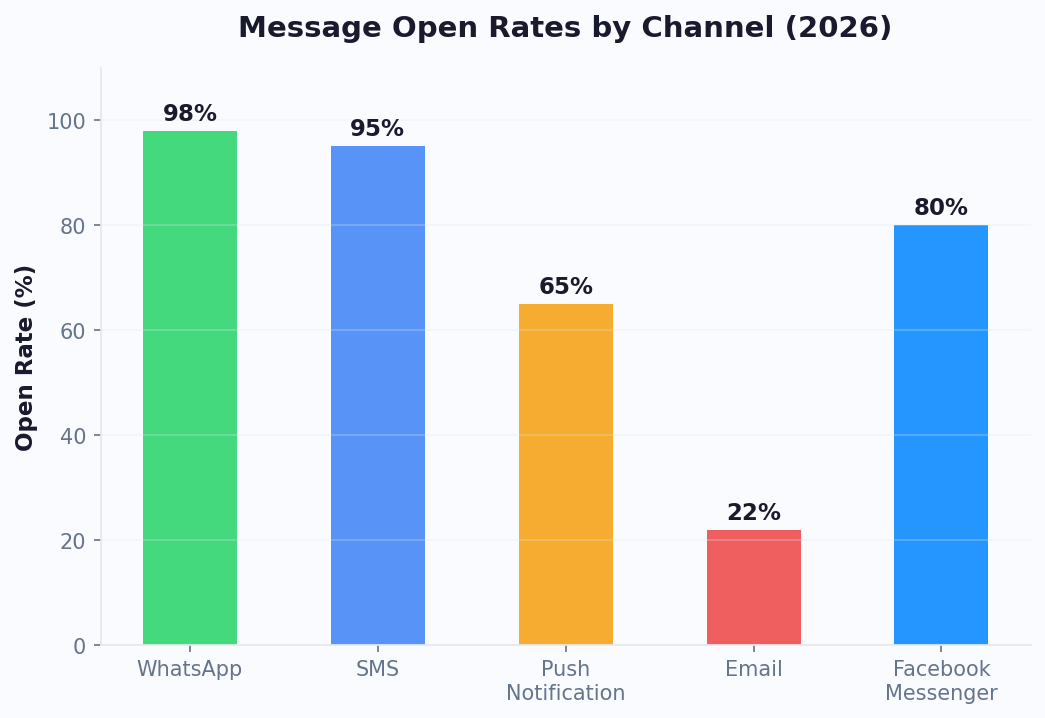
Step-by-Step LINE Bot Setup
Setting up a LINE chatbot involves creating a LINE Official Account and connecting it through the Messaging API. Here is the complete process.
Prerequisites
- A LINE account (personal account is fine to start)
- Access to the LINE Developers Console
- A Conferbot account
Step 1: Build Your Chatbot
Start in the Conferbot dashboard by creating a chatbot with the visual builder. For LINE's Asian markets, consider using templates designed for customer support or e-commerce, and customize with local language content.
Step 2: Create a LINE Channel
- Go to developers.line.biz and log in with your LINE account
- Create a Provider (your company or project name) if you do not have one
- Click "Create a new channel" and select Messaging API
- Fill in the channel details: name, description, category, and region
- Accept the terms and create the channel
Step 3: Collect Your Credentials
- In the channel's Basic settings, copy the Channel ID and Channel Secret
- Navigate to the Messaging API tab
- Scroll to "Channel access token" and click Issue to generate a long-lived token
- Copy the Channel Access Token
Step 4: Connect to Conferbot
- In Conferbot, go to Channels → LINE → Connect
- Enter your Channel ID, Channel Secret, and Channel Access Token
- Conferbot generates a Webhook URL — copy it
Step 5: Configure the Webhook
- Back in the LINE Developers Console, go to the Messaging API tab
- Paste the Webhook URL from Conferbot into the Webhook URL field
- Click Verify to confirm the connection
- Enable the "Use webhook" toggle
- Optionally, disable "Auto-reply messages" and "Greeting messages" in the LINE Official Account settings to prevent conflicts with your bot
Your LINE chatbot is now live. Add it as a friend using the QR code in the LINE Developers Console and send a test message. Setup takes approximately 10 minutes.
Key LINE Bot Features with Conferbot
Conferbot adds intelligent automation to LINE's already powerful messaging platform, creating a complete engagement solution for Asian markets.
Carousel-Driven Commerce
LINE's 10-column carousel templates are perfect for product browsing. Build interactive catalogs where users swipe through products, tap for details, and proceed to purchase — all within the LINE chat. This commerce-in-chat experience matches the shopping habits of LINE's core markets where mobile commerce dominates.
Multi-Language AI Responses
LINE spans four linguistically distinct markets. With OpenAI integration, your bot can understand and respond in Japanese, Mandarin Chinese, Thai, Bahasa Indonesia, and English — handling the linguistic diversity of LINE's user base automatically.
Rich Menu Design
Configure visually branded rich menus that serve as the main navigation for your bot. Unlike simple text menus, LINE rich menus use full images with tappable zones, enabling creative, on-brand navigation that feels like a mini-app.
Reply Token Optimization
LINE's 30-second reply token window demands fast bot response times. Conferbot's infrastructure is optimized for LINE's reply token system, processing incoming messages and generating responses well within the window to ensure every user receives a timely reply.
Omnichannel Continuity
Customers who start on LINE can continue conversations on your website, WhatsApp, or other channels through Conferbot's omnichannel platform. This is especially valuable for international businesses that serve LINE-dominant Asian markets alongside WhatsApp-dominant regions.
AI Knowledge Base for Asian Markets
Connect your product documentation, FAQ content, and support articles to Conferbot's AI knowledge base. The AI processes queries in Japanese, Mandarin, Thai, and Bahasa Indonesia, delivering accurate answers from your existing content without requiring you to build separate flows for each language. This dramatically reduces the setup time for multi-market LINE deployments.
Calendar Booking for LINE
Service businesses in LINE's markets can integrate calendar booking directly into LINE conversations. Customers book appointments, reserve restaurant tables, or schedule consultations through quick reply buttons and date pickers -- all within LINE. The bot syncs with Google Calendar or Outlook to manage availability in real time.
Analytics for Asian Markets
The analytics dashboard tracks LINE-specific metrics: friend additions, message delivery rates, carousel engagement, quick reply usage, and conversation completion rates by market.
LINE Chatbot Use Cases by Market
LINE chatbot use cases vary by market due to different consumer behaviors and regulations. Here are the highest-impact applications across LINE's key regions.
Japan
Japan is LINE's largest and most mature market. Effective chatbot use cases include restaurant reservations (especially important in Japan's dining culture), retail loyalty programs, product launches with carousel previews, train and travel information, healthcare appointment booking, and government services. Japanese consumers are highly receptive to brand interactions on LINE, with 70% of LINE users following at least one business account.
Taiwan
LINE dominates Taiwan's messaging landscape. Key use cases include e-commerce order management, food delivery coordination, banking and financial services, educational institution communications, and small business customer service. Taiwan's LINE ecosystem is particularly strong for local commerce — small restaurants, salons, and shops rely on LINE bots for reservation management.
Thailand
Thailand has one of LINE's most engaged user bases. Popular chatbot applications include hospitality and tourism (hotel bookings, tour information), e-commerce product recommendations, telecom customer support, insurance inquiries, and government service chatbots. Thai consumers are particularly responsive to visual commerce through carousel templates.
Indonesia
Indonesia represents a high-growth LINE market. Effective use cases include ride-hailing and delivery support, financial services (especially mobile banking), education and tutoring, healthcare appointment scheduling, and retail customer engagement. Indonesia's young, mobile-first population makes it an ideal market for conversational commerce.
Cross-Market Applications
For international businesses operating across multiple LINE markets, chatbot templates for lead generation and customer support can be localized for each market while maintaining consistent brand experience and backend automation.
LINE vs Other Asian Messaging Platforms
LINE competes with several platforms across Asia. Here is how it compares for chatbot deployment.
| Feature | LINE | KakaoTalk | ||
|---|---|---|---|---|
| Monthly Active Users | 230M+ | 2.7B+ | 1.3B+ | 53M+ |
| Key Markets | Japan, Taiwan, Thailand, Indonesia | Global | China | South Korea |
| Carousel Templates | Up to 10 columns | No | Yes | Yes |
| Quick Replies | Up to 13 items | Up to 3 buttons | Yes | Yes |
| Rich Menu | Visual image-based | No | Custom menus | Yes |
| Flex Messages | Yes (highly customizable) | No | Mini Programs | No |
| Payment Integration | LINE Pay | WhatsApp Pay (limited) | WeChat Pay | KakaoPay |
| API Accessibility | Open (global developers) | Open (Meta API) | Restricted (China-based entity required) | Open (Korean market) |
| Bot Setup Complexity | Moderate | Moderate | Complex | Moderate |
| Free Messaging Tier | Yes (limited messages/month) | No (conversation-based) | Varies | Yes |
When to choose LINE: LINE is essential if your business targets Japan, Taiwan, Thailand, or Indonesia. In these markets, no other platform comes close in terms of reach and engagement. For global coverage, combine LINE with WhatsApp for Western markets and use Conferbot's omnichannel platform to manage all channels from one dashboard.
LINE Chatbot Best Practices
LINE's Asian markets have distinct communication norms. Following these best practices ensures your bot resonates with local users.
1. Localize, Do Not Just Translate
Direct translation misses cultural nuances. Japanese users expect polite, formal language (keigo) in business interactions. Thai users appreciate friendly, warm tones. Work with native speakers to craft messages that feel natural, not robotic. Cultural fit matters more than technical features in LINE's markets.
2. Maximize Carousel Templates
LINE's carousel templates are its standout feature. Use them liberally for product showcases, service menus, location guides, and step-by-step tutorials. Each carousel column should have a compelling image, concise text, and a clear action button. Test that images display well on both iOS and Android.
3. Design an Effective Rich Menu
The rich menu is the first thing users see when they open your chat. Design it as the "home page" of your bot — include the most common actions (Order, Support, FAQ, Hours, Location). Update the rich menu seasonally or for promotions to keep the experience fresh.
4. Respect the Message Quota
LINE Official Accounts have monthly message quotas on free and lower-paid plans. Design your bot to be efficient with messages — combine information into single responses, use carousels instead of multiple messages, and avoid unnecessary follow-ups. Monitor message usage in your LINE Official Account Manager.
5. Optimize for 30-Second Reply Tokens
Every user message generates a reply token valid for 30 seconds. Your bot must respond within this window. Conferbot handles this automatically, but be aware when designing flows that require external API calls — keep integrations fast.
6. Use Quick Replies for Navigation
LINE's 13-item quick replies provide excellent navigation. Use them to guide users through complex flows without typing. Include action types beyond text — date pickers for bookings, location sharing for nearby store searches, and camera access for product photo submissions.
7. Monitor with Analytics
Track friend additions, block rates, message open rates, and carousel tap rates through Conferbot analytics. High block rates signal that your bot is too aggressive. Low carousel engagement suggests your content or images need improvement.
Getting Started with Your LINE Chatbot
If your business serves customers in Japan, Taiwan, Thailand, or Indonesia, a LINE chatbot is one of the highest-impact investments you can make. Here is how to start.
Quick Start Path
- Sign up for Conferbot and select a template for your use case — customer support, lead generation, or e-commerce
- Localize your content for your target market's language and cultural norms
- Create your LINE Messaging API channel in the LINE Developers Console
- Connect to Conferbot by entering your Channel ID, Channel Secret, and Access Token
- Configure the webhook and test with a personal LINE account
- Design your rich menu to serve as the bot's visual home page
- Launch and promote your LINE Official Account through QR codes, website links, and in-store materials
Market Entry Strategy
- Start with one market — Get your bot working perfectly in one country before expanding to others
- Leverage LINE's ecosystem — Integrate with LINE Pay for transactions, LINE Beacon for in-store experiences, and LINE Login for frictionless authentication
- Combine with other channels — Use Conferbot's omnichannel platform to serve LINE users in Asia and WhatsApp users globally from one dashboard
LINE chatbots are the gateway to four of Asia's most lucrative consumer markets in 2026. With Conferbot, you get enterprise-grade automation without the complexity of building on the Messaging API from scratch. View pricing and start building your LINE chatbot today.
LINE Beacon: Proximity Marketing
LINE Beacon is a Bluetooth Low Energy (BLE) technology that connects physical locations to your LINE chatbot. When a customer with LINE installed on their phone walks near a LINE Beacon device, your bot can automatically send a personalized message — a welcome greeting, a coupon code, a menu, or a loyalty stamp. This bridges the gap between online chatbot engagement and in-store experiences. Beacon hardware costs approximately $30-50 per unit and covers a radius of 5-50 meters (configurable). Use cases include: retail stores sending personalized discount codes when customers enter, restaurants displaying the daily menu when diners are seated, museums providing exhibit information as visitors move through galleries, and event venues distributing schedules and maps to attendees. In Japan, where LINE Beacon adoption is highest, merchants using proximity-triggered coupons report 18-25% higher redemption rates compared to push message coupons, because the offer arrives at the exact moment of purchase intent. Your Conferbot chatbot receives beacon entry events through the Messaging API and triggers location-specific conversation flows automatically.
LINE VOOM: Social Feed Integration
LINE VOOM (formerly LINE Timeline) is LINE's social feed feature where users consume short-form content, similar to Instagram Stories or TikTok. Your LINE Official Account can post to VOOM to reach followers in a feed context rather than a chat context. While your chatbot operates in the messaging channel, VOOM posts drive users into chatbot conversations through call-to-action links. Effective VOOM strategies include posting product highlights with "Chat to order" CTAs, sharing customer success stories with links to support bot flows, running interactive polls that continue as chatbot conversations, and announcing flash sales where purchase happens through the bot. VOOM posts are free (they do not count against your message quota), making them an efficient way to re-engage followers and funnel them into your chatbot. LINE VOOM reaches 30-40% of your followers organically, significantly higher than typical social media organic reach.
Flex Messages: Rich Card Design
Flex Messages are LINE's most powerful message format — JSON-based templates that give you pixel-level control over layout, typography, colors, and spacing. Think of them as mini web pages that render natively inside the LINE chat. While standard carousel and button templates work for most use cases, Flex Messages unlock experiences like order confirmation receipts with itemized pricing and delivery tracking buttons, boarding passes with QR codes, appointment confirmations with calendar integration, product comparison cards with side-by-side feature tables, and interactive loyalty cards showing points balance and tier progress. Flex Messages support three layout types: bubble (single card), carousel (scrollable cards), and container (grouped elements). Each bubble can contain header, hero (image), body, and footer sections with independent styling. The Conferbot visual builder generates Flex Message JSON automatically when you design rich card flows — no manual JSON editing required. For advanced customization, use LINE's Flex Message Simulator to preview designs before deploying through Conferbot.
LINE Notification Messages
LINE Notification Messages are a special message type designed for transactional and service notifications — order confirmations, appointment reminders, delivery updates, and payment receipts. Unlike regular push messages that count against your monthly quota, Notification Messages have a separate pricing structure and are permitted even when users have not explicitly opted in to marketing messages (subject to LINE's notification message guidelines). This makes them ideal for essential service communications. To use Notification Messages, your LINE Official Account must be approved for the Notification Message API. Conferbot handles the API integration — configure your notification triggers (order placed, appointment booked, delivery dispatched) and the SDK sends the appropriate Notification Message through LINE's dedicated channel. Notification Messages achieve 90%+ open rates because they appear as standard LINE messages with the visual authority of a verified business account.
Regional Market Data and Strategy
Understanding LINE's market penetration by region is essential for targeting and budgeting. Here is the current landscape:
| Market | Monthly Active Users | Population Penetration | Primary Use Cases | Payment Integration |
|---|---|---|---|---|
| Japan | 95 million | ~75% | Commerce, banking, government, dining, healthcare | LINE Pay (dominant) |
| Thailand | 54 million | ~77% | E-commerce, hospitality, telecom, insurance | Rabbit LINE Pay |
| Taiwan | 21 million | ~90% | Local commerce, food delivery, banking, education | LINE Pay |
| Indonesia | ~16 million | ~6% (but growing in urban centers) | Ride-hailing, fintech, education, retail | LINE Pay (via partners) |
Japan is the most mature market with the highest average revenue per user. Japanese consumers expect polished, detailed interactions with formal language (keigo). Chatbot response times under 2 seconds are expected. Thailand has the highest engagement rates — Thai users send more messages per day than any other LINE market. Visual commerce through carousels performs exceptionally well in Thailand. Taiwan has the highest penetration rate at approximately 90% of the population, making it the closest to a universal messaging platform. Local small businesses rely heavily on LINE for customer communication. Indonesia represents the highest growth opportunity, particularly in urban centers like Jakarta and Surabaya. The younger demographic is highly receptive to chatbot-driven commerce.
For multi-market deployments, build your core chatbot flows in Conferbot's visual builder, then localize content for each market. Use the AI knowledge base to handle language-specific queries automatically. Track performance by market in the analytics dashboard to optimize spending and content for each region. Combine LINE with WhatsApp to cover both Asian and global markets from a single omnichannel dashboard.
Why Conferbot for LINE
- No code required — Build LINE bots with our visual AI chatbot builder
- Multi-language AI — AI knowledge base supports Japanese, Mandarin, Thai, and Bahasa Indonesia
- Carousel commerce — 10-column carousels for product browsing and in-chat shopping
- Rich Menu design — Visually branded navigation that serves as your bot's home screen
- Reply token optimization — Infrastructure built for LINE's 30-second response window
- Calendar booking — Let customers book appointments directly in LINE with calendar integration
- Rich integrations — Connect LINE Pay, CRMs, and e-commerce platforms via integrations hub
- Omnichannel — Combine LINE with WhatsApp, Messenger, and your website
- Real-time analytics — Track friend additions, engagement, and conversion with built-in analytics
See how Conferbot compares to other chatbot platforms for LINE automation.
How Conferbot Compares for LINE
Most platforms charge per message, per seat, or limit channels by tier. Here's how Conferbot is different.
| Feature | Conferbot | Typical Competitor |
|---|---|---|
| Channels included | 13+ (all plans) | 3-6 (varies by tier) |
| Pricing model | Flat rate from $19/mo | Per-seat or per-message |
| AI chatbot builder | Yes (plain English) | No or limited |
| Native mobile SDKs | 4 (Android, iOS, Flutter, RN) | None (WebView only) |
| Knowledge base AI | Included | Add-on ($30-99/mo) |
| Live chat handoff | Included | Higher tiers only |
| Calendar booking | Built-in | Third-party required |
| Setup time | Under 10 minutes | Hours to days |
LINE FAQ
Everything you need to know about chatbots for line.
Discover More
Continue Exploring
Explore features, connect third-party tools, and browse ready-made templates.