
AI-Powered Knowledge Base: Help Customers Help Themselves
Build an AI-powered knowledge base that helps customers find answers instantly. Create and publish help articles with smart search, categories, and AI content.
No credit card required
Self-Service Knowledge Hub
Empower customers to find answers instantly with an AI-powered, searchable knowledge base integrated with your chatbot.
AI-Powered Article Generation
Generate comprehensive help articles from prompts, conversation logs, or existing docs using AI. Edit, refine, and publish in minutes with our rich text editor.
Smart Category Organization
Organize articles into nested categories and subcategories with drag-and-drop reordering, bulk actions, and automatic breadcrumb navigation for easy discovery.
Full-Text Search with AI
Powerful search engine with typo tolerance, synonym matching, and AI-powered suggestions that surface the most relevant articles instantly for your customers.
Why Knowledge Base Matters
The best support teams deflect tickets before they're created. A great knowledge base is your first line of defense.
60% Fewer Tickets
Empower customers to find answers on their own. Well-organized knowledge bases deflect the majority of repetitive support inquiries.
24/7 Self-Service
Your knowledge base never sleeps. Customers get instant answers at any hour, in any timezone, without waiting for agents.
SEO Traffic
Public-facing articles rank in search engines, driving organic traffic to your site and establishing thought leadership.
Lower Support Costs
Each self-service resolution costs a fraction of agent-handled tickets. Scale support without scaling your team.
Faster Resolution
Customers find answers in seconds rather than waiting hours for email replies. AI suggestions accelerate resolution.
Brand Consistency
Every customer receives the same accurate, up-to-date information. Version control maintains content quality.
How It Works
Launch a comprehensive knowledge base in minutes, not weeks.
Create & Organize Articles
Write articles using our rich editor or generate them with AI. Organize into categories with drag-and-drop simplicity.
Publish & Connect to Chatbot
Publish your knowledge base as a public portal or connect it to your chatbot for AI-powered answer suggestions during conversations.
Analyze & Improve
Track article views, search queries, and helpfulness ratings. Identify content gaps and continuously improve your knowledge base.
Knowledge Base for Every Team
From product docs to developer portals - a knowledge base that serves every audience.
Product Documentation
Comprehensive product guides, tutorials, and feature documentation for your users
FAQ Hub
Centralized FAQ portal with smart search, categorized questions, and AI-powered suggestions
Policy Center
Company policies, terms of service, and compliance documentation in one location
Training Portal
Employee onboarding materials, training guides, SOPs, and internal knowledge sharing
Community Help Center
Public-facing help center with user feedback and article ratings
Developer Docs
API documentation, code samples, integration guides, and technical references
Ready to Launch Your Knowledge Base?
Help customers help themselves with an AI-powered knowledge base. Start free, no credit card required.
What Is a Chatbot Knowledge Base?
A chatbot knowledge base is the information repository that powers your bot's ability to answer questions accurately. It is the "brain" behind intelligent responses — containing your FAQ answers, product documentation, policies, and any other information your chatbot needs to help users effectively.
Knowledge Base vs FAQ List
A traditional FAQ list is a flat collection of question-answer pairs. A knowledge base is a structured, searchable, intelligent system that understands relationships between topics, handles question variations, and synthesizes information from multiple sources to compose comprehensive answers. When combined with AI (as in Conferbot's AI knowledge base), it can understand any phrasing of a question and find the right answer without pre-programming each variation.
Why Every Chatbot Needs a Knowledge Base
Without a knowledge base, your chatbot is limited to scripted flows — it can only handle conversations you have pre-designed. With a knowledge base, the chatbot can answer any question within your domain, even questions you have never anticipated. This is the difference between a chatbot that handles 20 pre-programmed questions and one that handles 2,000+ variations on hundreds of topics.
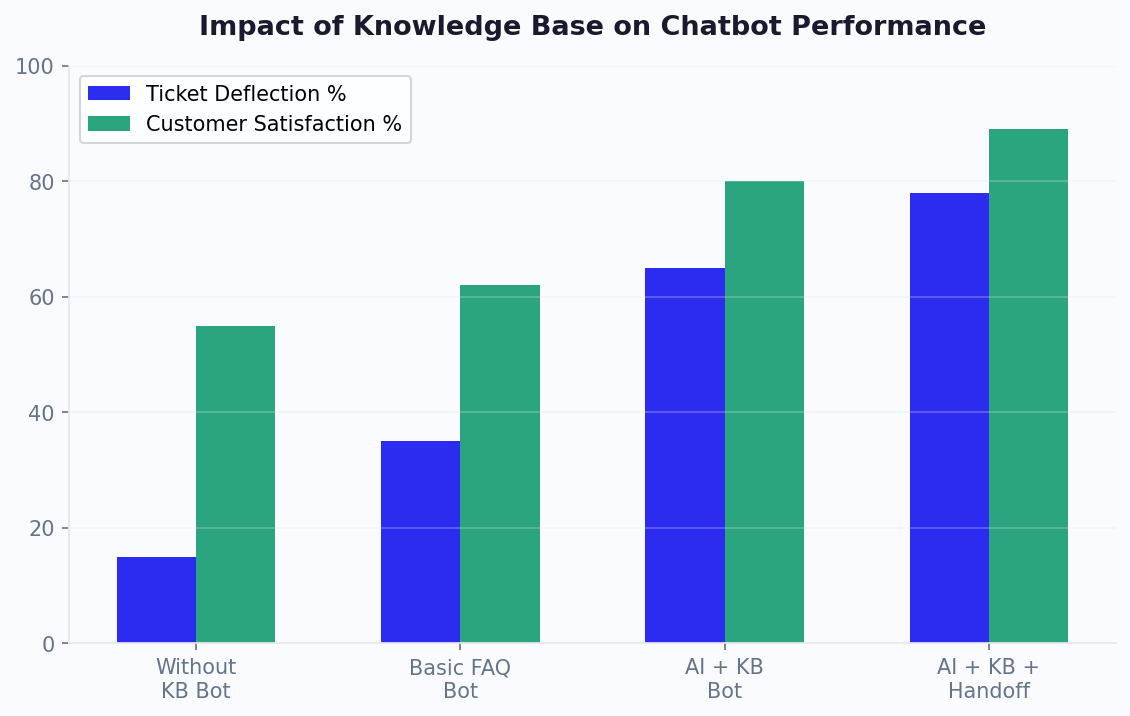
Businesses with comprehensive knowledge bases achieve 75-90% self-service resolution rates, reducing support tickets by 60-70% and saving $5-$12 per deflected conversation. Build your knowledge base alongside the AI chatbot builder for maximum impact, or calculate expected savings with our ROI calculator.
Types of Knowledge Bases for Chatbots
Different knowledge base architectures serve different chatbot use cases. Understanding the types helps you choose the right approach for your specific needs.
Knowledge Base Types
| Type | How It Works | Best For | Accuracy |
|---|---|---|---|
| FAQ pairs (rule-based) | Exact match or keyword match Q&A | Simple, predictable questions | 50-60% (limited phrasings) |
| Document-based (RAG) | AI retrieves from uploaded documents | Complex products with extensive docs | 82-92% |
| URL-based (web scraping) | Indexes content from web pages | Existing help centers and blogs | 78-88% |
| Hybrid (FAQ + RAG) | Exact matches for known Qs + AI for rest | Maximum accuracy + coverage | 88-95% |
| Dynamic (API-connected) | Real-time data from external systems | Order status, account info, pricing | 99% (live data) |
Choosing the Right Type
Start with FAQ pairs if you have 20-50 common questions with clear answers. Fast to set up, 100% accurate for matched questions, but limited to pre-programmed phrasings.
Add document-based RAG when your content exceeds 50 topics or when users ask complex, multi-part questions. Upload docs and let AI handle the understanding.
Include dynamic lookup for data that changes (order status, account balance, real-time pricing). Connect via integrations or API.
Conferbot supports all types simultaneously — use FAQ for critical questions requiring 100% accuracy, RAG for broad coverage, and API for dynamic data.
Building Your Knowledge Base: Step by Step
A well-built knowledge base is the difference between a chatbot that frustrates users and one that delights them. Follow this systematic approach to build a KB that achieves 80%+ resolution rate from day one.
Step 1: Audit Your Information Sources
Before creating anything new, inventory what already exists: FAQ pages on your website, help center articles, support email templates, product documentation, internal wikis, sales decks, and onboarding materials. Most businesses already have 80% of the knowledge needed — it just needs to be imported into the chatbot system.
Step 2: Identify Top Questions
Review your support ticket history, live chat transcripts, and common search queries. Identify the top 20 questions by volume — these alone typically cover 60-70% of all inquiries. Prioritize building KB content for these first.
Step 3: Upload and Index
Import existing content into Conferbot: upload PDFs and documents, paste URLs for web page scraping, or manually enter FAQ pairs. The system automatically chunks, indexes, and prepares the content for retrieval.
Step 4: Test and Gap-Fill
Test with 50+ sample questions representing real user queries. Identify gaps where the KB cannot answer adequately. Create new content for the most critical gaps. Prioritize by volume — a question asked 50 times/week matters more than one asked once/month.
Step 5: Launch and Monitor
Deploy the KB-powered bot and monitor resolution rates, confidence scores, and user feedback. Use analytics to identify remaining gaps and prioritize content creation for the next iteration.
Content Quality Checklist
- Clear, factual writing (not marketing fluff)
- Specific data (prices, dates, dimensions) included
- Structured with headings for topic boundaries
- Updated regularly as products/policies change
- Covers "what we do NOT do" in addition to what we do
For AI-powered knowledge bases, see the detailed guide on our AI knowledge base page.
Content Strategy: What to Write and When
Knowledge base content strategy determines what to create, in what order, and how to maintain it over time. A good strategy maximizes resolution rate with minimum content investment.
Priority Framework
Tier 1 (Week 1): Critical questions. The top 20 questions that account for 60%+ of support volume. These are typically: pricing, shipping/delivery, returns/refunds, account access, product features, and contact information. Write clear, complete answers for each.
Tier 2 (Week 2-3): Common topics. The next 50-100 questions covering product-specific information, policy details, how-to guides, and troubleshooting steps. These bring coverage from 60% to 85%.
Tier 3 (Month 2+): Long-tail content. Less common but still important topics: edge cases, advanced features, compliance questions, and industry-specific scenarios. These push coverage from 85% toward 95%.
Content Formats That Work Best
- Q&A format: Directly answers a specific question. Best for FAQ-style queries. "Q: How long does shipping take? A: Standard shipping takes 5-7 business days..."
- How-to guides: Step-by-step instructions for common tasks. Best for process-oriented questions.
- Comparison tables: Feature/plan comparisons in tabular format. Best for "what's the difference between..." questions.
- Policy documents: Clear, complete policy statements. Best for definitive answers on rules and exceptions.
Maintenance Cadence
- Weekly: Review unresolved queries and create content for top gaps
- Monthly: Audit existing content for accuracy and completeness
- Quarterly: Strategic review — new products, changed policies, seasonal updates
Track content performance in analytics. Identify which KB articles get used most and which have low satisfaction ratings for improvement.
Search & Discovery: Helping Users Find Answers
A knowledge base is only as good as its search capability. If users cannot find the right article or the bot cannot retrieve the relevant content, even the best-written information goes unused.
Search Methods
Keyword search: Traditional text matching. User types terms and system finds articles containing those terms. Simple but limited — fails when users use different words than the article author.
Semantic search: AI-powered understanding of meaning. User types "How do I get my money back?" and the system finds the "Refund Policy" article even without the word "refund" in the query. This is the default in Conferbot's AI-powered KB.
Guided discovery: The chatbot asks clarifying questions to narrow down the right content. "Are you asking about a recent order, or about our general policy?" This works well for ambiguous queries.
Optimizing Discoverability
- Clear article titles: Use the question as the title ("How do I return an item?") rather than abstract labels ("Return Policy")
- Include synonyms: Mention alternative terms within articles so semantic search catches them all
- Tag articles: Category tags help the system narrow results when multiple articles are relevant
- Link related articles: Internal references between articles help both search ranking and user navigation
Measuring Search Quality
- Search success rate: % of searches that lead to a useful result (target: 85%+)
- Zero-result rate: % of searches that return nothing (target: under 10%)
- Click-to-resolution: How often the first result resolves the question (target: 70%+)
Monitor search quality through analytics and improve by adding content for zero-result queries and refining articles for low-resolution searches.
Self-Service Metrics: Measuring KB Success
Knowledge base success is measured by how effectively it enables users to find answers without human help. These metrics tell you whether your KB is earning its keep.
Core Metrics
- Self-service rate: Percentage of users who find their answer without escalating to a human. Target: 70-85%. This is your headline metric — the higher it is, the more support cost you avoid.
- Deflection rate: Percentage of potential support tickets prevented by the KB. Calculated by comparing ticket volume before and after KB deployment. Industry benchmark: 50-70% deflection.
- Resolution confidence: Average AI confidence score for answers served. Target: 80%+. Low confidence indicates content gaps.
- Article usefulness: Thumbs up/down ratings on KB-powered answers. Target: 80%+ positive. Low ratings indicate wrong or incomplete answers.
- Search success rate: Percentage of queries that find relevant content. Target: 85%+.
- Escalation after KB attempt: Users who receive a KB answer but still escalate to human. Target: under 15%. High rates mean answers are found but not satisfactory.
Calculating ROI
KB ROI = (Deflected tickets x Cost per human ticket) - KB maintenance cost
Example: 2,000 tickets/month deflected x $8 average human ticket cost = $16,000/month saved. KB maintenance: 4 hours/week x $50/hr = $800/month. Net savings: $15,200/month. ROI: 1,900%.
Use our ROI calculator with your specific numbers. Track all metrics in Conferbot analytics. Report monthly to stakeholders showing trend lines — KB performance should improve steadily as content expands and refines.
Knowledge Base + Chatbot Integration
The most powerful configuration is a chatbot that uses structured flows for guided experiences AND a knowledge base for open-ended questions. This hybrid approach handles both predictable journeys and unexpected queries.
Integration Patterns
Pattern 1: KB as fallback. The chatbot runs its scripted flow normally. When a user asks an off-script question, the system searches the KB for an answer before falling back to "I don't understand." This catches 40-60% of conversations that would otherwise dead-end.
Pattern 2: KB as primary. The chatbot's main purpose is answering questions (support bot, FAQ bot). Every user message queries the KB first. If confidence is high, serve the answer. If low, route to scripted flow or human. Best for support-focused deployments.
Pattern 3: KB-enriched flows. Within a guided flow (e.g., product recommendation), the bot pulls KB content dynamically. When recommending products, it retrieves current specs, pricing, and availability from the KB rather than hardcoding information in the flow. This keeps flows current without constant manual updates.
Configuration in Conferbot
- Build your conversation flows in the visual builder
- Upload content to the Knowledge Base section
- In flow settings, enable "KB fallback" so unexpected questions get KB-powered answers
- Configure confidence thresholds (above 80% = show answer; 60-80% = show with disclaimer; below 60% = escalate)
- Set up live chat as the final fallback for anything KB cannot resolve
The combination of structured flows + KB + live chat creates a complete support system: guided paths for common journeys, AI answers for questions, and human agents for complex cases. This three-layer architecture achieves 90%+ resolution rates.
Knowledge Base Maintenance: Keeping Content Fresh
Knowledge bases degrade over time if not maintained. Products change, policies update, and new questions emerge. A maintenance routine keeps your KB accurate and comprehensive.
Maintenance Schedule
Weekly (30 min):
- Review "low confidence" answers from the past week — these need better content
- Check "thumbs down" feedback — fix or rewrite problematic answers
- Add 2-3 new articles for emerging questions identified in analytics
Monthly (2 hours):
- Audit all articles for factual accuracy against current product state
- Update pricing, feature lists, and time-sensitive information
- Review topic distribution — are new question categories emerging?
- Archive articles about discontinued products or old policies
Quarterly (half day):
- Strategic review: what is the current coverage rate and what are the biggest remaining gaps?
- Align KB content with upcoming product changes and launches
- Benchmark resolution rate against targets and industry standards
- Plan next quarter's content roadmap
Automation Tips
- Set alerts for articles not reviewed in 60+ days
- Auto-flag topics with declining satisfaction scores
- Configure the ticketing system to create KB tasks for unresolved topics
- Enable version tracking to see when articles were last updated
Well-maintained KBs show consistent 85-92% resolution rates. Neglected KBs degrade to 60-70% within 3-4 months. The investment in maintenance pays off directly in support cost avoidance.
Knowledge Base Best Practices
These proven practices from high-performing knowledge bases help you achieve maximum accuracy, coverage, and user satisfaction.
Content Best Practices
- Write for the user, not for you: Use the language your customers use, not internal jargon. If customers say "return," do not only write "RMA process."
- Be specific: "Shipping takes 5-7 business days" beats "Shipping is fast." Include exact numbers, dates, and processes.
- Cover exceptions: Include information about what you do NOT do, limitations, and edge cases. Users ask about boundaries as often as capabilities.
- Use examples: Concrete examples help both users and AI. "For example, if your order was placed on Monday, it will arrive by Friday" is clearer than "within 5 business days."
- Structure with headings: Clear H2/H3 hierarchy helps the AI chunk content correctly and retrieve relevant sections.
Operational Best Practices
- Single source of truth: All team members update the same KB. Do not let answers live in individual email templates or agent notes.
- Assign ownership: Each topic area should have a designated content owner responsible for accuracy
- Track what is missing: Log every question the KB cannot answer. Review weekly and create content for recurring gaps.
- Feedback loop: Enable user ratings on every answer. Use negative feedback as a content improvement signal.
- Measure relentlessly: Track resolution rate, confidence distribution, and satisfaction score trends in analytics
Technical Best Practices
- Upload content in clean, well-structured formats (headings, lists, tables)
- Keep individual articles focused on one topic (easier for AI to retrieve accurately)
- Include metadata (category, product, last-updated date) for better retrieval
- Test with real user queries, not just your own assumptions about how people ask
Start building your knowledge base today — even 20 well-written articles make a significant difference. See pricing plans for KB storage limits and AI features at each tier.
Discover More
Continue Exploring
Explore features, connect third-party tools, and browse ready-made templates.