
WhatsApp Business Pembuat Chatbot
Deploy chatbot Anda di WhatsApp Business API. Otomatisasi dukungan pelanggan, kirim notifikasi, dan tangkap prospek di tempat pelanggan Anda sudah menghabiskan waktu mereka.
WhatsApp Fitur Chatbot
Semua yang Anda butuhkan untuk membangun percakapan otomatis yang kuat
Integrasi WhatsApp Business API
Pesan media kaya (gambar, video, dokumen)
Tombol interaktif (hingga 3) dan menu daftar
Pesan template untuk notifikasi
Enkripsi end-to-end
Profil bisnis terverifikasi
Respons otomatis 24/7
Peralihan ke manusia yang mulus
Apa yang Bisa Anda Bangun?
Mulai dalam 9 Langkah Sederhana
Ikuti panduan ini untuk menghubungkan chatbot WhatsApp Anda
Buat Meta Business Account di business.facebook.com
Setup WhatsApp Business API di Meta Developer Portal
Dapatkan Phone Number ID Anda dan generate Access Token
Di Conferbot, buka Channels → WhatsApp → Connect
Masukkan Phone Number ID dan Access Token Anda
Salin Webhook URL dan Verify Token dari Conferbot
Konfigurasi webhook di Meta Developer Portal
Subscribe ke webhook field 'messages'
Bot WhatsApp Anda sudah aktif!
Introduction
WhatsApp is the world's most popular messaging platform, with over 2.7 billion active users across 180 countries. Every single day, more than 175 million people message a business on WhatsApp, making it the highest-engagement channel available to companies of any size. If your customers are not already reaching out to you on WhatsApp, they almost certainly will be in 2026.
A WhatsApp chatbot is an automated conversational agent that operates inside the WhatsApp interface your customers already know and trust. Instead of forcing people to download a separate app, visit a website, or wait on hold, a WhatsApp bot lets them get instant answers, place orders, book appointments, and receive updates right from their chat list. The experience feels natural because it happens in the same app they use to talk to friends and family.
For businesses, the benefits are transformative. WhatsApp chatbots can handle thousands of conversations simultaneously, operate around the clock without staffing costs, and deliver response times measured in seconds rather than hours. Companies using WhatsApp automation report up to 70% reduction in support ticket volume and significantly higher customer satisfaction scores compared to traditional channels like email or phone. According to Statista's WhatsApp statistics, WhatsApp is the most-used messaging app in over 100 countries, and business messaging is the fastest-growing segment of the platform.
With Conferbot's no-code chatbot builder, you can create and deploy a WhatsApp bot in minutes without writing a single line of code. Our visual flow builder lets you design conversation paths, set up automated replies, integrate with your existing tools, and go live on WhatsApp Business API the same day. Combined with our omnichannel platform, your WhatsApp bot works seamlessly alongside bots on your website, Messenger, Telegram, Instagram, Slack, and other channels, all managed from a single dashboard.
This guide covers everything you need to know about building, deploying, and optimizing a WhatsApp chatbot for your business in 2026 -- from understanding the WhatsApp Business API to step-by-step setup instructions, pricing, compliance, industry-specific use cases, migration guides, and best practices that drive real results.
Whether you are looking for a free WhatsApp chatbot to handle basic FAQ or an enterprise-grade solution with AI knowledge base integration, calendar booking, and third-party integrations, this page is your definitive resource. You can also read our step-by-step free WhatsApp chatbot guide for a quick-start walkthrough, explore how Conferbot compares to other chatbot platforms on the market, or check out our guide on the best AI customer service tools in 2026.
What Can a WhatsApp Chatbot Do?
A well-built WhatsApp chatbot goes far beyond simple auto-replies. Modern WhatsApp bots powered by natural language processing and AI models like OpenAI can understand context, remember conversation history, and handle complex multi-step workflows. Here is what your WhatsApp chatbot can do for your business.
Customer Support Automation
WhatsApp chatbots excel at resolving common customer queries instantly. FAQ answers, order status checks, return policy explanations, troubleshooting guides -- your bot handles the repetitive questions that consume 60-80% of your support team's time. When a query requires human expertise, the bot seamlessly escalates to a live agent with the full conversation context, so the customer never has to repeat themselves. Explore our pre-built support templates to see how quickly you can deploy automated support on WhatsApp.
Lead Generation and Qualification
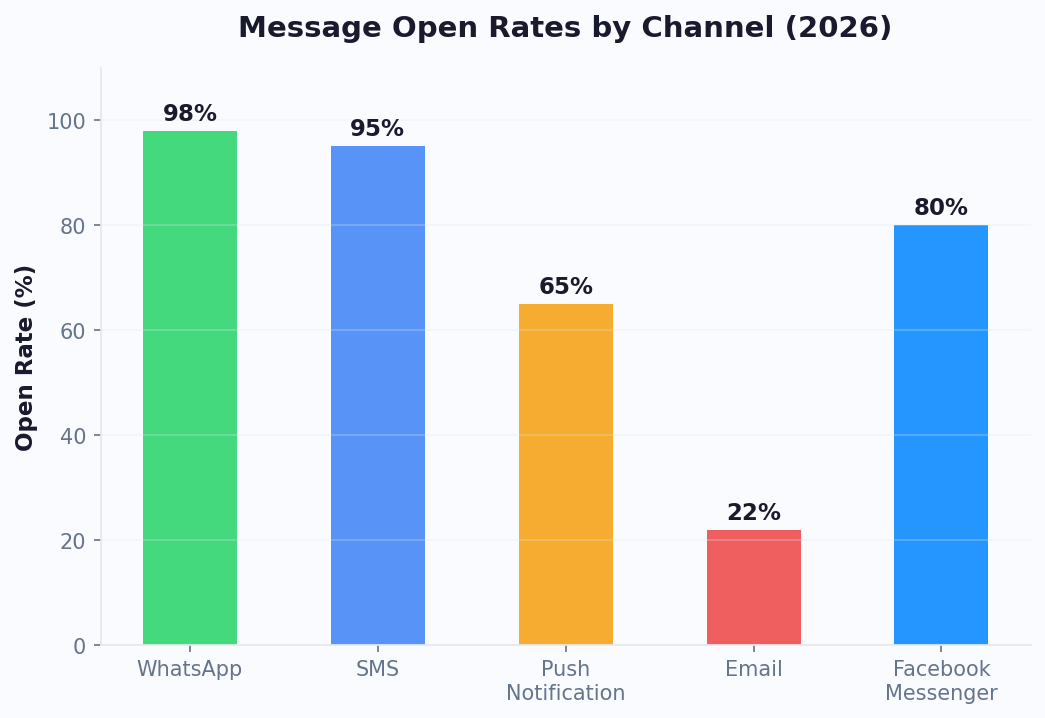
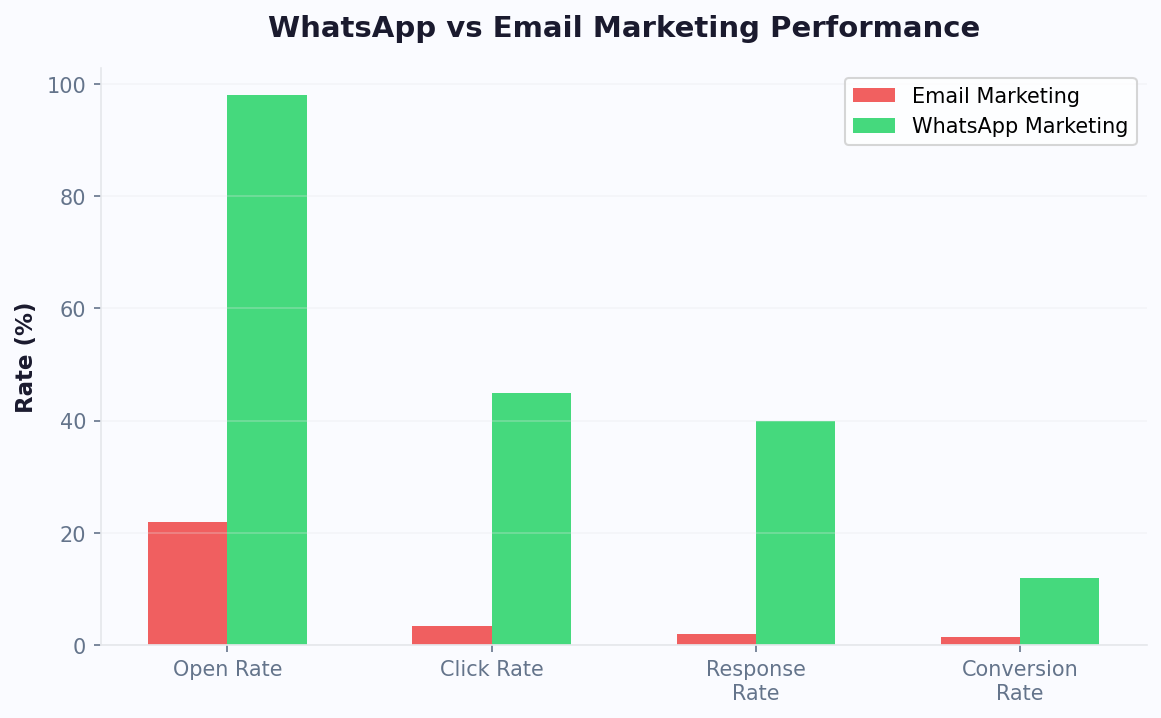
Turn WhatsApp conversations into qualified sales leads. Your bot can ask qualifying questions, collect contact details, gauge purchase intent, and route hot leads directly to your sales team. Because WhatsApp messages have a 98% open rate compared to just 20% for email, your lead nurturing sequences actually get read and responded to. Our lead generation templates give you proven conversation flows that convert.
Order Updates and Notifications
Keep customers informed at every step of their journey. Send automated order confirmations, shipping updates, delivery notifications, and payment receipts as WhatsApp template messages. Customers can check their order status anytime just by sending a message, reducing inbound support calls dramatically. This is especially powerful for e-commerce businesses handling hundreds of orders daily.
Appointment Booking
Let customers browse available time slots, select a date and time, and confirm appointments entirely within WhatsApp. The bot can send reminders before the appointment and handle rescheduling or cancellations automatically, reducing no-show rates by up to 40%. See our booking and scheduling templates for ready-to-deploy appointment flows that integrate with calendar booking.
Product Recommendations
Use conversational commerce to guide customers toward the right products. The bot asks about preferences, budget, and requirements, then suggests relevant products with images, descriptions, and direct purchase links. This personalized shopping experience drives higher conversion rates than traditional product pages.
Payment Processing
Collect payments directly within the WhatsApp conversation using integrated payment links. Customers can complete their purchase without ever leaving the chat, creating a frictionless buying experience that reduces cart abandonment.
WhatsApp Commerce and Catalog
WhatsApp now supports native product catalogs and shopping carts within the chat. Businesses can upload their product inventory, and customers can browse items, add products to a cart, and send the cart as an order message -- all without leaving WhatsApp. According to Meta, businesses using WhatsApp catalogs see a 40% increase in customer inquiries converting to sales. Combined with Conferbot's conversational flows, your bot can guide customers through the catalog, answer product questions, apply discount codes, and process orders seamlessly.
Click-to-WhatsApp Ads (CTWA)
Click-to-WhatsApp ads are Facebook and Instagram ads that open a WhatsApp conversation instead of a landing page when clicked. This eliminates the landing-page-to-form friction and drops the user directly into a chatbot-powered conversation. Businesses running CTWA campaigns report conversion rates 3-7x higher than traditional landing page ads because the conversational format builds trust and captures intent immediately. When you connect CTWA ads to a Conferbot-powered WhatsApp bot, every ad click triggers a tailored welcome flow that qualifies leads, answers questions, and books appointments in real time. Learn more about building effective ad funnels in our chatbot building guide.
Surveys and Feedback Collection
Collect customer feedback, NPS scores, and post-purchase reviews directly in WhatsApp. The conversational format achieves 3-5x higher survey completion rates compared to email surveys. Your bot can ask follow-up questions based on responses, creating a dynamic feedback loop that surfaces actionable insights. Track all results through built-in analytics that show you conversation volumes, resolution rates, lead conversion, and customer satisfaction scores in real time.
WhatsApp Business API vs WhatsApp Business App
Before building a WhatsApp chatbot, you need to understand the two distinct WhatsApp products for businesses. Choosing the right one is critical because chatbot automation requires the API, not the basic app. For the latest official documentation, refer to Meta's WhatsApp Cloud API developer docs.
| Feature | WhatsApp Business App | WhatsApp Business API (Cloud API) |
|---|---|---|
| Target users | Small businesses, solo entrepreneurs | Medium to large businesses, any company needing automation |
| Cost | Free to download and use | Conversation-based pricing from Meta |
| Chatbot support | No -- manual replies only | Yes -- full chatbot automation via webhooks |
| Number of agents | Up to 4 linked devices | Unlimited agents via platform integration |
| Template messages | Limited quick replies | Full template message system with approval workflow |
| Interactive elements | Basic text and media | Buttons, list menus, product catalogs, location sharing |
| Broadcast messaging | Limited to 256 contacts per list | Unlimited broadcasts to opted-in contacts |
| Integration | No API access | Full REST API for CRM, helpdesk, and platform integrations |
| Analytics | Basic message statistics | Detailed delivery, read, and engagement analytics |
| Verification | Not available | Green tick verified business badge available |

When to Use the WhatsApp Business App
The free WhatsApp Business App is suitable if you are a very small business receiving fewer than 20-30 messages per day and do not need automated responses. It lets you create a business profile, set up away messages, and organize chats with labels. However, it cannot connect to chatbot platforms, CRMs, or any external tools.
When to Use the WhatsApp Business API
The API is the right choice for any business that wants to automate conversations, handle high message volumes, send proactive notifications, or integrate WhatsApp with existing business systems. You need the API to connect a chatbot platform like Conferbot. Whether you are in e-commerce, healthcare, real estate, or education, the API unlocks the full potential of WhatsApp as a business channel.
How Conferbot Uses the WhatsApp Cloud API
Conferbot integrates directly with Meta's WhatsApp Cloud API, the hosted version of the API that Meta manages on its own infrastructure. This means you do not need to set up or maintain any servers. You create a Meta Business Account, configure your phone number, connect it to Conferbot using your access token, and your chatbot is live. Our API integration layer handles all the webhook processing, message routing, and session management behind the scenes.
The Cloud API also provides built-in support for rich media, interactive buttons, list messages, and template messages, all of which are fully supported in the Conferbot visual builder.
WhatsApp API Pricing Details
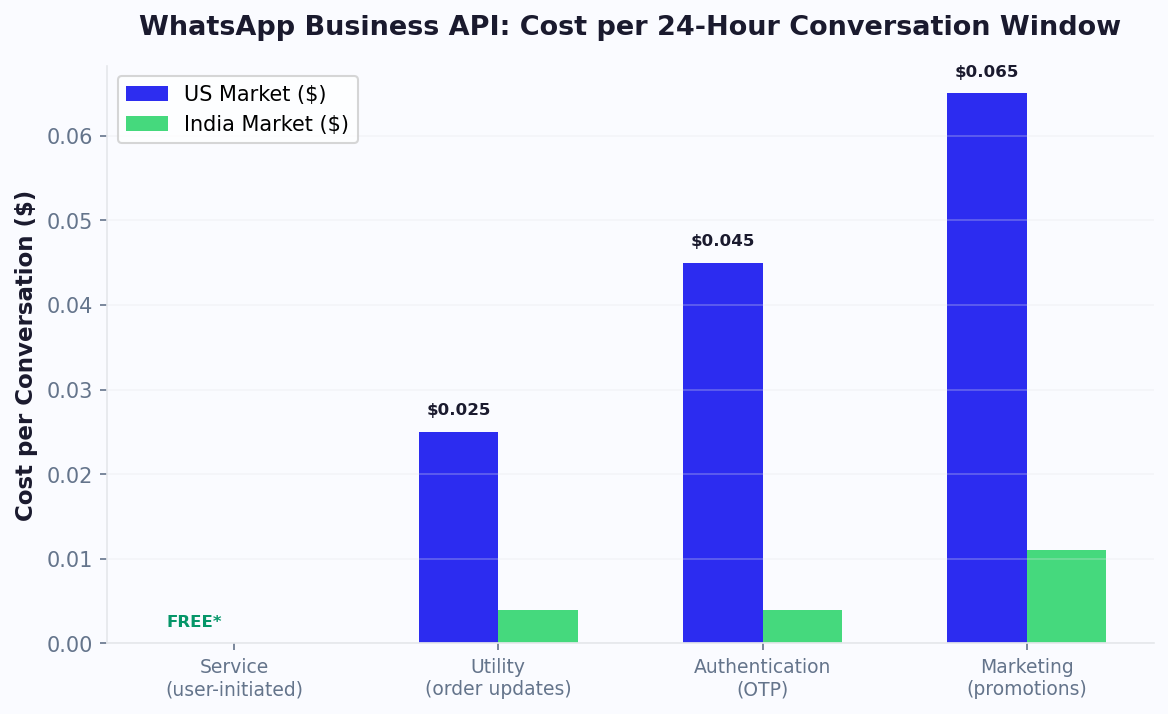
Meta revised its WhatsApp API pricing structure in late 2024. The key change: service conversations (customer-initiated) became free for all businesses, while business-initiated conversations are categorized into marketing, utility, and authentication tiers. In North America, a marketing conversation costs approximately $0.025, a utility conversation costs $0.015, and an authentication conversation costs $0.0085. In India, prices drop significantly to roughly $0.012 for marketing and $0.004 for utility. Each WhatsApp Business Account receives 1,000 free service conversations per month regardless of plan or region, making it extremely cost-effective for businesses where customers initiate most chats.
Compliance and Opt-In Rules
WhatsApp enforces strict opt-in requirements to protect user experience. Before you can send proactive template messages, you must obtain explicit, informed consent from the user. This means the user must actively agree to receive messages from your business, understand the types of messages they will receive, and have a clear way to opt out. Acceptable opt-in methods include website forms with specific WhatsApp consent checkboxes, in-app opt-in flows, IVR (phone system) opt-in during calls, and physical point-of-sale sign-ups. Simply having a user's phone number is not sufficient. Violating opt-in rules can result in account quality rating drops, message sending limits being reduced, or complete account suspension. Conferbot's AI chatbot builder includes opt-in collection templates that help you gather and manage consent properly.
WhatsApp Business API Pricing & Cost Breakdown
Understanding WhatsApp Business API pricing is essential for budgeting your chatbot deployment effectively. Meta uses a conversation-based pricing model where you pay per 24-hour conversation window rather than per individual message. This section provides a comprehensive cost breakdown that helps you estimate your monthly WhatsApp spend based on your conversation volume and mix.
How Conversation-Based Pricing Works
Every interaction on WhatsApp API is categorized into one of four conversation types, each with different pricing. A "conversation" is a 24-hour message window. Once opened, you can exchange unlimited messages within that window at no additional cost. The window starts when your first message is delivered (for business-initiated) or when you respond to a customer message (for service conversations). This is fundamentally different from SMS, where you pay per individual message regardless of length or timing.

The Four Conversation Categories
1. Service Conversations (Customer-Initiated) -- These are the most cost-effective category. When a customer messages your business first, the resulting conversation is classified as a service conversation. As of 2026, Meta provides 1,000 free service conversations per month to every WhatsApp Business API account. After the free tier, service conversations cost between $0.004 and $0.009 depending on your region. For most small and medium businesses, the free tier covers the majority of inbound customer support interactions.
2. Utility Conversations -- Business-initiated messages that deliver transactional information the customer expects, such as order confirmations, shipping updates, appointment reminders, and payment receipts. Utility conversations are moderately priced, ranging from $0.004 per conversation in India to $0.020 in Western Europe. These messages have the highest delivery and read rates because customers actively want this information.
3. Marketing Conversations -- Promotional messages, special offers, abandoned cart reminders, product recommendations, and re-engagement campaigns. Marketing is the most expensive category because it represents outbound promotional outreach. Prices range from $0.012 per conversation in India to $0.036 in Western Europe. Despite the higher cost, WhatsApp marketing delivers significantly better ROI than email marketing due to the 98% open rate.
4. Authentication Conversations -- One-time passwords (OTPs), verification codes, and login confirmations. These are the lowest-priced business-initiated conversations, ranging from $0.004 to $0.009 per conversation. They are essential for businesses that use WhatsApp for two-factor authentication.
Detailed Regional Pricing Table (2026)
| Region | Marketing | Utility | Authentication | Service |
|---|---|---|---|---|
| North America | $0.025 | $0.015 | $0.0085 | Free (first 1,000/mo) |
| Western Europe | $0.036 | $0.020 | $0.0080 | Free (first 1,000/mo) |
| UK | $0.032 | $0.018 | $0.0076 | Free (first 1,000/mo) |
| India | $0.012 | $0.004 | $0.0040 | Free (first 1,000/mo) |
| Brazil | $0.033 | $0.012 | $0.0075 | Free (first 1,000/mo) |
| Indonesia | $0.022 | $0.010 | $0.0036 | Free (first 1,000/mo) |
| Middle East | $0.028 | $0.014 | $0.0060 | Free (first 1,000/mo) |
| Rest of Africa | $0.012 | $0.006 | $0.0040 | Free (first 1,000/mo) |
| Rest of World | $0.016 | $0.008 | $0.0040 | Free (first 1,000/mo) |
Prices are approximate and subject to change. For the latest rates, always check Meta's official WhatsApp API pricing documentation.
WhatsApp Business App vs API vs Cloud API: Total Cost Comparison
The total cost of your WhatsApp chatbot depends on three components: the platform subscription (Conferbot), Meta's conversation charges, and any infrastructure costs.
| Cost Component | Business App | On-Premise API | Cloud API + Conferbot |
|---|---|---|---|
| Platform fee | $0 | $500-$1,000+/mo (BSP) | $0-$59/mo (Conferbot) |
| Infrastructure | $0 (your phone) | $200-$500/mo (servers) | $0 (Meta-hosted) |
| Conversation charges | N/A | Meta rates above | Meta rates above |
| Chatbot automation | Not possible | Yes | Yes |
| Setup time | 5 minutes | 2-4 weeks | 10-15 minutes |
| Maintenance | None | Ongoing server maintenance | None (fully managed) |
Monthly Cost Calculator Example
Consider a mid-size e-commerce business in North America handling 5,000 conversations per month:
- 3,000 service conversations (customer support): 1,000 free + 2,000 x $0.0088 = $17.60
- 1,200 utility conversations (order updates): 1,200 x $0.015 = $18.00
- 600 marketing conversations (promotions): 600 x $0.025 = $15.00
- 200 authentication conversations (OTPs): 200 x $0.0085 = $1.70
- Conferbot Pro plan: $39/mo
- Total monthly cost: $91.30 for 5,000 conversations (roughly $0.018 per conversation)
Compare that to $0.07-$0.15 per SMS message with no rich media, no interactivity, and no encryption. WhatsApp delivers far superior customer experience at a fraction of the cost. View our full pricing plans to find the right Conferbot tier for your volume.
Cost Optimization Strategies
- Maximize service conversations -- Encourage customers to message you first via website chat widgets, QR codes, and Click-to-WhatsApp ads. Service conversations are the cheapest category.
- Resolve within the 24-hour window -- Every message within a single conversation window costs nothing extra. Train your bot to resolve queries quickly.
- Batch utility notifications -- Group order updates, appointment reminders, and receipts efficiently to minimize the number of separate conversations.
- Use analytics to monitor spend -- Track conversation type distribution and cost per conversation to identify optimization opportunities.
- Segment marketing carefully -- Since marketing is the most expensive category, use NLP-driven segmentation to target only high-intent users.
How to Create a WhatsApp Chatbot with Conferbot
Setting up a WhatsApp chatbot with Conferbot takes 10-15 minutes. Follow these five steps to go from zero to a live WhatsApp bot.
Step 1: Create a Meta Business Account
Go to business.facebook.com and create a Meta Business Account if you do not already have one. This is the parent account that manages all of Meta's business products, including WhatsApp Business API. You will need to verify your business by providing your company name, website, and a business document (utility bill, registration certificate, or tax filing). Verification typically takes 1-3 business days. For detailed guidance, see WhatsApp's official Business Platform page.
Step 2: Set Up WhatsApp Business API
In the Meta Developer Portal (developers.facebook.com), create a new app and add the WhatsApp product. Meta provides a free test phone number so you can develop and test your bot before connecting your real business number. Navigate to WhatsApp > API Setup to find your Phone Number ID and generate a permanent Access Token. These two credentials are what Conferbot needs to send and receive messages on your behalf.
Step 3: Connect to Conferbot
Log in to your Conferbot dashboard and navigate to Channels > WhatsApp > Connect. Enter your Phone Number ID and Access Token. Conferbot will generate a unique Webhook URL and Verify Token for your account. Go back to the Meta Developer Portal, paste the Webhook URL and Verify Token into the WhatsApp webhook configuration, and subscribe to the messages webhook field. Conferbot now receives every message sent to your WhatsApp number.
Step 4: Build Your Conversation Flow
Use Conferbot's visual flow builder to design your WhatsApp bot's conversation logic. Drag and drop message nodes, add quick reply buttons, create branching paths based on user responses, and connect to external APIs for dynamic data. You can use rich media blocks to send images, videos, documents, and location pins. For complex queries, add an AI-powered node that uses GPT to generate natural, context-aware responses. If you need to pull data from external systems, use our integrations hub to connect with your CRM, helpdesk, or e-commerce platform.
Step 5: Test and Go Live
Use the test phone number to send messages to your bot and verify every conversation path works correctly. Check that buttons display properly, media loads correctly, and fallback messages appear when the bot does not understand a query. Once you are satisfied, switch to your production phone number and your WhatsApp chatbot is live for all your customers.
Need a head start? Browse our pre-built support templates, lead generation templates, or booking and scheduling templates to launch your WhatsApp bot in under 5 minutes.
Key Features of WhatsApp Chatbots
WhatsApp Business API provides a rich set of messaging features that make chatbot interactions feel native and engaging. Here are the key capabilities you can leverage with Conferbot.
Rich Media Messages
Go beyond plain text with rich media support. Send product images, how-to videos, PDF catalogs, audio messages, and location pins directly in the chat. Media messages have significantly higher engagement rates than text-only responses, making them ideal for product showcases, visual troubleshooting guides, and documentation sharing.
Interactive Buttons and List Menus
WhatsApp supports two types of interactive messages that make navigation effortless. Reply buttons display up to 3 tappable options inline with the message, perfect for yes/no questions, category selection, or quick actions. List messages present up to 10 options in a scrollable menu, ideal for product categories, service menus, or multi-step selections. Both eliminate typing friction and guide users through structured conversations.
Template Messages and Notifications
Template messages are pre-approved message formats that let you proactively reach out to customers outside the 24-hour conversation window. Use them for order confirmations, appointment reminders, shipping updates, payment receipts, and re-engagement campaigns. Each template must be submitted to Meta for approval before use, which typically takes a few hours to one business day.
End-to-End Encryption
Every WhatsApp message is protected by end-to-end encryption by default. This means only you and your customer can read the conversation -- not WhatsApp, not Meta, not anyone in between. This level of security is particularly important for businesses handling sensitive information in healthcare, finance, and legal industries.
Verified Business Profile
WhatsApp Business API accounts can apply for a green tick verification badge that appears next to your business name. This verified status builds instant trust with customers, increases message open rates, and distinguishes your business from potential impersonators. Conferbot guides you through the verification process to maximize your chances of approval.
Natural Language Understanding
With Conferbot's NLP engine and optional OpenAI integration, your WhatsApp bot can understand natural language input, detect user intent, extract key information like dates, phone numbers, and product names, and respond intelligently even to messages that do not follow a structured format. This makes the conversation feel human rather than robotic.
Seamless Human Handoff
When a conversation requires human judgment, the bot seamlessly transfers the chat to a live agent in the Conferbot dashboard. The agent sees the full conversation history and customer context, enabling them to resolve the issue without asking the customer to repeat anything. Once the agent resolves the query, the bot can resume automated handling.
Multi-Language Support
WhatsApp is used across 180 countries, and your customers speak many different languages. Conferbot's WhatsApp bots support automatic language detection and multilingual conversation flows, allowing you to serve global audiences from a single bot. Configure separate flows for each language or use AI-powered translation to handle any language dynamically. This is critical for businesses operating in multilingual markets like India, the EU, or the Middle East.
WhatsApp Chatbot Compliance & Data Security
Data privacy and regulatory compliance are top concerns for any business deploying automated messaging at scale. WhatsApp's built-in encryption provides a strong security foundation, but compliance extends far beyond encryption. This section covers everything you need to know about operating a GDPR-compliant WhatsApp chatbot, meeting data security requirements, and adhering to Meta's commerce policies.
GDPR Compliance for WhatsApp Chatbots
The General Data Protection Regulation (GDPR) applies to any business that collects, processes, or stores personal data of individuals in the European Economic Area (EEA), regardless of where the business is located. If your WhatsApp chatbot interacts with EU citizens, you must comply with GDPR. Key requirements include:
- Lawful basis for processing -- You need a legal basis to process personal data. For marketing messages, this is typically explicit consent. For transactional messages like order updates, you can rely on legitimate interest or contractual necessity.
- Data minimization -- Collect only the personal data you actually need. If your bot collects names, phone numbers, email addresses, or purchase history, you must justify each data point.
- Right to access and portability -- Users can request a copy of all personal data you hold about them. Conferbot's data export tools make it easy to fulfill Subject Access Requests (SARs).
- Right to erasure -- Users can request deletion of their personal data. You must be able to delete conversation histories, contact records, and any derived data within 30 days of a request.
- Data Processing Agreements (DPAs) -- You need DPAs with every third-party processor that handles your customer data, including your chatbot platform. Conferbot provides a standard DPA to all business plan customers.
- Privacy notices -- Your WhatsApp bot must inform users about data collection at the start of the conversation, ideally in the welcome message, with a link to your full privacy policy.
WhatsApp's End-to-End Encryption: What It Covers
WhatsApp uses the Signal Protocol for end-to-end encryption, meaning messages are encrypted on the sender's device and only decrypted on the recipient's device. However, there are important nuances for businesses using the API:
- Messages in transit are fully encrypted between the user's device and Meta's servers, and between Meta's servers and your webhook endpoint (via HTTPS/TLS).
- Cloud API storage -- When using the Cloud API, Meta temporarily stores messages on its servers for delivery. Meta states it does not use WhatsApp message content for ad targeting, but this temporary storage means messages are technically accessible to Meta during transit.
- Your server/platform storage -- Once messages reach your chatbot platform (Conferbot), they are stored according to the platform's data policies. Conferbot encrypts all stored conversation data at rest using AES-256 encryption.
- Media files -- Images, videos, and documents shared in WhatsApp conversations are also encrypted in transit but are stored on Meta's CDN temporarily for delivery.
Opt-In Requirements and Meta's Commerce Policy
Meta enforces strict opt-in rules to maintain user trust and prevent spam. Violating these rules can result in account quality degradation, reduced messaging limits, or permanent account suspension. Here is what you must do:
- Explicit opt-in before proactive messaging -- You must collect clear, documented consent before sending any business-initiated template messages. The user must actively choose to receive messages (no pre-checked boxes).
- Opt-in must specify message types -- The user must understand whether they are opting in for marketing promotions, transactional updates, or both. Blanket consent is not sufficient.
- Easy opt-out mechanism -- Every template message should include a clear way to unsubscribe. Conferbot bots automatically recognize "STOP" and similar keywords to process opt-outs.
- 24-hour customer service window -- After a customer messages you, you have a 24-hour window to respond with any message type. After 24 hours, you can only send pre-approved template messages.
- No prohibited content -- WhatsApp prohibits messages related to gambling, adult content, weapons, tobacco, and other restricted categories. Review WhatsApp's Commerce Policy for the full list.
Data Storage and Retention Policies
Best practices for WhatsApp chatbot data management include:
- Define retention periods -- Do not store conversation data indefinitely. Set automatic deletion schedules (e.g., 90 days for support conversations, 12 months for transaction records).
- Separate PII from analytics -- Anonymize conversation data used for analytics and reporting. Keep personally identifiable information in secure, access-controlled storage.
- Geographic data residency -- If you serve EU customers, ensure your data is stored in EU-compliant data centers. Conferbot offers data residency options for business plan customers.
- Regular security audits -- Conduct periodic reviews of who has access to customer conversation data and revoke unnecessary permissions.
Industry-Specific Compliance
Beyond GDPR, certain industries have additional requirements:
- Healthcare -- While WhatsApp is not HIPAA-certified, it can be used for non-PHI communications like appointment reminders and general information. For PHI-containing conversations, implement additional safeguards and obtain patient authorization.
- Financial services -- Ensure your WhatsApp chatbot complies with PCI DSS standards if processing payment information. Never collect full credit card numbers via chat; use secure payment links instead.
- Education -- If handling student data, comply with FERPA (US) or equivalent regional regulations. Limit data collection to what is necessary for enrollment and communication.
Conferbot's platform is designed with compliance in mind. Our team management features include role-based access controls, audit logs, and data retention policies that help you meet regulatory requirements across all your WhatsApp chatbot deployments.
WhatsApp Chatbot by Industry
WhatsApp chatbots deliver measurable ROI across every industry, but the specific use cases, metrics, and implementation strategies vary significantly by sector. This section provides detailed industry breakdowns with real-world statistics and actionable implementation guidance.

E-commerce: Order Tracking, Cart Recovery & Conversational Shopping
E-commerce businesses see some of the highest returns from WhatsApp chatbots. Key use cases and metrics include:
- Abandoned cart recovery -- WhatsApp cart recovery messages achieve 45-60% open rates and 15-25% recovery rates, compared to 5-10% for email. A single automated abandoned cart flow can recover thousands of dollars in monthly revenue.
- Order tracking automation -- Automatically send order confirmations, shipping updates, and delivery notifications as utility template messages. This eliminates "where is my order?" (WISMO) queries that account for 30-40% of e-commerce support tickets.
- Product recommendations -- AI-powered product suggestion flows increase average order value by 15-30%. The bot analyzes purchase history and browsing behavior to suggest complementary products.
- Returns and exchanges -- Automate return initiation, label generation, and refund status updates. Businesses report 68% reduction in return-related support costs.
- Flash sale notifications -- WhatsApp marketing messages for limited-time offers achieve 5-8x higher click-through rates than email campaigns.
Explore e-commerce chatbot templates to see pre-built flows for all these use cases.
Healthcare: Appointments, Reminders & Patient Communication
Healthcare organizations use WhatsApp chatbots to streamline patient communication while maintaining privacy. Key applications:
- Appointment scheduling and reminders -- Patients book appointments via WhatsApp and receive automated reminders 24 hours and 1 hour before. Clinics report 35-45% reduction in no-show rates.
- Prescription refill requests -- Patients send a message to request refills, and the bot checks eligibility, confirms the pharmacy, and notifies the provider. Processing time drops from 2-3 days to under 4 hours.
- Lab result notifications -- Notify patients when their results are ready with a secure link to the patient portal. This reduces inbound "are my results ready?" calls by up to 60%.
- Symptom triage -- An AI-powered bot asks patients about symptoms and severity, then routes them to the appropriate department or recommends urgent care when needed.
- Vaccination and wellness reminders -- Automate periodic health check-up reminders, vaccination schedules, and preventive care notifications.
See our healthcare chatbot templates and learn about calendar booking integration for appointment automation.
Banking & Financial Services: Instant Queries & Fraud Alerts
Financial institutions use WhatsApp chatbots to provide secure, instant banking services:
- Balance and transaction inquiries -- Customers check account balances, recent transactions, and statement summaries via WhatsApp. Banks report 72% reduction in call center volume for routine inquiries.
- Fraud alerts and confirmations -- Instantly notify customers of suspicious transactions and let them confirm or block with a single tap. Response times drop from hours (email/phone) to under 30 seconds.
- Loan application status -- Customers track their loan, mortgage, or credit card application progress without calling. The bot provides real-time status updates from the application system.
- KYC document collection -- Collect identity documents, proof of address, and selfie verification photos through the secure WhatsApp channel, reducing branch visits.
- Cross-sell and upsell -- After resolving a service query, the bot can recommend relevant financial products, achieving 30% higher cross-sell conversion than outbound calls.
Education: Admissions, Enrollment & Student Support
Educational institutions leverage WhatsApp chatbots across the entire student lifecycle:
- Admissions inquiries -- Answer questions about programs, eligibility, deadlines, and campus facilities 24/7. Universities using WhatsApp bots report 38% increase in completed applications due to instant query resolution.
- Course enrollment -- Guide students through course selection, prerequisites, and registration. The bot can check seat availability, process enrollment, and confirm schedules in real time.
- Fee payment reminders -- Send automated payment reminders with direct payment links. Institutions report 25% improvement in on-time fee collection.
- Exam and grade notifications -- Distribute exam schedules, hall ticket information, and grade results through WhatsApp. Students get instant notifications without checking portals.
- Student support and FAQ -- Handle questions about library hours, IT support, housing, financial aid, and campus events. Bots resolve 65-75% of student queries without human intervention.
Real Estate: Property Inquiries & Virtual Tours
Real estate professionals use WhatsApp chatbots to qualify leads and accelerate the sales cycle:
- Property matching -- The bot collects buyer preferences (budget, location, bedrooms, property type) and automatically matches them with relevant listings from the database. Agents save 15-20 hours per week on manual lead screening.
- Virtual tour scheduling -- Buyers browse available time slots and book property viewings or virtual tours directly in WhatsApp. Agents report 44% more scheduled site visits when using chatbot automation.
- Price updates and new listing alerts -- Notify interested buyers when new properties matching their criteria are listed or when prices change.
- Document collection -- Collect pre-qualification documents, mortgage pre-approval letters, and buyer identification through secure WhatsApp messages.
- Post-sale communication -- Keep buyers informed about closing timelines, inspection results, and move-in schedules through automated updates.
Explore our lead generation templates for real estate qualification flows that convert WhatsApp inquiries into showings.
WhatsApp Chatbot Pricing and Plans
WhatsApp chatbot pricing has two components: the Conferbot platform subscription and Meta's conversation-based charges for WhatsApp API usage. Understanding both is essential for budgeting.
Conferbot Pricing Plans
| Plan | Price | WhatsApp Features | Monthly Conversations |
|---|---|---|---|
| Free | $0/month | WhatsApp channel, basic flow builder, 1 bot | 100 conversations |
| Starter | $19/month | All Free features + template messages, rich media, 3 bots | 1,000 conversations |
| Pro | $39/month | All Starter features + AI/NLP, live chat, analytics, 10 bots | 5,000 conversations |
| Business | $59/month | All Pro features + API access, custom branding, unlimited bots | Unlimited conversations |
View the full feature comparison on our pricing page.
Meta's WhatsApp Conversation-Based Pricing
In addition to Conferbot's subscription, Meta charges for WhatsApp API conversations based on who initiates the chat and the conversation category:
- Marketing conversations -- Promotional messages, offers, and re-engagement campaigns. These are the most expensive category.
- Utility conversations -- Order updates, appointment reminders, payment confirmations. Moderately priced.
- Authentication conversations -- OTPs and verification codes. Lower priced.
- Service conversations -- Customer-initiated conversations where the user messages your business first. These are the least expensive and are free for the first 1,000 conversations per month.
Pricing varies by country. For example, in the United States a service conversation costs approximately $0.0088, while in India it costs approximately $0.0040. Meta provides 1,000 free service conversations per month to every WhatsApp Business API account.
Cost Optimization Tips
To minimize WhatsApp costs, encourage customers to message you first (service conversations are cheapest), resolve queries within the 24-hour conversation window, and batch utility notifications efficiently. Conferbot's analytics dashboard tracks your conversation usage and costs so you can optimize spending in real time.
WhatsApp Messaging Tier Limits
New WhatsApp Business API accounts start at Tier 1, which allows 250 business-initiated conversations in a rolling 24-hour period. As your account maintains a high quality rating (based on user feedback and block rates), the limit increases automatically: Tier 2 allows 1,000 conversations, Tier 3 allows 10,000, and Tier 4 provides unlimited business-initiated messaging. Quality rating is influenced by template message block rates, spam reports, and user feedback. Conferbot helps you maintain a healthy quality rating by providing analytics on template performance, tracking block rates, and suggesting optimizations before issues arise.
Regional Cost Comparison Table
| Region | Marketing | Utility | Authentication | Service (Customer-Initiated) |
|---|---|---|---|---|
| North America | $0.025 | $0.015 | $0.0085 | Free (first 1,000/mo) |
| Western Europe | $0.036 | $0.020 | $0.0080 | Free (first 1,000/mo) |
| India | $0.012 | $0.004 | $0.0040 | Free (first 1,000/mo) |
| Brazil | $0.033 | $0.012 | $0.0075 | Free (first 1,000/mo) |
| Indonesia | $0.022 | $0.010 | $0.0036 | Free (first 1,000/mo) |
| Rest of World | $0.016 | $0.008 | $0.0040 | Free (first 1,000/mo) |
For the latest rates, always check Meta's official pricing documentation, as rates are updated periodically. The combination of Conferbot's affordable platform subscription and Meta's free service conversation tier makes WhatsApp chatbots accessible to businesses of every size.
WhatsApp Chatbot Use Cases by Industry
WhatsApp chatbots deliver measurable results across every industry. Here are the most impactful use cases organized by sector.
E-commerce and Retail
E-commerce brands use WhatsApp bots to send order confirmations, shipping updates, and delivery notifications automatically. Customers can check order status, initiate returns, and browse product recommendations without leaving WhatsApp. Abandoned cart recovery messages on WhatsApp achieve 3-5x higher conversion rates than email because of WhatsApp's near-perfect open rates. Learn more about chatbots for e-commerce.
Healthcare
Clinics and hospitals deploy WhatsApp bots for appointment scheduling, prescription refill reminders, lab result notifications, and pre-visit intake forms. Patients can describe symptoms and receive triage guidance that routes them to the appropriate specialist. WhatsApp's end-to-end encryption makes it suitable for handling sensitive health information with proper compliance measures. Explore healthcare chatbot solutions and read how healthcare organizations are transforming patient engagement.
Education
Educational institutions use WhatsApp bots to answer admission inquiries, share course catalogs, send enrollment reminders, distribute exam schedules, and provide student support. Parents can receive attendance notifications and grade updates. The conversational format makes information easily accessible to students who prefer messaging over navigating complex websites.
Real Estate
Real estate agents and property developers use WhatsApp bots to qualify buyer leads, share property listings with photos and virtual tour links, schedule site visits, and send price updates. A bot can collect budget, location, and property type preferences, then automatically match buyers with relevant listings, saving agents hours of manual screening.
Restaurants and Food Service
Restaurants use WhatsApp bots to take orders, share digital menus, confirm reservations, and send promotional offers. Customers can reorder their favorites with a single message, check wait times, and receive pickup or delivery notifications. Integration with POS systems enables end-to-end order management within WhatsApp.
Travel and Hospitality
Travel agencies and hotels use WhatsApp bots to share itineraries, send booking confirmations, provide real-time travel updates, handle cancellation requests, and offer concierge services. Travelers can ask about local attractions, request room service, or modify their bookings anytime from their phone, creating a personalized service experience at scale.
Financial Services
Banks and fintech companies use WhatsApp bots for balance inquiries, transaction alerts, loan application status updates, and KYC document collection. The secure, encrypted channel builds customer confidence when discussing financial matters, and automated workflows reduce processing times from days to minutes.
WhatsApp Catalog & Payments Integration
WhatsApp has evolved from a messaging app into a full-fledged commerce platform. With native product catalogs, in-chat shopping carts, collection messages, and integrated payment flows, businesses can now sell products entirely within WhatsApp without redirecting customers to external websites. This section covers everything you need to know about WhatsApp commerce capabilities and how Conferbot supercharges them with AI-powered conversational selling.

WhatsApp Product Catalog
The WhatsApp Business catalog allows you to showcase up to 500 products or services directly within the app. Each catalog item includes a product image, title, description, price, product code, and a link to your website. Customers can browse your catalog without leaving WhatsApp, making product discovery seamless and frictionless.
Key catalog features:
- Single-product messages -- Send a rich product card with image, price, and description for a specific item. Perfect for personalized recommendations.
- Multi-product messages -- Display up to 30 products in a single interactive message. Customers scroll through products and tap to view details.
- Collection messages -- Group products into themed collections (e.g., "Summer Sale," "Best Sellers," "New Arrivals"). Collections make browsing intuitive and encourage exploration.
- Product detail pages -- When a customer taps a product, they see a full-screen detail view with all product information, similar to a product page on an e-commerce site.
When combined with a Conferbot chatbot, your catalog becomes interactive. The bot can ask customers about their preferences, filter products based on responses, and send personalized product recommendations using AI-powered intelligence. This conversational shopping experience achieves conversion rates 8-10x higher than traditional e-commerce browsing.
In-Chat Shopping Cart
Customers can add products to a cart directly from catalog messages and collection views. The cart persists within the conversation, allowing customers to:
- Add or remove items at any point in the conversation
- View the running total with quantities and prices
- Send the cart as an order message to the business
- Apply discount codes or promotional offers (via the chatbot)
The cart-to-order flow is seamless. Once the customer sends their cart, your Conferbot bot processes the order, confirms details, collects the delivery address, and initiates payment -- all within the same conversation thread.
WhatsApp Payments Integration
WhatsApp supports native payments in select markets (India, Brazil, and expanding) and integrates with external payment gateways for global coverage. Payment options include:
- WhatsApp Pay (UPI in India) -- Customers pay directly within WhatsApp using UPI-linked bank accounts. Zero transaction fees for users.
- Payment links -- For markets without native WhatsApp payments, send secure payment links (Stripe, Razorpay, PayPal, Mercado Pago) within the conversation. The customer taps the link, completes payment in a secure webview, and returns to the chat.
- Invoicing -- Send itemized invoices with "Pay Now" buttons for B2B transactions or high-value orders.
- COD (Cash on Delivery) -- For markets where COD is prevalent, the bot confirms the COD preference and provides delivery details.
Building a WhatsApp Commerce Flow with Conferbot
Here is a step-by-step example of a complete commerce flow:
- Discovery -- Customer clicks a Click-to-WhatsApp ad or scans a QR code and starts a conversation.
- Welcome and preferences -- The bot greets the customer, asks what they are looking for, and collects preferences (size, color, budget range).
- Catalog browsing -- Based on preferences, the bot sends a curated collection message with matching products.
- Product Q&A -- The customer asks questions about specific products. The bot answers from the AI knowledge base or escalates to a live agent for complex queries.
- Cart building -- The customer adds products to their cart. The bot applies any active promotions or discount codes.
- Checkout -- The bot collects the delivery address, offers shipping options, and sends a payment link.
- Confirmation -- After payment, the bot sends an order confirmation with tracking information and opt-in for delivery updates.
- Post-purchase -- Automated follow-ups for delivery tracking, product reviews, and personalized reorder reminders.
WhatsApp Commerce Performance Statistics
| Metric | Traditional E-commerce | WhatsApp Commerce | Improvement |
|---|---|---|---|
| Conversion rate | 2-3% | 15-28% | +700-900% |
| Average order value | Baseline | +15-30% | Higher due to recommendations |
| Cart abandonment | 70-80% | 25-35% | -55-60% |
| Customer return rate | 25-30% | 65-75% | +150-170% |
| Support cost per order | $3-$8 | $0.50-$1.50 | -75-85% |
For e-commerce businesses looking to launch WhatsApp commerce, Conferbot provides ready-to-deploy e-commerce templates with catalog browsing, cart management, and payment integration built in. Start selling on WhatsApp today by connecting your product inventory through our integrations hub.
How to Migrate to WhatsApp Business API
Whether you are currently using the free WhatsApp Business App, a competitor platform like Twilio or MessageBird, or starting fresh with WhatsApp for the first time, this migration guide walks you through every step of moving to the WhatsApp Business API with Conferbot. The process is designed to minimize disruption and can typically be completed in 3-7 business days.

Migration Path 1: From WhatsApp Business App to API
This is the most common migration scenario. You have been using the free WhatsApp Business App and want to upgrade to the API for chatbot automation, multi-agent support, and advanced messaging capabilities.
What you need to prepare:
- Your existing WhatsApp Business phone number
- A Meta Business Account (create one at business.facebook.com if you do not have one)
- Business verification documents (business registration, utility bill, or tax certificate)
- A backup of your existing chat history (the app allows exporting individual chats)
Step-by-step process:
- Back up your data -- Export important chat histories from the WhatsApp Business App. Note that conversation history does not transfer to the API, so save anything you need.
- Verify your Meta Business Account -- Submit your business documents for verification. This takes 1-3 business days. You can proceed with other steps while waiting.
- Delete the app registration -- Your phone number must be deregistered from the WhatsApp Business App before registering with the API. In the app, go to Settings > Account > Delete Account. Important: this removes all chat history from the app.
- Register the number with Cloud API -- In the Meta Developer Portal, add your phone number to your WhatsApp Business API app. You will receive a verification code via SMS or voice call.
- Connect to Conferbot -- Enter your Phone Number ID and Access Token in the Conferbot dashboard. Configure the webhook URL and verify token.
- Rebuild your flows -- Recreate your quick replies and away messages as automated chatbot flows in Conferbot's visual builder. This is an opportunity to significantly upgrade your automation.
- Submit template messages -- Create and submit any template messages you need for proactive outreach. Approval typically takes a few hours.
- Go live -- Test thoroughly with the test number, then switch to production. Your customers will see the same WhatsApp number but with upgraded capabilities.
Migration Path 2: From Twilio or MessageBird to Conferbot
If you are currently using a Business Solution Provider (BSP) like Twilio, MessageBird (now Bird), Vonage, or Infobip, migrating to Conferbot's Cloud API integration can reduce costs significantly since you eliminate the BSP middleman fee.
What changes:
- Your phone number remains the same -- Meta supports number porting between BSPs
- You switch from the BSP's on-premise API to Meta's Cloud API (zero infrastructure cost)
- Your conversation-based pricing from Meta remains the same (BSP markup is removed)
- You gain access to Conferbot's no-code bot builder, analytics, live chat, and AI capabilities
Step-by-step process:
- Audit your current setup -- Document all active template messages, conversation flows, webhook integrations, and contact lists on your current BSP.
- Request number migration from your current BSP -- Contact your BSP (Twilio, MessageBird, etc.) and request a phone number release. This process is governed by Meta's migration protocols and typically completes in 1-2 business days.
- Register the number on Cloud API -- Once released, register the number in your Meta Developer Portal under the Cloud API.
- Connect to Conferbot -- Configure your Conferbot account with the new Cloud API credentials.
- Recreate template messages -- Submit your existing templates for approval under the new account. If templates are identical, approval is usually expedited.
- Rebuild conversation flows -- Use Conferbot's visual builder to recreate your chatbot logic. This is often simpler than on the previous platform because Conferbot's no-code builder eliminates the need for custom webhook code.
- Migrate contact lists -- Import your opted-in contact lists into Conferbot. Ensure consent records are preserved for compliance.
- Test and switch over -- Run parallel testing, then cut over to Conferbot. The phone number change is seamless to your customers.
Migration Path 3: New WhatsApp Business Setup
If you have never used WhatsApp for business before, the process is the simplest:
- Create a Meta Business Account and complete verification (1-3 days)
- Register a new phone number or use an existing business number with the Cloud API
- Connect to Conferbot and build your first bot using pre-built templates
- Launch and promote your WhatsApp channel on your website, social media, and marketing materials
What to Expect During Migration
| Migration Step | Timeline | Disruption |
|---|---|---|
| Meta Business Account verification | 1-3 business days | None |
| Phone number deregistration/porting | Instant to 2 days | Brief downtime (minutes to hours) |
| Cloud API registration | Same day | None |
| Conferbot setup and webhook config | 10-15 minutes | None |
| Template message approval | Few hours to 1 day | Template messages unavailable until approved |
| Flow rebuilding | 1-5 days (complexity varies) | None (build on Conferbot while current platform runs) |
Need help with your migration? Our support team provides guided migration assistance for all paid plans. We also offer a dedicated migration concierge for Business plan customers that handles the entire process for you.
WhatsApp Chatbot vs Other Messaging Channels
WhatsApp is one of several messaging channels you can deploy chatbots on. Understanding how it compares helps you choose the right channels for your audience.
| Feature | Facebook Messenger | Telegram | SMS | |
|---|---|---|---|---|
| Global users | 2.7B+ | 1B+ | 800M+ | Universal |
| Open rate | 98% | 80% | 85% | 95% |
| Rich media | Images, video, docs, location | Images, video, GIFs, carousels | Images, video, docs, stickers | Text only (MMS for media) |
| Interactive elements | Buttons (3), list menus (10) | Quick replies (13), templates | Inline keyboards, custom buttons | None |
| Encryption | End-to-end by default | Optional (Secret Conversations) | Optional (Secret Chats) | No encryption |
| API cost | Conversation-based pricing | Free | Free | Per-message pricing |
| Proactive messaging | Template messages (approved) | Limited (24h + one-time notification) | Unlimited | Unlimited |
| Business verification | Green tick badge | Blue verification badge | Verified badge (premium) | Registered sender ID |
| Best for | Global businesses, high engagement | Businesses with Facebook audience | Tech-savvy audiences, communities | Transactional alerts, older audiences |
WhatsApp Chatbot vs SMS: A Detailed Comparison
Many businesses considering WhatsApp chatbots are currently using SMS for customer communication. Here is why WhatsApp offers a fundamentally better experience:
- Cost -- A WhatsApp service conversation costs $0.004-$0.009 for unlimited messages within a 24-hour window. A single SMS costs $0.01-$0.05 in the US and more internationally. For multi-message conversations, WhatsApp is 5-20x cheaper.
- Richness -- WhatsApp supports images, videos, documents, buttons, list menus, catalogs, and location sharing. SMS is limited to 160 characters of plain text.
- Security -- WhatsApp provides end-to-end encryption. SMS has zero encryption and is vulnerable to interception.
- Delivery verification -- WhatsApp shows blue ticks for read receipts. SMS delivery reports are unreliable and carrier-dependent.
- Global reach -- WhatsApp works over data/WiFi globally with no international surcharges. International SMS can cost $0.10-$0.50 per message.
When to Choose WhatsApp
WhatsApp is the strongest choice when your customers are in regions where WhatsApp dominates (Latin America, Europe, Africa, Middle East, South and Southeast Asia), when you need enterprise-grade encryption, when you want the highest message open and engagement rates, or when you want to send proactive notifications via template messages.
When to Consider Other Channels
Choose Facebook Messenger if your primary audience interacts with your Facebook Page. Choose Telegram if you serve a tech-savvy community or need unlimited free messaging. Choose Instagram DMs if your audience skews younger and is visually oriented. Choose Discord for gaming or community-focused audiences. Choose SMS for transactional alerts to audiences who may not use messaging apps.
The Best Approach: Omnichannel
Most successful businesses do not pick just one channel. Conferbot's omnichannel platform lets you deploy the same bot across WhatsApp, Messenger, Telegram, Instagram, Slack, Discord, and your website simultaneously. Conversations sync across channels so customers can start on WhatsApp and continue on your website without losing context.
WhatsApp Chatbot Best Practices
Building a WhatsApp bot is straightforward. Building one that customers actually enjoy using requires following proven best practices that respect the platform's guidelines and user expectations.
Get Proper Opt-In Consent
WhatsApp requires businesses to obtain explicit opt-in consent before sending proactive messages. This is not just a technical requirement -- it is a legal one in many jurisdictions (GDPR, CCPA, LGPD). Collect opt-in through your website, app, or at the point of sale. Clearly explain what types of messages the customer will receive and how frequently. Provide an easy way to opt out at any time. Violating opt-in rules can result in your WhatsApp Business account being suspended.
Follow Template Message Guidelines
Template messages must be approved by Meta before you can use them for proactive outreach. Write templates that are clear, specific, and provide value to the recipient. Avoid overly promotional language in utility templates. Use variables for personalization (customer name, order number, appointment date). Submit templates well in advance of campaigns so you have approval in time.
Respond Quickly -- Under 5 Minutes
WhatsApp users expect fast responses. Configure your bot to acknowledge every incoming message within seconds, even if the full resolution takes longer. Use typing indicators to show the bot is processing. If a query requires human intervention, set clear expectations about wait times. Remember that WhatsApp gives you a 24-hour customer service window after the last user message -- after that, you can only send approved template messages.
Personalize Every Interaction
Use the customer's name, reference their previous interactions, and tailor recommendations based on their history. WhatsApp conversations feel personal by nature, so a generic, one-size-fits-all bot experience feels jarring. Conferbot's conversation memory and user profiles let you personalize messages at scale without manual effort. Connect to your CRM through our integrations hub for even deeper personalization.
Design for Mobile-First
WhatsApp is primarily a mobile app. Keep messages concise -- aim for under 300 characters per message. Break long content into multiple shorter messages. Use buttons and list menus instead of asking users to type long responses. Ensure images and documents are optimized for mobile viewing.
Optimize with Analytics
Use Conferbot's analytics dashboard to monitor conversation completion rates, drop-off points, most common queries, resolution times, and customer satisfaction scores. Identify where users get stuck or abandon conversations, then iterate on your flow design. The best WhatsApp bots are continuously improved based on real usage data, not assumptions.
Provide a Clear Exit Path
Always give users the option to speak with a human agent, restart the conversation, or opt out of messages. A bot that traps users in loops or ignores their requests to speak to a person creates frustration and damages your brand. Implement a global keyword like "agent" or "help" that triggers live chat handoff from anywhere in the conversation.
Maintain High Quality Rating
WhatsApp assigns a quality rating to every Business API account based on user feedback, block rates, and spam reports. A low quality rating restricts your messaging tier and can eventually lead to account suspension. To maintain a high rating:
- Only send template messages to users who have opted in
- Keep marketing message frequency reasonable (no more than 2-3 per week)
- Ensure every message provides clear value to the recipient
- Monitor block rates through Conferbot analytics and pause campaigns with high block rates
- Include an easy unsubscribe option in every marketing template
Get Started with Your WhatsApp Chatbot Today
You are now equipped with everything you need to launch a successful WhatsApp chatbot for your business. Whether you want to automate customer support, generate more leads, sell products through WhatsApp commerce, or send real-time notifications, Conferbot makes it simple to go from idea to live WhatsApp bot in under 15 minutes.
Start Building in 3 Steps
- Sign up for free at app.conferbot.com/signup -- no credit card required. The free plan includes WhatsApp channel access and 100 monthly conversations.
- Choose a template from our library of lead generation, customer support, and booking and scheduling templates designed specifically for WhatsApp, or build your flow from scratch using the visual builder.
- Connect your WhatsApp number following the setup guide above and your bot is live.
Why Businesses Choose Conferbot for WhatsApp
- No code required -- Build and deploy WhatsApp bots with our drag-and-drop builder
- AI-powered intelligence -- Integrate OpenAI and NLP for human-like conversations
- Omnichannel reach -- Deploy the same bot across WhatsApp, Messenger, Telegram, Slack, and your website
- Real-time analytics -- Track every metric with built-in analytics
- Seamless handoff -- Transfer to live agents without losing context
- Developer-friendly API -- Extend with custom integrations via the Conferbot API
- Knowledge base integration -- Connect your AI knowledge base for instant, accurate answers
- WhatsApp commerce ready -- Catalog browsing, cart management, and payment integration built in
- Compliance tools -- GDPR-friendly data management, opt-in tracking, and team access controls
- Affordable pricing -- Start free, scale as you grow. See all plans
Explore More Resources
Dive deeper into chatbot strategies and industry-specific solutions:
- Best AI Customer Service Tools in 2026
- E-commerce Chatbot Solutions
- Healthcare Chatbot Solutions
- Real Estate Chatbot Solutions
- Education Chatbot Solutions
- Omnichannel Messaging Platform
- Messenger Chatbot Guide
- Telegram Chatbot Guide
- Instagram Chatbot Guide
- Compare Chatbot Platforms
Join thousands of businesses already using Conferbot to deliver exceptional customer experiences on WhatsApp. Create your free WhatsApp chatbot now and see the difference automated, intelligent conversations can make for your business in 2026.
How Conferbot Compares for WhatsApp
Most platforms charge per message, per seat, or limit channels by tier. Here's how Conferbot is different.
| Feature | Conferbot | Typical Competitor |
|---|---|---|
| Channels included | 13+ (all plans) | 3-6 (varies by tier) |
| Pricing model | Flat rate from $19/mo | Per-seat or per-message |
| AI chatbot builder | Yes (plain English) | No or limited |
| Native mobile SDKs | 4 (Android, iOS, Flutter, RN) | None (WebView only) |
| Knowledge base AI | Included | Add-on ($30-99/mo) |
| Live chat handoff | Included | Higher tiers only |
| Calendar booking | Built-in | Third-party required |
| Setup time | Under 10 minutes | Hours to days |
WhatsApp FAQ
Everything you need to know about chatbots for whatsapp.
Continue Exploring
Explore features, connect third-party tools, and browse ready-made templates.