
Facebook Messenger Pembuat Chatbot
Hubungkan Facebook Page Anda dan biarkan chatbot menangani percakapan Messenger secara otomatis. Sempurna untuk bisnis dengan kehadiran aktif di Facebook.
Messenger Fitur Chatbot
Semua yang Anda butuhkan untuk membangun percakapan otomatis yang kuat
Integrasi Facebook Page
Quick replies (hingga 13 opsi)
Template generik dengan kartu
Dukungan persistent menu
Tombol Get Started
Pertanyaan ice breaker
Lampiran media
Peralihan ke manusia yang mulus
Apa yang Bisa Anda Bangun?
Mulai dalam 10 Langkah Sederhana
Ikuti panduan ini untuk menghubungkan chatbot Messenger Anda
Buat Facebook Business Page (jika belum punya)
Buat App di Meta Developer Portal
Tambahkan produk Messenger ke app Anda
Generate Page Access Token
Di Conferbot, buka Channels → Messenger → Connect
Masukkan Page ID dan Page Access Token Anda
Salin Webhook URL dan Verify Token dari Conferbot
Konfigurasi webhook di Meta Developer Portal → Messenger Settings
Subscribe ke field 'messages' dan 'messaging_postbacks'
Bot Messenger Anda sudah aktif!
Introduction
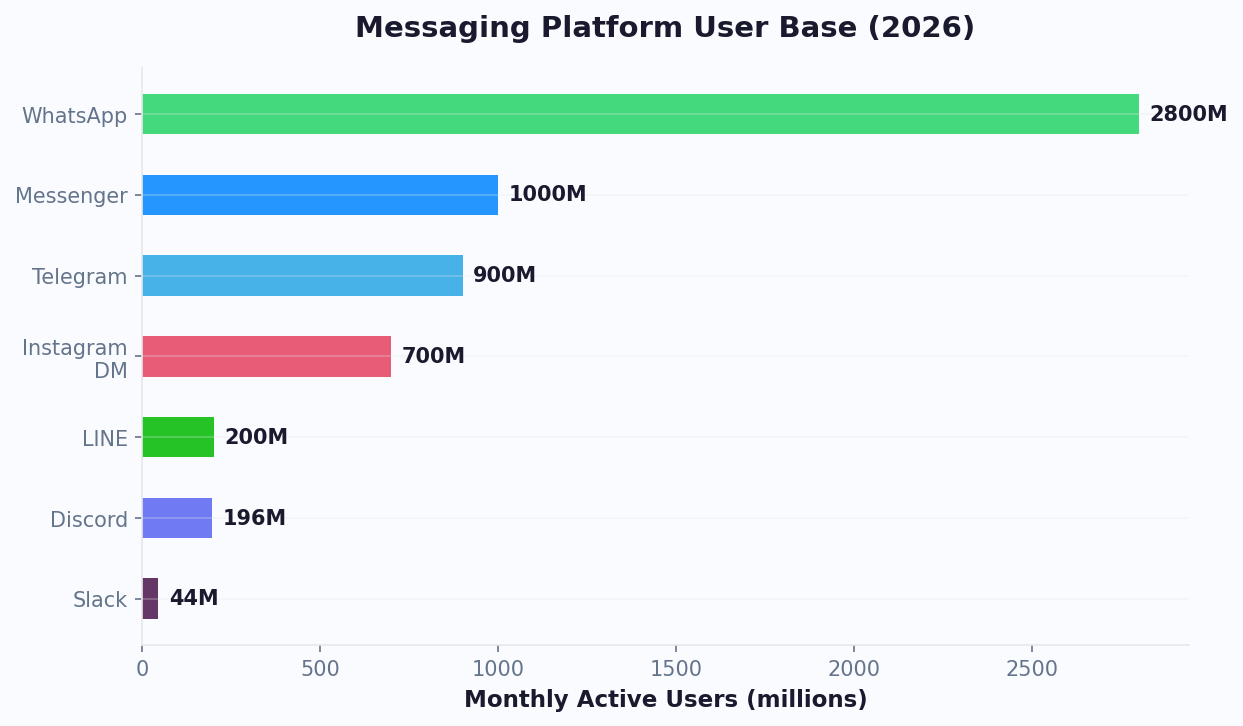
Facebook Messenger remains one of the most powerful customer engagement channels on the planet. With over 1 billion monthly active users (according to Statista's global messenger app rankings) and deep integration with Facebook's 3-billion-user ecosystem, Messenger gives businesses direct access to customers who are already browsing, shopping, and interacting with brands on social media every day.
For businesses running Facebook Pages, ads, or community groups, Messenger is not just a messaging app - it is the front door to customer conversations. Yet most businesses still handle Messenger manually, leading to slow response times, missed inquiries, and lost revenue. Studies show that 79% of consumers expect brands to respond on social media within 24 hours, and those that respond within the first five minutes are 21 times more likely to qualify a lead.
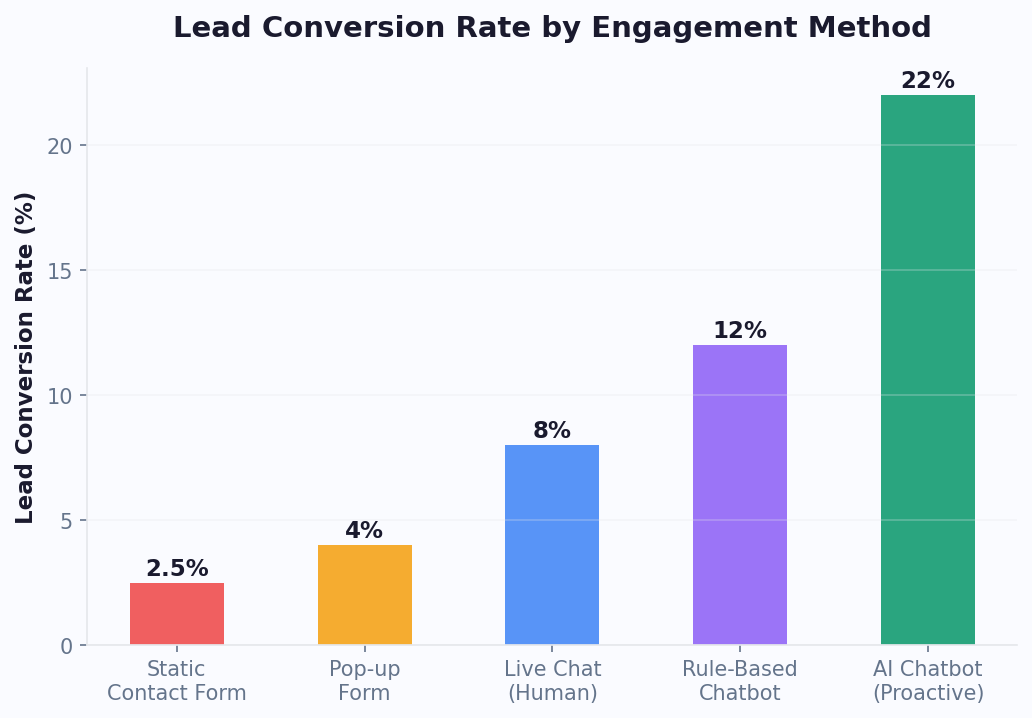
This is where a Messenger chatbot transforms the equation. With Conferbot's no-code chatbot builder, you can deploy an intelligent Messenger bot in minutes - one that qualifies leads, answers customer questions, showcases products with carousels, and seamlessly hands off to your human agents when needed. No coding, no complex API configurations, just a visual drag-and-drop builder that connects directly to your Facebook Page.
In this guide, we will cover everything you need to know about building a Messenger chatbot in 2026: platform capabilities, step-by-step setup, real-world use cases, and the best practices that separate average bots from those that drive measurable business results.
If you are new to chatbot building, start with our step-by-step guide to building a chatbot without coding. For businesses already using WhatsApp, see how Messenger compares in our channel overview - or deploy both simultaneously with Conferbot's omnichannel platform. You can also explore our full template library to find pre-built Messenger flows ready to customize. If you need a multilingual bot, check our multilingual chatbot capabilities.
What Can a Messenger Chatbot Do?
Facebook Messenger's bot platform offers a rich set of interactive features that go far beyond simple text replies. Understanding these capabilities helps you design bot experiences that feel native to the platform and delight users.
Rich Message Types
- Quick Replies - Up to 13 tappable buttons that appear below a message, perfect for guiding users through choices without typing. Quick replies disappear after selection, keeping conversations clean
- Generic Templates (Carousels) - Horizontal scrollable cards with images, titles, subtitles, and up to 3 buttons per card. Ideal for product catalogs, service menus, or property listings
- Button Templates - Text messages with up to 3 attached buttons (URL, postback, or call). Great for CTAs like "Visit Website," "Talk to Agent," or "Call Now"
- Media Templates - Share images, videos, audio, or files with optional buttons. Perfect for tutorials, product demos, or downloadable resources
- Receipt Templates - Formatted order receipts with line items, totals, and tracking links for e-commerce confirmations

Engagement Features
- Persistent Menu - A hamburger menu always accessible at the bottom of the chat, functioning like navigation for your bot. Include links to FAQs, contact info, or key actions
- Get Started Button - A prominent button that appears when a user first opens your bot, triggering the welcome flow
- Ice Breaker Questions - Pre-set questions displayed on first interaction that help users understand what the bot can do
- Typing Indicators - Show the "..." typing bubble to create a natural conversational rhythm
- User Profile Access - With permission, access the user's name, profile picture, and locale for personalized conversations
Combined with Conferbot's AI-powered responses and analytics dashboard, these features let you build Messenger experiences that rival dedicated mobile apps - at a fraction of the cost. For businesses that want to match the bot's personality to their brand voice, custom branding ensures every message reflects your identity.
Click-to-Messenger Ads Strategy
Click-to-Messenger ads are one of the highest-ROI ad formats available in the Meta advertising ecosystem. Instead of sending traffic to a landing page where 97% of visitors bounce without converting, these ads open a Messenger conversation directly. When connected to a Conferbot chatbot, every ad click triggers a customized welcome flow that engages the user immediately. Businesses using Click-to-Messenger ads with chatbot automation report 5-10x lower cost-per-lead compared to traditional lead-form ads, because the conversational format builds trust and captures information naturally.
To set up a Click-to-Messenger ad campaign, create a "Messages" objective campaign in Meta Ads Manager, select Messenger as the destination, and configure the ad creative. In Conferbot, design a dedicated welcome flow for ad traffic - typically a greeting that references the ad offer, followed by 2-3 quick reply buttons that qualify the lead. Track campaign performance through Conferbot analytics to measure cost per qualified lead, conversation completion rate, and downstream conversion.
The cost-per-lead data across industries is compelling. Real estate advertisers running Click-to-Messenger campaigns with Conferbot automation report an average cost-per-qualified-lead of $4.50-$8.00, compared to $25-$50 for traditional Facebook lead-form ads targeting the same audience. E-commerce brands see cost-per-acquisition drop by 62% on average when switching from landing page campaigns to Messenger bot campaigns, because the chatbot immediately engages the user, asks qualifying questions, and presents personalized product recommendations within seconds of the ad click. For best results, segment your ad audiences and create distinct welcome flows for each segment - a cold audience flow should introduce your brand and offer a lead magnet, while a retargeting flow should reference the product the user previously viewed and offer a time-sensitive discount.
Messenger Marketing Sequences
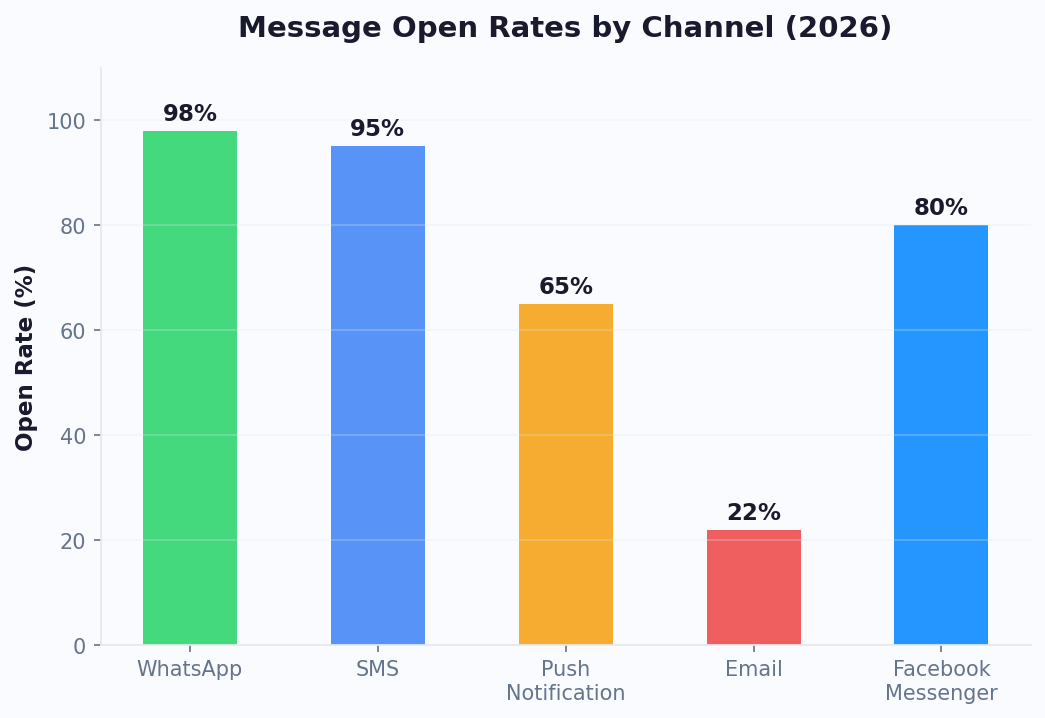
Within the 24-hour messaging window, you can send a series of follow-up messages to nurture leads and drive conversions. Design drip sequences that deliver value over multiple touchpoints: send a welcome message immediately, follow up with a resource or case study 2 hours later, and present a special offer 12 hours later. Because Messenger messages have 80%+ open rates (compared to 20% for email), these sequences achieve dramatically higher engagement. After the 24-hour window closes, use approved message tags for transactional follow-ups or sponsored messages for promotional re-engagement.
A well-structured Messenger marketing sequence typically follows three stages. The welcome sequence fires immediately after the user's first interaction: greet them by name (Messenger provides the user's first name via the Profile API), explain what the bot can do with 2-3 quick reply options, and deliver an immediate value piece such as a discount code, free resource, or product recommendation. The nurture sequence runs within the 24-hour window: send a case study or testimonial 2-4 hours after the welcome, follow with a comparison guide or FAQ 8-12 hours later, and close with a personalized offer or consultation booking link before the window expires. The recovery sequence uses approved message tags and recurring notification opt-ins to re-engage users who did not convert: send a shipping update tag when relevant, use the confirmed event tag for webinar or sale reminders, and leverage sponsored messages (paid) for promotional re-engagement campaigns. Businesses that implement all three stages report 3.2x higher lifetime value from Messenger-acquired leads compared to email-acquired leads.
Meta Compliance and the 24-Hour Messaging Window
Understanding Meta's messaging policies is critical for any Messenger bot deployment. The core rule is the 24-hour Standard Messaging window: your bot can send free-form messages only within 24 hours of the user's last interaction. After this window closes, you are limited to specific approved communication methods. Message Tags allow sending outside the 24-hour window for specific use cases: CONFIRMED_EVENT_UPDATE (for event reminders the user signed up for), POST_PURCHASE_UPDATE (shipping and delivery notifications), and ACCOUNT_UPDATE (changes to account status or application progress). Misusing message tags - such as sending promotional content via a post-purchase tag - can result in your bot being rate-limited or permanently disabled by Meta. Recurring Notifications allow users to explicitly opt in to receive daily, weekly, or monthly messages from your bot, providing a compliant channel for ongoing engagement. Sponsored Messages are paid messages that can be sent to anyone who has previously interacted with your bot, regardless of the 24-hour window. These appear with a "Sponsored" label and are priced on a CPM basis, typically $30-$80 CPM depending on audience targeting. Conferbot's platform automatically tracks messaging windows and prevents accidental policy violations, protecting your bot from Meta enforcement actions.
Messenger Commerce Features
Messenger has evolved into a full commerce channel with features that support the entire purchase journey. Product catalogs can be displayed through generic templates (carousels) with up to 10 scrollable cards, each showing a product image, title, price, and "Buy Now" or "View Details" buttons. Receipt templates provide formatted order confirmations with line items, totals, tax, shipping costs, and a tracking link - eliminating the need for separate confirmation emails. Payment integration allows in-chat checkout through Meta Pay or third-party payment processors connected via Conferbot's integrations hub, reducing the steps between product discovery and purchase from 5-7 clicks on a website to 2-3 taps in Messenger. Businesses using Messenger commerce features with Conferbot automation report 28% higher average order values compared to mobile web checkout, driven by the chatbot's ability to upsell and cross-sell through personalized carousel recommendations during the conversation. For a complete guide to building commerce flows, see our chatbot building tutorial.
Messenger API Changes and Platform Updates
Meta regularly updates the Messenger Platform policies and API capabilities. Key changes to be aware of in 2026 include stricter enforcement of the 24-hour messaging window, expanded use of message tags for confirmed events and post-purchase updates, improved support for recurring notifications (allowing users to opt in to daily, weekly, or monthly updates), and new API endpoints for enhanced commerce features. Conferbot stays current with all Messenger Platform changes, automatically updating our integration layer so your bot remains compliant without manual intervention. Visit our chatbot building blog for the latest platform updates, and learn about webhook configuration for advanced API integrations.
Step-by-Step Messenger Bot Setup
Setting up a Messenger chatbot with Conferbot is straightforward. Here is the complete process from start to a live bot on your Facebook Page.
Prerequisites
- A Facebook Business Page (personal profiles cannot use Messenger bots)
- Admin access to the Page
- A Conferbot account (free plan works for getting started)
Step 1: Build Your Chatbot
Start in the Conferbot dashboard by creating a new chatbot using the visual flow builder. Design your conversation flows, add quick replies and buttons, and configure your welcome message. You can also start from a pre-built template for common use cases like customer support or lead generation.
Step 2: Create a Meta App
- Go to developers.facebook.com and log in with your Facebook account
- Click "My Apps" and then "Create App"
- Select "Business" as the app type
- Name your app and select your Business Portfolio
- On the app dashboard, find "Messenger" and click "Set Up"
Step 3: Generate Access Token
- In the Messenger settings, scroll to "Access Tokens"
- Click "Add or remove Pages" and select your Facebook Page
- Grant the required permissions
- Click "Generate Token" next to your Page name
- Copy the Page Access Token (store it securely)
- Note your Page ID from the same section
Step 4: Connect to Conferbot
- In Conferbot, navigate to Channels → Messenger → Connect
- Enter your Page ID and Page Access Token
- Conferbot generates a Webhook URL and Verify Token - copy both
Step 5: Configure the Webhook
- Back in Meta Developer Portal, go to Messenger → Settings → Webhooks
- Click "Add Callback URL"
- Paste the Webhook URL and Verify Token from Conferbot
- Click "Verify and Save"
- Subscribe to these webhook fields: messages, messaging_postbacks, messaging_optins
Your Messenger bot is now live. Send a message to your Page to test it. The entire process typically takes 5-10 minutes.
Troubleshooting Common Setup Issues
If your bot does not respond after setup, check these common issues: ensure the Page Access Token has the correct permissions (pages_messaging scope), verify the webhook subscription includes the "messages" field, confirm the app is in "Live" mode (not Development mode), and check that Conferbot's webhook URL is entered correctly with the full HTTPS path. Meta's App Review process may also be required before your bot can message users who are not administrators or testers of the app - submit for review early to avoid delays at launch. For detailed API documentation, refer to the official Messenger Platform developer docs.
Key Messenger Bot Features with Conferbot
Conferbot adds a layer of intelligence and management on top of Messenger's native capabilities, giving you a complete customer engagement solution.
AI-Powered Conversations
Combine structured flows with OpenAI-powered natural language understanding. Your bot can handle unexpected questions, understand variations in how users phrase requests, and provide intelligent fallback responses instead of frustrating "I don't understand" loops.
Seamless Human Handoff
When a conversation requires a human touch - complex issues, high-value sales, or emotional situations - Conferbot's live chat feature lets agents take over seamlessly. The customer never leaves Messenger, and the agent sees the full conversation history.
Lead Capture and Qualification
Use conversational flows to collect contact information, qualify prospects based on budget and timeline, and automatically sync leads to your CRM. Messenger's built-in user profile data (name, locale) enriches leads without extra questions.
Omnichannel Continuity
With Conferbot's omnichannel platform, a customer who starts on Messenger can continue on WhatsApp, your website widget, or any other connected channel. Conversation history follows the customer across channels.
Advanced Analytics
The analytics dashboard tracks Messenger-specific metrics: message open rates, response times, conversation completion rates, popular flows, and user drop-off points. Use these insights to continuously optimize your bot's performance.
Template Message Campaigns
Send proactive messages to users who have previously interacted with your bot. Use template messages for order confirmations, appointment reminders, or promotional campaigns (within Meta's policies).
Knowledge Base Integration
Connect your product documentation, FAQ pages, and support articles to Conferbot's AI knowledge base. The bot draws from your existing content to answer questions accurately, reducing the time needed to build individual conversation flows. Upload PDFs, paste URLs, or connect your help center - the AI indexes everything and serves relevant answers in Messenger conversations automatically.
Calendar and Appointment Booking
Integrate calendar booking directly into your Messenger bot. Visitors can view available time slots, select a date and time, and confirm appointments without leaving the chat. The bot syncs with Google Calendar, Outlook, or Calendly to prevent double bookings and sends automated reminders before the appointment. Service businesses using Messenger booking bots report a 35% reduction in no-show rates compared to traditional phone or email scheduling.
Third-Party Integrations
Extend your Messenger bot's capabilities with Conferbot's integrations hub. Connect to CRMs like HubSpot and Salesforce for automatic lead syncing, link to e-commerce platforms like Shopify for order lookups, integrate with payment processors for in-chat transactions, or connect to Google Sheets for simple data logging. These integrations transform your Messenger bot from a conversation tool into a complete business automation engine. For enterprise teams, explore white-label chatbot solutions and team inbox for collaborative support management.
Industry Use Cases for Messenger Chatbots
Messenger chatbots deliver results across virtually every industry. Here are the most impactful applications we see from Conferbot customers.
E-Commerce and Retail
Product discovery through carousel templates, personalized recommendations based on browsing behavior, abandoned cart recovery, order status updates, and return processing. Messenger bots can increase conversion rates by 15-25% by engaging shoppers at the moment of interest. Use lead generation templates to capture shoppers who are not ready to buy yet. Explore our dedicated e-commerce chatbot solutions for industry-specific automation flows.
Real Estate
Property showcases with image carousels, automated scheduling for viewings, lead qualification based on budget and location preferences, and follow-up sequences. Agents report handling 3-5x more inquiries with a Messenger bot compared to manual responses. See our real estate chatbot solutions for purpose-built property listing flows.
Healthcare
Appointment booking, symptom pre-screening, clinic information, prescription reminders, and patient satisfaction surveys. Messenger bots help healthcare providers reduce no-shows by 30% through automated reminders sent directly to the patient's phone.
Education
Course information, enrollment assistance, campus tour scheduling, student FAQ handling, and deadline reminders. Educational institutions see 50-70% faster response times to prospective student inquiries.
Restaurants and Hospitality
Menu browsing, reservation management, order placement, loyalty program engagement, and post-visit feedback collection. Restaurants using Messenger bots report a 20% increase in repeat orders. See our restaurant chatbot and hospitality chatbot guides for menu and booking flows.
Professional Services
Consultation booking, service explanations, document collection, quote generation, and client onboarding. Law firms, accounting practices, and consulting agencies use Messenger bots to pre-qualify clients before the first call. Check our legal and insurance chatbot solutions for industry-specific compliance requirements.
Automotive
Test drive scheduling, vehicle inventory browsing via carousels, trade-in value estimation, service appointment booking, and recall notification delivery. Automotive dealerships using Messenger bots report 40% more test drive bookings compared to web forms. Pair with chatbot security features to protect customer PII during vehicle financing conversations.
Nonprofits and Government
Donor engagement, volunteer coordination, event registration, service inquiry routing, and feedback collection. Nonprofit organizations and government agencies use Messenger bots to extend service hours and reduce phone queue wait times by up to 60%.
Manufacturing, Logistics, and Energy
Manufacturing companies use Messenger bots for supplier inquiry routing and order status updates. Logistics providers deploy bots for real-time shipment tracking and delivery scheduling. Energy utilities automate billing inquiries, outage reporting, and service appointment booking. These industries benefit from Messenger's receipt and button templates for structured transactional communications.
Media, Technology, and HR
Media companies distribute content through recurring notifications, achieving 4x the engagement of email newsletters. Technology companies use Messenger bots for product onboarding, feature announcements, and technical support triage. HR departments deploy internal Messenger bots for employee FAQ handling, leave requests, and onboarding checklists - especially effective for organizations whose workforce already uses Facebook. For mortgage-related inquiries, mortgage chatbot solutions handle rate calculations and application pre-qualification.
Messenger vs Other Messaging Channels
Choosing the right channel depends on your audience, industry, and use case. Here is how Messenger compares to other popular chatbot channels.
| Feature | Messenger | Telegram | ||
|---|---|---|---|---|
| Monthly Active Users | 1B+ | 2.7B+ | 2B+ | 800M+ |
| Rich Media (Carousels) | Yes (up to 10 cards) | No | No | No |
| Quick Replies | Up to 13 | Up to 3 buttons | Yes | Inline keyboards |
| Persistent Menu | Yes | No | No | Bot commands |
| Proactive Messaging | Templates (24h + rules) | Templates (paid) | 24h window only | Unlimited |
| Ad Integration | Click-to-Messenger Ads | Click-to-WhatsApp Ads | Click-to-Instagram DM Ads | No native ads |
| User Profile Data | Name, photo, locale | Phone number, name | Username, name | Username, name |
| E-Commerce Features | Receipt templates, carousels | Catalogs, cart | Product tags | Inline payments |
| Setup Complexity | Moderate | Moderate | Moderate | Very easy |
| Cost | Free | Conversation-based | Free | Free |
When to choose Messenger: Messenger is the best choice when your audience actively engages with your Facebook Page, you run Facebook Ads, you need rich interactive templates like carousels and receipts, or you want the deepest integration with Meta's advertising ecosystem. For businesses targeting a global audience across multiple channels, Conferbot's omnichannel approach lets you deploy on Messenger alongside WhatsApp, Instagram, and more - all managed from one dashboard.
Messenger vs WhatsApp vs Instagram for Business
Choosing between Meta's three messaging platforms depends on your audience demographics, business model, and engagement strategy. The following comparison highlights the key differences that matter for chatbot deployment.
| Criteria | Messenger | WhatsApp Business | Instagram DM |
|---|---|---|---|
| Primary Audience | Facebook Page followers, ad clickers, community group members | Phone contacts, international customers, B2C transactional | Visual-first brands, Gen Z and millennial shoppers, influencer audiences |
| Rich Template Support | Carousels (10 cards), receipts, buttons, media templates | List messages (10 rows), reply buttons (3 max), catalogs | Quick replies, generic templates (limited), story mentions |
| Ad Integration | Click-to-Messenger Ads (highest ROI ad format) | Click-to-WhatsApp Ads (growing adoption) | Click-to-Instagram DM Ads (visual-first) |
| Messaging Costs | Free (standard messaging), paid sponsored messages | Conversation-based pricing ($0.005-$0.08 per conversation) | Free (standard messaging) |
| Proactive Outreach | 24h window + message tags + recurring notifications + sponsored | 24h window + template messages (pre-approved, paid) | 24h window only (very restrictive) |
| Commerce Features | Product carousels, receipt templates, in-chat payments | Product catalogs, cart, order messages | Product tags, Shop integration, story shopping |
| Best For | Lead gen, e-commerce, support with rich visual experiences | Transactional messaging, global reach, two-way support | Brand engagement, visual commerce, influencer marketing |
| Bot Complexity | Advanced (most template types, persistent menu) | Moderate (structured lists, limited buttons) | Basic (limited template support) |
| User Profile Data | Name, profile photo, locale, timezone | Phone number, name | Username, name, follower count |
For most businesses, the optimal strategy is deploying across all three platforms using Conferbot's omnichannel platform. Build your core conversational flows once, then let Conferbot adapt the experience to each channel's native capabilities. Messenger serves as the richest chatbot experience with its carousel and receipt templates, WhatsApp handles transactional and international communication, and Instagram captures your visual-first social audience. For team collaboration, consider pairing with Slack or Microsoft Teams bots to route Messenger conversations to internal support channels. Use analytics to compare performance across channels and allocate resources accordingly. See how Conferbot compares to other chatbot platforms for multi-channel automation.
Messenger Bot Pricing & Meta Platform Costs
One of the most common questions businesses ask is "How much does a Messenger chatbot cost?" The answer is surprisingly affordable - especially compared to SMS, email marketing platforms, and WhatsApp Business API. Understanding the full cost picture helps you budget accurately and maximize ROI.
Meta Messenger Pricing Tiers
Facebook Messenger operates on a fundamentally different pricing model than most business messaging channels. Here is the breakdown:
- Standard Messaging (Free) - Within the 24-hour window after a user's last interaction, your bot can send unlimited free-form messages at no charge from Meta. This includes text, images, carousels, quick replies, and all template types. There is no per-message fee, no conversation fee, and no volume cap
- Message Tags (Free) - Outside the 24-hour window, approved message tags (CONFIRMED_EVENT_UPDATE, POST_PURCHASE_UPDATE, ACCOUNT_UPDATE) are free to send, provided you use them for their intended purpose. These are transactional messages, not promotional
- Recurring Notifications (Free) - When a user explicitly opts in to receive daily, weekly, or monthly updates, you can send one message per opted-in frequency at no cost from Meta. This is the most cost-effective re-engagement channel available
- Sponsored Messages (Paid) - To send promotional messages outside the 24-hour window to users who have not opted in to recurring notifications, you pay on a CPM basis through Meta Ads Manager. Typical CPM ranges from $30-$80 depending on audience targeting, geography, and competition

Messenger vs SMS vs Email: Cost Comparison
When you compare Messenger's pricing to alternative communication channels, the economics are compelling:
| Channel | Cost per 1,000 Messages | Open Rate | Effective Cost per 1K Engaged |
|---|---|---|---|
| Messenger (Standard) | $0.00 | 80%+ | $0.00 |
| Email (ESP) | $2-$5 | 20% | $10-$25 |
| WhatsApp Business API | $5-$80 | 95%+ | $5-$84 |
| SMS (Twilio/carriers) | $10-$25 | 98% | $10-$25 |
| Messenger (Sponsored) | $30-$80 CPM | 70%+ | $43-$114 |
The key insight: Messenger standard messaging is completely free, and with 80%+ open rates, your cost-per-engaged-user is effectively $0. Even when you factor in sponsored messages for re-engagement, Messenger typically delivers 3-5x better ROI than SMS campaigns and 2-4x better than email marketing for direct response objectives.
Conferbot Platform Pricing for Messenger
Conferbot's pricing is based on your usage tier, not the channel. Your Conferbot subscription covers the chatbot builder, AI features, analytics, and all channel integrations. Messenger integration is included on all plans:
- Free Plan - Includes Messenger integration with basic chatbot flows, quick replies, and button templates. Perfect for testing and small businesses
- Pro Plan - Full Messenger feature set including AI-powered responses, advanced analytics, live chat handoff, and calendar booking
- Business Plan - All Pro features plus omnichannel deployment, AI knowledge base, priority support, and team collaboration tools
View all details on our pricing page. The combination of Meta's free messaging tier and Conferbot's affordable platform pricing makes Messenger chatbots one of the most cost-effective customer engagement channels available in 2026. Businesses looking for a branded solution can also explore white-label options for client-facing deployments.
ROI Calculator: Messenger Chatbot vs. Manual Support
Consider a business handling 500 Messenger conversations per month manually. With an average support agent cost of $18/hour and 8 minutes per conversation, that is roughly $1,200/month in labor costs. A Conferbot Messenger chatbot can automate 70-85% of these conversations, reducing the labor cost to $180-$360/month while simultaneously improving response times from hours to seconds. Factor in additional revenue from lead generation and appointment booking automation, and most businesses see a 300-500% ROI within the first 90 days of deploying a Messenger chatbot.
Click-to-Messenger Ads + Chatbot Automation
Click-to-Messenger ads represent the single highest-ROI advertising format in the Meta ecosystem for lead generation and direct response campaigns. Unlike traditional ads that send users to landing pages (where 97% bounce without converting), Click-to-Messenger ads open an immediate conversation with your chatbot - creating a 1:1 engagement that feels personal, responds instantly, and captures leads through natural dialogue.

How Click-to-Messenger Ads Work
Setting up a Click-to-Messenger ad campaign involves three layers: the ad creative in Meta Ads Manager, the Messenger conversation flow in Conferbot, and the lead routing and CRM integration. Here is the step-by-step process:
- Campaign setup - In Meta Ads Manager, create a new campaign with the "Messages" objective. Select "Messenger" as the messaging app destination. This tells Meta to optimize delivery for users most likely to start a Messenger conversation
- Ad creative - Design your ad with a compelling offer and a clear CTA like "Send Message" or "Get Your Quote." The ad can run on Facebook Feed, Instagram Feed, Instagram Stories, or Audience Network. Use carousel ads to showcase multiple products or services, each linking to a tailored Messenger flow
- Chatbot flow design - In Conferbot's visual flow builder, create a dedicated welcome flow for ad traffic. The first message should acknowledge the ad offer ("Thanks for your interest in [offer]!"), followed by quick reply buttons that qualify the lead
- Lead qualification - Design 3-5 qualifying questions using quick replies and buttons: budget range, timeline, location, specific needs. Each response narrows the lead quality and routes to the appropriate follow-up
- Handoff and CRM sync - For hot leads, trigger an instant live chat handoff to a sales agent. For warm leads, save the contact to your CRM via integrations and add to a nurture sequence. For cold leads, deliver a lead magnet and encourage recurring notification opt-in
Click-to-Messenger vs Lead Ads vs Landing Page Ads
Understanding how Click-to-Messenger ads compare to other Facebook ad formats helps you allocate budget effectively:
| Metric | Click-to-Messenger + Bot | Facebook Lead Ads | Landing Page Ads |
|---|---|---|---|
| Average CTR | 3.5-5.0% | 1.5-2.5% | 1.0-2.0% |
| Lead Conversion Rate | 30-45% | 12-18% | 2-5% |
| Cost Per Lead | $2-$8 | $15-$35 | $25-$60 |
| Lead Quality Score | High (conversational qualification) | Low-Medium (pre-filled forms) | Medium (self-selected) |
| Response Speed | Instant (automated) | Depends on follow-up | Depends on follow-up |
| Re-engagement | Recurring notifications + tags | Email only | Email/retargeting only |
ROAS Optimization Strategies
To maximize return on ad spend (ROAS) with Click-to-Messenger campaigns connected to Conferbot, implement these proven strategies:
- Audience segmentation flows - Create separate chatbot welcome flows for different ad audiences. A cold-audience flow should introduce your brand and build trust before asking for information. A retargeting flow should reference the product the user previously viewed and offer a time-sensitive incentive
- Quick qualification scoring - Use Conferbot's conditional logic to score leads based on their quick reply selections. High-intent signals (budget confirmed, timeline immediate, decision-maker confirmed) trigger instant handoff to sales. Lower-intent signals trigger automated nurture sequences
- Carousel product matching - For e-commerce, dynamically generate product carousel recommendations based on the ad the user clicked and their answers to preference questions. This creates a personalized shopping experience that increases average order value by 28-35%
- Recurring notification capture - Before the 24-hour window closes, prompt every lead to opt in to recurring notifications. This gives you a free, high-engagement channel for ongoing nurture without additional ad spend
- A/B test everything - Use Conferbot's A/B testing to test different welcome messages, qualification question order, and CTA placement. Even small improvements in conversation completion rate translate to significant cost-per-lead reductions at scale
Instagram Ad to Messenger Bot
Meta also allows Instagram ads to direct users into Messenger conversations instead of Instagram DMs. This is particularly effective for businesses whose audience is more active on Instagram but who want the richer chatbot experience that Messenger provides (carousels, persistent menu, receipt templates). Set the messaging destination to "Messenger" in your Instagram ad setup, and Conferbot handles the rest with the same chatbot flows. Pair this with your website chatbot for full-funnel coverage across all customer touchpoints. For deeper audience insights, combine ad flows with lead scoring and user segmentation to prioritize the highest-value prospects.
Messenger Recurring Notifications
Recurring notifications are one of the most powerful and underutilized features on the Messenger Platform. They solve the single biggest limitation of Messenger marketing - the 24-hour messaging window - by giving users an explicit way to opt in to ongoing messages from your bot at a frequency they choose.

How Recurring Notifications Work
The recurring notification system follows a structured opt-in process mandated by Meta:
- Opt-in request - Your bot presents a recurring notification opt-in card to the user. This is a special message type that clearly states what the user will receive and how often. The user sees a "Get Updates" button with the frequency (Daily, Weekly, or Monthly) and a description of the content
- User confirmation - The user taps "Get Updates" to confirm their opt-in. Meta records this consent with a unique notification token tied to the user and your Page
- Token management - Conferbot stores the notification token and tracks its validity. Daily tokens last 6 months, weekly tokens last 9 months, and monthly tokens last 12 months before requiring re-confirmation
- Message delivery - At the opted-in frequency, your bot sends one message using the recurring notification token. This message can contain any content type - text, images, carousels, buttons - but you get exactly one message per opted-in period
Recurring Notification Frequency Options
| Frequency | Token Validity | Avg Open Rate | Best Use Cases |
|---|---|---|---|
| Daily | 6 months | 85% | Flash sales, daily tips, news digests, fitness challenges |
| Weekly | 9 months | 78% | Newsletter roundups, weekly deals, content recommendations |
| Monthly | 12 months | 72% | Product launches, monthly reports, special promotions |
Designing High-Conversion Opt-In Flows
The opt-in rate for recurring notifications depends heavily on timing, context, and value proposition. Here are the strategies that Conferbot customers use to achieve 40-60% opt-in rates:
- Value-first timing - Present the opt-in request after your bot has delivered value, not at the start of the conversation. A user who just received a helpful product recommendation or had their question answered is 3x more likely to opt in than one who sees the request immediately
- Specific value proposition - Do not ask users to "Get Updates." Tell them exactly what they will receive: "Get weekly deals up to 50% off," "Daily AI marketing tips," or "Monthly product launch previews with early access." Specific promises convert 2.5x higher than generic requests
- Frequency choice - When possible, offer multiple frequency options so users feel in control. Conferbot's flow builder lets you present daily, weekly, and monthly as separate opt-in buttons, each leading to the appropriate Meta opt-in card
- Easy opt-out - Always include a visible "Stop Updates" option in every recurring notification message. This is required by Meta Platform Policy, and it actually improves opt-in rates because users feel safe knowing they can unsubscribe anytime
Re-Engagement Beyond the 24-Hour Window
Recurring notifications are the primary free method for re-engaging Messenger users after the 24-hour standard messaging window closes. Here is how they compare to other re-engagement options:
| Method | Cost | Reach | Content Flexibility | Open Rate |
|---|---|---|---|---|
| Recurring Notifications | Free | Opted-in users only | Full (any message type) | 72-85% |
| Message Tags | Free | Previous interactors | Restricted (transactional only) | 75%+ |
| Sponsored Messages | $30-$80 CPM | All previous interactors | Full (marked as sponsored) | 70%+ |
| Email Re-engagement | $2-$5 per 1K | Email list only | Full | 20% |
The most effective re-engagement strategy combines all available methods. Use message tags for legitimate transactional updates (shipping, event reminders). Use recurring notifications for content and soft-promotional messaging. Use sponsored messages sparingly for major promotions to your full Messenger audience. And maintain an email backup for users who do not opt in to recurring notifications - capture email addresses during your chatbot conversation and sync to your email platform via Conferbot's integrations hub.
Recurring Notification Content Strategies
The content you send via recurring notifications must deliver enough value to keep users opted in. Here are proven content formats by industry:
- E-commerce: Weekly "Top 5 Deals" carousel with direct purchase buttons, "Back in Stock" alerts for wishlisted items, seasonal sale previews with early access codes
- SaaS / Professional Services: Weekly tip with a quick reply to "Learn More," monthly feature update roundup, quarterly business review invitation
- Real Estate: Weekly new listing carousels matching saved search criteria, monthly market report summaries, open house invitations
- Media / Content: Daily headline digest with "Read More" buttons, weekly content roundup, breaking news alerts
- Restaurants: Daily specials with order buttons, weekly event announcements, monthly loyalty reward updates
Track the performance of each recurring notification through Conferbot's analytics - monitor open rates, click-through rates, opt-out rates, and downstream conversions to continuously refine your content strategy. Combine with broadcast messaging to coordinate recurring Messenger notifications with campaigns on other channels.
Messenger Commerce & Payments
Facebook Messenger has evolved from a simple messaging app into a full-featured commerce platform. With native support for product carousels, buy buttons, receipt templates, and payment integration, Messenger enables businesses to run the entire purchase journey inside the chat window - from discovery to checkout to post-purchase support.

Product Catalog Display
Messenger's generic template (carousel) is the backbone of in-chat commerce. Each carousel supports up to 10 horizontally scrollable cards, and each card includes:
- A high-resolution product image (recommended 1.91:1 ratio)
- A title (up to 80 characters)
- A subtitle with pricing and key details (up to 80 characters)
- Up to 3 action buttons (e.g., "Buy Now," "View Details," "Add to Cart")
With Conferbot's flow builder, you can dynamically populate carousels based on user preferences collected through quick replies. Ask "What are you looking for?" with category buttons, then serve a filtered product carousel matching their selection. This conversational product discovery achieves 68% engagement rates - far higher than static website product pages.
Rich Template Types for Commerce
Beyond the generic carousel, Messenger offers specialized template types designed for commerce scenarios:
- Receipt Template - Sends a beautifully formatted order confirmation with merchant name, order number, line items (with images, quantities, and prices), subtotal, tax, shipping cost, total, and a tracking URL. This replaces confirmation emails with a message that achieves 80%+ open rates
- Button Template - Perfect for post-browse CTAs: "Buy This Item," "See Similar Products," "Talk to Sales." Limit of 3 buttons keeps the decision space manageable
- Media Template - Share product demo videos, 360-degree product images, or sizing guides with an embedded action button. Video content in Messenger achieves 3x higher engagement than static images
- Airline Template - While designed for airlines, this template type (boarding pass, itinerary, check-in, flight update) can be adapted for any booking-heavy business: event tickets, hotel confirmations, or travel packages
In-Chat Payment and Checkout
The friction between "I want this" and "I bought this" is the biggest conversion killer in e-commerce. Messenger reduces this friction from 5-7 clicks on a website to 2-3 taps in chat. Here is how payment works in Messenger commerce:
- Meta Pay - Users with saved payment methods in their Meta account can complete purchases with a single tap. Meta Pay supports credit cards, debit cards, and PayPal
- Third-party payment processors - Connect Stripe, PayPal, or your preferred processor through Conferbot's integrations hub. The bot generates a secure payment link, and the user completes checkout either in-chat or in a webview
- Webview checkout - For complex checkout flows (multiple addresses, gift wrapping, detailed customization), Messenger supports in-app webviews that open your checkout page without leaving the Messenger app. The conversation context passes through, so the user does not have to re-enter information
Abandoned Cart Recovery
One of the most profitable Messenger commerce features is abandoned cart recovery. When a user browses products, adds items to their cart (tracked via Conferbot's conversation state), but does not complete the purchase, your bot can automatically follow up within the 24-hour window with a personalized reminder. Send a carousel showing the exact items left in the cart, add a time-sensitive discount ("Complete your order in the next 2 hours for 10% off"), and include a one-tap checkout button. Businesses using Messenger abandoned cart recovery report 15-25% recovery rates - 3-5x higher than email-based cart recovery (which averages 3-5%).
Order Updates and Post-Purchase Experience
Messenger excels at post-purchase communication through message tags. The POST_PURCHASE_UPDATE tag allows you to send shipping confirmations, delivery tracking updates, and delivery confirmations outside the 24-hour window at no cost. This eliminates the need for separate SMS notifications (saving $0.01-$0.03 per message) while achieving higher open rates. Connect your shipping provider to Conferbot via the integrations hub to automatically trigger tracking updates as packages move through the fulfillment pipeline.
Upselling and Cross-Selling in Conversation
The conversational format of Messenger is uniquely suited for upselling and cross-selling. After a user selects a product, your Conferbot chatbot can present complementary items: "Customers who bought [Product A] also love [Product B]" displayed as a carousel. After purchase confirmation, send a receipt template followed by a "You Might Also Like" carousel featuring accessories, refills, or upgrades. This conversational upselling increases average order value by 28% on average, because the recommendations feel like helpful suggestions rather than pushy sales tactics. Pair these commerce flows with Conferbot's analytics dashboard to track which cross-sell combinations generate the highest additional revenue. For multi-store setups, use multi-bot management to run separate bots for each store brand from a single Conferbot account.
Messenger Bot Policy & Compliance
Operating a Messenger chatbot requires strict compliance with Meta's Platform Policy, data protection regulations, and messaging rules. Violations can result in your bot being throttled, suspended, or permanently banned - so understanding these policies is not optional, it is essential for long-term success.
Meta Platform Policy: Core Rules
The Meta Messenger Platform Policy governs what your bot can and cannot do. Here are the rules that matter most:
- 24-Hour Standard Messaging - You may send free-form messages (any content, any format) only within 24 hours of the user's last interaction. Every user message resets the 24-hour clock. Conferbot automatically tracks this window for you
- Message Tags - Outside the 24-hour window, only three approved message tags are permitted: CONFIRMED_EVENT_UPDATE (events the user registered for), POST_PURCHASE_UPDATE (shipping, delivery, receipt), and ACCOUNT_UPDATE (application status, payment issues, policy changes). Sending promotional content via a message tag is a violation that Meta actively monitors and penalizes
- Recurring Notifications - Users must explicitly opt in via Meta's standard opt-in card. You cannot pre-check opt-in, auto-subscribe users, or incentivize opt-in with conditions ("opt in to get your discount"). The opt-in must be genuinely voluntary
- Sponsored Messages - Must be clearly labeled (Meta handles this automatically) and comply with Meta advertising policies. These are the only way to send promotional content outside the 24-hour window to users who have not opted in to recurring notifications
- Human Agent Availability - Meta recommends (and in some cases requires) that your bot clearly offers a path to human assistance. Conferbot's live chat integration satisfies this requirement
Subscription Messaging
Subscription messaging was a legacy permission category that allowed certain Pages (primarily news organizations) to send non-promotional content outside the 24-hour window. Meta has largely replaced this with recurring notifications for most use cases. If your business previously relied on subscription messaging, you should migrate to recurring notifications. Conferbot supports both systems during the transition period, and our support team can help you plan the migration.
GDPR and Data Privacy Compliance
For businesses operating in the EU, UK, or serving European customers, GDPR compliance is critical when running Messenger chatbots:
- Data processing basis - Your chatbot collects personal data (name, profile picture, conversation content, email if asked). Under GDPR, you need a lawful basis - typically "legitimate interest" for responding to customer inquiries or "consent" for marketing communications
- Privacy notice - Your bot's welcome message or persistent menu should include a link to your privacy policy that explains what data you collect, how you use it, and the user's rights under GDPR
- Data retention - Configure Conferbot's data retention settings to automatically delete conversation data after your retention period. Meta stores Messenger conversation data on its servers, but you control how long Conferbot retains the data it processes
- Right to erasure - Users have the right to request deletion of their data. Conferbot provides tools to search and delete individual user data across all channels, including Messenger
- Data processing agreement - Ensure your agreements with Meta (as a data controller) and Conferbot (as a data processor) comply with GDPR Article 28 requirements
CCPA and Other Regional Requirements
California Consumer Privacy Act (CCPA), Brazil's LGPD, Canada's PIPEDA, and other regional data protection laws impose similar requirements. The key principles are: disclose what data you collect, provide opt-out mechanisms, honor deletion requests, and secure the data you store. Conferbot's platform is built with global privacy compliance in mind, supporting configurable consent flows and data management tools across all channels.
App Review and Permissions
Before your Messenger bot can message users who are not administrators or testers of your Meta App, you must submit for App Review. This process verifies that your bot complies with Meta Platform Policy and uses requested permissions appropriately. Key tips for a smooth review:
- Prepare a screen recording showing your bot in action
- Document every permission you request and why
- Ensure your bot has clear error handling and a path to human support
- Remove any placeholder or test content before submitting
- Expect the review process to take 1-5 business days
Rate Limits and Throttling
Meta enforces rate limits on the Messenger Platform API. Standard limits allow 200 API calls per user per hour, and Pages with a good reputation can access higher throughput. If your bot repeatedly violates policies or generates high user complaint rates (reporting or blocking the bot), Meta will reduce your bot's sending capacity or disable it entirely. Conferbot's platform includes built-in rate limiting and compliance monitoring to prevent accidental violations, and our analytics dashboard surfaces warning signs like rising block rates before they trigger Meta enforcement. For organizations with strict security requirements, explore Conferbot's security features including encryption, access controls, and audit logs.
Conferbot vs ManyChat vs Chatfuel for Messenger
Choosing the right chatbot platform for Messenger can significantly impact your ROI, scalability, and long-term flexibility. The three leading platforms - Conferbot, ManyChat, and Chatfuel - each take a different approach to Messenger automation. Here is a detailed, honest comparison to help you make the right choice for your business in 2026.
Feature-by-Feature Comparison
| Feature | Conferbot | ManyChat | Chatfuel |
|---|---|---|---|
| Messenger Integration | Full API support | Full API support | Full API support |
| Visual Flow Builder | Drag-and-drop with conditional logic | Visual flow builder | Block-based builder |
| AI / NLP Engine | OpenAI GPT integration + custom AI | AI intents (limited) | ChatGPT plugin (add-on) |
| Omnichannel | Messenger, WhatsApp, Instagram, Telegram, Slack, Teams, Website, Line, SMS | Messenger, Instagram, WhatsApp, SMS, Email | Messenger, Instagram, WhatsApp (beta) |
| Live Chat Handoff | Built-in with full history | Live Chat (paid plan) | Third-party integration |
| AI Knowledge Base | Upload docs, URLs, PDFs - AI answers from your content | Not available | Not available |
| Calendar Booking | Native (Google, Outlook, Calendly) | Third-party (Calendly widget) | Third-party only |
| E-Commerce Integration | Shopify, WooCommerce, custom API | Shopify integration | Shopify, JSON API |
| A/B Testing | Built-in with analytics | Built-in (Pro plan) | Limited |
| Analytics Dashboard | Comprehensive with channel-specific metrics | Good for Messenger-specific | Basic analytics |
| Custom Branding | Full white-label available | Limited on free plan | Limited |
| Pricing Model | Feature-based tiers | Contact-based pricing | Conversation-based pricing |
When Conferbot Wins
Conferbot is the strongest choice when your requirements include any of the following:
- True omnichannel deployment - You need one bot across Messenger, WhatsApp, Instagram, Telegram, Slack, Microsoft Teams, LINE, Discord, and your website. Conferbot supports more channels than any competitor from a single bot configuration
- AI-powered conversations - Conferbot's native OpenAI integration and AI knowledge base deliver genuinely intelligent responses. ManyChat and Chatfuel offer basic keyword matching or limited AI add-ons that require separate configuration
- Enterprise features at startup pricing - Live chat, calendar booking, A/B testing, and advanced analytics are included in standard plans, not locked behind enterprise tiers
- Mobile app deployment - If you also need chatbot functionality in a native iOS, Android, React Native, or Flutter app, Conferbot provides SDKs that ManyChat and Chatfuel do not offer
When Competitors May Be Better
In the interest of transparency:
- ManyChat - If you are a solo creator or small business focused exclusively on Instagram and Messenger marketing with comment automation, ManyChat's comment-trigger feature and Instagram Automation are mature and well-documented. However, ManyChat's contact-based pricing can become expensive at scale
- Chatfuel - If you need a Messenger-only bot with the absolute simplest setup and minimal features, Chatfuel's block-based builder has a shorter learning curve. However, Chatfuel lacks the AI depth, omnichannel support, and enterprise features that growing businesses need
Pricing Comparison
| Platform | Free Plan | Paid Starting At | Pricing Model | AI Included |
|---|---|---|---|---|
| Conferbot | Yes (full Messenger integration) | Affordable tiers | Feature-based | Yes (OpenAI GPT) |
| ManyChat | Yes (1,000 contacts) | $15/mo (500 contacts) | Contact-based (scales up) | Limited |
| Chatfuel | Yes (50 conversations/mo) | $14.99/mo (500 conv) | Conversation-based | Add-on cost |
The critical difference is the pricing model. ManyChat charges per contact - as your audience grows to 10K, 50K, or 100K subscribers, costs balloon to $65/mo, $145/mo, or more. Chatfuel charges per conversation, which can become unpredictable during traffic spikes. Conferbot's feature-based pricing means your costs are predictable regardless of audience size, making it the most scalable option for growing businesses.
Ready to switch? Conferbot offers free migration assistance from ManyChat and Chatfuel - including flow import, contact migration, and setup support. View plans or start building for free today. For a broader platform comparison, see our full chatbot platform comparison page.
Messenger Chatbot Best Practices
Building a Messenger bot is easy. Building one that users love and that drives business results requires following proven best practices.
1. Nail the Welcome Experience
Your Get Started button and welcome message set the tone. Clearly explain what the bot can do, offer 2-3 quick reply options for the most common actions, and keep the tone conversational. Avoid walls of text - Messenger is a chat app, not an email client.
2. Design for Mobile First
Over 85% of Messenger usage is on mobile devices. Keep messages short (under 3 lines), use quick replies instead of asking users to type, and ensure images display well on small screens. Test every flow on a phone before going live.
3. Use Quick Replies Strategically
Quick replies reduce friction dramatically. Instead of asking "What can I help you with?", offer buttons like "Browse Products," "Track Order," or "Talk to Support." Each tap should move the user closer to their goal.
4. Respect the 24-Hour Messaging Window
Meta's policy allows free-form messaging only within 24 hours of a user's last interaction. After that, you must use approved message tags (shipping updates, confirmed events, account updates) or paid sponsored messages. Design re-engagement flows that encourage users to interact regularly.
5. Set Up a Human Handoff Path
Every bot conversation should have a clear escape hatch to reach a human agent. Use Conferbot's live chat to ensure frustrated users never feel trapped in a loop. Train your bot to recognize frustration signals and proactively offer human assistance.
6. Track and Iterate
Use analytics to monitor completion rates, identify where users drop off, and discover which flows drive the most conversions. The best Messenger bots are never "done" - they improve continuously based on real user data.
7. Comply with Meta Policies
Follow Meta's Platform Policy strictly. Do not spam users, always provide an opt-out mechanism, and ensure your bot's content complies with advertising policies if you use sponsored messages. Violations can result in your bot being disabled.
8. Leverage Recurring Notifications
Meta introduced recurring notifications that allow users to opt in to receive daily, weekly, or monthly messages from your bot. This is a powerful engagement tool for content-driven businesses - send weekly deal roundups, daily tips, or monthly newsletters directly through Messenger. Users explicitly opt in, so engagement rates remain high (typically 70-85% open rates), and you maintain compliance with Meta's messaging policies. Design your opt-in flow with clear value propositions and easy frequency management.
9. Build for Discovery
Help users find your bot through multiple entry points: add a "Message Us" button to your Facebook Page, embed Messenger chat on your website using the customer chat plugin, include m.me links in email signatures and marketing materials, and use QR codes in physical locations. The more entry points you create, the more conversations your bot handles, and the faster you see ROI. Combine these entry points with analytics tracking to understand which sources drive the highest-quality conversations.
Getting Started with Your Messenger Chatbot
Building a Messenger chatbot with Conferbot takes minutes, not months. Here is how to get started today.
Choose Your Starting Point
- Start from a template: Browse our support and FAQ templates or lead generation templates for pre-built flows optimized for Messenger
- Build from scratch: Use the visual flow builder to design custom conversations tailored to your business
- AI-powered: Leverage OpenAI integration to build an intelligent bot that handles open-ended questions alongside structured flows
Recommended First Steps
- Define your primary goal - Is it lead generation, customer support, e-commerce, or something else?
- Map your top 5 customer questions - Build flows that address the inquiries you receive most often on your Facebook Page
- Design a welcome flow - Guide first-time users to the right path with quick reply buttons
- Set up human handoff - Configure live chat as a fallback for complex queries
- Connect and test - Follow the setup guide above, then test thoroughly on mobile before announcing to customers
Messenger chatbots are one of the highest-ROI marketing and support channels available in 2026. With Conferbot, you get the power of an enterprise bot platform with the simplicity of a no-code builder. View pricing to find the plan that fits your business, or start building for free today.
Why Conferbot for Messenger
- No code required - Build and deploy Messenger bots with our drag-and-drop AI chatbot builder
- AI-powered intelligence - Integrate AI knowledge base for human-like answers from your documentation
- Omnichannel deployment - Same bot works on Messenger, WhatsApp, Instagram, Telegram, and your website
- Click-to-Messenger ready - Purpose-built flows for ad-driven conversations
- Real-time analytics - Track every metric with built-in analytics
- Seamless handoff - Transfer to live agents without losing context
- Calendar booking - Let customers book appointments directly in Messenger with calendar integration
- Affordable pricing - Start free, scale as you grow. See all plans
Related Resources
Continue learning about chatbot automation across channels and industries:
- How to Build a Chatbot Without Coding - Complete beginner guide
- WhatsApp Chatbot Guide - Compare Messenger and WhatsApp strategies
- Instagram DM Chatbot Guide - Extend your Meta chatbot to Instagram
- Telegram Bot Guide - Complement your Messenger bot with Telegram
- Slack Bot Guide - Route Messenger leads to your team in Slack
- Microsoft Teams Bot Guide - Enterprise internal bot deployment
- Discord Bot Guide - Community engagement automation
- LINE Bot Guide - Reach Asian markets alongside Messenger
- E-Commerce Chatbot Solutions - Industry-specific commerce automation
- Healthcare Chatbot Solutions - HIPAA-aware patient engagement
- Real Estate Chatbot Solutions - Property listing and booking flows
- Education Chatbot Solutions - Student enrollment and support
- Restaurant Chatbot Solutions - Menu, ordering, and reservation automation
- Automotive Chatbot Solutions - Test drive booking and inventory browsing
- Logistics Chatbot Solutions - Shipment tracking and delivery scheduling
- Insurance Chatbot Solutions - Quote generation and claims processing
- Omnichannel Platform - Deploy once, run everywhere
- Conditional Logic - Build intelligent branching flows
- Webhooks - Connect Messenger to any external system
- Broadcast Messaging - Send coordinated campaigns across channels
- Lead Scoring - Prioritize high-value Messenger leads
- E-Commerce Templates - Pre-built shopping and cart flows
- Appointment Booking Templates - Ready-to-use scheduling flows
- Feedback Templates - Customer satisfaction survey flows
- Chatbot Best Practices Guide - Advanced optimization strategies
- AI Chatbot vs Rule-Based - Choosing the right approach
- Platform Comparison - See how Conferbot compares to alternatives
How Conferbot Compares for Messenger
Most platforms charge per message, per seat, or limit channels by tier. Here's how Conferbot is different.
| Feature | Conferbot | Typical Competitor |
|---|---|---|
| Channels included | 13+ (all plans) | 3-6 (varies by tier) |
| Pricing model | Flat rate from $19/mo | Per-seat or per-message |
| AI chatbot builder | Yes (plain English) | No or limited |
| Native mobile SDKs | 4 (Android, iOS, Flutter, RN) | None (WebView only) |
| Knowledge base AI | Included | Add-on ($30-99/mo) |
| Live chat handoff | Included | Higher tiers only |
| Calendar booking | Built-in | Third-party required |
| Setup time | Under 10 minutes | Hours to days |
Messenger FAQ
Everything you need to know about chatbots for messenger.
Continue Exploring
Explore features, connect third-party tools, and browse ready-made templates.