
Team Management: Organize Your Support Team for Maximum Efficiency
Manage your support team with role-based access, member invitations, chatbot assignment, and performance tracking. Organize agents for maximum efficiency.
No credit card required
Organize Your Support Team
Role-based access, smart routing, and performance tracking to keep your team running at peak efficiency.
Role-Based Access Control
Define Admin and Agent roles with granular permissions. Admins manage bots and settings, agents handle conversations. Custom roles available for enterprise teams.
Smart Workload Routing
Automatically distribute conversations based on agent availability, skill set, and current workload. Round-robin, skill-based, and capacity-based routing options.
Performance Tracking & Analytics
Real-time metrics for each team member including response times, resolution rates, CSAT scores, and conversation volume. Identify top performers and coaching opportunities.
Why Team Management Matters
Great support starts with great team organization. The right conversation to the right agent, every time.
Clear Accountability
Every conversation has a clear owner. Role-based permissions maintain security and focus.
Balanced Workload
Intelligent routing distributes work evenly. No agent overwhelmed while others idle.
Better Training
Performance metrics reveal where coaching is needed. Review quality per agent.
Faster Onboarding
Pre-configured roles and permissions get new members productive in minutes.
Data-Driven Coaching
Compare agent performance side-by-side. Share best practices from top performers.
Scalable Operations
Add members, create departments, manage locations from one dashboard.
How It Works
Get your team set up and productive in minutes.
Invite Team Members
Send email invitations to your team. Assign roles (Admin or Agent) and set permissions. Members join with one click and start immediately.
Assign Chatbots & Routes
Assign team members to specific chatbots, departments, or conversation types. Configure routing rules for automatic workload distribution.
Monitor & Optimize
Track team performance in real-time. Use analytics to balance workloads, identify training needs, and continuously improve operations.
Teams for Every Organization
From startups to enterprises - team management that scales with your business.
Customer Support Teams
Organize agents by skill, language, or product with automatic routing
Sales Teams
Assign leads to reps by territory or round-robin. Track conversions per agent
HR Departments
Manage internal support for employee queries about benefits and policies
IT Support
Organize L1/L2/L3 tiers with automatic escalation by category
Multi-Location
Manage teams across offices and time zones with location-based routing
Agency Management
Manage multiple client chatbots with dedicated teams per client
Ready to Organize Your Team?
Get your support team running at peak efficiency with smart management tools. Start free, no credit card required.
Why Team Management Is Critical for Chatbot-Powered Support
A chatbot alone cannot handle every customer interaction. Even the most advanced AI-powered bots escalate 30-50% of conversations to human agents, and how those conversations are managed determines whether your support operation scales efficiently or collapses under volume. Team management in the chatbot context means the systems, rules, and workflows that govern how human agents receive, handle, and resolve escalated conversations. Without proper team management, adding agents creates chaos -- overlapping responses, dropped conversations, inconsistent quality, and zero visibility into performance.
The stakes are high. Freshdesk's 2024 support benchmark data shows that poorly managed teams have 2.4x longer resolution times, 35% lower CSAT scores, and 60% higher agent turnover compared to well-orchestrated operations. The root cause is not agent quality -- it is operational friction: agents receiving conversations they are not qualified to handle, lacking context from the chatbot interaction, dealing with unbalanced workloads, and operating without clear performance expectations.
Conferbot's team management system addresses these challenges by providing intelligent routing, workload balancing, performance monitoring, and role-based access controls that scale from solo operators to enterprise support teams with hundreds of agents across multiple departments and time zones. The system integrates directly with the chatbot flow -- when a bot escalates a conversation, it passes all collected context (intent, sentiment, customer tier, conversation transcript) to the routing engine, which assigns the conversation to the optimal available agent.
Key Team Management Capabilities
- Smart routing -- assign conversations based on skills, capacity, availability, and priority
- Workload balancing -- prevent burnout by capping concurrent conversations per agent
- Performance dashboards -- real-time visibility into queue depth, handle time, and CSAT per agent
- Role hierarchy -- define managers, team leads, and agents with appropriate permissions
- SLA enforcement -- automatic escalation when response time commitments are at risk
For teams just starting with chatbot-to-agent handoff, our customer support chatbot guide explains how to design escalation flows that keep both bots and humans productive.
Routing Strategies: Choosing the Right Assignment Method
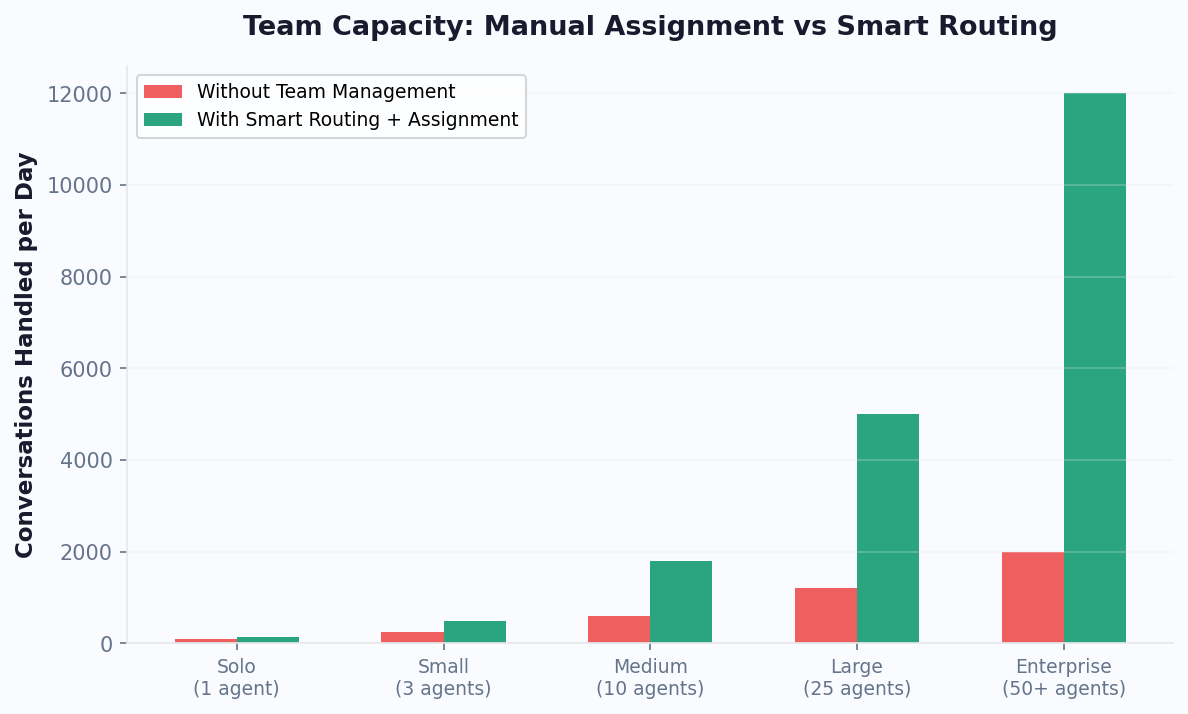
The routing strategy you choose determines how efficiently conversations are distributed across your team. No single strategy works for every scenario -- the right choice depends on team size, specialization level, conversation complexity, and business hours coverage. Most high-performing teams use a combination of strategies applied at different points in the escalation flow.
| Strategy | How It Works | Best For | Limitation |
|---|---|---|---|
| Round Robin | Rotate assignments equally across agents | Small teams, uniform skills | Ignores capacity and specialization |
| Capacity-Based | Assign to agent with fewest active chats | High-volume teams, variable complexity | Does not consider expertise match |
| Skill-Based | Match conversation topic to agent expertise | Specialized teams (billing, tech, sales) | Requires skill tagging maintenance |
| Priority-Based | VIP/urgent goes to senior agents first | Tiered support, enterprise accounts | Can overload senior agents |
| Time-Zone | Route to agents in customer's time zone | Global teams, 24/7 coverage | Needs distributed team |
| Language-Based | Detect language and route to fluent agent | Multilingual support operations | Limited by language coverage |
| Hybrid (Recommended) | Combine skill + capacity + priority rules | Any team above 5 agents | Requires initial configuration time |
Conferbot's routing engine supports all these strategies and lets you layer them. A typical enterprise configuration might be: first filter by language, then by skill/department, then within the qualified pool assign to the agent with the lowest current load. This ensures the customer reaches a qualified agent quickly without overwhelming any individual. Configure routing rules visually in the dashboard -- no code required. For teams evaluating routing capabilities across platforms, see our comparison page.
Assignment Rules: Automating Every Routing Decision
Assignment rules are the conditional logic that powers your routing strategy. They define specific criteria and actions: "IF this condition is true, THEN assign to this agent/team." Well-configured assignment rules eliminate manual triage entirely -- every conversation that enters the human queue is automatically placed in the right hands without a manager needing to review and dispatch.
Rule Types and Examples
Conferbot supports rule types based on any combination of conversation attributes, customer data, and system state:
- Intent-based rules -- "If chatbot detects billing_dispute intent, assign to billing team." The NLP engine classifies the intent before escalation, enabling precise routing.
- Customer tier rules -- "If customer is tagged as Enterprise or their company has >100 employees, assign to senior account team." Requires CRM integration to access customer data.
- Sentiment-based rules -- "If sentiment score is very negative, prioritize and assign to experienced conflict-resolution agents." Prevents angry customers from reaching junior agents.
- Capacity rules -- "Never assign more than 5 simultaneous conversations to any single agent." Prevents burnout and maintains quality.
- Availability rules -- "Only assign to agents with status set to Available. If no agents available, queue with estimated wait time."
- Fallback rules -- "If no matching agent is found within 30 seconds, escalate to team lead."
Rule Priority and Conflict Resolution
Rules execute in priority order. When multiple rules match a conversation, the highest-priority rule wins. This means you can set broad defaults ("all conversations go to general queue") and add specific overrides above them ("VIP customers always go to dedicated team"). The rules engine evaluates in real-time -- typically under 50ms -- so routing feels instantaneous to the customer.
Teams with complex routing needs often start simple and iterate. Begin with 3-5 rules covering your most common scenarios, then add specificity as you identify patterns in your queue. Conferbot's routing analytics show which rules fire most frequently and which conversations still end up in generic queues, helping you identify where additional rules would add value. Explore routing-optimized chatbot templates for pre-configured assignment rule sets.
Scaling Teams: What Changes from 1 Agent to 50
Team management needs evolve dramatically as you grow. What works for a solo support operator breaks down at 5 agents, and what works at 5 falls apart at 50. Understanding these inflection points helps you invest in the right tools at the right time rather than over-engineering early or under-investing late.
| Team Size | Key Challenges | Required Capabilities | Avg Cost/Ticket |
|---|---|---|---|
| 1-3 agents | Coverage gaps, no specialization | Basic queue, availability status | $18-25 |
| 4-10 agents | Uneven workloads, inconsistent quality | Round robin, basic skill routing | $12-18 |
| 11-25 agents | Performance visibility, training gaps | Dashboards, SLAs, department routing | $9-14 |
| 26-50 agents | Cross-team coordination, shift coverage | Advanced routing, scheduling, QA tools | $8-12 |
| 50+ agents | Coordination overhead eating efficiency | Full automation, AI-assisted QA, API integrations | $7-11 |
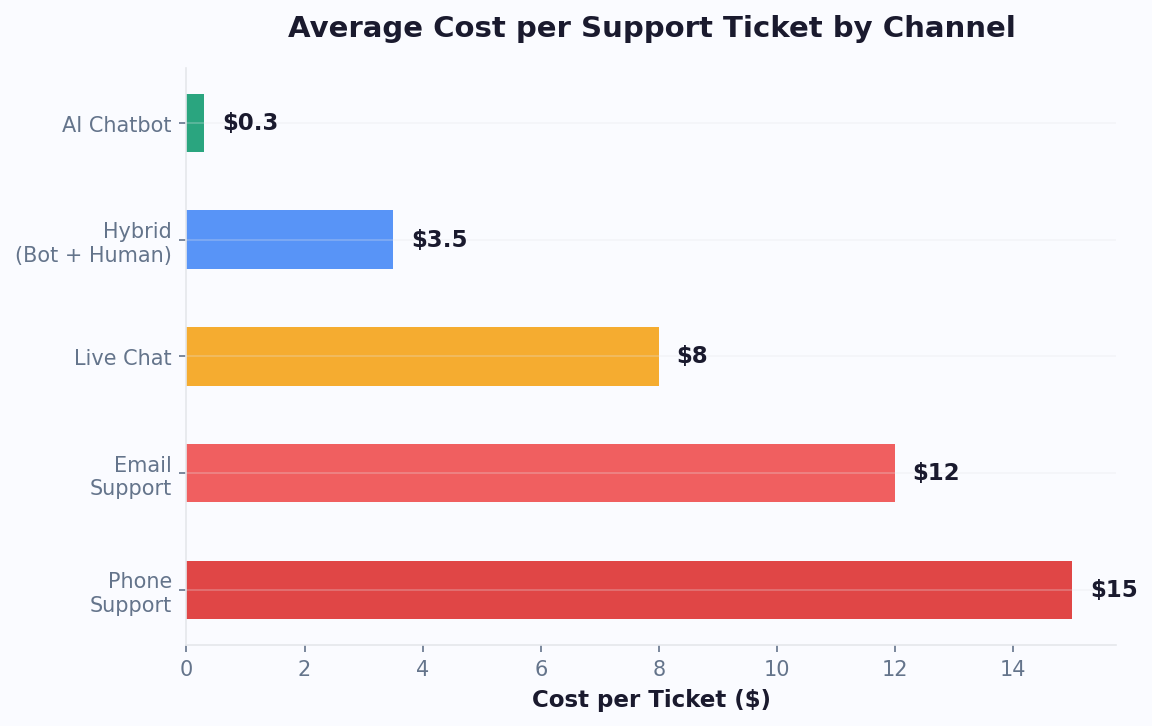
The cost-per-ticket sweet spot occurs at 10-30 agents where you have enough specialization to route efficiently but not so much coordination overhead that management labor inflates costs. Teams above 30 agents need aggressive automation to prevent the U-curve effect where adding agents actually increases per-ticket costs due to management complexity. Conferbot's team management features scale linearly -- the same routing engine that handles 3 agents handles 300 without configuration changes, just additional rules and roles.
For a cost projection at your team size, use the chatbot ROI calculator which models agent productivity gains and cost-per-ticket reduction based on team size and chatbot deflection rate.
Performance Monitoring: Real-Time Agent Dashboards
You cannot improve what you cannot measure. Performance monitoring provides the data foundation for every team management decision -- from staffing levels to training priorities to bonus allocation. Conferbot's agent performance dashboard surfaces real-time and historical metrics that give managers complete visibility into individual and team performance without requiring manual reporting.
Key Metrics Tracked
- Average handle time (AHT) -- how long each agent takes to resolve conversations. Industry benchmark is 6-8 minutes for chat support.
- First contact resolution (FCR) -- percentage of conversations resolved without follow-up. Target: 80%+.
- Customer satisfaction (CSAT) -- post-conversation rating per agent. Target: 85%+.
- Queue depth -- real-time count of waiting conversations per team/agent.
- Response time -- time between customer message and agent reply. Target: under 60 seconds.
- Conversations per hour -- throughput metric for capacity planning.
- Transfer rate -- how often an agent transfers conversations to another agent/team. High rates indicate routing issues.
- Availability rate -- percentage of shift time agent is set to Available vs Away/Offline.
Using Data for Coaching
Performance data is most valuable when used for coaching rather than punishment. Agents with high handle times but high CSAT may be providing excellent thoroughness -- they need different coaching than agents with low handle times but low resolution rates. Conferbot's comparison views let managers benchmark agents against team averages and identify outliers in both directions. High performers can be studied for best practices, while struggling agents can be identified early for targeted training before performance issues compound.
Real-time dashboards are especially valuable during peak periods. Managers can see queue buildup in real-time and take immediate action: pull agents from low-priority queues, activate overflow teams, or adjust chatbot deflection thresholds to reduce human escalation during spikes. This proactive management keeps SLAs intact even during unexpected volume surges. For automated monitoring and escalation, connect your team dashboard to Slack notifications for instant alerts when metrics breach thresholds.
SLA Management: Automated Escalation and Compliance
Service Level Agreements define the response and resolution times you commit to your customers. Missing SLAs costs real money -- enterprise contracts often include SLA penalty clauses, and even without formal penalties, slow responses drive churn. A 2024 HubSpot survey found that 90% of customers rate "immediate" response as important, with 60% defining immediate as under 10 minutes. Conferbot's SLA management system ensures commitments are met through automated monitoring, escalation, and compliance reporting.
Configuring SLA Policies
Define SLA policies based on customer tier, conversation priority, or department. Each policy specifies target times for first response, follow-up responses, and total resolution. For example:
- Enterprise tier -- first response in 2 minutes, resolution in 2 hours
- Business tier -- first response in 5 minutes, resolution in 4 hours
- Standard tier -- first response in 15 minutes, resolution in 8 hours
SLAs can be business-hours-aware so conversations received at midnight on Saturday do not count against weekday response targets. Holiday calendars are configurable per team or region, ensuring accurate measurement for global operations.
Automated Escalation
When an SLA is at risk of being breached, the system takes automatic action. Escalation rules fire at configurable warning thresholds -- typically at 75% and 90% of the SLA window:
- 75% warning -- the assigned agent receives a visual alert and the conversation moves to the top of their queue
- 90% warning -- the team lead is notified via Slack/email, conversation may be reassigned to any available agent
- SLA breached -- incident is logged, manager is notified, conversation is escalated to next tier
This graduated escalation prevents breaches without creating alarm fatigue. Teams using Conferbot's SLA automation report 97% SLA adherence compared to the industry average of 82%. The system also generates compliance reports for customers who require SLA documentation, exportable as PDF or available via API. Pair SLA management with our ticket system for complete support operations coverage.
Multi-Department Routing: Sales, Support, and Success in One Platform
Most businesses have multiple teams that handle customer conversations -- sales, support, customer success, billing, and technical specialists. Without unified multi-department management, each team operates in isolation with separate tools, duplicated customer records, and no visibility into cross-team interactions. A customer who talks to sales on Monday and support on Tuesday should not have to re-explain their situation, and the support agent should see the full sales conversation history for context.
Conferbot's multi-department architecture provides unified conversation management across departments while maintaining appropriate access controls and routing separation. Here is how it works in practice:
Department Configuration
- Separate queues -- each department has its own conversation queue with department-specific SLAs and routing rules
- Cross-department transfers -- agents can transfer conversations to another department with full context preserved, plus internal notes for the receiving agent
- Unified customer view -- all conversations with a customer are visible in one timeline regardless of which department handled them
- Department-specific bot flows -- the chatbot routes conversations to the appropriate department before escalation based on NLP intent classification
- Role-based access -- sales agents see sales conversations, support agents see support conversations, managers see everything
Cross-Department Scenarios
Consider a common scenario: a customer contacts support about a billing issue that actually requires a plan upgrade (sales) plus a technical configuration change (engineering). With multi-department management, the support agent handles the billing question, transfers to sales for the upgrade conversation, and creates a ticket for engineering -- all within one unified thread. The customer experiences a seamless interaction, and each team has full context. Without this system, the same interaction requires 3 separate conversations, 3 instances of the customer re-explaining, and 3x the total handle time.
For teams with WhatsApp and Messenger channels, multi-department routing works identically across channels -- a WhatsApp conversation can be transferred between departments just like a web chat conversation. See our pricing page for multi-department support across plans.
Agent Training and Onboarding: Getting New Team Members Productive Fast
The speed at which new agents become productive directly impacts your support economics. Industry data shows that the average support agent takes 4-6 weeks to reach full productivity, costing approximately $10,000-15,000 in reduced efficiency during ramp-up. Teams with structured onboarding and training tools cut this timeline to 2-3 weeks -- a 50% improvement that compounds with every new hire.
Training Features in Conferbot
Conferbot's team management includes training-specific features designed to accelerate new agent onboarding:
- Shadow mode -- new agents observe live conversations handled by experienced team members without the customer being aware. They see the full interaction in real-time and can ask internal questions via side chat.
- Supervised mode -- new agents handle conversations while a mentor reviews their responses before they are sent. The mentor can edit, approve, or provide feedback on each message.
- Canned response library -- pre-approved response templates for common scenarios. New agents use these as a safety net while they develop confidence with free-form responses.
- Internal knowledge base -- agent-facing documentation with procedures, escalation guides, and product information searchable during conversations.
- Performance benchmarks -- clear targets for each week of onboarding so new agents know what "good" looks like and can self-assess progress.
Continuous Learning
Training does not stop after onboarding. Conferbot's QA tools enable ongoing skill development through conversation review and scoring. Managers can randomly sample conversations for quality audits, score them against customizable rubrics, and provide feedback directly linked to specific messages. Agents see their quality scores trend over time, creating a continuous improvement loop. Top-performing agent responses can be flagged as examples and added to the training library for new hires to study.
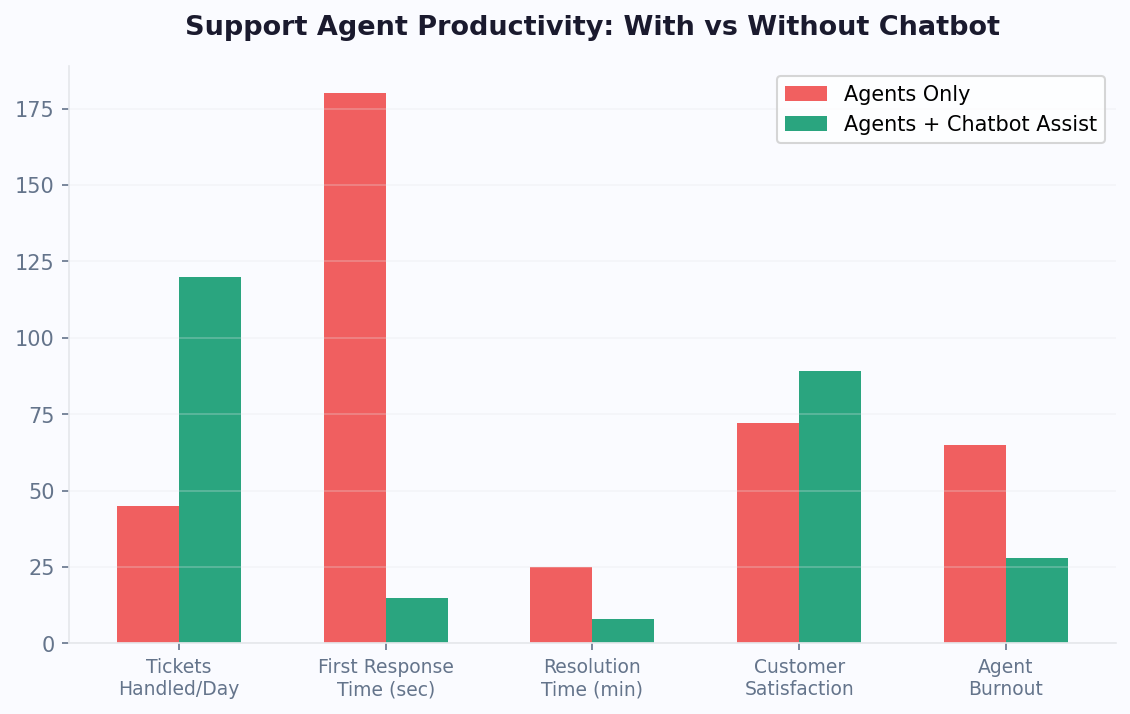
For teams scaling rapidly, the combination of chatbot deflection (handling simple queries automatically) and structured training (getting new agents productive faster) creates a powerful growth engine. The chatbot reduces pressure on the team while new agents ramp up, and trained agents handle the complex cases the bot cannot resolve. Our chatbot building guide explains how to design bot flows that complement human agent strengths.
Best Practices: Building a High-Performing Support Operation
After managing tens of thousands of agent conversations across Conferbot deployments, clear patterns emerge in what separates high-performing support operations from struggling ones. These best practices apply regardless of team size or industry, though the specific implementation varies based on your context.
1. Automate Triage Completely
No human should spend time deciding where a conversation should go. The chatbot should classify intent, detect sentiment, identify customer tier, and route to the right team/agent before a human ever sees the conversation. Manual triage adds 3-5 minutes per conversation and scales linearly with volume -- it is the first thing to automate.
2. Set Capacity Limits and Enforce Them
Agent quality degrades sharply above 4-5 simultaneous conversations. Set hard caps in your routing rules and let overflow queue rather than overloading agents. A slightly longer wait time with quality resolution is always better than a fast response that does not actually solve the problem.
3. Use Data, Not Instinct, for Staffing
Historical volume patterns predict future needs with high accuracy. Use Conferbot's analytics to identify peak hours, day-of-week patterns, and seasonal trends. Staff accordingly rather than maintaining flat coverage that is either wasteful during quiet periods or insufficient during peaks.
4. Invest in Bot Deflection Before Hiring
Every query the chatbot resolves is a query that does not need an agent. Before adding headcount, invest in improving your bot's knowledge base, adding NLP training data for common unresolved queries, and expanding automated workflows. A 10% improvement in deflection rate often eliminates the need for 1-2 additional agents. Calculate your specific numbers with our ROI calculator.
5. Create Feedback Loops Between Bot and Agents
When agents resolve escalated conversations, that resolution should feed back into the chatbot's knowledge base. If agents repeatedly answer the same question, that question should be automated. Conferbot's agent interface includes a "suggest for automation" button that flags resolved conversations for knowledge base addition, creating a continuous improvement loop where the bot gets smarter from every human interaction.
6. Monitor Leading Indicators, Not Just Lagging Ones
CSAT and resolution rate are lagging indicators -- by the time they drop, damage is done. Monitor leading indicators: queue depth trends, first-response time trends, and agent availability percentage. These signals predict problems before they impact customers. Set up Slack alerts for threshold breaches on leading indicators so you can act proactively.
Ready to build a high-performing support operation? Explore pre-built support chatbot templates, compare team management capabilities on our comparison page, or see pricing plans with multi-agent support included.
Continue Exploring
Explore features, connect third-party tools, and browse ready-made templates.